
Caching in Presto
Qubole’s Presto-as-a-Service is primarily targeted at Data Analysts who are tasked with translating ad-hoc business questions into SQL queries and getting results. Since the questions are often ad-hoc, there is some trial and error involved. Therefore, arriving at the final results may involve a series of SQL queries. By reducing the response time of these queries, the platform can reduce the time to insight and greatly benefit the business. In this post, we will talk about some improvements we’ve made in Presto to support this use-case in a cloud setting.
The typical use-case here is a few tables, each of which is a 10-100TB in size, living in cloud storage (e.g. S3). Tables are generally partitioned by date and/or by other attributes. Analyst queries pick a few partitions at a time, typically last one week or one month of data, and involve where clauses. Queries may involve a join with a smaller dimension table and contain aggregates and group-by clauses.
The main bottleneck in supporting this use-case is storage bandwidth. Cloud storage (specifically, Amazon S3) has many positives – it is great for storing large amount of data at low cost. However, S3’s bandwidth is not high enough to support this use-case very well. Furthermore, clusters are ephemeral in Qubole’s cloud platform. They are launched when required and shutdown when not in use. We recently introduced industry’s first auto-scaling Presto clusters which can add and remove nodes depending on traffic. The challenge was to support this use-case while keeping all the economic advantages of the cloud and auto-scaling.
The big opportunity here was that the new generation of Amazon instance types come with SSD devices. Some machine types also come with large amount of memory (r3 instance types) per node. If we’re able to use SSDs and memory as a caching hierarchy, this could solve the bandwidth problem for us. We started building a caching system to take advantage of this opportunity.
Architecture
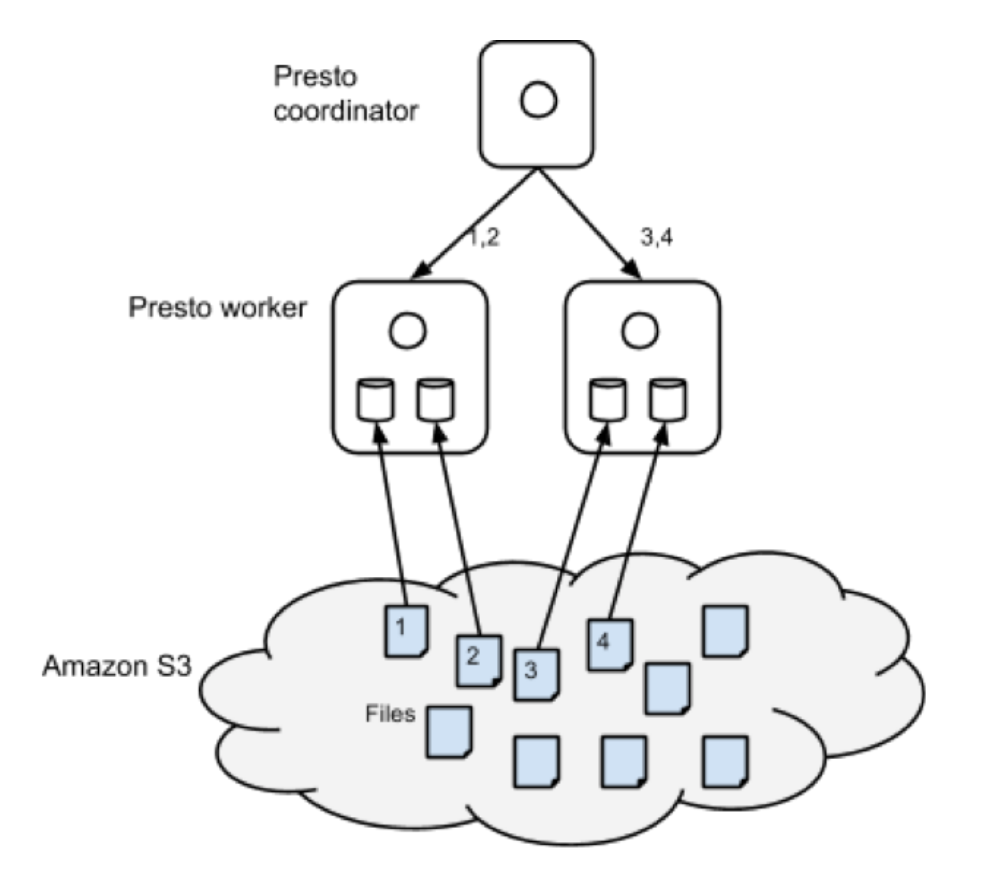
The figure below shows the architecture of the caching solution. As part of query execution, Presto, like Hadoop, performs split computation. Every worker node is assigned one or more splits. For the sake of exposition, we can assume that one split is one file. Presto’s scheduler assigns splits to worker nodes randomly. We modified the scheduling mechanism to assign split to a node based on a hash of the filename. This assures us that if the same file were to be read for another query, that split will be executed in the same node. This gave us spatial locality. Then, we modified the S3 filesystem code to cache files in local disks as part of query execution. In the example below, if another query required reading file 2, it will be read by worker node 1 from local disk instead of S3 which will be a whole lot faster. The cache, like all others, contains logic for eviction and expiry. Some of the EC2 instances contain multiple SSD volumes and we stripe data across them.
We attempted to use MappedByteBuffer and explicit ByteBuffers for an in-memory cache, but quickly abandoned this approach – the OS filesystem cache did a good enough job and we didn’t have to worry about garbage collection issues.
One problem remained, though. What if a node was added or removed due to auto-scaling? The danger with using simple hashing techniques was that the mapping of files to nodes could change considerably causing a lot of grief. The answer was surprisingly simple – consistent hashing. Consistent hashing ensures that the remapping of splits to nodes changes gracefully. This blogpost does a great job of explaining consistent hashing from a developer’s point of view.
We used Guava extensively for the caching implementation. Guava has a in-memory pluggable cache. We extended it to support our use-case of maintaining on-disk cache. Furthermore, we used Guava’s implementation of consistent hashing.
Experimental Results
To test this feature, we generated a TPC-DS scale 10000 data on a 20 c3.8xlarge node cluster. We used delimited/zlib and ORC/zlib formats. The ORC version was not sorted. Here are table statistics.
Table Rows Text Text, zlib ORC, zlib
store_sales 28 billion 3.6 TB 1.4 TB 1.1 TB
customer 65 billion 12 GB 3.1 GB 2.5 GB
We used the following queries to measure performance improvements. These queries are representative of common query patterns from analysts.
| ID | Query | Description |
| Q1 | select * from store_sales where ss_customer_sk=1000; | Selects ~400 rows |
| Q2 | select ss_store_sk - sum(ss_quantity) as cnt from store_sales group by ss_store_sk order by cnt desc limit 5; | Top 5 stores by sales |
| Q3 | select sum(ss_quantity) as cnt from store_sales ssjoin customer c on (ss.ss_customer_sk = c.c_customer_sk)where c.c_birth_year < 1980; |
Quantity sold to customers born before 1980 Quantity sold to customers born before 1980 |
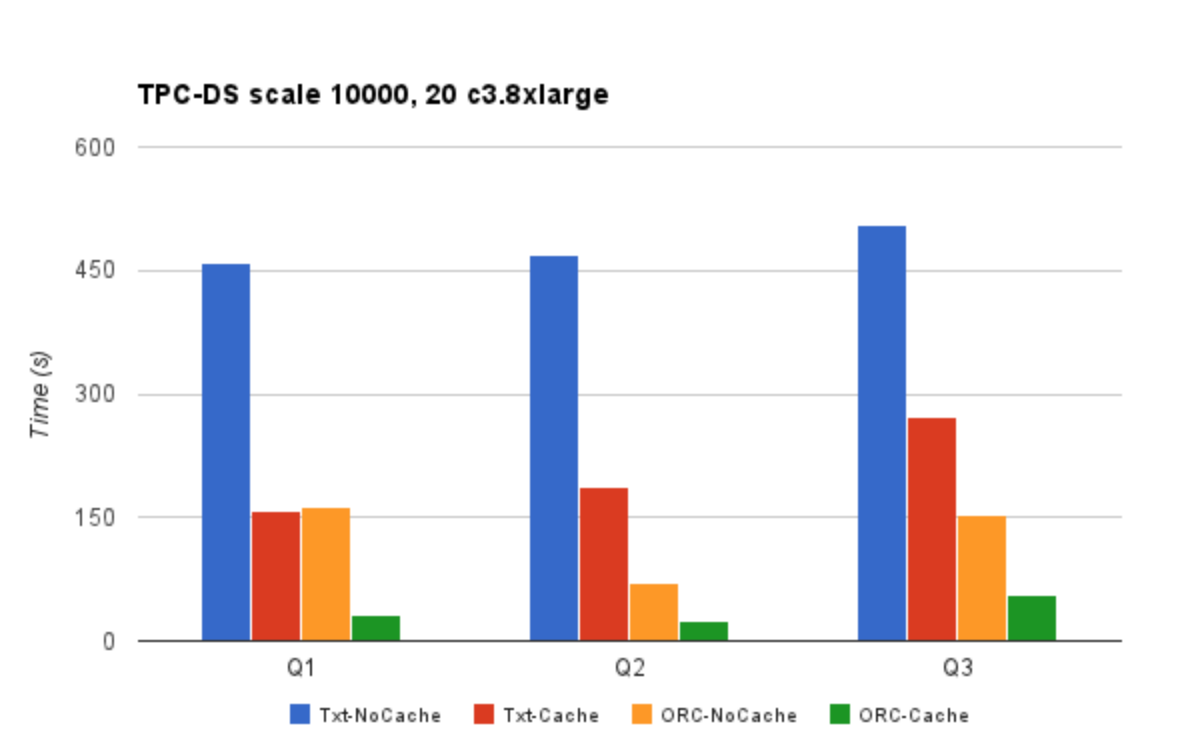
Txt-NoCache means using Txt format with caching feature disabled. The Txt-NoCache case suffers from both problems – inefficient storage format and slow access. Switching to caching provides a good performance improvement. However, the biggest gains are realized when caching is used in conjunction with the ORC format. There is a 10-15x performance improvement by switching to ORC and using Qubole’s caching feature. We incorporated Presto/ORC improvements courtesy Dain (@daindumb) in these experiments. Results show that queries that take many minutes now take a few seconds, thus benefiting the analyst use-case.
Conclusion
Presto, along with Qubole’s caching implementation, can provide the performance necessary to satisfy the Data Analysts while still retaining all the benefits of cloud economics – pay as you go and auto-scaling. We’re also in the process of open-sourcing this work.
Caching in Presto的更多相关文章
- 解读ASP.NET 5 & MVC6系列(8):Session与Caching
在之前的版本中,Session存在于System.Web中,新版ASP.NET 5中由于不在依赖于System.Web.dll库了,所以相应的,Session也就成了ASP.NET 5中一个可配置的模 ...
- ABP理论学习之缓存Caching
返回总目录 本篇目录 介绍 ICacheManager ICache ITypedCache 配置 介绍 ABP提供了缓存的抽象,它内部使用了这个缓存抽象.虽然默认的实现使用了MemoryCache, ...
- caching与缓存
通常,应用程序可以将那些频繁访问的数据,以及那些需要大量处理时间来创建的数据存储在内存中,从而提高性能.例如,如果应用程序使用复杂的逻辑来处理大量数据,然后再将数据作为用户频繁访问的报表返回,避免在用 ...
- Lind.DDD.Caching分布式数据集缓存介绍
回到目录 戏说当年 大叔原创的分布式数据集缓存在之前的企业级框架里介绍过,大家可以关注<我心中的核心组件(可插拔的AOP)~第二回 缓存拦截器>,而今天主要对Lind.DDD.Cachin ...
- 使用Enyim.Caching访问阿里云的OCS
阿里云的开放式分布式缓存(OCS)简化了缓存的运维管理,使用起来很方便,官方推荐的.NET访问客户端类库为 Enyim.Caching,下面对此做一个封装. 首先引用最新版本 Enyim.Cachin ...
- #数据技术选型#即席查询Shib+Presto,集群任务调度HUE+Oozie
郑昀 创建于2014/10/30 最后更新于2014/10/31 一)选型:Shib+Presto 应用场景:即席查询(Ad-hoc Query) 1.1.即席查询的目标 使用者是产品/运营/销售 ...
- presto的动态化应用(一):presto节点的横向扩展与伸缩
一.presto动态化概述 近年来,基于hadoop的sql框架层出不穷,presto也是其中的一员.从2012年发展至今,依然保持年轻的活力(版本迭代依然很快),presto的相关介绍,我们就不赘述 ...
- Asp.net Web.Config - 配置元素 caching
Asp.net Web.Config - 配置元素 caching 记得之前在写缓存DEMO的时候,好像配置过这个元素,好像这个元素还有点常用. 一.caching元素列表 元素 说明 cache ...
- 环境搭建 Hadoop+Hive(orcfile格式)+Presto实现大数据存储查询一
一.前言 Hadoop简介 Hadoop就是一个实现了Google云计算系统的开源系统,包括并行计算模型Map/Reduce,分布式文件系统HDFS,以及分布式数据库Hbase,同时Hadoop的相关 ...
随机推荐
- java 每间隔一段时间执行一段代码
Java中java.util.Timer类中有若干个schedule的重载方法,其中 void schedule(TimerTask task, long delay, long period ) 安 ...
- 关于手机ios和安卓和pc的点击事件的兼容
var u = navigator.userAgent, app = navigator.appVersion; var clickEvent; var isAndroid = u.indexOf(' ...
- re+正则01
# 正则 # 正则 ''' 正则就是带语法的字符串, 用来匹配目标字符串得到想要得字符串结果 ''' # 部分语法: # 1.单独字符 # \d 范围 [0-9] # \D 范围刨除 [^0-9] # ...
- 2018-软工机试-E-热河路(TLE只拿了90分,待思考)
单点时限: 2.0 sec 内存限制: 256 MB 没有人在热河路谈恋爱, 总有人在天亮时伤感 如果年轻时你没来过热河路, 那你现在的生活是不是很幸福 ——李志<热河> 奔跑.跌倒.奔跑 ...
- 基于vue的图片查看插件vue-photo-preview
1. 安装 在任务管理器中输入命令 2. 在项目main.js中引入 3.在所需要的项目中直接使用 还有两个属性,可以看需求添加 preview-title-enable="false&qu ...
- Tomcat生成的session持久化到MySQL
Telling Tomcat to save session records in MySQL 此部分内容摘自 MySQL cookbook 3th.具体内容不做翻译,哈哈,懒 The default ...
- CSS中line-height继承问题
在CSS中,line-height属性用于设置多行元素的空间量,比如文本.对于块级元素,它指定元素行盒的最小高度.对于非替代的inline元素,它用于计算行盒的高度. 语法 /* Keyword va ...
- Python IO密集型任务、计算密集型任务,以及多线程、多进程
对于IO密集型任务: 直接执行用时:10.0333秒 多线程执行用时:4.0156秒 多进程执行用时:5.0182秒 说明多线程适合IO密集型任务. 对于计算密集型任务 直接执行用时:10.0273秒 ...
- flume实现kafka到hdfs测试用例
kafka 到hdfs at1.sources =st1 at1.channels = ct1 at1.sinks = kt1 # For each one of the sources, the t ...
- javascript最全最好的判断数组的方法
var arr = [1,2,3,1]; var arr2 = [{ abac : 1, abc : 2 }]; function isArrayFn(value){ if (typeof Array ...