
struts2-剩余
一、说明
类型转换、输入验证(前台和后台)(validate()、validateXXX()、xml)
标签、上传下载、i18n(国际化)、ognl(#reqeust.name)
注解方式、log4j(日志记录)、jfreechart(java图形报表)、highcharts(jquery插件)
二、上传下载
1、上传
在struts2框架中,上传不需要添加额外的jar,上传默认使用Apache的上传组件fileupload;我们可以直接使用
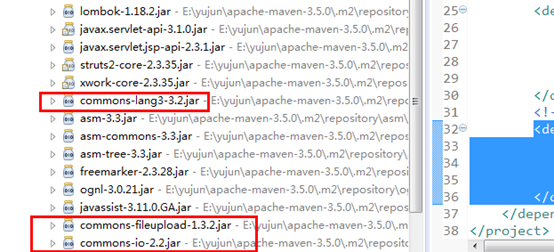
需要注意的是,上传组件只是帮我们把上传的文件流转为文件数据的封装,上传保存的逻辑代码还是需要我们自己来完成;
(1)demo1.jsp
<form action="demo1Action!upload.action" method="post" enctype="multipart/form-data">

        文件1:<input type="file" name="myFile"/><br/>

        <input type="submit" value="上      传"/>

</form>
(2)Demo1Action
@Setter

@Getter

public class Demo1Action extends ActionSupport {

    private File myFile; //上传的文件

    //myFile是表单name元素,后面的FileName和ContentType是固定的

    private String myFileFileName; //上传文件名

    private String myFileContentType; //上传文件类型

    public String upload(){

        try {

            System.out.println("文件名:"+myFileFileName+",文件类型:"+myFileContentType);

            //上传路径

            String path = ServletActionContext.getServletContext().getRealPath("/upload/");

            path += myFileFileName;

            //上传(流操作)

            //输出流

            FileOutputStream fos = new FileOutputStream(path);

            //输入流

            FileInputStream fis = new FileInputStream(myFile);

            //读取和写入

            byte[] b = new byte[1024];

            int len = 0;

            while((len=fis.read(b)) != -1){

                fos.write(b, 0, len);

            }

            //关闭

            fis.close();

            fos.flush();

            fos.close();

            return SUCCESS;

        } catch (Exception e) {

            e.printStackTrace();

        }

        return INPUT;

    }

}
(3)struts.xml
<action name="demo1Action" class="com.yujun.maven.action.Demo1Action">

 </action>
2、下载
https://struts.apache.org/core-developers/stream-result.html
(1)demo2.jsp
<h4>

        <a href="demo2Action!download.action?fileName=第二章-选择器.pptx">第二章-选择器.pptx</a>

    </h4>

    <h4>

        <a href="demo2Action!download.action?fileName=jquery-3.2.1.min.js">jquery-3.2.1.min.js</a>

    </h4>
(2)Demo2Action
@Setter

@Getter

public class Demo2Action extends ActionSupport {

    private String fileName; //文件名

    private InputStream is; //输入流

    public String download(){

        try {

            System.out.println("文件名:"+fileName);

            //下载路径

            String path = ServletActionContext.getServletContext().getRealPath("/download/");

            path += fileName;

            //文件输入流

            is = new FileInputStream(path);

            //文件名进行下载时乱码处理

            fileName = new String(fileName.getBytes(),"iso-8859-1");

            return SUCCESS;

        } catch (Exception e) {

            e.printStackTrace();

        }

        return INPUT;

    }

}
(3)struts.xml
<action name="demo2Action" class="com.yujun.maven.action.Demo2Action">

            <!-- type=stream  表示流 -->

            <result name="success" type="stream">

                <!-- 设置下载的类型:这里表示流类型 -->

                  <param name="contentType">application/octet-stream</param>

                  <!-- action类中的输入流成员变量名 -->

                  <param name="inputName">is</param>

                  <!-- 下载时的文件名,${fileName}表示引用action类中的成员变量 -->

                  <param name="contentDisposition">attachment;filename=${fileName}</param>

                  <!-- 下载时的缓冲大小 -->

                  <param name="bufferSize">1024</param>

            </result>

        </action>
三、i18n国际化
internationalization 的首字母i和尾字母n,18中间字符数
国际化:根据不同的语言和地区显示不同界面内容
标识符:
zh 中文
CN 中国
en 英文
US 美国
1、新增语言资源文件
src目录/xxx_zh_CN.properties 中文
src目录/xxx_en_US.properties 英文
xxx是自定义的
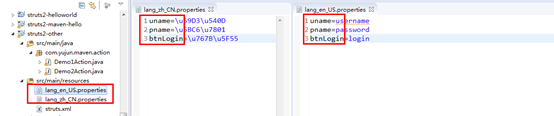
2、struts.xml
<!-- 开启国际化配置,lang是国际化资源文件的前缀,如果有多个资源文件,可以使用逗号分隔开 -->
<constant name="struts.custom.i18n.resources" value="lang"/>
3、页面
<%@ taglib prefix="s" uri="/struts-tags" %>

<form>

        <s:property value="%{getText('uname')}"/>:<input/><br/><br/>

        <s:property value="%{getText('pname')}"/>:<input/><br/><br/>

        <input type="submit" value="<s:property value="%{getText('btnLogin')}"/>"/>

    </form>
4、动态切换语言
(1)页面
<h4>

        <a href="langAction?request_locale=zh_CN">中文</a>

        <a href="langAction?request_locale=en_US">英文</a>

    </h4>
(2)LangActoin
public class LangAction extends ActionSupport {

    @Override

    public String execute() throws Exception {

        return SUCCESS;

    }

}
(3)struts.xml
<action name="langAction" class="com.yujun.maven.action.LangAction">

            <result>/login.jsp</result>

</action>
struts2-剩余的更多相关文章
- Struts2拦截器之FileUploadInterceptor
一.它能做什么? 借助于这个拦截器我们可以实现文件的上传和下载功能. 理论部分: struts2的文件上传下载功能也要依赖于Apache commons-fileupload和Apache commo ...
- Struts2(十四)拦截器实现权限管理
一.认识拦截器 拦截器也是一个类 拦截器可以在Action被调用之前和之后执行代码 框架很多核心功能是拦截器实现的 拦截器的特点: 拦截器自由组合,增强了灵活性.扩展性.有利于系统解耦 拦截器可以拦截 ...
- 转载:struts2和spring的结合原理(精品)
转载网址:http://blog.sina.com.cn/s/blog_683278bc0101236z.html Ioc将所有的对象之间的关系转移到了xml配置文件中来. 在TopLogic中声明存 ...
- 浅谈Struts2(四)
一.Struts2的拦截器(Intercept) 作用:把多个Action中的共有代码,提取至拦截器,从而减少Action中的冗余代码. 1.Action拦截器 a.编写interceptor类 pu ...
- struts2之拦截器
1. 为什么需要拦截器 早期MVC框架将一些通用操作写死在核心控制器中,致使框架灵活性不足.可扩展性降低, Struts 2将核心功能放到多个拦截器中实现,拦截器可自由选择和组合,增强了灵活性,有利于 ...
- 第四章 Struts2深入
4.1 Struts2架构 1.ActionMapper: 提供请求和Action之间的映射.根据请求查找是否存在对于的action,如有,翻译描述action映射的ActionM ...
- 自定义简单的struts2的s标签
一:自定标签前需要了解的知识: BodyTagSupport类的方法: 编写标签对应的实现类时,需要重载BodyTagSupport类几个方法:doStartTag(), setBodyContent ...
- Struts2+Hibernate实现图书管理系统
效果图 部分代码 Books.java package entity; import java.util.Date; public class Books { //书籍编号 private Strin ...
- Struts2 学习笔记(概述)
Struts2 学习笔记 2015年3月7日11:02:55 MVC思想 Strust2的MVC对应关系如下: 在MVC三个模块当中,struts2对应关系如下: Model: 负责封装应用的状态,并 ...
- struts2 基础5 OGNL、标签、四大域、默认拦截器说明
OGNL表达式 OGNL:对象导抗图语言 OGNL表达式是一个上下文的概念,上下文Map结构 OGNL表达式需要使用#标注命名空间.访问上下文(Context)中的对象需要使用#符号标注命名空间,如# ...
随机推荐
- postgresql 基本使用及常见问题
基本使用参考 https://www.yiibai.com/postgresql/postgresql-insert.html 关于编码问题: 这是一个很复杂,但弄懂之后还是很迷的问题. postgr ...
- 【Linux】CentOS7下安装JDK详细过程
https://www.cnblogs.com/sxdcgaq8080/p/7492426.html
- openflow packet_out和packet_in分析
任务目的 1. 掌握OpenFlow交换机发送Packet-in消息过程及其消息格式. 2. 掌握OpenFlow控制器发送Packet-out消息过程及其消息格式. 实验原理 Packet-In 使 ...
- jforum(2)--中文乱码的解决方式
安装好jforum后可能出现如下乱码页面: 解决方式 1.在建数据库时要用如下语句: CREATE DATABASE JForum DEFAULT CHARACTER SET utf8 COLLATE ...
- 阿里云ECS服务器部署Node.js项目全过程详解
本文详细介绍如何部署NodeJS项目到阿里云ECS上,以及本人在部署过程中所遇到的问题.坑点和解决办法,可以说是全网最全最详细的教程了.同时讲解了如何申请阿里云免费SSL证书,以及一台ECS服务器配置 ...
- dsu on tree 树上启发式合并 学习笔记
近几天跟着dreagonm大佬学习了\(dsu\ on\ tree\),来总结一下: \(dsu\ on\ tree\),也就是树上启发式合并,是用来处理一类离线的树上询问问题(比如子树内的颜色种数) ...
- JS设置Cookie过期时间
//JS操作cookies方法! //写cookies function setCookie(name,value) { var Days = 30; var exp = new Date(); ex ...
- Python——爬取人口迁徙数据(以腾讯迁徙为例)
说明: 1.迁徙量是腾讯修改后的数值,无法确认真实性. 2.代码运行期间,腾讯迁徙未设置IP屏蔽和浏览器检测,因此下段代码仅能保证发布近期有效. 3.代码功能:爬取指定一天的四十(此四十是根据自己的城 ...
- vue+element 正则表达式进行表单验证
<template> <el-form :model="form" label-width="115px" ref="form&qu ...
- Aras前端的一些知识
top.aras包含了aras前端大部分的API /* * uiShowItem * 打开物体视窗 * parameters: * 1) itemTypeName - may be empty str ...