
struts2-剩余
一、说明
类型转换、输入验证(前台和后台)(validate()、validateXXX()、xml)
标签、上传下载、i18n(国际化)、ognl(#reqeust.name)
注解方式、log4j(日志记录)、jfreechart(java图形报表)、highcharts(jquery插件)
二、上传下载
1、上传
在struts2框架中,上传不需要添加额外的jar,上传默认使用Apache的上传组件fileupload;我们可以直接使用
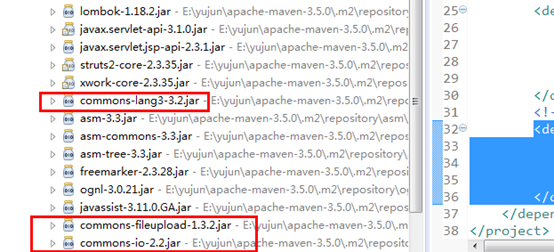
需要注意的是,上传组件只是帮我们把上传的文件流转为文件数据的封装,上传保存的逻辑代码还是需要我们自己来完成;
(1)demo1.jsp
<form action="demo1Action!upload.action" method="post" enctype="multipart/form-data">

        文件1:<input type="file" name="myFile"/><br/>

        <input type="submit" value="上      传"/>

</form>
(2)Demo1Action
@Setter

@Getter

public class Demo1Action extends ActionSupport {

    private File myFile; //上传的文件

    //myFile是表单name元素,后面的FileName和ContentType是固定的

    private String myFileFileName; //上传文件名

    private String myFileContentType; //上传文件类型

    public String upload(){

        try {

            System.out.println("文件名:"+myFileFileName+",文件类型:"+myFileContentType);

            //上传路径

            String path = ServletActionContext.getServletContext().getRealPath("/upload/");

            path += myFileFileName;

            //上传(流操作)

            //输出流

            FileOutputStream fos = new FileOutputStream(path);

            //输入流

            FileInputStream fis = new FileInputStream(myFile);

            //读取和写入

            byte[] b = new byte[1024];

            int len = 0;

            while((len=fis.read(b)) != -1){

                fos.write(b, 0, len);

            }

            //关闭

            fis.close();

            fos.flush();

            fos.close();

            return SUCCESS;

        } catch (Exception e) {

            e.printStackTrace();

        }

        return INPUT;

    }

}
(3)struts.xml
<action name="demo1Action" class="com.yujun.maven.action.Demo1Action">

 </action>
2、下载
https://struts.apache.org/core-developers/stream-result.html
(1)demo2.jsp
<h4>

        <a href="demo2Action!download.action?fileName=第二章-选择器.pptx">第二章-选择器.pptx</a>

    </h4>

    <h4>

        <a href="demo2Action!download.action?fileName=jquery-3.2.1.min.js">jquery-3.2.1.min.js</a>

    </h4>
(2)Demo2Action
@Setter

@Getter

public class Demo2Action extends ActionSupport {

    private String fileName; //文件名

    private InputStream is; //输入流

    public String download(){

        try {

            System.out.println("文件名:"+fileName);

            //下载路径

            String path = ServletActionContext.getServletContext().getRealPath("/download/");

            path += fileName;

            //文件输入流

            is = new FileInputStream(path);

            //文件名进行下载时乱码处理

            fileName = new String(fileName.getBytes(),"iso-8859-1");

            return SUCCESS;

        } catch (Exception e) {

            e.printStackTrace();

        }

        return INPUT;

    }

}
(3)struts.xml
<action name="demo2Action" class="com.yujun.maven.action.Demo2Action">

            <!-- type=stream  表示流 -->

            <result name="success" type="stream">

                <!-- 设置下载的类型:这里表示流类型 -->

                  <param name="contentType">application/octet-stream</param>

                  <!-- action类中的输入流成员变量名 -->

                  <param name="inputName">is</param>

                  <!-- 下载时的文件名,${fileName}表示引用action类中的成员变量 -->

                  <param name="contentDisposition">attachment;filename=${fileName}</param>

                  <!-- 下载时的缓冲大小 -->

                  <param name="bufferSize">1024</param>

            </result>

        </action>
三、i18n国际化
internationalization 的首字母i和尾字母n,18中间字符数
国际化:根据不同的语言和地区显示不同界面内容
标识符:
zh 中文
CN 中国
en 英文
US 美国
1、新增语言资源文件
src目录/xxx_zh_CN.properties 中文
src目录/xxx_en_US.properties 英文
xxx是自定义的
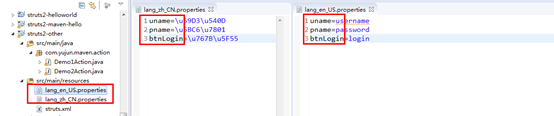
2、struts.xml
<!-- 开启国际化配置,lang是国际化资源文件的前缀,如果有多个资源文件,可以使用逗号分隔开 -->
<constant name="struts.custom.i18n.resources" value="lang"/>
3、页面
<%@ taglib prefix="s" uri="/struts-tags" %>

<form>

        <s:property value="%{getText('uname')}"/>:<input/><br/><br/>

        <s:property value="%{getText('pname')}"/>:<input/><br/><br/>

        <input type="submit" value="<s:property value="%{getText('btnLogin')}"/>"/>

    </form>
4、动态切换语言
(1)页面
<h4>

        <a href="langAction?request_locale=zh_CN">中文</a>

        <a href="langAction?request_locale=en_US">英文</a>

    </h4>
(2)LangActoin
public class LangAction extends ActionSupport {

    @Override

    public String execute() throws Exception {

        return SUCCESS;

    }

}
(3)struts.xml
<action name="langAction" class="com.yujun.maven.action.LangAction">

            <result>/login.jsp</result>

</action>
struts2-剩余的更多相关文章
- Struts2拦截器之FileUploadInterceptor
一.它能做什么? 借助于这个拦截器我们可以实现文件的上传和下载功能. 理论部分: struts2的文件上传下载功能也要依赖于Apache commons-fileupload和Apache commo ...
- Struts2(十四)拦截器实现权限管理
一.认识拦截器 拦截器也是一个类 拦截器可以在Action被调用之前和之后执行代码 框架很多核心功能是拦截器实现的 拦截器的特点: 拦截器自由组合,增强了灵活性.扩展性.有利于系统解耦 拦截器可以拦截 ...
- 转载:struts2和spring的结合原理(精品)
转载网址:http://blog.sina.com.cn/s/blog_683278bc0101236z.html Ioc将所有的对象之间的关系转移到了xml配置文件中来. 在TopLogic中声明存 ...
- 浅谈Struts2(四)
一.Struts2的拦截器(Intercept) 作用:把多个Action中的共有代码,提取至拦截器,从而减少Action中的冗余代码. 1.Action拦截器 a.编写interceptor类 pu ...
- struts2之拦截器
1. 为什么需要拦截器 早期MVC框架将一些通用操作写死在核心控制器中,致使框架灵活性不足.可扩展性降低, Struts 2将核心功能放到多个拦截器中实现,拦截器可自由选择和组合,增强了灵活性,有利于 ...
- 第四章 Struts2深入
4.1 Struts2架构 1.ActionMapper: 提供请求和Action之间的映射.根据请求查找是否存在对于的action,如有,翻译描述action映射的ActionM ...
- 自定义简单的struts2的s标签
一:自定标签前需要了解的知识: BodyTagSupport类的方法: 编写标签对应的实现类时,需要重载BodyTagSupport类几个方法:doStartTag(), setBodyContent ...
- Struts2+Hibernate实现图书管理系统
效果图 部分代码 Books.java package entity; import java.util.Date; public class Books { //书籍编号 private Strin ...
- Struts2 学习笔记(概述)
Struts2 学习笔记 2015年3月7日11:02:55 MVC思想 Strust2的MVC对应关系如下: 在MVC三个模块当中,struts2对应关系如下: Model: 负责封装应用的状态,并 ...
- struts2 基础5 OGNL、标签、四大域、默认拦截器说明
OGNL表达式 OGNL:对象导抗图语言 OGNL表达式是一个上下文的概念,上下文Map结构 OGNL表达式需要使用#标注命名空间.访问上下文(Context)中的对象需要使用#符号标注命名空间,如# ...
随机推荐
- oracle wm_concat 函数无法使用的情况下,使用LISTAGG()函数
http://dacoolbaby.iteye.com/blog/1698957 --20180327 重写wm_concat函数,解决行数超过上限问题 /*执行前请将APPS替换为当前登录用户*/ ...
- Java逆向工程SpringBoot + Mybatis Generator + MySQL
Java逆向工程SpringBoot+ Mybatis Generator + MySQL Meven pop.xml文件添加引用: <dependency> <groupId> ...
- vs2005设置打开文件和保存文件编码
一般vs2005打开文件时会自动侦测文件编码,自动以相应的编码格式打开.但是如果不认识的编码,就会出现乱码. Set VS2005 to use without BOM UTF-8 encoding ...
- 核心类生成-Mybatis Generator的使用
总结一下Generator的使用,首先要设计好数据表,然后修改generator.xml中的配制,接着直接运行命令就可以了. 第一步:数据库设计: 生成数据表代码: /* Navicat MySQL ...
- 目前的.NET 主流的后端ORM框架
转自:https://www.cnblogs.com/yeminglong/p/9518438.html 推荐一些常用的asp.net ORM框架 SqlSugar (国内) Dos.ORM (国内 ...
- DataTable行列转置
DataTable dtNew = new DataTable(); dtNew.Columns.Add("ColumnName", typeof(string)); ; i &l ...
- redis---------AOF文件异常导致的redis无法载入
AOF损坏时的对策1.若在写AOF文件时Server崩溃则可能导致AOF文件损坏而不能被Redis载入.可通过如下步骤修复: 创建一个AOF文件的备份: cp appendonly.aof appen ...
- Future of Future
innovation 革新 , <社会创新实验室 宣传片>的个人记录(有加戏便于我自己理解) 1. 清洁能源 => sustainable 家. 2. 老龄化 => 外出接 ...
- Linux CentOS7 安装wkhtmltopdf工具
wkhtmltopdf是一款将html文件转换成pdf格式的优秀的文件内容转换工具.它使用QT作为渲染引擎,目前它的RELEASE版尚不支持flex布局的Html5代码转换.使用flex的嵌套元素将会 ...
- Centos6.5 安装 python3.5 虚拟环境 virtualenvwrapper
Centos6.5 安装 python3.5 虚拟环境 virtualenvwrapper 1 . 安装 python3.5 下载:https://www.python.org/ https://ww ...