
C# 动态生成word文档
本文以一个简单的小例子,简述利用C#语言开发word表格相关的知识,仅供学习分享使用,如有不足之处,还请指正。
在工程中引用word的动态库
在项目中,点击项目名称右键-->管理NuGet程序包,打开NuGet包管理器窗口,进行搜索下载即可,如下图所示:

涉及知识点
- _Application: 表示word应用程序的接口,对应的实现类是Application类。
- _Document:表示一个word文档,通过_Application对应的文档接口进行创建。
- Paragraph:表示一个段落,通过_Document对象的相关方法进行创建。
- Table:表示一个表格,通过_Document对象的相关方法进行创建。
- Range:表示一个区域,可以是一个段落,也可以是一个表格,也可以是一个单元格,可以Range.select()将光标移动到当前区域。
- 移动焦点:wordApp.Selection.MoveDown(ref wdLine, ref ncount, ref oMissing);//移动焦点
生成文档效果图
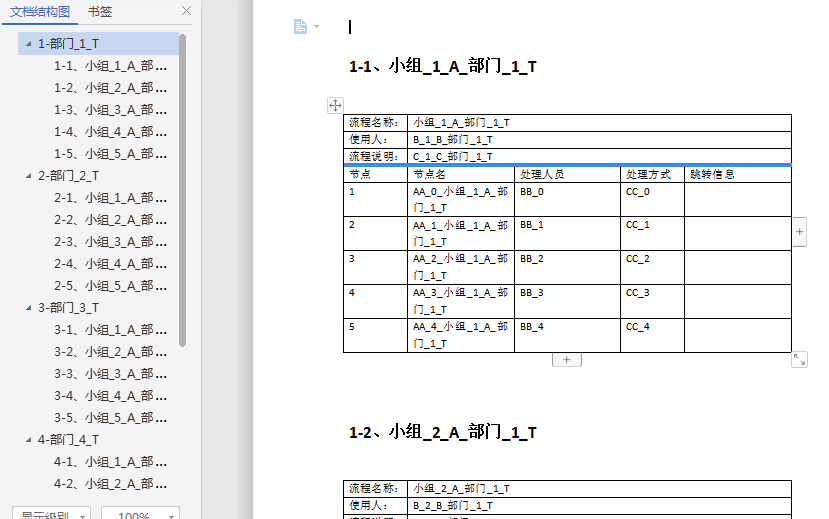
核心代码
 using Microsoft.Office.Interop.Word;

 using System;

 using System.Collections.Generic;

 using System.Data;

 using System.IO;

 using System.Linq;

 using System.Reflection;

 using System.Text;

 using System.Threading.Tasks;

 namespace ETWord

 {

     public class WordHelper

     {

         public static void CreateWordFile(string filePath)

         {

             try

             {

                 CreateFile(filePath);

                 //

                 MessageFilter.Register();

                 object wdLine = WdUnits.wdLine;

                 object oMissing = Missing.Value;

                 object fileName = filePath;

                 object heading2 = WdBuiltinStyle.wdStyleHeading2;

                 object heading3 = WdBuiltinStyle.wdStyleHeading3;

                 _Application wordApp = new Application();

                 wordApp.Visible = true;

                 _Document wordDoc = wordApp.Documents.Open(ref fileName, ref oMissing, ref oMissing, ref oMissing, ref oMissing, ref oMissing, ref oMissing, ref oMissing, ref oMissing, ref oMissing, ref oMissing, ref oMissing, ref oMissing, ref oMissing, ref oMissing, ref oMissing);

                 System.Data.DataTable dtDepts = DatabaseHelper.getDept();

                 int ii = ;

                 foreach (DataRow dr in dtDepts.Rows)

                 {

                     string dept = dr["dept"].ToString();

                     Paragraph oPara0 = wordDoc.Content.Paragraphs.Add(ref oMissing);

                     oPara0.Range.Text = string.Format("{0}-{1}", ii + , dept);

                     //oPara0.Range.Font.Bold = 1;

                     //oPara0.Format.SpaceAfter = 5;

                     oPara0.Range.Select();

                     oPara0.set_Style(ref heading2);

                     oPara0.Range.InsertParagraphAfter();

                     System.Data.DataTable dtTemplate = DatabaseHelper.getTemplateByDept(dept);

                     int jj = ;

                     foreach (DataRow dr1 in dtTemplate.Rows)

                     {

                         string template = dr1["template"].ToString();

                         string user1 = dr1["user1"].ToString();

                         string remark = dr1["remark"].ToString();

                         System.Data.DataTable dtData = DatabaseHelper.getDataByDeptAndTemplate(dept, template);

                         int count = dtData.Rows.Count;

                         int row = count + ;

                         int column = ;

                         object ncount = ;

                         wordApp.Selection.MoveDown(ref wdLine, ref ncount, ref oMissing);

                         wordApp.Selection.TypeParagraph();

                         Paragraph oPara1 = wordDoc.Content.Paragraphs.Add(ref oMissing);

                         oPara1.Range.Select();

                         oPara1.Range.Text = string.Format("{0}-{1}、{2}", ii + , jj + , template);

                         //oPara1.Range.Font.Bold = 1;

                         //oPara1.Format.SpaceAfter = 5;

                         oPara1.set_Style(ref heading3);

                         oPara1.Range.InsertParagraphAfter();

                         wordApp.Selection.MoveDown(ref wdLine, ref ncount, ref oMissing);

                         wordApp.Selection.TypeParagraph();

                         //设置表格

                         Table table = wordDoc.Tables.Add(wordApp.Selection.Range, row, column, ref oMissing, ref oMissing);

                         table.Borders.OutsideLineStyle = WdLineStyle.wdLineStyleSingle;

                         table.Borders.InsideLineStyle = WdLineStyle.wdLineStyleSingle;

                         table.Range.Font.Bold = ;

                         table.PreferredWidthType = WdPreferredWidthType.wdPreferredWidthAuto;

                         table.Columns[].Width = 60f;

                         table.Columns[].Width = 100f;

                         table.Columns[].Width = 100f;

                         table.Columns[].Width = 60f;

                         table.Columns[].Width = 100f;

                         //列的合并

                         Cell cell = table.Cell(, );

                         cell.Merge(table.Cell(, ));

                         Cell cell2 = table.Cell(, );

                         cell2.Merge(table.Cell(, ));

                         Cell cell3 = table.Cell(, );

                         cell3.Merge(table.Cell(, ));

                         //赋值

                         table.Cell(, ).Range.Text = "流程名称:";

                         table.Cell(, ).Range.Text = "使用人:";

                         table.Cell(, ).Range.Text = "流程说明:";

                         table.Cell(, ).Range.Text = "节点";

                         table.Cell(, ).Range.Text = "节点名";

                         table.Cell(, ).Range.Text = "处理人员";

                         table.Cell(, ).Range.Text = "处理方式";

                         table.Cell(, ).Range.Text = "跳转信息";

                         table.Cell(, ).Range.Text = template;

                         table.Cell(, ).Range.Text = user1;

                         table.Cell(, ).Range.Text = remark;

                         int kk = ;

                         foreach (DataRow dr2 in dtData.Rows)

                         {

                             table.Cell(kk, ).Range.Text = (kk - ).ToString();

                             table.Cell(kk, ).Range.Text = dr2["NodeName"].ToString();

                             table.Cell(kk, ).Range.Text = dr2["DoName"].ToString();

                             table.Cell(kk, ).Range.Text = dr2["DoType"].ToString();

                             table.Cell(kk, ).Range.Text = string.Empty;

                             kk++;

                         }

                         table.Cell(kk - , ).Range.Select();

                         wordApp.Selection.MoveDown(ref wdLine, ref ncount, ref oMissing);//移动焦点

                         wordApp.Selection.TypeParagraph();//插入段落

                         jj++;

                     }

                     ii++;

                 }

                 //保存

                 wordDoc.Save();

                 wordDoc.Close(ref oMissing, ref oMissing, ref oMissing);

                 wordApp.Quit(ref oMissing, ref oMissing, ref oMissing);

                 MessageFilter.Revoke();

             }

             catch (Exception e)

             {

                 Console.WriteLine(e.Message);

                 Console.WriteLine(e.StackTrace);

             }

         }

         private static void CreateFile(string filePath)

         {

             if (!File.Exists(filePath))

             {

                 using (FileStream fs = File.Create(filePath))

                 {

                 }

             }

         }

     }

 }
关于word开发中字体大小
满足中文出版中使用字号作为字体大小的单位的需要,它允许用户同时使用“号”和 “磅”作为字体大小的单位。
磅值与字号之间的换算关系如下:
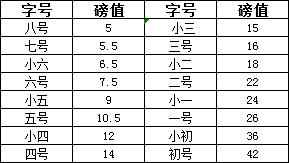
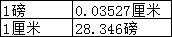
word中设置宽度时,采用磅为单位,磅与厘米之间的换算关系如下:
备注
- 插入多个表格时,表格容易嵌套,主要是由于往下移动的行数不对,后来通过选中表格右下角的单元格,将光标移动到表格右下角,然后再往下移动两行,即可解决表格嵌套的问题。
- 单元格合并问题,当单元格合并时,单元格的位置也随之改变,如:水平方向第二,三两个单元格合并,则原来的第四个单元格的坐标就会变成第三个单元格。
- 开发运行需要在电脑上安装office组件,或者也可以安装wps。
关于源码下载链接
C# 动态生成word文档的更多相关文章
- 使用C#动态生成Word文档/Excel文档的程序测试通过后,部署到IIS服务器上,不能正常使用的问题解决方案
使用C#动态生成Word文档/Excel文档的程序功能调试.测试通过后,部署到服务器上,不能正常使用的问题解决方案: 原因: 可能asp.net程序或iis访问excel组件时权限不够(Ps:Syst ...
- C# 动态生成word文档 [C#学习笔记3]关于Main(string[ ] args)中args命令行参数 实现DataTables搜索框查询结果高亮显示 二维码神器QRCoder Asp.net MVC 中 CodeFirst 开发模式实例
C# 动态生成word文档 本文以一个简单的小例子,简述利用C#语言开发word表格相关的知识,仅供学习分享使用,如有不足之处,还请指正. 在工程中引用word的动态库 在项目中,点击项目名称右键-- ...
- C#动态生成Word文档并填充数据
C#也能动态生成Word文档并填充数据 http://www.cnblogs.com/qyfan82/archive/2007/09/14/893293.html 引用http://blog.csdn ...
- [转载]Java动态生成word文档(图文并茂)
很多情况下,软件开发者需要从数据库读取数据,然后将数据动态填充到手工预先准备好的Word模板文档里,这对于大批量生成拥有相同格式排版的正式文件非常有用,这个功能应用PageOffice的基本动态填充功 ...
- [原创]Java动态生成word文档(图文并茂)
很多情况下,软件开发者需要从数据库读取数据,然后将数据动态填充到手工预先准备好的Word模板文档里,这对于大批量生成拥有相同格式排版的正式文件非常有用,这个功能应用PageOffice的基本动态填充功 ...
- C#简单实现动态数据生成Word文档并保存
今天正好有人问我,怎么生成一个报表式的Word文档. 就是文字的样式和位置相对固定不变,只是里面的内容从数据中读取. 我觉得类似这种的一般用第三方报表来做比较简便.但既然要求了Word,只好硬着头皮来 ...
- JAVA Freemarker + Word 模板 生成 Word 文档 (普通的变量替换,数据的循环,表格数据的循环,以及图片的东替换)
1,最近有个需求,动态生成 Word 文当并供前端下载,网上找了一下,发现基本都是用 word 生成 xml 然后用模板替换变量的方式 1.1,这种方式虽然可行,但是生成的 xml 是在是太乱了,整理 ...
- [转载]Java动态填充word文档并上传到服务器
一. 需求背景 在一些特殊应用场合,客户希望在服务器上生成文档的同时并填充数据,客户端的页面不显示打开文档,但是服务器上生成文档对服务器压力很大,目前服务器上生成文档第一种就是方式是jacob, 但是 ...
- [原创]Java动态填充word文档并上传到服务器
一. 需求背景 在一些特殊应用场合,客户希望在服务器上生成文档的同时并填充数据,客户端的页面不显示打开文档,但是服务器上生成文档对服务器压力很大,目前服务器上生成文档第一种就是方式是jacob, 但是 ...
随机推荐
- 超有料丨小白如何成功逆袭为年薪30万的Web安全工程师
今天的文章是一篇超实用的学习指南,尤其是对于即将毕业的学生,新入职场的菜鸟,对Web安全感兴趣的小白,真的非常nice,希望大家能够好好阅读,真的可以让你少走很多弯路,至少年薪30万so easy! ...
- PHP 点阵5*7字体
效果: 源码: <?php // standard ascii 5x7 font 纵向取模 // defines ascii characters 0x20-0x7f (32-127) $fon ...
- [Swift]LeetCode19. 删除链表的倒数第N个节点 | Remove Nth Node From End of List
Given a linked list, remove the n-th node from the end of list and return its head. Example: Given l ...
- [Bash]LeetCode193. 有效电话号码 | Valid Phone Numbers
Given a text file file.txt that contains list of phone numbers (one per line), write a one liner bas ...
- [Swift]LeetCode414. 第三大的数 | Third Maximum Number
Given a non-empty array of integers, return the third maximum number in this array. If it does not e ...
- springboot 实战之一站式开发体验
都说springboot是新形势的主流框架工具,然而我的工作中并没有真正用到springboot: 都说springboot里面并没有什么新技术,不过是组合了现有的组件而已,但是自己却说不出来: 都说 ...
- python之pickle模块
1 概念 pickle是python语言的标准模块,安装python后以包含pickle库,不需要再单独安装. pickle提供了一种简单的持久化功能,可以将对象以文件的形式存放在磁盘上. pickl ...
- 数据攻略●R语言自述
(注明:以下文章均在Linux操作系统下执行) 一.R语言简介 R语言是用于统计分析,图形表示和报告的编程语言和软件环境.R语言由Ross Ihaka和Robert Gentleman在新西兰奥克兰大 ...
- spark能传递外部命名参数给main函数吗?
查了资料好像都没有办法.只能通过: def main(args: Array[String]): Unit = { // 读取参数 var city = args(0) var input = arg ...
- 使用reflector对.NET反编译
reflector的下载地址:https://www.cr173.com/soft/355285.html 反编译后的结果: