
Android5.0新特性之——按钮点击效果动画(涟漪效果)
Android5.0 Material Design设计的动画效果
RippleDrawable涟漪效果
涟漪效果是Android5.0以后的新特性。为了兼容性,建议新建drawable-v21文件夹来存放RippleDrawable,drawable文件夹下也要放相应的适配图片。(这里可以安装一个AndroidSelector插件,具体的可以参考https://blog.csdn.net/oqihaogongyuan/article/details/53102615的第三部分)
涟漪动画主要是对于ripple标签的使用。,其中ripple节点的,必须要设置color属性。这里根节点的设置的color就是涟漪效果的波纹颜色。子节点的item设置的drawable是涟漪效果的背景(也可以认为是涟漪效果的展示范围)。
我这里根据场景分了4种不同的效果。话不多说先上图。
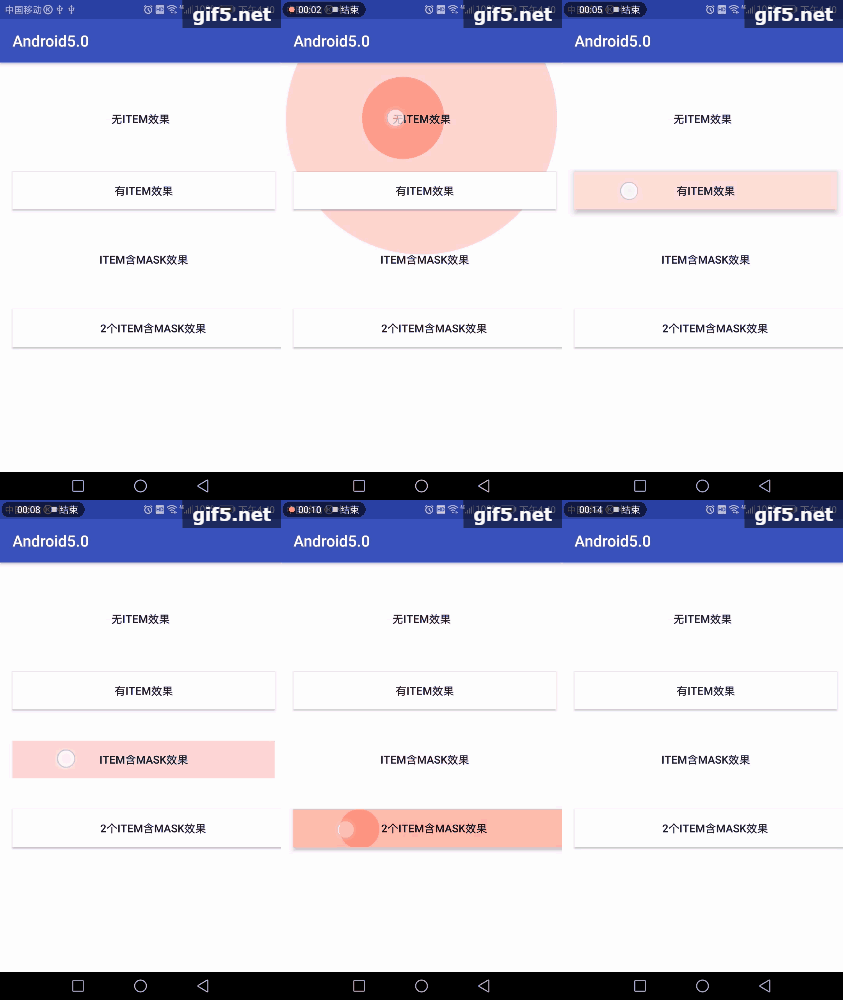
1、只有ripple节点,无item子节点。通过效果图可以看出,涟漪效果的扩散范围没有限制。已经扩散到了父控件。
 <?xml version="1.0" encoding="utf-8"?>

 <ripple xmlns:android="http://schemas.android.com/apk/res/android"

     android:color="@color/colorBtn">

 </ripple>
2、含有一个item节点。通过效果图,可以看到,控件显示了设置的背景色。涟漪效果的范围得到了控制。
<?xml version="1.0" encoding="utf-8"?>

<ripple xmlns:android="http://schemas.android.com/apk/res/android" android:color="@color/colorBtn">

    <!--显示默认的 drawable-->

    <item android:drawable="@color/colorWhite" />

</ripple>
3、第二种情况已经符合大多数的场景了。但是随着现在的一些视觉效果的变更,可能存在只要涟漪效果,背景可能是透明色的。设置id为mask的item节点,只起到一个涟漪效果限制作用,并不显示设置的drawable
<?xml version="1.0" encoding="utf-8"?>

<ripple xmlns:android="http://schemas.android.com/apk/res/android" android:color="@color/colorBtn">

    <item

        android:id="@android:id/mask"

        android:drawable="@color/colorPrimary"/>

</ripple>
4、第四种其实和第二种效果上是一样的。个人感觉没有什么区别。希望了解的大牛进行指点
<?xml version="1.0" encoding="utf-8"?>

<ripple xmlns:android="http://schemas.android.com/apk/res/android" android:color="@color/colorBtn">

    <!--显示默认的 drawable-->

    <item android:drawable="@color/colorWhite" />

    <item

        android:id="@android:id/mask"

        android:drawable="@color/colorAccent"/>

</ripple>
我的布局文件:
<?xml version="1.0" encoding="utf-8"?>

<android.support.constraint.ConstraintLayout xmlns:android="http://schemas.android.com/apk/res/android"

    xmlns:app="http://schemas.android.com/apk/res-auto"

    xmlns:tools="http://schemas.android.com/tools"

    android:layout_width="match_parent"

    android:layout_height="match_parent"

    tools:context="com.gaosiedu.android50.MainActivity">

    <Button

        android:id="@+id/btn_touch_no"

        android:layout_width="match_parent"

        android:layout_height="wrap_content"

        android:layout_marginEnd="8dp"

        android:layout_marginStart="8dp"

        android:layout_marginTop="48dp"

        android:background="@drawable/ripple_item_no"

        android:text="无item效果"

        app:layout_constraintEnd_toEndOf="parent"

        app:layout_constraintStart_toStartOf="parent"

        app:layout_constraintTop_toTopOf="parent" />

    <Button

        android:id="@+id/btn_touch_single"

        android:layout_width="0dp"

        android:layout_height="wrap_content"

        android:layout_marginStart="8dp"

        android:layout_marginTop="44dp"

        android:background="@drawable/ripple_item_single"

        android:text="有item效果"

        app:layout_constraintEnd_toEndOf="@+id/btn_touch_no"

        app:layout_constraintStart_toStartOf="@+id/btn_touch_no"

        app:layout_constraintTop_toBottomOf="@+id/btn_touch_no" />

    <Button

        android:id="@+id/btn_touch_mask"

        android:layout_width="0dp"

        android:layout_height="wrap_content"

        android:layout_marginTop="40dp"

        android:background="@drawable/ripple_item_mask"

        android:text="item含mask效果"

        app:layout_constraintEnd_toEndOf="@+id/btn_touch_single"

        app:layout_constraintStart_toStartOf="@+id/btn_touch_single"

        app:layout_constraintTop_toBottomOf="@+id/btn_touch_single" />

    <Button

        android:id="@+id/btn_touch_double"

        android:layout_width="360dp"

        android:layout_height="wrap_content"

        android:layout_marginEnd="8dp"

        android:layout_marginTop="40dp"

        android:background="@drawable/ripple_item_double"

        android:text="2个item含mask效果"

        app:layout_constraintEnd_toEndOf="@+id/btn_touch_mask"

        app:layout_constraintHorizontal_bias="0.0"

        app:layout_constraintStart_toStartOf="@+id/btn_touch_mask"

        app:layout_constraintTop_toBottomOf="@+id/btn_touch_mask" />

</android.support.constraint.ConstraintLayout>
Android5.0新特性之——按钮点击效果动画(涟漪效果)的更多相关文章
- Android5.0新特性:RecyclerView实现上拉加载更多
RecyclerView是Android5.0以后推出的新控件,相比于ListView可定制性更大,大有取代ListView之势.下面这篇博客主要来实现RecyclerView的上拉加载更多功能. 基 ...
- Android5.0新特性-Material Design
概述 2014年,Google携Android5.X重装归来.全新的UI设计和更加优化的性能,令开发人员眼前一亮 安装和配置Android5.0开发环境 开发Android还得靠AS.下载地址 htt ...
- Android5.0新特性——兼容性(support)
兼容性 虽然Material Design新增了许多新特性,但是并不是所有新内容对对下保持了兼容. 使用v7包 v7 support libraries r21 及更高版本包含了以下Material ...
- Android5.0新特性——全新的动画(animation)
全新的动画 在Material Design设计中,为用户与app交互反馈他们的动作行为和提供了视觉上的连贯性.Material主题为控件和Activity的过渡提供了一些默认的动画,在android ...
- Kotlin实例----android5.0新特性之palette
一.Palette的使用 使用Palette可以让我们从一张图片中拾取颜色,将拾取到的颜色赋予ActionBar,StatusBar以及UI背景色可以让界面色调实现统一或者加载不同图片时同步变化色调 ...
- Android5.0新特性——新增的Widget(Widget)
新增的Widget RecyclerView RecyclerView是ListView的升级版,它具备了更好的性能,且更容易使用.和ListView一样,RecyclerView是用来显示大量数据的 ...
- Android5.0新特性——阴影和剪裁(shadow)
阴影和剪裁 View的z属性 Material Design建议为了凸显布局的层次,建议使用阴影效果,并且Android L为了简化大家的工作,对View进行了扩展,能使大家非常方便的创建阴影效果: ...
- Android5.0新特性——图片和颜色(drawable)
图片和颜色 tint属性 tint属性一个颜色值,可以对图片做颜色渲染,我们可以给view的背景设置tint色值,给ImageView的图片设置tint色值,也可以给任意Drawable或者NineP ...
- Android5.0新特性——Material Design简介
Material Design Material Design简介 Material Design是谷歌新的设计语言,谷歌希望寄由此来统一各种平台上的用户体验,Material Design的特点是干 ...
随机推荐
- 修改了my.ini没有效果,MySql的字符集还是没有变成utf8——mysql中文乱码
https://www.jianshu.com/p/554b9575c5da Windows下修改MySql 5.6的字符集,根据网上提供的方法.就是修改my.ini配置文件,然后增加几个字段就可以了 ...
- Python——开发一个自动化微信投票器【附代码实例方法】
一个研究Python实践,最近研究一个投票的东东,主要是想测试利用Python实现刷微信投票. 本文纯粹为了记录一下 webdriver直接操作页面按钮的方法: #!/usr/bin/python # ...
- 微信小程序--地图组件与api-模拟器上返回的scale 与真机上不同--bindregionchange触发图标一直闪现问题
场景:根据地理定位获取不同地区的充电桩位置,要求 1.平移的时候,跟随坐标变化展示不同区域的坐标点信息 2.不同的缩放等级,14以下,展示聚合点数据,14以上,展示真正的站点信息: 3.点击聚合点的时 ...
- 64IE无法显示网页
1.碰到如下图情况ie浏览器打开之后显示不了网页,但是试了下电脑上其他的浏览器都可以正常的打开网页. 2.解决办法为:打开浏览器-选择“工具”-“Internet选项”-“高级”-重置,重启浏览器后能 ...
- jedis & common pool
http://mvnrepository.com/artifact/redis.clients/jedis http://mvnrepository.com/artifact/org.apache.c ...
- jeecg自定义按钮使用exp属性不起作用
为什么要写这篇文章? 之前写过一篇类似的文章 jeecg笔记之自定义显示按钮exp属性,但是有些小伙伴留言参考后不起作用,当时我的 jeecg 版本为3.7.5,最终以版本不同,暂时搁浅了.今天,重新 ...
- Push rejected: Push to origin/master was rejected
1.错误日志 : Maven projects need to be imported: Import Changes Enable Auto-Import : files committed: 初始 ...
- docker+kibana+filebeat的安装
安装filebeat服务(在需要收集日志的主机安装filebeat) 下载和安装key文件 rpm --import https://packages.elastic.co/GPG-KEY-elast ...
- [ML] 数据处理
可以不需要自己开发,使用CloudCompare的分割合并功能实现点云标注(labeling),生成点云训练集数据. (1)首先对点云中的物体进行分割,分割出一个一个的类别. (2)接着删除所有的SF ...
- ESP8266 RTOS SDK(IDF)编译环境搭建
前提条件 按照https://www.cnblogs.com/ansersion/p/10458171.html的步骤搭建非IDF环境 下载 https://github.com/espressif/ ...