
poi生成word2007及以上文件
一、简介
对于poi来说,poi可以完成对word、excel、ppt的处理。word目前有两种文件格式,一种是doc后缀、另一种是docx后缀的。2007之前的版本都是doc后缀的,这种格式poi使用HWPF进行处理。HWPF也能有限多地对旧的word6和word95格式的文件处理提供支持。2007(包括)之后都是docx后缀的,poi使用XWPF进行处理。HWPF 和 XWPF的特性有些相似,但是目前两者没有共用接口。
HWPF和XWPF可以被描述为“适度功能”。对于一些例子来说,管理文本的提取,提供强有力的支持。对于其他莱斯,支持是有限或不完整的,需要深入研究低级别的代码。错误检测已经被移除,所有可能会创建格式错误的文件。
HWPF 包含在poi-scratchpad-XXX.jar包中,而XWPF 包含在 poi-ooxml-XXX.jar包中。我们可以根据我们的需要来将这些包添加都classpath里面。HWPF与XWPF网址为:http://poi.apache.org/document/index.html 。此网站为官网,我一般下载jar包所用网站为http://mvnrepository.com/
二、实例
1、依赖如下:
<!-- https://mvnrepository.com/artifact/org.apache.poi/poi -->
<dependency>
    <groupId>org.apache.poi</groupId>
    <artifactId>poi</artifactId>
    <version>3.16</version>
</dependency>
<!-- https://mvnrepository.com/artifact/org.apache.poi/poi-scratchpad -->
<dependency>
    <groupId>org.apache.poi</groupId>
    <artifactId>poi-scratchpad</artifactId>
    <version>3.16</version>
</dependency>
<!-- https://mvnrepository.com/artifact/org.apache.poi/poi-ooxml -->
<dependency>
    <groupId>org.apache.poi</groupId>
    <artifactId>poi-ooxml</artifactId>
    <version>3.16</version>
</dependency>

2、示例代码如下:
  1 package com.test.word;

  2

  3 import java.io.FileOutputStream;

  4 import java.io.IOException;

  5 import java.math.BigInteger;

  6 import java.util.List;

  7

  8 import org.apache.poi.xwpf.usermodel.ParagraphAlignment;

  9 import org.apache.poi.xwpf.usermodel.TextAlignment;

 10 import org.apache.poi.xwpf.usermodel.XWPFDocument;

 11 import org.apache.poi.xwpf.usermodel.XWPFParagraph;

 12 import org.apache.poi.xwpf.usermodel.XWPFRun;

 13 import org.apache.poi.xwpf.usermodel.XWPFTable;

 14 import org.apache.poi.xwpf.usermodel.XWPFTableCell;

 15 import org.junit.Test;

 16 import org.openxmlformats.schemas.wordprocessingml.x2006.main.CTTblPr;

 17 import org.openxmlformats.schemas.wordprocessingml.x2006.main.STTblWidth;

 18

 19 /**

 20  * 创建word文档

 21  */

 22 public class WordCreate {

 23     /**

 24      * 2007word文档创建

 25      */

 26     @Test

 27     public void createWord2007() {

 28         XWPFDocument doc = new XWPFDocument();

 29         XWPFParagraph p1 = doc.createParagraph();

 30

 31         XWPFTable table = doc.createTable(11, 4);

 32         // CTTblBorders borders=table.getCTTbl().getTblPr().addNewTblBorders();

 33         CTTblPr tblPr = table.getCTTbl().getTblPr();

 34         tblPr.getTblW().setType(STTblWidth.DXA);

 35         tblPr.getTblW().setW(new BigInteger("7000"));

 36

 37         // 设置上下左右四个方向的距离,可以将表格撑大

 38         table.setCellMargins(20, 20, 20, 20);

 39

 40         // 表格

 41         List<XWPFTableCell> tableCells = table.getRow(0).getTableCells();

 42

 43         XWPFTableCell cell = tableCells.get(0);

 44         XWPFParagraph newPara = new XWPFParagraph(cell.getCTTc().addNewP(), cell);

 45         XWPFRun run = newPara.createRun();

 46         /** 内容居中显示 **/

 47         newPara.setAlignment(ParagraphAlignment.CENTER);

 48         // run.getCTR().addNewRPr().addNewColor().setVal("FF0000");/**FF0000红色*/

 49         // run.setUnderline(UnderlinePatterns.THICK);

 50         run.setText("第一 数据");

 51

 52         tableCells.get(1).setText("第一 数据");

 53         tableCells.get(2).setText("第一 据")

 54         tableCells.get(3).setText("第 据");

 55

 56         tableCells = table.getRow(1).getTableCells();

 57         tableCells.get(0).setText("第数据");

 58         tableCells.get(1).setText("第一 数据");

 59         tableCells.get(2).setText("第一 据");

 60         tableCells.get(3).setText("第 据");

 61

 62         // 设置字体对齐方式

 63         p1.setAlignment(ParagraphAlignment.CENTER);

 64         p1.setVerticalAlignment(TextAlignment.TOP);

 65

 66         // 第一页要使用p1所定义的属性

 67         XWPFRun r1 = p1.createRun();

 68

 69         // 设置字体是否加粗

 70         r1.setBold(true);

 71         r1.setFontSize(20);

 72

 73         // 设置使用何种字体

 74         r1.setFontFamily("Courier");

 75

 76         // 设置上下两行之间的间距

 77         r1.setTextPosition(20);

 78         r1.setText("标题");

 79

 80         FileOutputStream out;

 81         try {

 82             out = new FileOutputStream("c:/test/word2007.docx");

 83             // 以下代码可进行文件下载

 84             // response.reset();

 85             // response.setContentType("application/x-msdownloadoctet-stream;charset=utf-8");

 86             // response.setHeader("Content-Disposition",

 87             // "attachment;filename=\"" + URLEncoder.encode(fileName, "UTF-8"));

 88             // OutputStream out = response.getOutputStream();

 89             // this.doc.write(out);

 90             // out.flush();

 91

 92             doc.write(out);

 93             out.close();

 94         } catch (IOException e) {

 95             e.printStackTrace();

 96         }

 97         System.out.println("success");

 98     }

 99

100 }
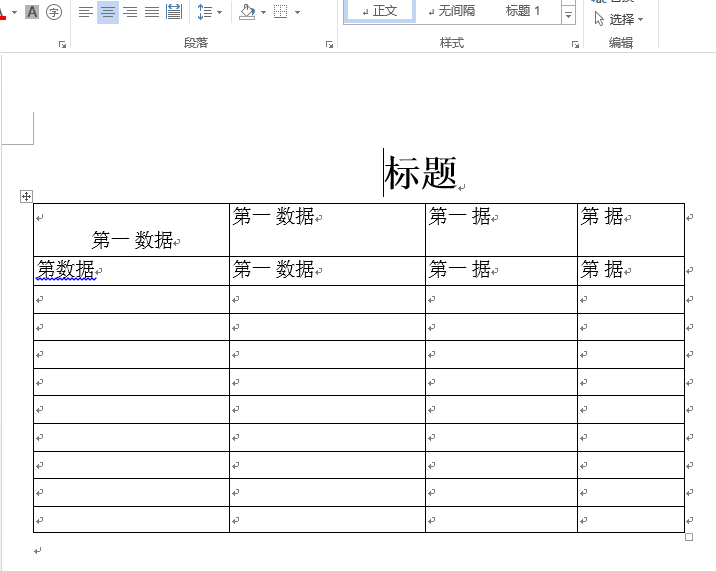
3、生成word如下所示
poi生成word2007及以上文件的更多相关文章
- POI生成Web版Word文件
POI生成Web版Word文件 1 通过URL的输入流实现 2 直接把Html文本写入到Word文件 所谓的使用POI生成Web版Word文件是指利用POI将Html代码插入到 ...
- 【Java】使用Apache POI生成和解析Excel文件
概述 Excel是我们平时工作中比较常用的用于存储二维表数据的,JAVA也可以直接对Excel进行操作,分别有jxl和poi,2种方式. HSSF is the POI Project's pure ...
- POI生成EXCEL文件
POI生成EXCEL文件 一.背景 根据指定格式的JSON文件生成对应的excel文件,需求如下 支持多sheet 支持单元格合并 支持插入图片 支持单元格样式可定制 需要 标题(title),表头( ...
- 使用poi读取word2007(.docx)中的复杂表格
使用poi读取word2007(.docx)中的复杂表格 最近工作需要做一个读取word(.docx)中的表格,并以html形式输出.经过上网查询,使用了poi. 对于2007及之后的word文档,需 ...
- POI生成WORD文档
h2:first-child, body>h1:first-child, body>h1:first-child+h2, body>h3:first-child, body>h ...
- 黄聪:利用OpenXml生成Word2007文档(转)
原文:http://blog.csdn.net/francislaw/article/details/7568317 版权声明:本文为博主原创文章,未经博主允许不得转载. 目录(?)[-] 一Op ...
- 利用OpenXml生成Word2007文档
一.OpenXml简介 利用C#生成Word文档并非一定要利用OpenXml技术,至少可以使用微软提供的Office相关组件来编程,不过对于Office2007(确切的说是Word.Excel和Pow ...
- 使用POI生成Excel报表
先把报表模板截图贴上来 下面是POI编写的报表生成类ExcelReport.java package com.jadyer.report; import java.io.FileNotFoundExc ...
- 使用Java类库POI生成简易的Excel报表
使用Java类库POI生成简易的Excel报表 1.需求 1.数据库生成报表需要转义其中字段的信息.比如 1,有效 2.无效等 2.日期格式的自数据需要转义其格式. 3.标题的格式和数据的格式需要分别 ...
随机推荐
- C++异常与析构函数及构造函数
析构函数不要抛出异常. 构造函数可以抛出异常,但是要谨慎. 原因下面这篇文章讲的不错,转载如下: http://jarfield.iteye.com/blog/811703 写Java代码的时候,遇到 ...
- [HTML 5] aria-hidden
You want to use aria-hidden to prevent screen reader to access some content should be hidden from us ...
- [笔记][Java7并发编程实战手冊]3.4 等待多个并发事件的完毕CountDownLatch倒计数闭锁
[笔记][Java7并发编程实战手冊]系列文件夹 简单介绍 本文学习CountDownLatch 倒计数闭锁. 本人英文不好.靠机器翻译,然后有一段非常形象的描写叙述,让我把它叫为倒计数 用给定的计数 ...
- MySql 基础学习笔记 1——概述与基本数据类型: 整型: 1)TINYINT 2)SMALLINT 3) MEDIUMINT 4)INT 5)BIGINT 主要是大小的差别 图 浮点型:命令
一.CMD中经常使用mysql相关命令 mysql -D, --database=name //打开数据库 --delimiter=name //指定分隔符 -h, --host=name // ...
- openssl之EVP系列之2---对称加密算法概述
openssl之EVP系列之2---对称加密算法概述 ---依据openssl doc/crypto/EVP_EncryptInit.pod和doc/ssleay.txt cipher.doc ...
- 使用Handler在子线程中更新UI
Android规定仅仅能在主线程中更新UI.假设在子线程中更新UI 的话会提演示样例如以下错误:Only the original thread that created a view hierach ...
- zzulioj--1613--少活一年?(稍微有点坑,水!)
1613: 少活一年? Time Limit: 1 Sec Memory Limit: 128 MB Submit: 344 Solved: 70 SubmitStatusWeb Board De ...
- EOJ 3 玩具谜题
小南有一套可爱的玩具小人,它们各有不同的职业. 有一天,这些玩具小人把小南的眼镜藏了起来.小南发现玩具小人们围成了一个圈,它们有的面朝圈内,有的面朝圈外.如下图: 这时 singer 告诉小南一个谜题 ...
- 关于QObject类的一些理解
QRunnable并没有继承自QObject,所以它和其他QObject组件的通信不能使用传统的信号和槽,要是用信号和槽我们必须将其继承自QObject自动的添加 QThread的退出最好用exit( ...
- 11.MATLAB基本编程
概述: 1 脚本M文件 clear all; %设置精度 format long; %定义变量 n= s= %循环 :n s=s+/^i; end s format short; 2 函数M文件 fu ...