
modSecurity规则学习(四)——规则指令编写
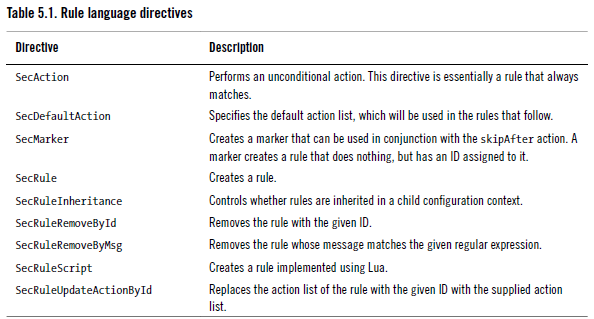
规则语言是使用9个指令实现:
语法:SecRule VARIABLES OPERATOR [TRANSFORMATION_FUNCTIONS, ACTIONS]
Variables 以下几种:
Regular variables
Contain only one piece of information, or one string. For example, REMOTE_ADDR, always
contains the IP address of the client.
Collections
Groups of regular variables. Some collections (e.g., ARGS) allow enumeration, making
it possible to use its every member in a rule. Some other collections (e.g., ENV)
are not as flexible, but there is always going to be some way to extract individual regular
variables out of them.
Read-only collections
Many of the collections point to some data that cannot be modified, in which case
the collection itself will be available only for reading.
Read/write collections
When a collection is not based on immutable data ModSecurity will allow you to
modify it. A good example of a read/write collection is TX, which a collection that
starts empty and exists only as long as the currently processed transaction exists.
Special collections
Sometimes a collection is just a handy mechanism to retrieve information from
something that is not organised as a collection but it can seem that way. This is the
case with the XML collection, which takes an XPath expression as a (mandatory) parameter
and allows you to extract values out of an XML file.
Persistent collections
Some collections can be stored and retrieved later. This feature allows you to adopt a
wider view of your systems, for example tracking access per IP address or per session,
or per user account.
1、一个简单的规则
在rule/目录下创建myruls.conf
添加规则
SecRule ARGS "(testwwd)+" \

        "msg:'wwd22 test',\

        id:,\

        phase:request,\

        deny,\

        status:"
nginx reload
测试:http://nginxip:nginxport/?test=testwwd
503拦截
2、针对struts漏洞
3、lua脚本
4、白名单、黑名单
6、自定义评分
modSecurity规则学习(四)——规则指令编写的更多相关文章
- Prometheus之告警规则的编写
Prometheus之告警规则的编写 一.前置知识 二.需求 三.实现步骤 1.编写告警规则 2.修改prometheus.yml执行告警规则的位置 3.配置文件截图 4.页面上看告警数据信息 5.查 ...
- Hexo之旅(四):文章编写技巧
hexo 编写文章可以使用以下命令创建hexo new "文件名" #创建的文章会在_pots目录下文章的后缀名是以md命名的文件格式,遵循markdown语法,所以编写文章可以使 ...
- modSecurity规则学习(三)——SecRule
通用格式 SecRule VARIABLES OPERATOR [TRANSFORMATION_FUNCTIONS, ACTIONS] 阶段phase (1)request headers (2) ...
- 技术转载:Jni学习四:如何编写jni方法
转载:http://blog.chinaunix.net/u1/38994/showart_1099528.html 一.概述: 在这篇文章中将会简单介绍如何编制一些简单的JNI 方法.我们都知道JN ...
- modSecurity规则学习(一)——配置文件
环境:modSecurity3.0,nignx1.13.8 modSecurity配置文件 1.nginx.conf server { listen ; modsecurity on; //启动mod ...
- udev规则以及编写
主要内容: udev简介 如何配置和使用udev 如何编写udev规则 字符串替换和匹配 udev主要作用 编写udev规则实例 难点解析 1. udev简介 1.1 什么是udev? udev是Li ...
- Vue.js-----轻量高效的MVVM框架(四、指令)
Vue指令 指令 (Directives) 是特殊的带有前缀 v- 的特性.指令的值限定为绑定表达式,因此上面提到的 JavaScript 表达式及过滤器规则在这里也适用.指令的职责就是当其表达式的值 ...
- vue.js 四(指令和自定义指令)
官方的指令说明已经很简单了,这里再写一遍,也是自己加深一下印象 v-text 就是写入单纯的文本,可以忽略这个指令直接双花括号代替 <span v-text="msg"> ...
- modSecurity规则学习(八)——防止CC攻击
modSecurity日志收集:在phase 5阶段处理. 由于CC攻击主要考虑对动态请求的防护,所以要排除静态资源的请求,或者自定义动态请求的后缀或者关键字做接口针对性的防护. 定义需要排除的请求u ...
随机推荐
- Map的5种遍历方式
public class MapF { public static void main(String[] args) { Map<String, Integer> tempMap = ne ...
- ajax错误信息
XMLHttpRequest.status状态码 1xx-信息提示 这些状态代码表示临时的响应.客户端在收到常规响应之前,应准备接收一个或多个1xx响应. 100-继续. 101-切换协议. 2xx- ...
- 学习jvm,关于MAT an internal error occurred during:"Parsing heap dump" from问题
写了一个死循环不断的创建对象,模拟内存溢出 package com.zuo.test1; import java.util.ArrayList; import java.util.List; publ ...
- Spark脚本调用
Spark提供了多个脚本来作为程序的入口,其中最常用的是交互脚本 spark-shell, pyspark,还有spark sql的客户端spark-sql. 这些脚本最后都会归结到对SparkSub ...
- selenium自动化(二).........................................Demo篇
二 编写简单代码 简单代码一: demo1.py 1.from selenium import webdriver driver = webdriver.Chrome() driver.get(& ...
- NodeJS 第一天学习
NodeJS 第一天学习 严格模式 ECMAScript 5的严格模式是采用具有限制性JavaScript变体的一种方式,从而使代码显示地 脱离"马虎模式/稀松模式/懒散模式"(s ...
- du -sh*查看当前目录下的文件夹大小
du -sh*查看当前目录下的文件夹大小 u 命令 用途 概述磁盘使用. 语法 du [ -a | -s ] [ -k ] [ -m ] [ -g ][ -l ] [ -r ] ...
- Java基础学习总结(3)——抽象类
一.抽象类介绍 下面通过一下的小程序深入理解抽象类 因此在类Animal里面只需要定义这个enjoy()方法就可以了,使用abstract关键字把enjoy()方法定义成一个抽象方法,定义如下:pub ...
- TOMCATserver不写port号、不写项目名訪问项目、虚拟文件夹配置
一.不写port. 这个问题都被问烂了.由于TOMCAT默认的訪问port为8080.而TCP/IP协议默认80port訪问,大家之所以看到别的站点都不写port号是由于人家用的的80port訪问的, ...
- Android 中如何使用 enum / 枚举
如何在Android开发中合理的使用enum 欢迎大家访问我的Github开源库,这里有好玩的App源码,想和大家分享.https://github.com/ChoicesWang 转载请注明:htt ...