
Android自定义View入门(一)
最近在写一个关于音乐播放的应用,写到播放界面UI时,就想自己实现的一个播放界面。那么如何实现自定义View呢?通过查看他人博客和Android官方开发文档,初步了解了一些浅显的内容。在此记录,已供需要的朋友参考。
自定义视图的官方参考文档:http://developer.android.com/training/custom-views/create-view.html
当我们使用XML布局文件进行UI编写时,通过增加xml tag我们可以加入自己想要的任何view组件,例如下面的布局文件(只是个例子,删除了其他不重要布局元素):
 <?xml version="1.0" encoding="utf-8"?>

 <RelativeLayout xmlns:android="http://schemas.android.com/apk/res/android"

     android:layout_width="match_parent"

     android:layout_height="match_parent">

     <TextView

         android:layout_width="match_parent"

         android:layout_height="match_parent" />

 </RelativeLayout>
用过<RelativeLayout 引入RelativeLayout,通过<TextView引入TextView。然后在对应便签了加入了各种属性(如:android:layout_width、android:layout_heignt),编译程序在编译时会解析xml文件,把对应的tag生成相应的view对象。
那么自己定义的view如何通过上面那种方式使用呢?这就要说到xmlns(XML namespace)了。了解XML的朋友都知道,XML为了传输数据设计的可拓展标记语言,它不同于HTML有预定义的各种便签,它的便签是用户自定义的。在哪定义呢?xmlns!
不知道你注意到没,我们的布局文件中总是用这样一行代码:
xmlns:android="http://schemas.android.com/apk/res/android"
这就是引入命名空间。更过关于XML知识,请查看:XML介绍。简单来说通过在顶级tag中引入命名空间,整个个xml都可以用命名空间中定义的内容了,如android:id等。那么怎么为我们的自己写的view添加命名空间呢?
下面我们来创建自己的命名空间文件:首先在res->values目录下新建attrs资源文件,如下图:

在attrs中定义里需要表述的属性:
 <?xml version="1.0" encoding="utf-8"?>

 <resources>

     <declare-styleable name="Circle">

         <attr name="radius" format="dimension"/>

         <attr name="background_color" format="color"/>

     </declare-styleable>

 </resources>
其中declare-styeable节点的name属性值一般是你写的view的名字,如这里我自己写的view叫Cirecle。接下来定义可以在xml中定义的组件属性,这里可以指定两个,radius和background。其中format属性指定可接受值的类型,多个类型用“|”分隔。
更多关于怎么写attrs可以参考Android sdk目录下的platforms\android-xxx\data\res\values\attrs.xml文件,哪里为自带的所有空间声明了命名空间。
写好的命名空间如何使用呢?下面给出布局文件:
 <?xml version="1.0" encoding="utf-8"?>

 <RelativeLayout xmlns:android="http://schemas.android.com/apk/res/android"

     xmlns:custom="http://schemas.android.com/apk/res-auto"

     xmlns:tools="http://schemas.android.com/tools"

     android:layout_width="match_parent"

     android:layout_height="match_parent"

     android:paddingBottom="@dimen/activity_vertical_margin"

     android:paddingLeft="@dimen/activity_horizontal_margin"

     android:paddingRight="@dimen/activity_horizontal_margin"

     android:paddingTop="@dimen/activity_vertical_margin"

     tools:context="com.github.fallblank.myapplication.MainActivity">

     <!--引入自定义View,并设置属性-->

     <com.github.fallblank.myapplication.Circle

         android:id="@+id/circle"

         android:layout_width="wrap_content"

         android:layout_height="wrap_content"

         custom:background_color="#ff0000"

         custom:radius="100dp" />

   <!--下面两个按钮是为了改变View使其重绘-->

     <Button

         android:id="@+id/btn_larger"

         android:layout_width="wrap_content"

         android:layout_height="wrap_content"

         android:layout_alignParentBottom="true"

         android:text="Larger" />

     <Button

         android:id="@+id/btn_smaller"

         android:layout_width="wrap_content"

         android:layout_height="wrap_content"

         android:layout_toRightOf="@id/btn_larger"

         android:layout_alignParentBottom="true"

         android:text="Smaller" />

 </RelativeLayout>
注意这行代码:
xmlns:custom="http://schemas.android.com/apk/res-auto"
这里就是引入自定义的命名空间,有了这行代码后面就可以使用我们之前定义的内容custom:radius和custom:backgroud_color了。需要注意的是这里引入的方式适合于gradle编译,对应ant编译,xmlns定义如下:
xmlns:custom="http://schemas.android.com/apk/res/自定义view的包名
接下来就是如何获取在xml指定属性的值了,下面给出自定义view的代码:
 package com.github.fallblank.myapplication;

 import android.content.Context;

 import android.content.res.TypedArray;

 import android.graphics.Canvas;

 import android.graphics.Paint;

 import android.util.AttributeSet;

 import android.view.View;

 import android.widget.Toast;

 /**

  * Created by fallb on 2015/11/24.

  */

 public class Circle extends View {

     private int mColor;

     private Context mContext;

     private float mRadius;

     public Circle(Context context, AttributeSet attrs) {

         super(context, attrs);

         mContext = context;

         TypedArray a = context.getTheme().obtainStyledAttributes(attrs,R.styleable.Circle,0,0);

24         try {

25             //

26             mColor = a.getColor(R.styleable.Circle_line_color,0x000000);

27             mRadius = a.getDimension(R.styleable.Circle_side,16);

28         }finally {

29             a.recycle();

30         }

     }

     public void addSide() {

         mRadius+=5.0;

         invalidate();

         requestLayout();

     }

     public void subSide(){

         if (mRadius>=5.0){

             mRadius-=5.0;

             invalidate();

             requestLayout();

         }else {

             Toast.makeText(mContext,"smaller enough!",Toast.LENGTH_LONG).show();

         }

     }

     @Override

     protected void onDraw(Canvas canvas) {

         super.onDraw(canvas);

         Paint paint = new Paint();

         paint.setColor(mColor);

         canvas.drawCircle(0,0,mRadius,paint);

     }

 }
上面标红的代码就是获取定义在xml中的属性的方法(为什么不用AttributeSet直接获取属性?官方文档有介绍,需要了解的朋友可以去看看)
获取到属性后就是实现自己的绘图方法,重载onDraw()实现绘制。对应怎么使用Pait、canvas,我会在后面介绍。
说了这么多,来总结一下。
- 自定义视图为了能在xml布局文件中同Android定义视图一样使用,需要创建attrs布局文件。
- 在View实现代码中通过上面的方式获取定义在xml中的属性,然后实现绘制。
- xml布局文件为了能使用自定义view需要引入用户定义的命名空间。
为了不空放嘴炮,最后给出效果图和代码:
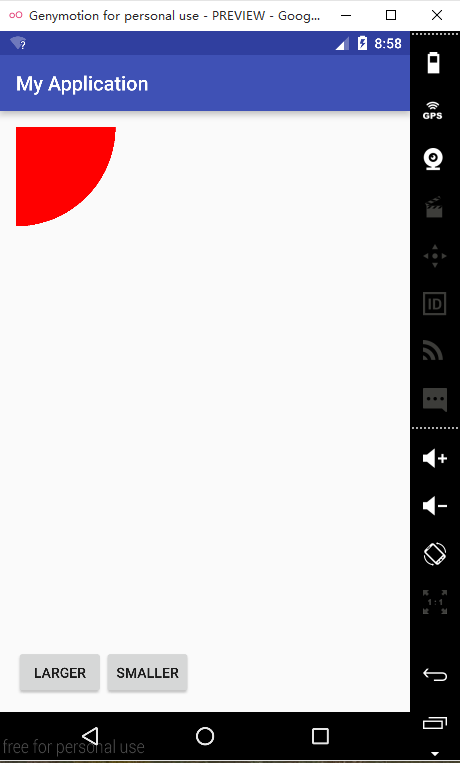

样例代码:https://github.com/fallblank/CustomView
现在遇到一个疑问:我定义的View在xml中的默认大小是充满这个父控件,指定宽度为wrap_content也没用。应该是哪里没设置,知道的朋友请告之!小弟大榭!
仅此抛砖引玉!
Android自定义View入门(一)的更多相关文章
- Android自定义View
转载请标明出处:http://blog.csdn.net/lmj623565791/article/details/24252901 很多的Android入门程序猿来说对于Android自定义View ...
- Android 自定义View (一)
转载请标明出处:http://blog.csdn.net/lmj623565791/article/details/24252901 很多的Android入门程序猿来说对于Android自定义View ...
- Android 自定义View(button)
很多的Android入门程序猿来说对于Android自定义View,可能都是比较恐惧的,但是这又是高手进阶的必经之路,所有准备在自定义View上面花一些功夫,多写一些文章.先总结下自定义View的步骤 ...
- 简单说说Android自定义view学习推荐的方式
这几天比较受关注,挺开心的,嘿嘿. 这里给大家总结一下学习自定义view的一些技巧. 以后写自定义view可能不会写博客了,但是可以开源的我会把源码丢到github上我的地址:https://git ...
- Android自定义View 画弧形,文字,并增加动画效果
一个简单的Android自定义View的demo,画弧形,文字,开启一个多线程更新ui界面,在子线程更新ui是不允许的,但是View提供了方法,让我们来了解下吧. 1.封装一个抽象的View类 B ...
- (转)[原] Android 自定义View 密码框 例子
遵从准则 暴露您view中所有影响可见外观的属性或者行为. 通过XML添加和设置样式 通过元素的属性来控制其外观和行为,支持和重要事件交流的事件监听器 详细步骤见:Android 自定义View步骤 ...
- Android 自定义View合集
自定义控件学习 https://github.com/GcsSloop/AndroidNote/tree/master/CustomView 小良自定义控件合集 https://github.com/ ...
- Android 自定义View (五)——实践
前言: 前面已经介绍了<Android 自定义 view(四)-- onMeasure 方法理解>,那么这次我们就来小实践下吧 任务: 公司现有两个任务需要我完成 (1)监测液化天然气液压 ...
- Android 自定义 view(四)—— onMeasure 方法理解
前言: 前面我们已经学过<Android 自定义 view(三)-- onDraw 方法理解>,那么接下我们还需要继续去理解自定义view里面的onMeasure 方法 推荐文章: htt ...
随机推荐
- Visual Studio Debugger
Visual Studio Debugger中七个鲜为人知的小功能 Visual Studio debugger是一个很棒的调试工具,可以帮助程序猿们快速地发现和解决问题.这里给大家简单介绍一下V ...
- html5和html的区别是什么(精问)
html5和html的区别是什么(精问) 一.总结 一句话总结:html5:简洁(文档生命,链接引入) 语义化(语义化标签) API(canvas,地理位置等) 一些标签(input新类型) 二. ...
- BootstrapTable的使用教程
官方网站:http://bootstrap-table.wenzhixin.net.cn/参考文档:http://issues.wenzhixin.net.cn/bootstrap-table/ind ...
- UUID不失精度,长度改进
在使用到uuid的时候,往往头疼于它的长度(如1bfe50d8-544e-4e8a-95b8-199ceff15268),于是乎就有了改写uuid的各种方法 1.去除"-"的uui ...
- app.config中的值获取及设置 以及对log4net配置
修改或新增AppSetting节点 /// <summary> /// 修改AppSettings中配置 /// </summary> /// <param name ...
- SQL生成n位随机字符串
--1.随着newid() go --创建一个视图(因为不能在功能直接用于newid()) create view vnewid as select newid() N'MacoId'; go --创 ...
- Swift语言实现代理传值
需求:利用代理实现反响传值(下面样例採用点击第二个视图控制器中的button来改变第一个视图控制器中的Label的内容) 一.创建RootViewController import Foundatio ...
- 【30.00%】【vijos 1909】寻找道路
描述 在有向图 G 中,每条边的长度均为 1,现给定起点和终点,请你在图中找一条从起点到 终点的路径,该路径满足以下条件: 路径上的所有点的出边所指向的点都直接或间接与终点连通. 在满足条件 1 的情 ...
- 《⑨也懂系列:MinGW-w64安装教程》著名C/C++编译器GCC的Windows版本(MinGW-w64在安装的时候可以选择版本,有图,一步一步)
发布日期 2016年10月31日 分类 教程 标签 编程.软件 前言<⑨也懂系列:MinGW-w64安装教程>这篇文章由 rsreland (http://rsreland.net)于 2 ...
- 【a401】直线的交点数
Time Limit: 1 second Memory Limit: 32 MB [问题描述] 平面上有n条直线,且无三线共点,问这些直线能有多少种不同的交点数. [输入格式] n(n≤20) [输出 ...