
css中background-clip属性的作用
background-clip属性的通俗作用就是指定元素背景所在的区域,有四种取值
1、border-box
border-box是默认值,表示元素的背景从border区域(包括border)以内开始保留背景。
简单代码如下:
<!doctype html>

<html>

    <head>

        <style>

	    *{margin:0;padding:0;}

            .box{width:380px;height:280px;margin:100px auto;background:url("1.jpg") no-repeat -5px;padding:5px;border:5px dotted #000;
       background-clip:border-box;}

        </style>

   </head>

   <body>

       <div class="box"></div>

   </body>

</html>
效果如下:
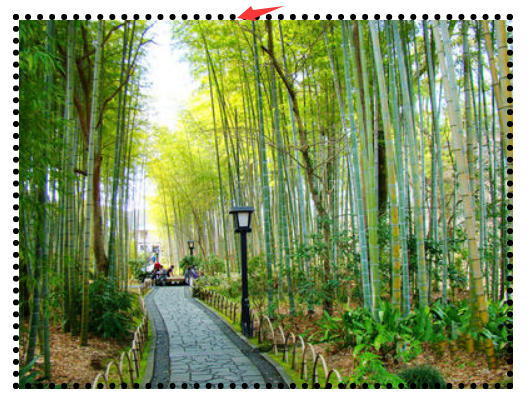

从上图我们可以看出,元素背景默认是存在于边框及以内的区域,但是不知道为什么加背景图片,不能全部覆盖;而背景颜色则没没这个问题。
2、padding-box
padding-box表示元素的背景从padding区域(包括padding)以内开始保留。
简单代码如下:
<!doctype html>

<html>

    <head>

        <style>

	    *{margin:0;padding:0;}

            .box{width:380px;height:280px;margin:100px auto;background:url("1.jpg") no-repeat -5px;padding:5px;border:5px dotted #000;
            background-clip:padding-box;}

        </style>

   </head>

   <body>

       <div class="box"></div>

   </body>

</html>
效果如下:

从上图我们可以看出背景图片存在于padding及以内区域。
3、content-box
content-box表示元素的背景从内容区域以内开始保留。
简单代码如下:
<!doctype html>

<html>

    <head>

        <style>

	    *{margin:0;padding:0;}

            .box{width:380px;height:280px;margin:100px auto;background:url("1.jpg") no-repeat -5px;padding:5px;border:5px dotted #000;
            background-clip:content-box;}

        </style>

   </head>

   <body>

       <div class="box"></div>

   </body>

</html>
效果如下:
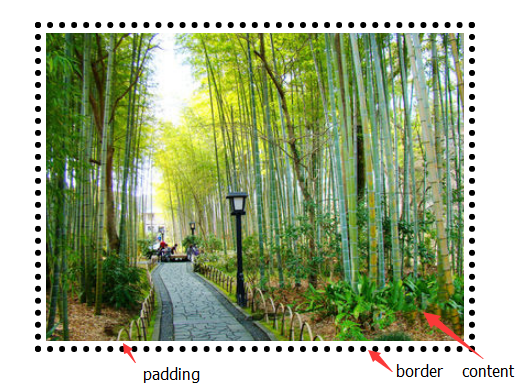
从上图我们可以看出背景图片存在于内容区域以内。
4、text
content-box表示元素的背景保留在前景内容中(文字),和其形状大小相同,目前仅支持chrome浏览器
简单代码如下:
<!doctype html>

<html>

    <head>

        <style>

	    *{margin:0;padding:0;}

            .box{width:380px;height:280px;margin:100px auto;background:red;padding:5px;border:5px dotted #000;
             font-size:100px;font-weight;bold;-webkit-background-clip:text;-webkit-text-fill-color:transparent;}

        </style>

   </head>

   <body>

       <div class="box">你 好 你 好</div>

   </body>

</html>
效果如下:

说明:目前值为text时,兼容性极差,仅知道即可。
css中background-clip属性的作用的更多相关文章
- css中background背景属性概
css中background背景属性概 background:url(背景图片路径) no-repeat;/*不重复默认在左上方*/background:url(背景图片路径) no-repeat ...
- css中background背景属性概述
background:url(背景图片路径) no-repeat;/*不重复默认在左上方*/ background:url(背景图片路径) no-repeat center;/*不重复背景图片中间显示 ...
- CSS中display:block属性的作用
display:block可以理解为块,举个简单的例子!比如你做一个超链接,<li><a href="#">超链接</a></li> ...
- 理解与应用css中的display属性
理解与应用css中的display属性 display属性是我们在前端开发中常常使用的一个属性,其中,最常见的有: none block inline inline-block inherit 下面, ...
- CSS中的display属性(none,block,inline,inline-block,inherit)
css中的display属性(none,block,inline,inline-block,inherit) display属性是我们在前端开发中常常使用的一个属性,其中,最常见的有: none bl ...
- Css中的Position属性
Css中的Position属性 Css属性在线查询地址: http://www.css88.com/book/css/properties/index.htm CSS 中的 position 属性 在 ...
- 深入理解css中的margin属性
深入理解css中的margin属性 之前我一直认为margin属性是一个非常简单的属性,但是最近做项目时遇到了一些问题,才发现margin属性还是有一些“坑”的,下面我会介绍margin的基本知识以及 ...
- 转:css中overflow:hidden 不起作用了吗?
css中overflow:hidden 不起作用了吗? 有同学遇到这样的问题,现象是给元素设置了overflow:hidden,但超出容器的部分并没有被隐藏,难道是设置的hidden失效了吗?其实看似 ...
- 前端CSS-font属性,超链接的美化,css精灵,background综合属性
前端CSS-font属性,超链接的美化,css精灵,background综合属性 1. font属性 使用font属性,能够将字号.行高.字体,能够一起设置. font:14px/24px " ...
- css中的定位属性position(转)
css中的定位属性position 同样的也是上课的时候发现学生难以理解的一些问题拿出来记录一下,希望帮助初学者. 在css中定位属性position的运用在页面中是很常用的,特别是一些结合js来 ...
随机推荐
- snprintf不能使用"字符串指针"赋值,可以使用字符数组
#cat snprintf.c #include <stdio.h> #include <stdlib.h> #include <string.h> struct ...
- EasyUI, Dialog 在框架页(ifrmae)的Top页面弹出时,拖拽Dialog边缘(以改变窗口大小),UI界面被卡死的解决办法
将Dialog的modal属性设置为true,可以解决卡死的问题(但会给用户使用体验带来影响) var par = { title: This.title, width: This.width, he ...
- 【[Offer收割]编程练习赛14 D】剑刃风暴(半径为R的圆能够覆盖的平面上最多点数目模板)
[题目链接]:http://hihocoder.com/problemset/problem/1508 [题意] [题解] 求一个半径为R的圆能够覆盖的平面上的n个点中最多的点数; O(N2log2N ...
- Java基础学习总结(69)——匿名内部类与Lambda表达式
前言 Java Labmda表达式的一个重要用法是简化某些匿名内部类(Anonymous Classes)的写法.实际上Lambda表达式并不仅仅是匿名内部类的语法糖,JVM内部是通过invokedy ...
- Package pdftex.def Error: PDF mode expected, but DVI mode detected!
本系列文章由 @yhl_leo 出品,转载请注明出处. 文章链接: http://blog.csdn.net/yhl_leo/article/details/51646781 在如下使用LaTeX编译 ...
- 【ACM】hdu_2004_成绩转换_201307261516
成绩转换Time Limit: 2000/1000 MS (Java/Others) Memory Limit: 65536/32768 K (Java/Others)Total Submiss ...
- 开启IIS的动态gzip功能
首先安装IIS的动态压缩模块 然后打开system32/intesrv下的applicationhost文件,找到其中的webServer节点,将其中的压缩配置部分替换如下: <?xml ver ...
- iOS开发使用Unwind Segue进行返回
我们在之前的一篇博客中谈到怎样使用dismissViewControllerAnimation()的方法在iOS中返回,如今我们有一个更为方便的方法来实现界面跳转之后的返回操作.使用的是Unwind ...
- Android开发之WebView的开发使用(源码分享)
假设我们想提供一个web应用程序(或仅仅是一个网页)作为client应用程序的一部分,我们能够使用WebView.WebView类是Android的视图类的扩展,它同意您显示web页面的一部分活动布局 ...
- ExtJS学习笔记3:载入、提交和验证表单
载入数据 1.比較好用的设置form数据的方法: formPanel.getForm().setValues([{id: 'FirstName', value: 'Joe'}]); 当中id值为for ...