
vue货币格式化组件、局部过滤功能以及全局过滤功能
一、在这里介绍一个vue的时间格式化插件: moment
使用方法:

.npm install moment --save.
2 定义时间格式化全局过滤器
在main.js中 导入组件
import moment from 'moment'
Vue.filter('dateformat', function(dataStr, pattern = 'YYYY-MM-DD HH:mm:ss') {
return moment(dataStr).format(pattern)
})
filter两个参数 第一个是函数名 第二个是时间格式化处理的函数
3 只需要在需要格式化时间的地方使用插值表达式就OK了
<!-- 子标题 -->
<p class="subtitle">
<span>发表时间:{{ newsinfo.add_time | dateformat('YYYY-MM-DD HH:mm:ss')}}</span>
<span>点击{{ newsinfo.click }}次</span>
</p>
第二种方法
引入moment.js
<script>
let moment = require("moment");
export default {
data() {
return {
}
可以直接使用了
if(this.ruleForm2.startTime == '' || this.ruleForm2.startTime == null || this.ruleForm2.startTime == undefined){
this.ruleForm2.startTime = ''
}else {
this.ruleForm2.startTime = moment(this.ruleForm2.startTime).format('YYYY-MM-DD')
}
如果是想要 转化为年月日分秒
this.ruleForm2.startTime = moment(this.ruleForm2.startTime).format('YYYY-MM-DD HH-mm')
</script>
二、货币格式化
在页面中,例如价格数据,不管是后台传递过来的还是前台计算之后显示在页面上的,一般都只是一个数字没有格式,完整的格式应该是
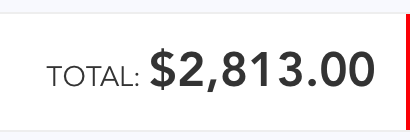
要实现这个其实很简单,vue的过滤功能就很好的能解决这个问题,什么叫做过滤,就是将元数据进行相应的处理在显示出来。
首先建立一个 js 文件 currency.js
const digitsRE = /(\d{})(?=\d)/g

/**

* value  金额

* currency 货币符号

* decimals  保留位数

*/

export function currency (value, currency, decimals) {

  value = parseFloat(value)

  if (!isFinite(value) || (!value && value !== )) return ''

  currency = currency != null ? currency : '$'

  decimals = decimals != null ? decimals :

  var stringified = Math.abs(value).toFixed(decimals)

  var _int = decimals

    ? stringified.slice(, - - decimals)

    : stringified

  var i = _int.length %

  var head = i >

    ? (_int.slice(, i) + (_int.length >  ? ',' : ''))

    : ''

  var _float = decimals

    ? stringified.slice(- - decimals)

    : ''

  var sign = value <  ? '-' : ''

  return sign + currency + head +

    _int.slice(i).replace(digitsRE, '$1,') +

    _float

}
1、局部过滤,全局不使用,在某一个页面使用
引入:
import {currency} from '@/unit/currency';

这个文件是有返回值的,必须这样引入,并且他不是默认抛出的
js中写法:
filters:{

        currency: currency

    },
页面中需要 价格 格式化的地方写法
{{totalPrice | currency('$')}}
2、全局引入,在任何地方都能使用。
在main.js 中导入,并
Vue.filter("currency", currency);

这里 一定不能加 (),加了就成了函数执行了
这样在全局任何地方都可以使用了。
vue货币格式化组件、局部过滤功能以及全局过滤功能的更多相关文章
- 【Vue.js实战案例】- Vue.js递归组件实现组织架构树和选人功能
大家好!先上图看看本次案例的整体效果. 浪奔,浪流,万里涛涛江水永不休.如果在jq时代来实这个功能简直有些噩梦了,但是自从前端思想发展到现在的以MVVM为主流的大背景下,来实现一个这样繁杂的功能简直不 ...
- Vue.js之组件系统
vue.js既然是框架,那就不能只是简单的完成数据模板引擎的任务,它还提供了页面布局的功能.本文详细介绍使用vue.js进行页面布局的强大工具,vue.js组件系统. Vue.js组件系统 每一个新技 ...
- vue学习之四组件系统
vue.js既然是框架,那就不能只是简单的完成数据模板引擎的任务,它还提供了页面布局的功能.本文详细介绍使用vue.js进行页面布局的强大工具,vue.js组件系统. 一.Vue.js组件系统 每一个 ...
- Vue ---- 组价 组件化 子传父 父传子
目录 补充js的for循环: 组件 1.组件的分类: 2.组件的特点 3.创建局部组件 4.全局组件 二.组件化 一.组件传参父传子 二.组件传参:子传父 补充js的for循环: // for in遍 ...
- Vue 根组件,局部,全局组件 | 组件间通信,案例组件化
一 组件 <div id="app"> <h1>{{ msg }}</h1> </div> <script src=" ...
- Vue 2 --v-model、局部组件和全局组件、父子组件传值、平行组件传值
一.表单输入绑定(v-model 指令) 可以用 v-model 指令在表单 <input>.<textarea> 及 <select> 元素上创建双向数据绑定. ...
- WijmoJS V2019.0 Update2发布:再度增强 React 和 Vue 框架的组件功能
前端开发工具包 WijmoJS 在2019年的第二个主要版本 V2019.0 Update2 已经发布,本次发布涵盖了React 和 Vue 框架下 WijmoJS 前端组件的功能增强,并加入更为易用 ...
- vue自定义组件(vue.use(),install)+全局组件+局部组件
相信大家都用过element-ui.mintui.iview等诸如此类的组件库,具体用法请参考:https://www.cnblogs.com/wangtong111/p/11522520.html ...
- Vue其他指令-组件-全局-局部-组件的交互父传子
v-once指令 once:一旦,当...时候 <!DOCTYPE html> <html lang="zh"> <head> <meta ...
随机推荐
- Java SE 之 递归方法
public void removeSon(String id, List<Dept> deptList) { String hql = "from Dept where par ...
- nyoj 306 二分+dfs
#include<stdio.h> #include<string.h> #define N 200 int Min(int a,int b) { return a>b? ...
- jQuery - 获取爱好
<!DOCTYPE html > <html> <head> <title> 获取爱好 </title> <meta http-equ ...
- 【最短路算法】Dijkstra知识点&代码
代码: #include<iostream> #include<vector> #include<cstdio> #include<queue> #in ...
- Coder-Strike 2014
转载请注明出处,谢谢http://blog.csdn.net/ACM_cxlove? viewmode=contents by---cxlove Qualification Round 略 Ro ...
- luogu1514 引水入城
题目大意 在一个遥远的国度,一侧是风景秀美的湖泊,另一侧则是漫无边际的沙漠.该国的行政区划十分特殊,刚好构成一个NN 行\times M×M 列的矩形,如上图所示,其中每个格子都代表一座城市,每座城市 ...
- inux内核模块编程入门
linux内核模块编程入门 2013-07-06 23:59:54 分类: LINUX 原文地址:linux内核模块编程入门 作者:s270768095 模块编程属于内核编程,因此,除了对内核相关知识 ...
- Linux Framebuffer驱动框架之二软件架构(未完待续)【转】
本文转载自:http://blog.csdn.net/gqb_driver/article/details/12918547 /************************************ ...
- SqlServer 自动备份策略设置
企业管理器中的Tools,Database Maintenance Planner,可以设置数据库的定期自动备份计划.并通过启动Sql server Agent来自动运行备份计划.具体步骤如下: 1. ...
- P2932 [USACO09JAN]地震造成的破坏Earthquake Damage 爆搜
这题怎么这么水~~~本来以为挺难的一道题,结果随便一写就过了...本来还不知道损坏的牛棚算不算,结果不明不白就过了... 题干: 农夫John的农场遭受了一场地震.有一些牛棚遭到了损坏,但幸运地,所有 ...