
Spring MVC-集成(Integration)-生成Excel示例(转载实践)
以下内容翻译自:https://www.tutorialspoint.com/springmvc/springmvc_excel.htm
说明:示例基于Spring MVC 4.1.6。
以下示例显示如何使用Spring Web MVC框架生成Excel。首先,让我们使用Eclipse IDE,并按照以下步骤使用Spring Web Framework开发基于动态窗体的Web应用程序:
| 步 | 描述 |
|---|---|
| 1 | 创建一个名为TestWeb的项目,在一个包com.tutorialspoint下,如Spring MVC - Hello World Example章节所述。 |
| 2 | 创建一个Java类UserExcelView,ExcelController下com.tutorialspoint包。 |
| 3 | 从maven存储库页面下载Apache POI库Apache POI。把它放在你的CLASSPATH中。 |
| 4 | 最后一步是创建所有源和配置文件的内容并导出应用程序,如下所述。 |
ExcelController.java
package com.tutorialspoint;

import java.util.HashMap;

import java.util.Map;

import javax.servlet.http.HttpServletRequest;

import javax.servlet.http.HttpServletResponse;

import org.springframework.web.servlet.ModelAndView;

import org.springframework.web.servlet.mvc.AbstractController;

public class ExcelController extends AbstractController {

   @Override

   protected ModelAndView handleRequestInternal(HttpServletRequest request, HttpServletResponse response) throws Exception {

      //user data

      Map<String,String> userData = new HashMap<String,String>();

      userData.put("1", "Mahesh");

      userData.put("2", "Suresh");

      userData.put("3", "Ramesh");

      userData.put("4", "Naresh");

      return new ModelAndView("UserSummary","userData",userData);

   }

}
UserExcelView.java
package com.tutorialspoint;

import java.util.Map;

import javax.servlet.http.HttpServletRequest;

import javax.servlet.http.HttpServletResponse;

import org.apache.poi.hssf.usermodel.HSSFRow;

import org.apache.poi.hssf.usermodel.HSSFSheet;

import org.apache.poi.hssf.usermodel.HSSFWorkbook;

import org.springframework.web.servlet.view.document.AbstractExcelView;

public class UserExcelView extends AbstractExcelView {

   @Override

   protected void buildExcelDocument(Map<String, Object> model, HSSFWorkbook workbook, HttpServletRequest request, HttpServletResponse response)

         throws Exception {

         Map<String,String> userData = (Map<String,String>) model.get("userData");

         //create a wordsheet

         HSSFSheet sheet = workbook.createSheet("User Report");

         HSSFRow header = sheet.createRow(0);

         header.createCell(0).setCellValue("Roll No");

         header.createCell(1).setCellValue("Name");

         int rowNum = 1;

         for (Map.Entry<String, String> entry : userData.entrySet()) {

            //create the row data

            HSSFRow row = sheet.createRow(rowNum++);

            row.createCell(0).setCellValue(entry.getKey());

            row.createCell(1).setCellValue(entry.getValue());

         }

   }

}
TestWeb-servlet.xml
<beans xmlns="http://www.springframework.org/schema/beans"

   xmlns:context="http://www.springframework.org/schema/context"

   xmlns:xsi="http://www.w3.org/2001/XMLSchema-instance"

   xmlns:mvc="http://www.springframework.org/schema/mvc"

   xsi:schemaLocation="

   http://www.springframework.org/schema/beans

   http://www.springframework.org/schema/beans/spring-beans-3.0.xsd

   http://www.springframework.org/schema/context

   http://www.springframework.org/schema/context/spring-context-3.0.xsd

   http://www.springframework.org/schema/mvc

   http://www.springframework.org/schema/mvc/spring-mvc-3.0.xsd">

   <bean class="org.springframework.web.servlet.mvc.support.ControllerClassNameHandlerMapping" />

   <bean class="com.tutorialspoint.ExcelController" />

   <bean class="org.springframework.web.servlet.view.XmlViewResolver">

      <property name="location">

         <value>/WEB-INF/views.xml</value>

      </property>

   </bean>

</beans>
views.xml
<beans xmlns="http://www.springframework.org/schema/beans"

   xmlns:context="http://www.springframework.org/schema/context"

   xmlns:xsi="http://www.w3.org/2001/XMLSchema-instance"

   xsi:schemaLocation="

   http://www.springframework.org/schema/beans

   http://www.springframework.org/schema/beans/spring-beans-3.0.xsd

   http://www.springframework.org/schema/context

   http://www.springframework.org/schema/context/spring-context-3.0.xsd">

   <bean id="UserSummary" class="com.tutorialspoint.UserExcelView"></bean>

</beans>
在这里我们创建了一个ExcelController和ExcelView。Apache POI库处理Microsoft Office文件格式,并将数据转换为Excel文档。
完成创建源文件和配置文件后,导出应用程序。右键单击应用程序并使用Export > WAR File选项,并将您的TestWeb.war文件保存在Tomcat的webapps文件夹中。
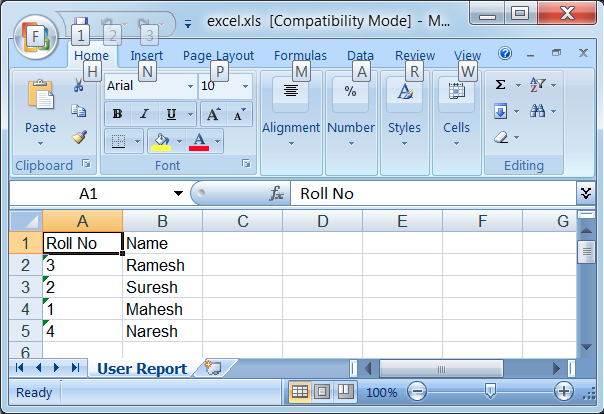
现在启动您的Tomcat服务器,并确保您可以使用标准浏览器从webapps文件夹访问其他网页。现在尝试URL http://localhost:8080/TestWeb/excel,您应该看到以下结果。
Maven示例:
https://github.com/easonjim/5_java_example/tree/master/springmvc/tutorialspoint/test30
Spring MVC-集成(Integration)-生成Excel示例(转载实践)的更多相关文章
- Spring MVC使用@RestController生成JSON示例
继上一章的生成JSON示例http://www.cnblogs.com/EasonJim/p/7500405.html,现在还有另一种选择,就是使用@RestController,下面将参照上一节例子 ...
- Spring MVC 使用kaptcha生成验证码
Spring MVC 使用kaptcha生成验证码 1.下载kaptcha-2.3.2.jar(或直接通过该文章附件下载) http://code.google.com/p/kaptcha/downl ...
- Spring Boot 集成 Swagger 生成 RESTful API 文档
原文链接: Spring Boot 集成 Swagger 生成 RESTful API 文档 简介 Swagger 官网是这么描述它的:The Best APIs are Built with Swa ...
- Spring MVC集成slf4j-logback
转自: Spring MVC集成slf4j-logback 1. Spring MVC集成slf4j-log4j 关于slf4j和log4j的相关介绍和用法,网上有很多文章可供参考,但是关于logb ...
- spring mvc集成freemarker使用
freemarker作为视图技术出现的比velocity早,想当年struts风靡一时,freemarker作为视图层也风光了一把.但现在velocity作为后起之秀的轻量级模板引擎,更容易得到青睐. ...
- spring mvc集成velocity使用
目前流行的三大页面视图神器是:老牌大哥jsp.后起之秀freemarker和velocity.这里不详细比较这三者的优劣,总体来说,jsp是标配,但后面两个更严格的执行了视图与业务的分离,页面里是不允 ...
- spring mvc 集成freemarker模板
主要使用到的jar 文件:spring mvc +freemarker.jar 第一步:spring mvc 集成 freemarker <!-- 定义跳转的文件的前后缀 ,视图模式配置--&g ...
- Spring MVC集成Swagger
什么是Swagger? 大部分 Web 应用程序都支持 RESTful API,但不同于 SOAP API——REST API 依赖于 HTTP 方法,缺少与 Web 服务描述语言(Web Servi ...
- Spring Security(三十六):12. Spring MVC Test Integration
Spring Security provides comprehensive integration with Spring MVC Test Spring Security提供与Spring MVC ...
随机推荐
- E20171015-hm
quirk n. 怪癖; 奇事,巧合; 突然的弯曲; propagation n. 宣传; 传播,传输,蔓延,扩展,波及深度; [生]繁殖法,[地]传导; 培养; immediate adj. ...
- 湖南集训day4
难度:☆☆☆☆☆☆☆ 题解: 有个定理,另sum(x)表示小于等于x的数中与x互质的数的和 sum(x)=φ(x)*x/2 最后可知f(x)=x (f(1)=2) 当然打表能知道. 然后就转 ...
- codevs1690 开关灯(线段树)
1690 开关灯 USACO 时间限制: 1 s 空间限制: 128000 KB 题目等级 : 钻石 Diamond 题目描述 Description YYX家门前的街上有N(2< ...
- web安全:防止浏览器记住或自动填写用户名和密码(表单)的终极解决方案
最近项目上要求做到这一点,在网上搜了一圈,发现都是不完美的,不兼容全部的浏览器,于是只能自己摸索了,最终得出了终极解决方案: 涉及: disabled 或 readonly display:none; ...
- ActiveMQ 5.10.0 安装与配置
先在官网下载activeMQ,我这里是5.10.0. 然后在解压在一个文件夹下即可. 我这里是:D:\apache-activemq-5.10.0-bin 然后进入bin目录:D:\apache-ac ...
- Android 获取android安装apk框的安装状态(如点击取消、返回)
最近鼓捣android,碰到个问题,因为没有root权限,需要调用Intent安装apk,但需要获取用户是否安装了(如,用户点击了返回或取消),查了很多文章,最后可以解决,但有瑕疵,解决方法如下: p ...
- 解决Android弹出软键盘导致的问题
一.当Activity启动后EditText直接获取了焦点,此时软键盘会自动弹出,这种体验并不是很好,因此要做的Activity启动不自动弹出软键盘,只需要在Manifest中对应的Activity添 ...
- PHP面相对象中的重载与重写
重写Overriding是父类与子类之间多态性的一种表现,重载Overloading是一个类中多态性的一种表现.Overloaded的方法是可以改变返回值的类型.也就是说,重载的返回值类型可以相同也可 ...
- html5——动画案例(无缝滚动)
无缝滚动:是两组拼在一起的 <!DOCTYPE html> <html lang="en"> <head> <meta charset=& ...
- hibernate工作流程、session
hibernate是对jdbc的封装,不建议直接使用jdbc的connection操作数据库,而是通过session操作数据库.session可以理解为操作数据库的对象. session与connec ...