
SpringBoot 整合 Mybatis 和 Mysql (详细版)
结构如下
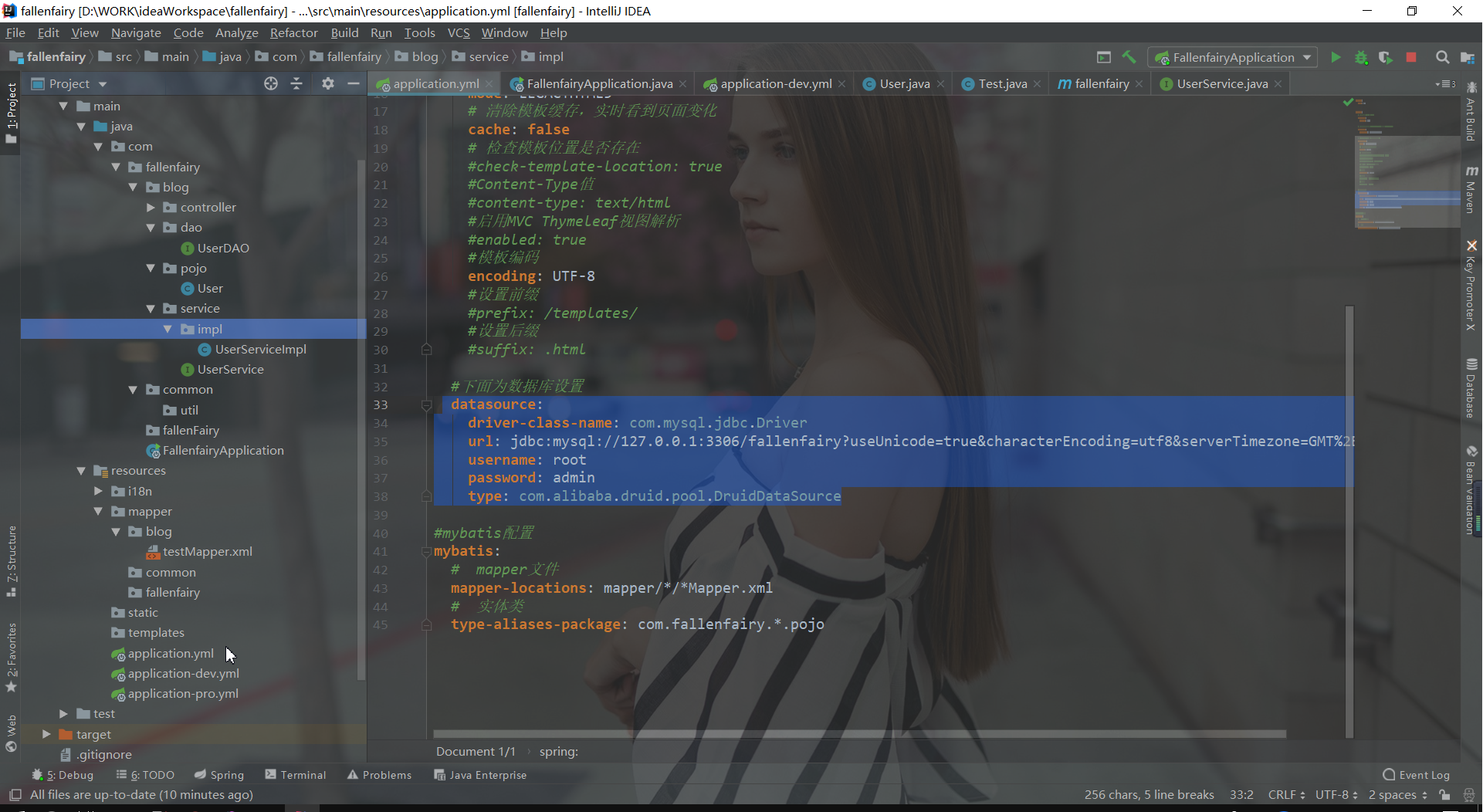
1、引入相关依赖
<!--mysql-->
<dependency>
    <groupId>mysql</groupId>
    <artifactId>mysql-connector-java</artifactId>
    <version>5.1.46</version>
</dependency>
<!--druid连接池-->
<dependency>
    <groupId>com.alibaba</groupId>
    <artifactId>druid</artifactId>
    <version>1.0.29</version>
</dependency>
<!--mybatis-->
<dependency>
    <groupId>org.mybatis.spring.boot</groupId>
    <artifactId>mybatis-spring-boot-starter</artifactId>
    <version>1.3.2</version>
</dependency>
2、配置application.yml文件
server:

  port: 80

  servlet:

    context-path:

spring:

  # 配置文件选择(dev,pro)

  profiles:

    active: dev

  # 国际化(消息源自动配置,springboot默认找出messages)

  messages:

     basename: i18n.messages
  datasource:
    driver-class-name: com.mysql.jdbc.Driver
    url: jdbc:mysql://127.0.0.1:3306/fallenfairy?useUnicode=true&characterEncoding=utf8&serverTimezone=GMT%2B8
    username: root
    password: admin
    type: com.alibaba.druid.pool.DruidDataSource
mybatis:
  #  mapper文件
  mapper-locations: mapper/*/*Mapper.xml
  #  实体类
  type-aliases-package: com.fallenfairy.*.pojo
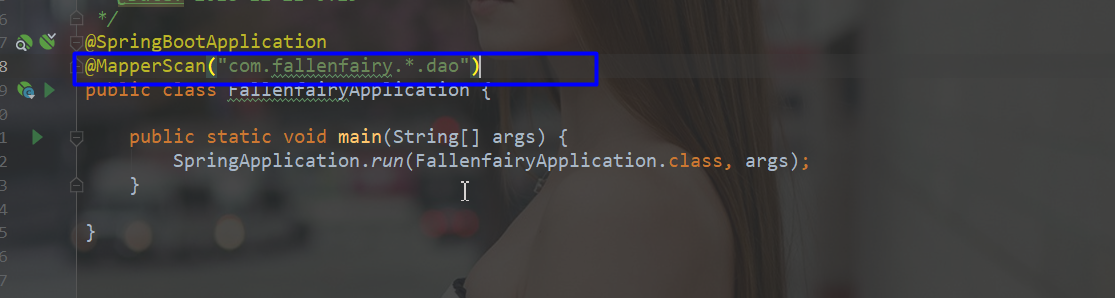
3、启动类添加@MapperScan注解
@SpringBootApplication

@MapperScan("com.fallenfairy.*.dao")

public class FallenfairyApplication {

    public static void main(String[] args) {

        SpringApplication.run(FallenfairyApplication.class, args);

    }

}
6、编写mapper.xml文件
<?xml version="1.0" encoding="UTF-8"?>

<!DOCTYPE mapper PUBLIC "-//mybatis.org//DTD Mapper 3.0//EN"

        "http://mybatis.org/dtd/mybatis-3-mapper.dtd">

<mapper namespace="com.example.demo.dao.UserDAO">

    <!--id对应UserDAO接口方法名-->

    <!--parameterType对应参数类型-->

    <!--resultType对应返回值类型-->

    <!--注意sql语句字段和数据库对应-->

    <select id="getUserById" parameterType="int" resultType="com.example.demo.pojo.User">

        SELECT * FROM user WHERE id = #{id}

    </select>

</mapper>

7、编写controller测试
/**

 * Copyright (C), 2017-2018, XXX有限公司

 * FileName: UserController

 * Author:   丶Zh1Guo

 * Date:     2018/11/21 16:51

 * Description: user控制器

 * History:

 * <author>          <time>          <version>          <desc>

 * 作者姓名

 * 〈一句话功能简述〉<br>

 * 〈user控制器〉

 *

 * @author 丶Zh1Guo

 * @create 2018/11/21

 * @since 1.0.0

 */

@RestController

public class UserController {

    @Autowired

    private UserDAO userDAO;

  // url: xxx/user?id=1

    @RequestMapping("/user")

    public User getUser(@RequestParam("id") int id){

        return userDAO.getUserById(id);

    }

  // url: xxx/user/1

    @RequestMapping("/user/{id}")

    public User getUser2(@PathVariable int id){

        return userDAO.getUserById(id);

    }

}
8、启动服务测试
测试第一种@RequestParam("id") int id:

测试第二种@PathVariable int id:

若访问报错如下:
mysql运行报The server time zone value 'Öйú±ê׼ʱ¼ä' is unrecognized or represents more than one time zone
设置数据库时区为东八区即可
设置数据库连接:(增加:&serverTimezone=GMT%2B8)
driverClassName: com.mysql.jdbc.Driver

url: jdbc:mysql://127.0.0.1:3306/flexo?useUnicode=true&characterEncoding=utf8&serverTimezone=GMT%2B8

username: root

password: admin
或修改数据时区:

ok
SpringBoot 整合 Mybatis 和 Mysql (详细版)的更多相关文章
- SpringBoot整合Mybatis【非注解版】
接上文:SpringBoot整合Mybatis[注解版] 一.项目创建 新建一个工程 选择Spring Initializr,配置JDK版本 输入项目名 选择构建web项目所需的state ...
- springboot整合mybatis连接mysql数据库出现SQLException异常
在springboot整合mybatis连接数据库的时候,项目中遇到一个SQLException,我检查了properties配置文件,看数据源有没有配错,检查有没有打错字,在数据库中把sql语句查询 ...
- kotlin + springboot整合mybatis操作mysql数据库及单元测试
项目mybatis操作数据库参考: http://how2j.cn/k/springboot/springboot-mybatis/1649.html?p=78908 junit对controller ...
- SpringBoot 整合 Mybatis + Mysql——XML配置方式
一.介绍 SpringBoot有两种方法与数据库建立连接,一种是集成Mybatis,另一种用JdbcTemplate,本文主要讨论集成Mybatis方式. SpringBoot整合Mybatis也有两 ...
- 学习springboot整合mybatis并编写测试类
报名立减200元.暑假直降6888. 邀请链接:http://www.jnshu.com/login/1/20535344 邀请码:20535344 遇到的问题: 1.原因是在启动类上只有一个@Map ...
- SpringBoot整合Mybatis完整详细版二:注册、登录、拦截器配置
接着上个章节来,上章节搭建好框架,并且测试也在页面取到数据.接下来实现web端,实现前后端交互,在前台进行注册登录以及后端拦截器配置.实现简单的未登录拦截跳转到登录页面 上一节传送门:SpringBo ...
- SpringBoot整合Mybatis完整详细版
记得刚接触SpringBoot时,大吃一惊,世界上居然还有这么省事的框架,立马感叹:SpringBoot是世界上最好的框架.哈哈! 当初跟着教程练习搭建了一个框架,传送门:spring boot + ...
- SpringBoot整合Mybatis注解版---update出现org.apache.ibatis.binding.BindingException: Parameter 'XXX' not found. Available parameters are [arg1, arg0, param1, param2]
SpringBoot整合Mybatis注解版---update时出现的问题 问题描述: 1.sql建表语句 DROP TABLE IF EXISTS `department`; CREATE TABL ...
- 手把手Maven搭建SpringMVC+Spring+MyBatis框架(超级详细版)
手把手Maven搭建SpringMVC+Spring+MyBatis框架(超级详细版) SSM(Spring+SpringMVC+Mybatis),目前较为主流的企业级架构方案.标准的MVC设计模式, ...
随机推荐
- otto源代码分析
otto这个开源项目是一个event bus模式的消息框架.用于程序各个模块之间的通信.此消息框架能够使得各个 模块之间降低耦合性. 此项目是支付公司square一个开源项目,项目托管于github ...
- 清华EMBA课程系列思考之六 -- 比較文明视野下的中华领导智慧、企业管理与经济解析
告别马年的最后一缕阳光,踏着猴年的钟声,度过了温馨的春节,已然开启了新学期的第一堂课.看题目其貌不扬,但一旦进入课堂,已然聚精会神.唯恐掉队,就请大家跟我一起进入四天的心路修炼旅程,開始我们的新一期思 ...
- 数学之路-python计算实战(6)-numpy-ndarray
>>>> mya=np.zeros(shape=(2,2)) >>>> mya array([[ 0., 0.], [ 0., 0.]]) > ...
- poj 2513 欧拉回路+并查集推断是否联通+Trie树
http://poj.org/problem? id=2513 最初看到 第一感觉---map 一看250000的数据量 果断放弃 然后记得曾经看过.trie取代map.尤其当数据量特别大的时候 学 ...
- 支持并发的httpclient(基于tcp连接池以及netty)
闲来无事,将曾经自己写的一个库放出来吧. . 有的时候会有这样子的需求: (1)serverA通过HTTP协议来訪问serverB (2)serverA可能会并发的像B发送非常多HTTP请求 类似于上 ...
- leetcode——Insertion Sort List 对链表进行插入排序(AC)
Sort a linked list using insertion sort. class Solution { public: ListNode *insertionSortList(ListNo ...
- 一站式学习WireShark
一 基础 http://blog.sina.com.cn/s/blog_987e00020102x5k1.html 选中一个数据包,右键选中某一个数据包,然后follow-->Tcp Strea ...
- 制作 Gif 工具
ScreenToGif:非常小,非常强大: 从此可以十分方便地从视频中抠 gif 出来了: 以及制作一些教学类小 gif,插入到网页中: 丰富的编辑功能: 插入文本,插入标题,插入图像等: 下载地址: ...
- js相关禁止
遇到网页上有精美图片或者精彩文字想保存时,通常大家都是选中目标后按鼠标右键,在弹出菜单中选择“图片另存为”或“复制”来达到我们的目的.但是,目前有许多网页都屏蔽了鼠标右键,那么用js如何实现禁止鼠标右 ...
- Spring的注解@SuppressWarnings用法记录
@SuppressWarnings注解用法 @SuppressWarnings注解主要用在取消一些编译器产生的警告对代码左侧行列的遮挡,有时候这会挡住我们断点调试时打的断点. 如图所示: 这时候我们在 ...