
Ajax打开三种页面的请求
xmlhttprequest对象可以打开两种方式的页面请求
<webServices >

         <protocols >

           <add name ="HttpGet"/>

         </protocols>

       </webServices>
2,在WebSerVice.asmx文件中写一个方法getResult,该方法接受两个字符型的参数,其中的WebMethod属性不可以漏掉。。。
{
[WebMethod]
public string getResult(string str1,string str2)
{
return "输入的第一个字符串是:" + str1 + "\n输入的第二个字符串是:" + str2;
}
}
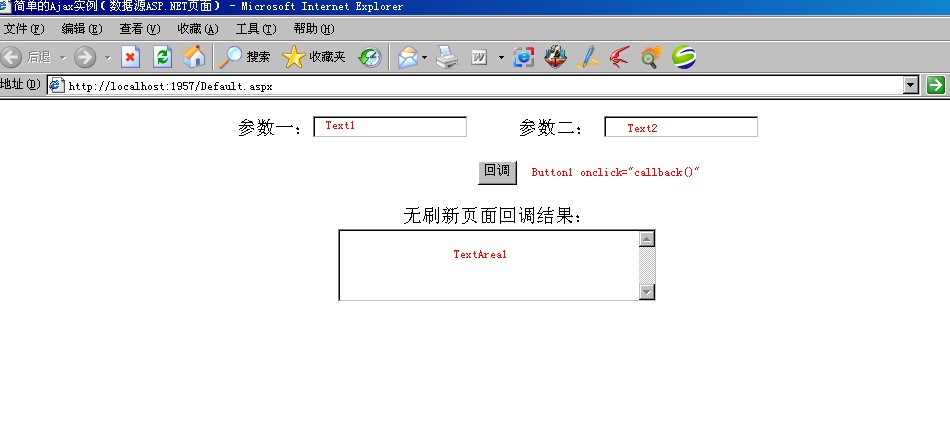
//以下为创建xmlHttpRequest对象
var xmlHttpRequest=false;
try
{
xmlHttpRequest=new XMLHttpRequest();//非IE浏览器
}
catch (microsoft)//IE浏览器
{
try
{
xmlHttpRequest=new ActiveXObject("Msxml2.XMLHTTP");
}
catch (othermicrosoft)
{
try
{
xmlHttpRequest=new ActiveXObject("Microsoft.XMLHTTP");
}
catch (failed)
{
xmlHttpRequest=false;
}
}
}
if (!xmlHttpRequest)
{
alert("不能初始化XMLHttpRequest对象!");
}
//相应button的Click事件
function callback()
{
var arg1=document.getElementById ("Text1").value;//获取Text1文本框的值
var arg2=document.getElementById ("Text2").value;//获取Text2文本框的值
var url="WebService.asmx/getResult?str1="+escape(arg1)+"&str2="+escape(arg2);//要打开的url地址,并传递两个参数,这里参数名必须同webservice提供的参数名一致
xmlHttpRequest.open("get",url,true);//以get方式打开指定的url请求,并且使用的是异步调用方式(true)
xmlHttpRequest.onreadystatechange=updatePage;//指定回调函数updatePage
xmlHttpRequest.send(null);//发送请求,由于是get方式,这里用null
}
//回调函数
function updatePage()
{
if (xmlHttpRequest.readyState==4)
{
if (xmlHttpRequest.status==200)
{
var response=xmlHttpRequest.responseXML;//以xml格式回调内容
var result;
if (response.evaluate)//XML Parsing in Mozilla
{
result=response.evaluate("//text()",response,null,XpathResult.STRING_TYPE,null).stringValue;//Mozilla中获取xml中的文本内容
}
else
{
//XML Parsing in IE
result=response.selectSingleNode("//text()").data;//IE中获取xml中的文本内容
}
document.getElementById ("TextArea1").value=result;
}
}
}
</script>
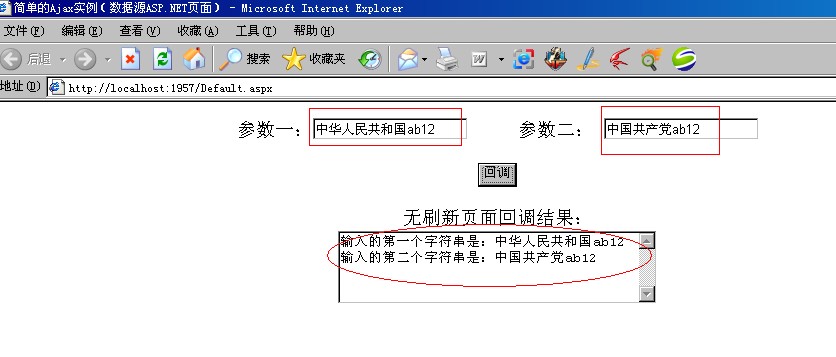
Code highlighting produced by Actipro CodeHighlighter (freeware)
http://www.CodeHighlighter.com/
-->protected void Page_Load(object sender, EventArgs e)
{
string str1 = Request["argA"].ToString();
string str2 = Request["argB"].ToString();
Response.Write("输入的第一个字符串是:" + str1 + "\n输入的第二个字符串是:" + str2);
}
//以下为创建xmlHttpRequest对象
var xmlHttpRequest=false;
try
{
xmlHttpRequest=new XMLHttpRequest();//非IE浏览器
}
catch (microsoft)//IE浏览器
{
try
{
xmlHttpRequest=new ActiveXObject("Msxml2.XMLHTTP");
}
catch (othermicrosoft)
{
try
{
xmlHttpRequest=new ActiveXObject("Microsoft.XMLHTTP");
}
catch (failed)
{
xmlHttpRequest=false;
}
}
}
if (!xmlHttpRequest)
{
alert("不能初始化XMLHttpRequest对象!");
}
//相应button的Click事件
function callback()
{
var arg1=document.getElementById ("Text1").value;//获取Text1文本框的值
var arg2=document.getElementById ("Text2").value;//获取Text2文本框的值
var url="ReturnStr.aspx?argA="+escape(arg1)+"&argB="+escape(arg2);//要打开的url地址
xmlHttpRequest.open("get",url,true);//以get方式打开指定的url请求,并且使用的是异步调用方式(true)
xmlHttpRequest.onreadystatechange=updatePage;//指定回调函数updatePage
xmlHttpRequest.send(null);//发送请求,由于是get方式,这里用null
}
//回调函数
function updatePage()
{
if (xmlHttpRequest.readyState==4)
{
if (xmlHttpRequest.status==200)
{
var response=xmlHttpRequest.responsetext;//回调的内容,以文本的方式返回,当然也可以以xml方式返回(写法为xmlHttpRequest.responseXML)
// alert(response);//这里返回的不仅有文本,还有诸如.aspx文件中的各种标签
// var result=response.split('<')[0];//所以这里要使用split来取文本内容
var res=response.split('<');
var result=res[0];
document.getElementById ("TextArea1").value=result;
}
}
}
</script>
{
if (Request["argA"]!=null && Request["argB"]!=null)//这个判断一定要加上
{
string str1 = Request["argA"].ToString();//获取客户端发送过来的参数的值
string str2 = Request["argB"].ToString();
Response.Write("输入的第一个字符串是:" + str1 + "\n输入的第二个字符串是:" + str2);
}
}
//以下为创建xmlHttpRequest对象
var xmlHttpRequest=false;
try
{
xmlHttpRequest=new XMLHttpRequest();//非IE浏览器
}
catch (microsoft)//IE浏览器
{
try
{
xmlHttpRequest=new ActiveXObject("Msxml2.XMLHTTP");
}
catch (othermicrosoft)
{
try
{
xmlHttpRequest=new ActiveXObject("Microsoft.XMLHTTP");
}
catch (failed)
{
xmlHttpRequest=false;
}
}
}
if (!xmlHttpRequest)
{
alert("不能初始化XMLHttpRequest对象!");
}
//相应button的Click事件
function callback()
{
var arg1=document.getElementById ("Text1").value;//获取Text1文本框的值
var arg2=document.getElementById ("Text2").value;//获取Text2文本框的值
var url="Default.aspx?argA="+escape(arg1)+"&argB="+escape(arg2);//要打开的url地址,并传递两个参数
// var url="ReturnStr.aspx?argA="+escape(arg1)+"&argB="+escape(arg2);
// var url="WebService.asmx/getResult?str1="+escape(arg1)+"&str2="+escape(arg2);//要打开的url地址,并传递两个参数,这里参数名必须同webservice提供的参数名一致
xmlHttpRequest.open("get",url,true);//以get方式打开指定的url请求,并且使用的是异步调用方式(true)
xmlHttpRequest.onreadystatechange=updatePage;//指定回调函数updatePage
xmlHttpRequest.send(null);//发送请求,由于是get方式,这里用null
}
//回调函数
function updatePage()
{
if (xmlHttpRequest.readyState==4)
{
if (xmlHttpRequest.status==200)
{
var response=xmlHttpRequest.responsetext;//回调的内容,以文本的方式返回,当然也可以以xml方式返回(写法为xmlHttpRequest.responseXML)
// alert(response);//这里返回的不仅有文本,还有诸如.aspx文件中的各种标签
// var result=response.split('<')[0];//所以这里要使用split来取文本内容
var res=response.split('<');
var result=res[0];
document.getElementById ("TextArea1").value=result;
// var response=xmlHttpRequest.responseXML;//以xml格式回调内容
// var result;
// if (response.evaluate)//XML Parsing in Mozilla
// {
// result=response.evaluate("//text()",response,null,XpathResult.STRING_TYPE,null).stringValue;//Mozilla中获取xml中的文本内容
// }
// else
// {
// //XML Parsing in IE
// result=response.selectSingleNode("//text()").data;//IE中获取xml中的文本内容
// }
// document.getElementById ("TextArea1").value=result;
}
}
}
</script>
Ajax打开三种页面的请求的更多相关文章
- Ajax的三种实现及JSON解析
本文为学习笔记,属新手文章,欢迎指教!! 本文主要是比较三种实现Ajax的方式,为以后的学习开个头. 准备: 1. prototype.js 2. jquery1.3.2.min.js 3. j ...
- MVC异步AJAX的三种方法(JQuery的Get方法、JQuery的Post方法和微软自带的异步方法)
异步是我们在网站开发过程中必不可少的方法,MVC框架的异步方法也有很多,这里介绍三种方法: 一.JQuery的Get方法 view @{ Layout = null; } <!DOCTYPE h ...
- ajax 使用 三种方法 设置csrf_token的装饰器
1. CSRF中间件 CSRF跨站请求伪造 2. 补充两个装饰器 from django.views.decorators.csrf import csrf_exempt, csrf_prote ...
- [Web 前端] 006 css 三种页面引入的方法
1. 外链式 用法 step 1: 在 html 文档的 head 头部分写入下方这句话 <link rel="stylesheet" href="./xxx.cs ...
- Jquery Ajax处理,服务端三种页面aspx,ashx,asmx的比较
常规的Jquery Ajax 验证登录,主要有3种服务端页面相应 ,也就是 aspx,ashx,asmx即webserivice . 下面分别用3种方式来(aspx,ashx,asmx)做服务端来处理 ...
- web三种跨域请求数据方法
以下测试代码使用php,浏览器测试使用IE9,chrome,firefox,safari <!DOCTYPE HTML> <html> <head> < ...
- ajax 的三种使用方法
第一种 也是最古老的一种方法之一 from 表单直接提交数据到php文件里 action为路径 <form method="post" action="./inde ...
- AJax的三种响应
AJax的响应 1.普通文本方式(字符串) resp.getWriter().print("你好"); 2.JSON格式当要给前台页面传输 集合或者对象时 使用普通文本传输的时St ...
- CSS——三种页面引入方法
目的:为了把样式和内容分开,并且使网页元素更加丰富,引入了CSS CSS页面引入有三种方式: 1)内联式:比较不常用,因为内容和样式仍然在一起,不方便.示例: <!DOCTYPE html> ...
随机推荐
- 最正经的php post get
https://www.cnblogs.com/ps-blog/p/6732448.html /** * 模拟post进行url请求 * @param string $url * @param str ...
- 【BZOJ 3156】防御准备
[链接] 链接 [题意] 在这里输入题意 [题解] 把a倒过来 设f[i]表示在i放一个防御塔的最小花费; 我们如果从j转移过来 就表示j+1..i-1这一段放人偶. s[i] = 1 + 2 + . ...
- 关于stm32的串口电压问题
在同一块板子的另一个 2号串口,因为没有使用所以就没有配置,,,所以导致这三个引脚都为0; 上面的串口接口封装是围墙座: 注意:倘若要连线,那时候要记得交叉,当然这也要看各自的设计才行
- Delphi 获取Internet缓存文件 -- FindFirstUrlCacheEntry FindNextUrlCacheEntry
下面是我写的一个函数,把所有的缓存文件路径添加到一个字符串列表中,直接看代码,带了注释.另外还有删除缓存等等大家自己到msdn找找. 需要引用 WinInet // 获取Internet缓存文件 fu ...
- 使用Opencv中matchTemplate模板匹配方法跟踪移动目标
模板匹配是一种在图像中定位目标的方法,通过把输入图像在实际图像上逐像素点滑动,计算特征相似性,以此来判断当前滑块图像所在位置是目标图像的概率. 在Opencv中,模板匹配定义了6种相似性对比方式: C ...
- "Swift"编程语言
来自英文文档.百度翻译以及自己没过4级的渣渣英语功底,为了自己以后看起来方便 About Swift 关于"海燕" IMPORTANT 重要 This is a prelimina ...
- 【a703】求逆序对(线段树的解法)
Time Limit: 10 second Memory Limit: 2 MB 问题描述 给定一个序列a1,a2...an.如果存在i小于j 并且ai大于aj,那么我们称之为逆序对,求给定序列中逆序 ...
- Android 离线语音用法(讯飞语音)
这次给大家带来的是项目的离线语音功能. 讯飞开放平台中的离线语音 首先创建开放平台的账号.这个不必多说 然后创建新应用 选择我的应用,例如以下图,注意下我打马赛克的地方,这个appId非常重要 点击进 ...
- as.data.frame一定要小心的一个參数stringsAsFactors
假设说一个data.frame中的元素是factor.你想转化成numeric,你会怎么做?比方d[1,1]是factor 正确答案是 先as.character(x) 再as.numeric(x ...
- Linux中export导入环境变量的几种方式
1.首先类似于windows中的设定系统环境变量的方式为,在/etc/profile中 export PATH=$PATH:....:... 注意间隔符为: 然后复用原来路径是$PATH的方式 2.用 ...