
C#WPF 如何绘制几何图形 图示教程 绘制sin曲线 正弦 绘制2D坐标系 有图有代码
原文:C#WPF 如何绘制几何图形 图示教程 绘制sin曲线 正弦 绘制2D坐标系 有图有代码
C#WPF 如何绘制几何图形? 怎么绘制坐标系?绘制sin曲线(正弦曲线)?
这离不开Path(System.Windows.Shapes)和StreamGeometry(System.Windows.Media)类。
完成该工程,我们首先要建立并绘制一个坐标系,然后在该坐标系中绘制sin曲线的点(x,y),最后,把曲线的点转换为屏幕坐标并连接;这样坐标系和sin曲线就绘制完成了。
代码下载:http://download.csdn.net/detail/wyx100/8320225
如果有帮助,别忘了给评价!
一、建立WPF工程
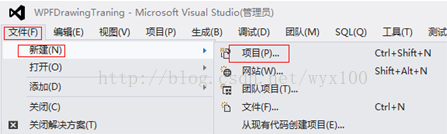
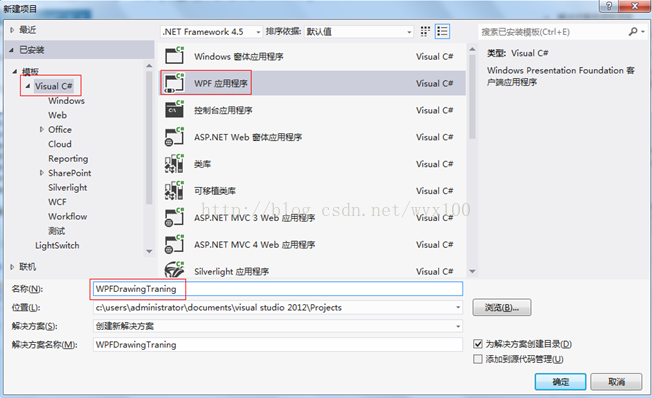
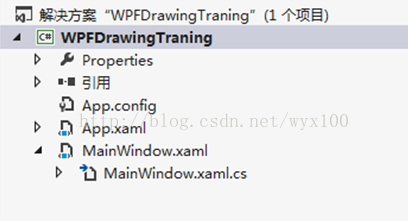
二、添加代码
MainWindow.xaml 中代码
<Window x:Class="WPFDrawingTraning.MainWindow"

        xmlns="<a target=_blank href="http://schemas.microsoft.com/winfx/2006/xaml/presentation">http://schemas.microsoft.com/winfx/2006/xaml/presentation</a>"

        xmlns:x="<a target=_blank href="http://schemas.microsoft.com/winfx/2006/xaml">http://schemas.microsoft.com/winfx/2006/xaml</a>"

        Title="MainWindow" Height="350" Width="525">

    <Grid>

        <Canvas Name="mainPanel" HorizontalAlignment="Left" Height="320" VerticalAlignment="Top" Width="517"/>

    </Grid>

</Window>
MainWindow.xaml.cs中代码
using System;

using System.Collections.Generic;

using System.Linq;

using System.Text;

using System.Threading.Tasks;

using System.Windows;

using System.Windows.Controls;

using System.Windows.Data;

using System.Windows.Documents;

using System.Windows.Input;

using System.Windows.Media;

using System.Windows.Media.Imaging;

using System.Windows.Navigation;

using System.Windows.Shapes;

namespace WPFDrawingTraning

{

    /// <summary>

    /// MainWindow.xaml 的交互逻辑

    /// </summary>

    public partial class MainWindow : System.Windows.Window

    {

        //Canvas mainPanel = new Canvas();

        public MainWindow()

        {

            InitializeComponent();

            Drawsin();//绘制2D坐标系和sin曲线

            Drawpentagon();

        }

        /// <summary>

        /// 绘制一组线段

        /// </summary>

        protected void Drawing()

        {

            PathFigure myPathFigure = new PathFigure();

            myPathFigure.StartPoint = new Point(10, 50);

            LineSegment myLineSegment = new LineSegment();

            myLineSegment.Point = new Point(200, 70);

            PathSegmentCollection myPathSegmentCollection = new PathSegmentCollection();

            myPathSegmentCollection.Add(myLineSegment);

            myPathFigure.Segments = myPathSegmentCollection;

            PathFigureCollection myPathFigureCollection = new PathFigureCollection();

            myPathFigureCollection.Add(myPathFigure);

            PathGeometry myPathGeometry = new PathGeometry();

            myPathGeometry.Figures = myPathFigureCollection;

            Path myPath = new Path();

            myPath.Stroke = Brushes.Black;

            myPath.StrokeThickness = 1;

            myPath.Data = myPathGeometry;

            // Add path shape to the UI.

            StackPanel mainPanel = new StackPanel();

            mainPanel.Children.Add(myPath);

            this.Content = mainPanel;

        }

        /// <summary>

        /// 绘制线段

        /// </summary>

        protected void DrawingLine(Point startPt,Point endPt)

        {

            LineGeometry myLineGeometry = new LineGeometry();

            myLineGeometry.StartPoint = startPt;

            myLineGeometry.EndPoint = endPt;

            Path myPath = new Path();

            myPath.Stroke = Brushes.Black;

            myPath.StrokeThickness = 1;

            myPath.Data = myLineGeometry;

            mainPanel.Children.Add(myPath);

        }

        /// <summary>

        /// 绘制星状线

        /// </summary>

        protected void DrawingAstroid(Point center,double r)

        {

            double h1 = r * Math.Sin(18 * Math.PI / 180);

            double h2 = r * Math.Cos(18*Math.PI/180);

            double h3 = r * Math.Sin(36 * Math.PI / 180);

            double h4 = r * Math.Cos(36 * Math.PI / 180); ;

            Point p1 = new Point(r, 0);

            Point p2 = new Point(r - h2, r - h1);

            Point p3 = new Point(r - h3, r + h4);

            Point p4 = new Point(r + h3, p3.Y);

            Point p5 = new Point(r + h2, p2.Y);

            Point[] values = new Point[] { p1, p2, p3, p4, p5 };

            PathFigureCollection myPathFigureCollection = new PathFigureCollection();

            PathGeometry myPathGeometry = new PathGeometry();

            for (int i = 0; i < values.Length; i++)

            {

                //DrawingLine(center, values[i]);

                PathFigure myPathFigure = new PathFigure();

                myPathFigure.StartPoint = center;

                LineSegment myLineSegment = new LineSegment();

                myLineSegment.Point = values[i];

                PathSegmentCollection myPathSegmentCollection = new PathSegmentCollection();

                myPathSegmentCollection.Add(myLineSegment);

                myPathFigure.Segments = myPathSegmentCollection;

                myPathFigureCollection.Add(myPathFigure);

            }

            myPathGeometry.Figures = myPathFigureCollection;

            Path myPath = new Path();

            myPath.Stroke = Brushes.Black;

            myPath.StrokeThickness = 1;

            myPath.Data = myPathGeometry;

            mainPanel.Children.Add(myPath);

        }

        /// <summary>

        /// 绘制坐标系和sin曲线

        /// </summary>

        private void Drawpentagon()

        {

            Point center = new Point(50, 50);

            double r = 50;

            DrawingAstroid(center, r);

            double h1 = r * Math.Sin(18 * Math.PI / 180);

            double h2 = r * Math.Cos(18 * Math.PI / 180);

            double h3 = r * Math.Sin(36 * Math.PI / 180);

            double h4 = r * Math.Cos(36 * Math.PI / 180); ;

            Point p1 = new Point(r, 0);

            Point p2 = new Point(r - h2, r - h1);

            Point p3 = new Point(r - h3, r + h4);

            Point p4 = new Point(r + h3, p3.Y);

            Point p5 = new Point(r + h2, p2.Y);

            Point[] values = new Point[] { p1, p3, p5, p2, p4 };

            // Create a path to draw a geometry with.

            Path myPath = new Path();

            myPath.Stroke = Brushes.Black;

            myPath.StrokeThickness = 1;

            StreamGeometry theGeometry = BuildRegularPolygon(values, true, false);

            // Create a StreamGeometry to use to specify myPath.

            theGeometry.FillRule = FillRule.EvenOdd;

            // Freeze the geometry (make it unmodifiable)

            // for additional performance benefits.

            theGeometry.Freeze();

            // Use the StreamGeometry returned by the BuildRegularPolygon to

            // specify the shape of the path.

            myPath.Data = theGeometry;

            // Add path shape to the UI.

            mainPanel.Children.Add(myPath);

        }

        /// <summary>

        /// 绘制连续的线段

        /// </summary>

        /// <param name="values"></param>

        /// <returns></returns>

        private StreamGeometry BuildRegularPolygon(Point[] values, bool isClosed,bool isfilled)

        {

            // c is the center, r is the radius,

            // numSides the number of sides, offsetDegree the offset in Degrees.

            // Do not add the last point.

            StreamGeometry geometry = new StreamGeometry();

            using (StreamGeometryContext ctx = geometry.Open())

            {

                ctx.BeginFigure(values[0], isfilled /* is filled */, isClosed /* is closed */);

                for (int i = 1; i < values.Length; i++)

                {

                    ctx.LineTo(values[i], true /* is stroked */, false /* is smooth join */);

                }

            }

            return geometry;

        }

        /// <summary>

        /// 绘制五角星

        /// </summary>

        private void Drawsin()

        {

            Point point = new Point(this.mainPanel.Width, this.mainPanel.Height);

            Point xypoint = new Point(point.X / 2, point.Y / 2);//新坐标原点

            //x轴坐标起点

            Point xstartpoint = new Point(0, point.Y / 2);

            //x轴坐标终点

            Point xendpoint = new Point(point.X, point.Y / 2);

            //y轴坐标起点

            Point ystartpoint = new Point(point.X / 2, point.Y);

            //y轴坐标终点

            Point yendpoint = new Point(point.X / 2, 0);

            Line xline = new Line();

            xline.Stroke = System.Windows.Media.Brushes.LightSteelBlue;

            xline.X1 = 0;

            xline.Y1 = this.mainPanel.Height / 2;

            xline.X2 = this.mainPanel.Width;

            xline.Y2 = this.mainPanel.Height / 2;

            this.mainPanel.Children.Add(xline);

            Line yline = new Line();

            yline.Stroke = System.Windows.Media.Brushes.LightSteelBlue;

            yline.X1 = this.mainPanel.Width / 2;

            yline.Y1 = this.mainPanel.Height;

            yline.X2 = this.mainPanel.Width / 2;

            yline.Y2 = 0;

            this.mainPanel.Children.Add(yline);

            Point[] points=new Point[1000];

            //绘制sin曲线,从原点(0,0)开始

              Point zpoint = new Point(0, 0);

            zpoint = XYTransf(zpoint, xypoint);

            points[0] = zpoint;//sin曲线的起点

              for (int i = 1; i < 1000; i++)

            {

                //计算sin(x,y)

                point.X =10 * i;//x

              point.Y =10 * Math.Sin(i);//y

                //坐标转换

                point = XYTransf(point, xypoint);

                points[i] = point;

            }

            Path myPath = new Path();

            myPath.Stroke = Brushes.Black;

            myPath.StrokeThickness = 1;

            StreamGeometry theGeometry = BuildRegularPolygon(points, true, false);

            // Create a StreamGeometry to use to specify myPath.

            theGeometry.FillRule = FillRule.EvenOdd;

            // Freeze the geometry (make it unmodifiable)

            // for additional performance benefits.

            theGeometry.Freeze();

            // Use the StreamGeometry returned by the BuildRegularPolygon to

            // specify the shape of the path.

            myPath.Data = theGeometry;

            // Add path shape to the UI.

            mainPanel.Children.Add(myPath);

        }

        //构建的XY坐标系中的坐标转换为界面坐标系

        public Point XYTransf(Point point, Point xypoint)
{
point.X += xypoint.X;
point.Y = xypoint.Y - point.Y;
return point;//显示屏幕坐标系的位置
}
}
}
三、页面效果
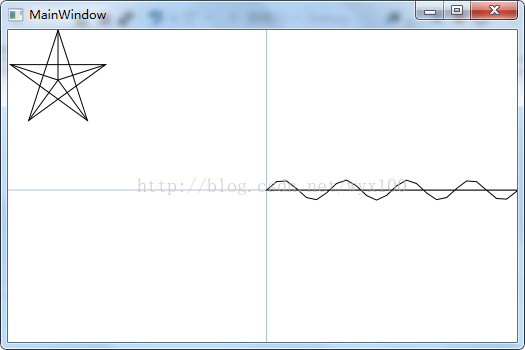
四、介绍
private void Drawsin() 函数中完成:坐标系绘制,sin曲线绘制;
point是绘图坐标系中的点,xypoint(maincanvas.Width/2,maincanvas.Height/2)是绘图屏幕坐标的几何中心点( 图 坐标点转换,中x轴和y轴原点)的坐标。
public Point XYTransf(Point point, Point xypoint)函数返回值是在屏幕坐标绘制点的坐标。
//转换为界面坐标系
public Point XYTransf(Point point, Point xypoint)
        {

            point.X += xypoint.X;

            point.Y = xypoint.Y - point.Y;

            return point;//显示屏幕坐标系的位置

        }
1.mainPanel 是一个Canvas面板,我们在该面板绘制图形。
2.绘制坐标系,以mainPanel 的图形中心为坐标原点;
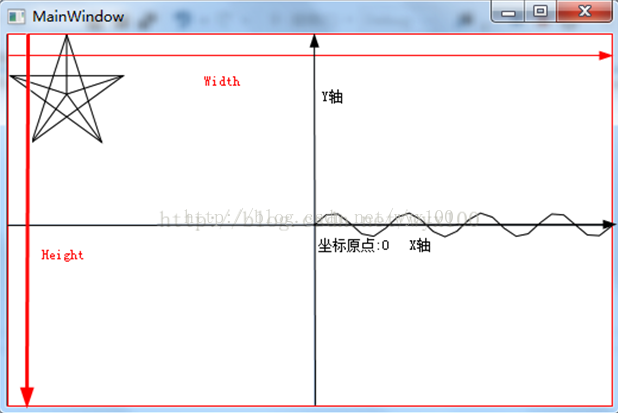
图 坐标点转换
3.计算sin(x,y)并转换为屏幕坐标点,取1000个坐标点,并存在points数组中
            for (int i = 1; i < 1000; i++)

            {

                //计算sin(x,y)

                point.X =10 * i;//sin x

              point.Y =10 * Math.Sin(i);//sin y

                //坐标转换

                point = XYTransf(point, xypoint);

              points[i] = point;

            }
4.连接1000个sin(x,y)的屏幕坐标点,并显示在Canvas中
StreamGeometry theGeometry = BuildRegularPolygon(points, true, false); 通过该函数连接points中所有的点;
            Path myPath = new Path();

            myPath.Stroke = Brushes.Black;

            myPath.StrokeThickness = 1;

            StreamGeometry theGeometry = BuildRegularPolygon(points, true, false);

            // Create a StreamGeometry to use to specify myPath.

            theGeometry.FillRule = FillRule.EvenOdd;

            // Freeze the geometry (make it unmodifiable)

            // for additional performance benefits.

            theGeometry.Freeze();

            // Use the StreamGeometry returned by the BuildRegularPolygon to

            // specify the shape of the path.

            myPath.Data = theGeometry;

            // Add path shape to the UI.

            mainPanel.Children.Add(myPath);
5.执行显示效果
点击“启动”或按键盘“F5”执行工程,显示界面。

C#WPF 如何绘制几何图形 图示教程 绘制sin曲线 正弦 绘制2D坐标系 有图有代码的更多相关文章
- 最全Pycharm教程(43)——Pycharm扩展功能之UML类图使用 代码结构
版权声明:本文为博主原创文章,转载时麻烦注明源文章链接,谢谢合作 https://blog.csdn.net/u013088062/article/details/50353202 1.什么是UML ...
- Cocos2D中使用CCDrawNode绘制几何图形崩溃的解决
在cocos2D v3.x中已经不能像在v2.x中那样直接调用ccDrawXXX函数来绘制几何图形了. 我们可以使用CCDrawNode或者CCRenderer来绘制图形. 但是官方的Api手册中说的 ...
- Win10系列:VC++绘制几何图形2
新建了Direct2D中的资源后,接下来初始化用于绘制图形的应用窗口.在解决方案资源管理器窗口中右键点击项目图标,在弹出的菜单栏中选中"添加", 并在"添加"的 ...
- Win10系列:VC++绘制几何图形1
本小节主要介绍如何使用Direct2D来绘制几何图形,其中会使用到FillGeometry函数和FillEllipse函数,FillGeometry函数用于填充几何图形的内部区域,而FillEllip ...
- HTML5绘制几何图形
<!DOCTYPE html><html xmlns="http://www.w3.org/1999/xhtml"><head> < ...
- OpenGL入门学习 课程 (三) 绘制几何图形的一些细节问题
http://oulehui.blog.163.com/blog/static/79614698201191832753312/ 先回顾一下我们都学习了些什么: 第一课,编写第一个OpenGL程序第二 ...
- HTML5实现绘制几何图形
HTML5新增了一个<canvas.../>属性.该元素自身并不绘制图形,只是相当于一张空画布.如果开发者需要向<canvas.../>上绘制图形则必须使用JavaScript ...
- Shadertoy 教程 Part 5 - 运用SDF绘制出更多的2D图形
Note: This series blog was translated from Nathan Vaughn's Shaders Language Tutorial and has been au ...
- WPF入门(三)->几何图形之不规则图形(PathGeometry) (2)
原文:WPF入门(三)->几何图形之不规则图形(PathGeometry) (2) 上一节我们介绍了PathGeometry中LineSegment是点与点之间绘制的一条直线,那么我们这一节来看 ...
随机推荐
- Yii Framework2.0开发教程(1)配置环境及第一个应用HelloWorld
准备工作: 我用的开发环境是windows下的apache+mysql+php 编辑器不知道该用哪个好.临时用dreamweaver吧 我自己的http://localhost/相应的根文件夹是E:/ ...
- js进阶解决浏览器缓存不能自动更新的问题(在ajax的url上带上一个参数,可以是日期,或者是随机数)(随机数Math.random)(取得日期的毫秒数:new Date().getTime();)
js进阶解决浏览器缓存不能自动更新的问题(在ajax的url上带上一个参数,可以是日期,或者是随机数)(随机数Math.random)(取得日期的毫秒数:new Date().getTime();) ...
- 使用C#版本的gdal库打开hdf文件
作者:朱金灿 来源:http://blog.csdn.net/clever101 最近应同事的请求帮忙研究下使用C#版的gdal库读取hdf文件,今天算是有一点成果,特地做一些记录. 首先是编译C#版 ...
- DI:依赖注入详解
DI(依赖注入) 依赖注入的理解: 一般写程序的时候service层都需要用到dao层,所以一般都是在service层里面new dao ,而现在利用依赖注入的方式,直接把dao给了service层 ...
- erlang一些参考资源
1. erlang非业余研究 http://blog.yufeng.info/ 2.code.wang http://www.cnblogs.com/codew/ 3.码农生涯 http://www. ...
- php实现 明明的随机数
php实现 明明的随机数 一.总结 一句话总结: 1.asort是干嘛的? asort — 对数组进行排序并保持索引关系 2.从控制台取数据怎么取? trim(fgets(STDIN)) 3.多组测试 ...
- C++ 与 Java 语言对比
1 . Java 是完全封装的,而 C++ 的函数是可以定义在 Class 的外部的.从这里就可以看出 C++ 的 OO 思想不够彻底,至少在封装这一点上. 2. C++ 中有拷贝构造函数,可以把一个 ...
- TCP协议的一些认识及实践
http://www.2cto.com/net/201210/163047.html 一.简介 引用<TCP/IP详解-卷1>中的介绍,TCP与UDP使用相同的网络层(IP层),TCP却向 ...
- [转至云风的博客]谈谈陌陌争霸在数据库方面踩过的坑( Redis 篇)
« 谈谈陌陌争霸在数据库方面踩过的坑(芒果篇) | 返回首页 | linode 广告时间 » 谈谈陌陌争霸在数据库方面踩过的坑( Redis 篇) 注:陌陌争霸的数据库部分我没有参与具体设计,只是参与 ...
- redis举例调用两种方式方式
在以下的代码演示样例中.将给出两种最为经常使用的Redis命令操作方式,既普通调用方式和基于管线的调用方式. 注:在阅读代码时请留意凝视. 1 #include <stdio.h> ...