
C#将内容导出到Word到指定模板
昨天做了下导入导出Excel文件,今天研究了下导出Word文件。 从网上找了半天才找到了一个能导出到指定模板的,在这里总结下。
导出模板原理就是利用的替换占位符。
我这里先建立好了一个模板,
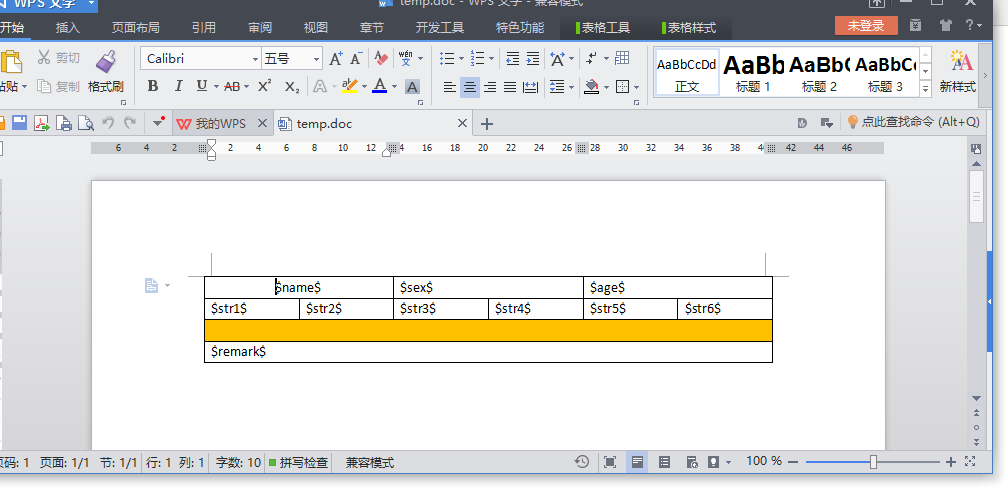
接下来写代码进行导出,
前端就一段AJAX调用,这里我就不写了,直接上后端代码,看下面:
     /// <summary>

        /// 导出Word文件

        /// </summary>

        /// <returns></returns>

        [HttpPost]

        public ActionResult LeadWord()

        {

            #region 动态创建DataTable数据

            DataTable tblDatas = new DataTable("Datas");

            DataColumn dc = null;

            //赋值给dc,是便于对每一个datacolumn的操作

            dc = tblDatas.Columns.Add("ID", Type.GetType("System.Int32"));

            dc.AutoIncrement = true;//自动增加

            dc.AutoIncrementSeed = ;//起始为1

            dc.AutoIncrementStep = ;//步长为1

            dc.AllowDBNull = false;//

            dc = tblDatas.Columns.Add("name", Type.GetType("System.String"));

            dc = tblDatas.Columns.Add("sex", Type.GetType("System.String"));

            dc = tblDatas.Columns.Add("age", Type.GetType("System.String"));

            dc = tblDatas.Columns.Add("str1", Type.GetType("System.String"));

            dc = tblDatas.Columns.Add("str2", Type.GetType("System.String"));

            dc = tblDatas.Columns.Add("str3", Type.GetType("System.String"));

            dc = tblDatas.Columns.Add("str4", Type.GetType("System.String"));

            dc = tblDatas.Columns.Add("str5", Type.GetType("System.String"));

            dc = tblDatas.Columns.Add("str6", Type.GetType("System.String"));

            dc = tblDatas.Columns.Add("remark", Type.GetType("System.String"));

            DataRow newRow;

            newRow = tblDatas.NewRow();

            newRow["name"] = "张三";

            newRow["sex"] = "男";

            newRow["age"] = "";

            newRow["str1"] = "字符串1";

            newRow["str2"] = "字符串2";

            newRow["str3"] = "字符串3";

            newRow["str4"] = "字符串4";

            newRow["str5"] = "字符串5";

            newRow["str6"] = "字符串6";

            newRow["remark"] = "备注一下";

            tblDatas.Rows.Add(newRow);

            #endregion

            #region word要替换的表达式和表格字段的对应关系

            Dictionary<string, string> dic = new Dictionary<string, string>();

            dic.Add("$name$", "name");

            dic.Add("$sex$", "sex");

            dic.Add("$age$", "age");

            dic.Add("$str1$", "str1");

            dic.Add("$str2$", "str2");

            dic.Add("$str3$", "str3");

            dic.Add("$str4$", "str4");

            dic.Add("$str5$", "str5");

            dic.Add("$str6$", "str6");

            dic.Add("$remark$", "remark");

            #endregion

            string tempFile = "~/Content/Word/temp.doc";

            string saveFile = "~/Content/Word/1.doc";

            WordUtility w = new WordUtility(tempFile, saveFile);

            w.GenerateWord(tblDatas, dic, null);

            return Content("ok");

        }
Helper Class(WordUtility.cs)
using System;

using System.Collections.Generic;

using System.Data;

using Word = Microsoft.Office.Interop.Word;

using System.IO;

using System.Windows.Forms;

using System.Runtime.Remoting.Contexts;

namespace Headfree.DefUI

{

    /// <summary>

    /// 使用替换模板进行到处word文件

    /// </summary>

    public class WordUtility

    {

        private object tempFile = null;

        private object saveFile = null;

        private static Word._Document wDoc = null; //word文档

        private static Word._Application wApp = null; //word进程

        private object missing = System.Reflection.Missing.Value;

        public WordUtility(string tempFile, string saveFile)

        {

            tempFile=System.Web.HttpContext.Current.Server.MapPath(tempFile);

            saveFile = System.Web.HttpContext.Current.Server.MapPath(saveFile);

            this.tempFile = Path.Combine(Application.StartupPath, @tempFile);

            this.saveFile = Path.Combine(Application.StartupPath, @saveFile);

        }

        /// <summary>

        /// 模版包含头部信息和表格,表格重复使用

        /// </summary>

        /// <param name="dt">重复表格的数据</param>

        /// <param name="expPairColumn">word中要替换的表达式和表格字段的对应关系</param>

        /// <param name="simpleExpPairValue">简单的非重复型数据</param>

        public bool GenerateWord(DataTable dt, Dictionary<string, string> expPairColumn, Dictionary<string, string> simpleExpPairValue)

        {

            if (!File.Exists(tempFile.ToString()))

            {

                return false;

            }

            try

            {

                wApp = new Word.Application();

                wApp.Visible = false;

                wDoc = wApp.Documents.Add(ref tempFile, ref missing, ref missing, ref missing);

                wDoc.Activate();// 当前文档置前

                bool isGenerate = false;

                if (simpleExpPairValue != null && simpleExpPairValue.Count > )

                    isGenerate = ReplaceAllRang(simpleExpPairValue);

                // 表格有重复

                if (dt != null && dt.Rows.Count >  && expPairColumn != null && expPairColumn.Count > )

                    isGenerate = GenerateTable(dt, expPairColumn);

                if (isGenerate)

                    wDoc.SaveAs(ref saveFile, ref missing, ref missing, ref missing, ref missing, ref missing, ref missing,

                        ref missing, ref missing, ref missing, ref missing, ref missing, ref missing, ref missing, ref missing, ref missing);

                DisposeWord();

                return true;

            }

            catch (Exception ex)

            {

                return false;

            }

        }

        /// <summary>

        /// 单个替换 模版没有重复使用的表格

        /// </summary>

        /// <param name="dc">要替换的</param>

        public bool GenerateWord(Dictionary<string, string> dc)

        {

            return GenerateWord(null, null, dc);

        }

        private bool GenerateTable(DataTable dt, Dictionary<string, string> expPairColumn)

        {

            try

            {

                int tableNums = dt.Rows.Count;

                Word.Table tb = wDoc.Tables[];

                tb.Range.Copy();

                Dictionary<string, object> dc = new Dictionary<string, object>();

                for (int i = ; i < tableNums; i++)

                {

                    dc.Clear();

                    if (i == )

                    {

                        foreach (string key in expPairColumn.Keys)

                        {

                            string column = expPairColumn[key];

                            object value = null;

                            value = dt.Rows[i][column];

                            dc.Add(key, value);

                        }

                        ReplaceTableRang(wDoc.Tables[], dc);

                        continue;

                    }

                    wDoc.Paragraphs.Last.Range.Paste();

                    foreach (string key in expPairColumn.Keys)

                    {

                        string column = expPairColumn[key];

                        object value = null;

                        value = dt.Rows[i][column];

                        dc.Add(key, value);

                    }

                    ReplaceTableRang(wDoc.Tables[], dc);

                }

                return true;

            }

            catch (Exception ex)

            {

                DisposeWord();

                return false;

            }

        }

        private bool ReplaceTableRang(Word.Table table, Dictionary<string, object> dc)

        {

            try

            {

                object replaceArea = Word.WdReplace.wdReplaceAll;

                foreach (string item in dc.Keys)

                {

                    object replaceKey = item;

                    object replaceValue = dc[item];

                    table.Range.Find.Execute(ref replaceKey, ref missing, ref missing, ref missing,

                      ref  missing, ref missing, ref missing, ref missing, ref missing,

                      ref  replaceValue, ref replaceArea, ref missing, ref missing, ref missing,

                      ref  missing);

                }

                return true;

            }

            catch (Exception ex)

            {

                DisposeWord();

                return false;

            }

        }

        private bool ReplaceAllRang(Dictionary<string, string> dc)

        {

            try

            {

                object replaceArea = Word.WdReplace.wdReplaceAll;

                foreach (string item in dc.Keys)

                {

                    object replaceKey = item;

                    object replaceValue = dc[item];

                    wApp.Selection.Find.Execute(ref replaceKey, ref missing, ref missing, ref missing,

                      ref  missing, ref missing, ref missing, ref missing, ref missing,

                      ref  replaceValue, ref replaceArea, ref missing, ref missing, ref missing,

                      ref  missing);

                }

                return true;

            }

            catch (Exception ex)

            {

                return false;

            }

        }

        private void DisposeWord()

        {

            object saveOption = Word.WdSaveOptions.wdSaveChanges;

            wDoc.Close(ref saveOption, ref missing, ref missing);

            saveOption = Word.WdSaveOptions.wdDoNotSaveChanges;

            wApp.Quit(ref saveOption, ref missing, ref missing); //关闭Word进程

        }

    }

}
好了,代码就这么多,来看下导出效果吧:

ZJ。。。
C#将内容导出到Word到指定模板的更多相关文章
- javascript下用ActiveXObject控件替换word书签,将内容导出到word后打印第1/2页
由于时间比较紧,没多的时候去学习研究上述工具包,现在用javascript操作ActiveXObject控件,用替换word模板中的书签方式解决. 最近有需求将数据导出到word里,然后编辑打印. 想 ...
- 内容导出成word
private void 导出word(string 内容) { string tit = "<html xmlns:v=\"urn:schemas-microsoft-co ...
- PHP获取网址详情页的内容导出到WORD文件
亲自测试效果一般, css的样式文件获取不到 如果没有特殊的样式 或者是内容里面包括样式的 直接输出有样式的内容 然后导出 这样还是可以的 class word { function start ...
- PowerDesigner导出word,PowerDesigner把表导出到word,PDM导出word文档
PowerDesigner导出word,PowerDesigner把表导出到word,PDM导出word文档 >>>>>>>>>>>& ...
- java导出生成word(类似简历导出)
参考帖子: http://www.cnblogs.com/lcngu/p/5247179.html http://www.cnblogs.com/splvxh/archive/2013/03/15/2 ...
- java导出生成word
最近做的项目,需要将一些信息导出到word中.在网上找了好多解决方案,现在将这几天的总结分享一下. 目前来看,java导出word大致有6种解决方案: 1:Jacob是Java-COM Bridge的 ...
- 导出到word
导出到excel功能会常做,但是导出到word功能很少做,项目遇到,在这里做一下标记. 导出到excel比较容易,excel都有固定格式也模板,但是word需要自己写模板,这里用了freemarker ...
- PowerDesigner逆向操作(从mysql5.0生成数据库的物理模型),把Comment写到name中,pdm文件导出为word
PowerDesigner逆向操作(从mysql5.0生成数据库的物理模型) 环境:powderdesigner12.5:mysql5.0步骤:1. 为指定的数据库配置mysql的ODBC数据源先下载 ...
- (转)WEB页面导出为Word文档后分页&横向打印的方法
<html> <HEAD> <title>WEB页面导出为Word文档后分页&横向打印的方法 </title> < ...
随机推荐
- Nagios Windows客户端NSClient++ 0.4.x安装配置
NSClient++ 0.3.x和NSClient++ 0.4.x的配置完全不一样,官方的文档也没有全部更新.我记录下自己的一些操作. 一.下载安装NSClient++ 1.到http://nsc ...
- MongoDB_pymongo
python使用pymongo访问MongoDB的基本操作 安装pymongo: pip install pymongo from pymongo import MongoClient import ...
- Eclipse maven工程 Missing artifact com.sun:tools:jar:1.7.0:system 解决方法
解决方案一:通过maven取运行时参数,eclipse提供的环境变量,基本类似System.getProperty("java.home") <dependency> ...
- Python笔记2----包、模块、库、条件循环
包.模块.库 包指的是 : 文件夹 模块和库就是.py文件. 其中,库是一些功能相同的模块的集合,其也是模块. 1.import 模块 2.form 库 import 模块 3.import 包.子包 ...
- Python笔记17---------魔法方法
魔法方法也为特殊方法,即用两个下划线形成的(__方法__).自己定义的方法最好不要采用这种方式,因为这些方法会在一些特殊的情况下直接被调用. 1.第一个魔法方法:类中常用的__init__()方法:相 ...
- Django之瀑布流
一. 小功能瀑布流的实现 1.完成效果图 2.代码部分 <1>models.py from django.db import models # Create your models her ...
- C语言基础 (6) 类型转换,数组与随机数
复习 1.隐式转换 Double a Int b = 1 A = b //编译器自动转换把b转换为double类型后 再给a赋值(隐式转换) 2.强制类型转换 (变量)类型名 Int a = 1 // ...
- 【CF666E】Forensic Examination - 广义后缀自动机+线段树合并
广义SAM专题的最后一题了……呼 题意: 给出一个长度为$n$的串$S$和$m$个串$T_{1\cdots m}$,给出$q$个询问$l,r,pl,pr$,询问$S[pl\cdots pr]$在$T_ ...
- 2019-04-03 SQL Group By某列,预先对该列进行一个预处理,提炼出共有的信息,即关键字case when 列名什么条件 then 赋值 else 赋值 end as 新列名
select sum(发行金额) from( select PoolNameFormat,count(cast(ItemValue as decimal(19,4))) as 发行笔数,sum(cas ...
- 多个API接口
青云客智能聊天机器人API 为保证接口稳定,API接口正式启用 api.qingyunke.com,www.qingyunke.com 如何更换API接口地址? 答:如果您的API接口是用在微信公众号 ...