
Activiti:MalformedByteSequenceException: 3 字节的 UTF-8 序列的字节 3 无效。
在win下开发,有时编译或运行项目会报3字节的UTF-8序列的字节3无效。
解决该问题的办法
1、将xml头文件改为GBK编码方式
,我这里不OK
- <?xml version="1.0" encoding="GBK"?>
2、使用Maven修改默认格式
,我这里不OK
    <build>

        <plugins>

            <!-- resource插件 -->

            <plugin>

                <groupId>org.apache.maven.plugins</groupId>

                <artifactId>maven-resources-plugin</artifactId>

                <version>2.6</version>

                <configuration>

                    <encoding>UTF-8</encoding>

                </configuration>

            </plugin>

        </plugins>

    </build>
3、以上如果还不可行,那么在pom.xml里加入 ,我这里不OK
- <properties>
- <!-- 设置默认编码 -->
- <project.build.sourceEncoding>UTF-8</project.build.sourceEncoding>
- </properties>
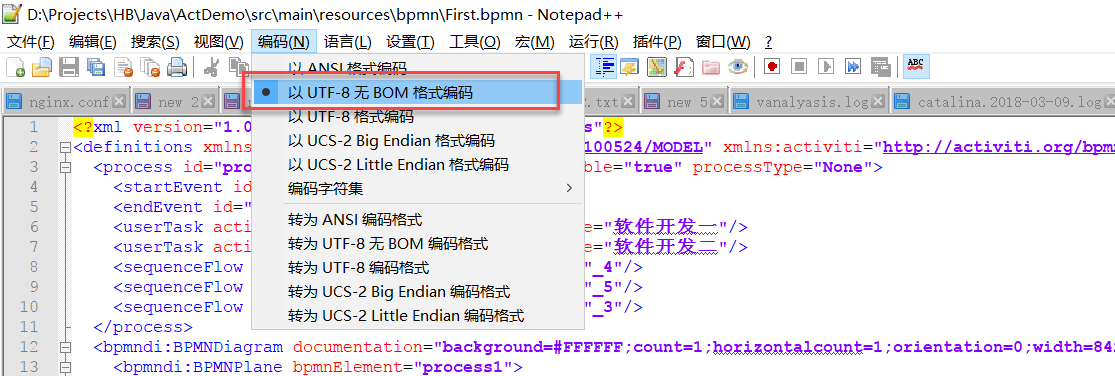
4、修改bpmn文件的编码格式为UTF-8,我这里OK
用记事本打开bpmn文件,另存为utf-8编码的文件,XML也是utf-8编码格式
pom.xml文件
<?xml version="1.0" encoding="UTF-8"?>

<project xmlns="http://maven.apache.org/POM/4.0.0"

         xmlns:xsi="http://www.w3.org/2001/XMLSchema-instance"

         xsi:schemaLocation="http://maven.apache.org/POM/4.0.0 http://maven.apache.org/xsd/maven-4.0.0.xsd">

    <modelVersion>4.0.0</modelVersion>

    <groupId>ActDemo</groupId>

    <artifactId>Activiti</artifactId>

    <version>1.0-SNAPSHOT</version>

    <properties>

        <!-- 设置默认编码 -->

        <project.build.sourceEncoding>UTF-8</project.build.sourceEncoding>

    </properties>

    <dependencies>

        <dependency>

            <groupId>org.activiti</groupId>

            <artifactId>activiti-engine</artifactId>

            <version>6.0.0</version>

        </dependency>

        <dependency>

            <groupId>org.slf4j</groupId>

            <artifactId>slf4j-api</artifactId>

            <version>1.7.21</version>

        </dependency>

        <dependency>

            <groupId>org.slf4j</groupId>

            <artifactId>slf4j-log4j12</artifactId>

            <version>1.7.21</version>

        </dependency>

        <dependency>

            <groupId>com.h2database</groupId>

            <artifactId>h2</artifactId>

            <version>1.4.193</version>

        </dependency>

        <dependency>

            <groupId>mysql</groupId>

            <artifactId>mysql-connector-java</artifactId>

            <version>6.0.5</version>

        </dependency>

    </dependencies>

    <build>

        <plugins>

            <!-- resource插件 -->

            <plugin>

                <groupId>org.apache.maven.plugins</groupId>

                <artifactId>maven-resources-plugin</artifactId>

                <version>2.6</version>

                <configuration>

                    <encoding>UTF-8</encoding>

                </configuration>

            </plugin>

        </plugins>

    </build>

</project>
bpmn文件
<?xml version="1.0" encoding="UTF-8" standalone="yes"?>

<definitions xmlns="http://www.omg.org/spec/BPMN/20100524/MODEL" xmlns:activiti="http://activiti.org/bpmn" xmlns:bpmndi="http://www.omg.org/spec/BPMN/20100524/DI" xmlns:omgdc="http://www.omg.org/spec/DD/20100524/DC" xmlns:omgdi="http://www.omg.org/spec/DD/20100524/DI" xmlns:tns="http://www.activiti.org/test" xmlns:xsd="http://www.w3.org/2001/XMLSchema" xmlns:xsi="http://www.w3.org/2001/XMLSchema-instance" expressionLanguage="http://www.w3.org/1999/XPath" id="m1520825820812" name="" targetNamespace="http://www.activiti.org/test" typeLanguage="http://www.w3.org/2001/XMLSchema">

  <process id="process1" isClosed="false" isExecutable="true" processType="None">

    <startEvent id="_2" name="StartEvent"/>

    <endEvent id="_3" name="EndEvent"/>

    <userTask activiti:exclusive="true" id="_4" name="软件开发一"/>

    <userTask activiti:exclusive="true" id="_5" name="软件开发二"/>

    <sequenceFlow id="_6" sourceRef="_2" targetRef="_4"/>

    <sequenceFlow id="_7" sourceRef="_4" targetRef="_5"/>

    <sequenceFlow id="_8" sourceRef="_5" targetRef="_3"/>

  </process>

  <bpmndi:BPMNDiagram documentation="background=#FFFFFF;count=1;horizontalcount=1;orientation=0;width=842.4;height=1195.2;imageableWidth=832.4;imageableHeight=1185.2;imageableX=5.0;imageableY=5.0" id="Diagram-_1" name="New Diagram">

    <bpmndi:BPMNPlane bpmnElement="process1">

      <bpmndi:BPMNShape bpmnElement="_2" id="Shape-_2">

        <omgdc:Bounds height="32.0" width="32.0" x="60.0" y="160.0"/>

        <bpmndi:BPMNLabel>

          <omgdc:Bounds height="32.0" width="32.0" x="0.0" y="0.0"/>

        </bpmndi:BPMNLabel>

      </bpmndi:BPMNShape>

      <bpmndi:BPMNShape bpmnElement="_3" id="Shape-_3">

        <omgdc:Bounds height="32.0" width="32.0" x="805.0" y="180.0"/>

        <bpmndi:BPMNLabel>

          <omgdc:Bounds height="32.0" width="32.0" x="0.0" y="0.0"/>

        </bpmndi:BPMNLabel>

      </bpmndi:BPMNShape>

      <bpmndi:BPMNShape bpmnElement="_4" id="Shape-_4">

        <omgdc:Bounds height="55.0" width="85.0" x="275.0" y="190.0"/>

        <bpmndi:BPMNLabel>

          <omgdc:Bounds height="55.0" width="85.0" x="0.0" y="0.0"/>

        </bpmndi:BPMNLabel>

      </bpmndi:BPMNShape>

      <bpmndi:BPMNShape bpmnElement="_5" id="Shape-_5">

        <omgdc:Bounds height="55.0" width="85.0" x="590.0" y="200.0"/>

        <bpmndi:BPMNLabel>

          <omgdc:Bounds height="55.0" width="85.0" x="0.0" y="0.0"/>

        </bpmndi:BPMNLabel>

      </bpmndi:BPMNShape>

      <bpmndi:BPMNEdge bpmnElement="_6" id="BPMNEdge__6" sourceElement="_2" targetElement="_4">

        <omgdi:waypoint x="92.0" y="176.0"/>

        <omgdi:waypoint x="275.0" y="217.5"/>

        <bpmndi:BPMNLabel>

          <omgdc:Bounds height="0.0" width="0.0" x="0.0" y="0.0"/>

        </bpmndi:BPMNLabel>

      </bpmndi:BPMNEdge>

      <bpmndi:BPMNEdge bpmnElement="_7" id="BPMNEdge__7" sourceElement="_4" targetElement="_5">

        <omgdi:waypoint x="360.0" y="217.5"/>

        <omgdi:waypoint x="590.0" y="227.5"/>

        <bpmndi:BPMNLabel>

          <omgdc:Bounds height="0.0" width="0.0" x="0.0" y="0.0"/>

        </bpmndi:BPMNLabel>

      </bpmndi:BPMNEdge>

      <bpmndi:BPMNEdge bpmnElement="_8" id="BPMNEdge__8" sourceElement="_5" targetElement="_3">

        <omgdi:waypoint x="675.0" y="227.5"/>

        <omgdi:waypoint x="805.0" y="196.0"/>

        <bpmndi:BPMNLabel>

          <omgdc:Bounds height="0.0" width="0.0" x="0.0" y="0.0"/>

        </bpmndi:BPMNLabel>

      </bpmndi:BPMNEdge>

    </bpmndi:BPMNPlane>

  </bpmndi:BPMNDiagram>

</definitions>
注意格式:为uft-8
Activiti:MalformedByteSequenceException: 3 字节的 UTF-8 序列的字节 3 无效。的更多相关文章
- com.sun.org.apache.xerces.internal.impl.io.MalformedByteSequenceException: 3 字节的 UTF-8 序列的字节 3 无效。
org.springframework.beans.factory.BeanDefinitionStoreException: IOException parsing XML document fro ...
- com.sun.org.apache.xerces.internal.impl.io.MalformedByteSequenceException: 3 字节的 UTF-8 序列的字节 x 无效
在启动Tomcat项目时,控制台报错:nested exception is com.sun.org.apache.xerces.internal.impl.io.MalformedByteSeque ...
- Maven 项目 启动时 解决3 字节的 UTF-8 序列的字节 3 无效
"org.activiti.bpmn.exceptions.XMLException: 3 字节的 UTF-8 序列的字节 3 无效." Maven 项目启动时,由于读XML配置文 ...
- tomcat 1字节的UTF-8序列的字节1无效
微信支付时, 命名返回支付成功, 但是成功后却返回如下的错误, 在测试环境都是没有任何问题, 到客户现场后, 可能客户现场使用的4G网络, 用微信支付时一直报这样的错误 错误现象: com.sun.o ...
- 报错:3 字节的 UTF-8 序列的字节 3 无效。
错误如下: Caused by: org.springframework.beans.factory.BeanCreationException: Error creating bean with n ...
- 异常: 2 字节的 UTF-8 序列的字节 2 无效。
具体异常: 十二月 08, 2015 7:16:55 下午 org.apache.catalina.core.StandardWrapperValve invoke 严重: Servlet.servi ...
- java.lang.RuntimeException: org.dom4j.DocumentException: 1 字节的 UTF-8 序列的字节 1 无效。
向一个XML文件写入出现异常 解决办法:使用记事本打开该XML文件,另存为,编码选择UTF-8 java.lang.RuntimeException: org.dom4j.DocumentExcept ...
- 出现 关于UTF-8 序列的字节 2 无效的异常
学习mybatis中碰到了 Caused by: org.apache.ibatis.builder.BuilderException: Error creating document instanc ...
- XML文件存在中文注释报错问题( 3 字节的 UTF-8 序列的字节 3 无效)
今天在做mybatis项目的时候,给映射文件添加了中文注释后,程序就报错.把中文注释删除后,程序又可以正常执行.解决方法在下文提到. 我的xml映射文件如下: <?xml version=&qu ...
随机推荐
- Python的format函数
Python的format函数 自python2.6开始,新增了一种格式化字符串的函数str.format(),此函数可以快速处理各种字符串. 语法 它通过{}和:来代替%. 请看下面的示例,基本上总 ...
- Go HelloWorld 网络版和并发版
网络版 package main import ( "net/http" "fmt" ) func main() { http.HandleFunc(" ...
- 谈谈 cci 与 i2c
cci的名字叫, camera control interface, 他由两部分组成,一是i2c ,而另一个部分是 gpio.也就是说,cci 包含i2c.一般情况下,我们只是用到了i2c 部分,没有 ...
- 2015 ACM/ICPC Asia Regional Changchun Online HDU 5444 Elven Postman【二叉排序树的建树和遍历查找】
Elven Postman Time Limit: 1500/1000 MS (Java/Others) Memory Limit: 131072/131072 K (Java/Others)T ...
- pom.xml里使用了一系列的版本的框架,配置一个版本属性,让使用版本的都引用这个属性
在pom.xml定义properties标签 <properties> <project.build.sourceEncoding>UTF-8</project.buil ...
- linux jdk安装。
我使用的centos 7: 安转sun公司的jdk要先检查系统中是否安装jdk,一般来说Centos系统会默认会安装OpenJDK,但是openJDK部分内容 与SUN JDK不兼容,因此下面进行重新 ...
- 字符在内存中最终的表示形式是什么?是某种字符编码还是码位(Code Point)?
字符在内存中最终的表示形式是什么?是某种字符编码还是码位(Code Point)? 根据我的了解,编码中有三个核心概念:1. 字符集(Character Set),可以说是一个抽象概念,字符的合集2. ...
- Spinner使用一
Spinner使用一 一.使用方法 1.在layout中创建Spinner控件 <Spinner android:id="@+id/spinner1" android:lay ...
- spring:自定义限定符注解@interface, 首选bean
spring:自定义限定符注解@interface, 首选bean 1.首选bean 在声明bean的时候,通过将其中一个可选的bean设置为首选(primary)bean能够避免自动装配时的歧义性. ...
- poj3252 数位dp
这题不是用10进制储存的,要转化成2进制再计算 dp[i][j][k] i是位数,j是1的个数,k是0的个数 #include<map> #include<set> #in ...