
【scrapy实践】_爬取安居客_广州_新楼盘数据
需求:爬取【安居客—广州—新楼盘】的数据,具体到每个楼盘的详情页的若干字段。
难点:楼盘类型各式各样:住宅 别墅 商住 商铺 写字楼,不同楼盘字段的名称不一样。然后同一种类型,比如住宅,又分为不同的情况,比如分为期房在售,现房在售,待售,尾盘。其他类型也有类似情况。所以字段不能设置固定住。
解决方案:目前想到的解决方案,第一种:scrapy中items.py中不设置字段,spider中爬的时候自动识别字段(也就是有啥字段就保留下来),然后返回字典存起来。第二种,不同字段的网页分别写规则单独抓取。显然不可取。我采用的是第一种方案。还有其他方案的朋友们,欢迎交流哈。
目标网址为:http://gz.fang.anjuke.com/ 该网页下的楼盘数据

示例楼盘网址:http://gz.fang.anjuke.com/loupan/canshu-298205.html?from=loupan_tab
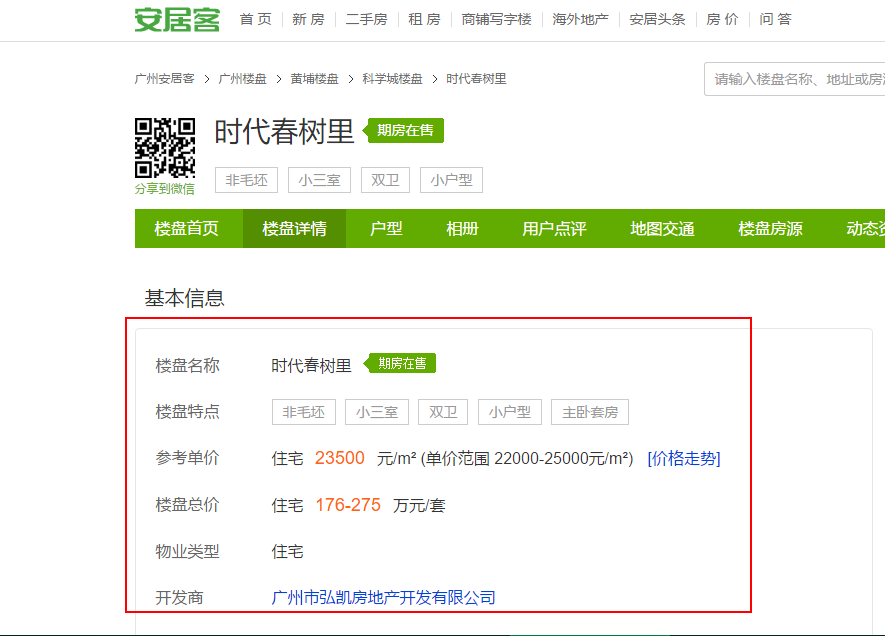
开始编写scrapy脚本。建立工程步骤略过。

1、count.py
 __author__ = 'Oscar_Yang'

 #-*- coding= utf-8 -*-

 """

     查看mongodb存储状况的脚本count.py

 """

 import time

 import pymongo

 client = pymongo.MongoClient("localhost", 27017)

 db = client["SCRAPY_anjuke_gz"]

 sheet = db["anjuke_doc1"]

 while True:

     print(sheet.find().count())

     print("____________________________________")

     time.sleep(3)
 """

     entrypoint.py

 """

 from scrapy.cmdline import execute

 execute(['scrapy', 'crawl', 'anjuke_gz'])
 # -*- coding: utf-8 -*-

 """

     settings.py

 """

 # Scrapy settings for anjuke_gz project

 #

 # For simplicity, this file contains only settings considered important or

 # commonly used. You can find more settings consulting the documentation:

 #

 #     http://doc.scrapy.org/en/latest/topics/settings.html

 #     http://scrapy.readthedocs.org/en/latest/topics/downloader-middleware.html

 #     http://scrapy.readthedocs.org/en/latest/topics/spider-middleware.html

 BOT_NAME = 'anjuke_gz'

 SPIDER_MODULES = ['anjuke_gz.spiders']

 NEWSPIDER_MODULE = 'anjuke_gz.spiders'

 MONGODB_HOST = "127.0.0.1"

 MONGODB_PORT = 27017

 MONGODB_DBNAME="SCRAPY_anjuke_gz"

 MONGODB_DOCNAME="anjuke_doc1"

 # Crawl responsibly by identifying yourself (and your website) on the user-agent

 #USER_AGENT = 'anjuke_gz (+http://www.yourdomain.com)'

 # Obey robots.txt rules

 ROBOTSTXT_OBEY = False

 # Configure maximum concurrent requests performed by Scrapy (default: 16)

 #CONCURRENT_REQUESTS = 32

 # Configure a delay for requests for the same website (default: 0)

 # See http://scrapy.readthedocs.org/en/latest/topics/settings.html#download-delay

 # See also autothrottle settings and docs

 #DOWNLOAD_DELAY = 3

 # The download delay setting will honor only one of:

 #CONCURRENT_REQUESTS_PER_DOMAIN = 16

 #CONCURRENT_REQUESTS_PER_IP = 16

 # Disable cookies (enabled by default)

 #COOKIES_ENABLED = False

 # Disable Telnet Console (enabled by default)

 #TELNETCONSOLE_ENABLED = False

 # Override the default request headers:

 #DEFAULT_REQUEST_HEADERS = {

 #   'Accept': 'text/html,application/xhtml+xml,application/xml;q=0.9,*/*;q=0.8',

 #   'Accept-Language': 'en',

 #}

 # Enable or disable spider middlewares

 # See http://scrapy.readthedocs.org/en/latest/topics/spider-middleware.html

 #SPIDER_MIDDLEWARES = {

 #    'anjuke_gz.middlewares.AnjukeGzSpiderMiddleware': 543,

 #}

 # Enable or disable downloader middlewares

 # See http://scrapy.readthedocs.org/en/latest/topics/downloader-middleware.html

 #DOWNLOADER_MIDDLEWARES = {

 #    'anjuke_gz.middlewares.MyCustomDownloaderMiddleware': 543,

 #}

 # Enable or disable extensions

 # See http://scrapy.readthedocs.org/en/latest/topics/extensions.html

 #EXTENSIONS = {

 #    'scrapy.extensions.telnet.TelnetConsole': None,

 #}

 # Configure item pipelines

 # See http://scrapy.readthedocs.org/en/latest/topics/item-pipeline.html

 ITEM_PIPELINES = {

    'anjuke_gz.pipelines.AnjukeGzPipeline': 300,

 }

 # Enable and configure the AutoThrottle extension (disabled by default)

 # See http://doc.scrapy.org/en/latest/topics/autothrottle.html

 #AUTOTHROTTLE_ENABLED = True

 # The initial download delay

 #AUTOTHROTTLE_START_DELAY = 5

 # The maximum download delay to be set in case of high latencies

 #AUTOTHROTTLE_MAX_DELAY = 60

 # The average number of requests Scrapy should be sending in parallel to

 # each remote server

 #AUTOTHROTTLE_TARGET_CONCURRENCY = 1.0

 # Enable showing throttling stats for every response received:

 #AUTOTHROTTLE_DEBUG = False

 # Enable and configure HTTP caching (disabled by default)

 # See http://scrapy.readthedocs.org/en/latest/topics/downloader-middleware.html#httpcache-middleware-settings

 HTTPCACHE_ENABLED = True

 HTTPCACHE_EXPIRATION_SECS = 0

 HTTPCACHE_DIR = 'httpcache'

 HTTPCACHE_IGNORE_HTTP_CODES = []

 HTTPCACHE_STORAGE = 'scrapy.extensions.httpcache.FilesystemCacheStorage'
接下来,是items。因为没有设置字段,为默认的代码。
 # -*- coding: utf-8 -*-

 # Define here the models for your scraped items

 #

 # See documentation in:

 # http://doc.scrapy.org/en/latest/topics/items.html

 import scrapy

 class AnjukeGzItem(scrapy.Item):

     # define the fields for your item here like:

     # name = scrapy.Field()

     pass
接下来,是piplines.py。在中设置了mongodb的配置。
# -*- coding: utf-8 -*-

# Define your item pipelines here

#

# Don't forget to add your pipeline to the ITEM_PIPELINES setting

# See: http://doc.scrapy.org/en/latest/topics/item-pipeline.html

import pymongo

from scrapy.conf import settings

class AnjukeGzPipeline(object):

    def __init__(self):

        host=settings["MONGODB_HOST"]

        port=settings["MONGODB_PORT"]

        dbname=settings["MONGODB_DBNAME"]

        client=pymongo.MongoClient(port=port,host=host)

        tdb = client[dbname]

        self.post=tdb[settings["MONGODB_DOCNAME"]]

    def process_item(self,item,spider):

        info = dict(item)

        self.post.insert(info)

        return item
最后,是最主要的spider.py
 from scrapy.http import Request

 import scrapy

 from bs4 import BeautifulSoup

 import re

 import requests

 """

     spider脚本

 """

 class Myspider(scrapy.Spider):

     name = 'anjuke_gz'

     allowed_domains = ['http://gz.fang.anjuke.com/loupan/']

     start_urls = ["http://gz.fang.anjuke.com/loupan/all/p{}/".format(i) for i in range(39)]

     def parse(self, response):

         soup = BeautifulSoup(response.text,"lxml")

         content=soup.find_all(class_="items-name") #返回每个楼盘的对应数据

         for item in content:

             code=item["href"].split("/")[-1][:6]

             real_href="http://gz.fang.anjuke.com/loupan/canshu-{}.html?from=loupan_tab".format(code) #拼凑出楼盘详情页的url

             res=requests.get(real_href)

             soup = BeautifulSoup(res.text,"lxml")

             a = re.findall(r'<div class="name">(.*?)</div>', str(soup))

             b = soup.find_all(class_="des")

             data = {}

             for (i, j) in zip(range(len(b)), a):

                 data[j] = b[i].text.strip().strip("\t")

                 data["url"] = real_href

             yield data
下面是存入mongodb的情况。
因为针对不同的网页结构,爬取的规则是一个,所以爬取的时候就不能针对每个字段进行爬取,所以存到库里的数据如果要是分析的话还需要清洗。
在python中使用mongodb的查询语句,再配合使用pandas应该就很方便清洗了。

【scrapy实践】_爬取安居客_广州_新楼盘数据的更多相关文章
- Python开发爬虫之BeautifulSoup解析网页篇:爬取安居客网站上北京二手房数据
目标:爬取安居客网站上前10页北京二手房的数据,包括二手房源的名称.价格.几室几厅.大小.建造年份.联系人.地址.标签等. 网址为:https://beijing.anjuke.com/sale/ B ...
- PyCharm+Scrapy爬取安居客楼盘信息
一.说明 1.1 开发环境说明 开发环境--PyCharm 爬虫框架--Scrapy 开发语言--Python 3.6 安装第三方库--Scrapy.pymysql.matplotlib 数据库--M ...
- python3 [爬虫实战] selenium 爬取安居客
我们爬取的网站:https://www.anjuke.com/sy-city.html 获取的内容:包括地区名,地区链接: 安居客详情 一开始直接用requests库进行网站的爬取,会访问不到数据的, ...
- python爬取安居客二手房网站数据(转)
之前没课的时候写过安居客的爬虫,但那也是小打小闹,那这次呢, 还是小打小闹 哈哈,现在开始正式进行爬虫书写 首先,需要分析一下要爬取的网站的结构: 作为一名河南的学生,那就看看郑州的二手房信息吧! 在 ...
- Python-新手爬取安居客新房房源
新手,整个程序还有很多瑕疵. 1.房源访问的网址为城市的拼音+后面统一的地址.需要用到xpinyin库 2.用了2种解析网页数据的库bs4和xpath(先学习的bs4,学了xpath后部分代码改成xp ...
- python爬虫爬取安居客并进行简单数据分析
本文的文字及图片来源于网络,仅供学习.交流使用,不具有任何商业用途,如有问题请及时联系我们以作处理 爬取过程一.指定爬取数据二.设置请求头防止反爬三.分析页面并且与网页源码进行比对四.分析页面整理数据 ...
- python3 爬虫之爬取安居客二手房资讯(第一版)
#!/usr/bin/env python3 # -*- coding: utf-8 -*- # Author;Tsukasa import requests from bs4 import Beau ...
- 安居客scrapy房产信息爬取到数据可视化(下)-可视化代码
接上篇:安居客scrapy房产信息爬取到数据可视化(下)-可视化代码,可视化的实现~ 先看看保存的数据吧~ 本人之前都是习惯把爬到的数据保存到本地json文件, 这次保存到数据库后发现使用mongod ...
- scrapy爬取极客学院全部课程
# -*- coding: utf-8 -*- # scrapy爬取极客学院全部课程 import scrapy from pyquery import PyQuery as pq from jike ...
随机推荐
- Web Deploy 安装及问题解决
注意: 站点名称: 服务器上IIS的站点名称. . 我之前这里随便写一直不成功. 返回500..... 用户名, 密码: 这里最好用windows帐号. 问题比较少. 目标URL: 可不写. 可 ...
- hadoop本地运行与集群运行
开发环境: windows10+伪分布式(虚拟机组成的集群)+IDEA(不需要装插件) 介绍: 本地开发,本地debug,不需要启动集群,不需要在集群启动hdfs yarn 需要准备什么: 1/配置w ...
- HAProxy详解
HAProxy概述与配置 一.HAProxy概述 HAProxy是由 WillyTarreau开发的一款具备高可用性.负载均及基于 TCP和 HTTP的应用代理开源软件,基于HAProxy的负载均衡架 ...
- Capslock and Esc
将Caps Lock转换成Esc(windows and linux) 1. linux 下将Caps Lock 转换成Esc 作为一个vimer,Caps Lock对我(还有其他很多人)来说根本就是 ...
- 计算机网络概述---OSI参考模型
应用层:所有能产生网络流量的程序,例如:qq等,txt记事本没有产生流量,所以不属于应用层: 表示层:在传输之前对应用层的数据进行加工或处理,例如:加密.压缩.传视频时二进制,传文档时ASCII码 等 ...
- Linux基础三---打包压缩&vim&系统的初始化和服务
一,常用命令——tar&vim 1. tar [参数] 文件名 [路径] 参数: -c :建立一个压缩文件的参数指令(create 的意思): -x :解开一个压缩文件的参数指令! ...
- linux中获取堆栈空间大小的方法
#include <stdio.h> #include <stdlib.h> #include <sys/time.h> #include < ...
- Python 条件判断语句(if ,elif, else)
条件判断可以分: 单分支判断:只有一个if语句 双分支判断:if else 的格式 多分支判断:if elif else 的格式 条件语句嵌套判断 # 下面是个条件多分支判断 score = 85 ...
- 使用easyui的form提交表单,在IE下出现类似附件下载时提示是否保存的现象
之前开发时遇到的一个问题,使用easyui的form提交表单,在Chrome下时没问题的,但是在IE下出现类似附件下载时提示是否保存的现象. 这里记录一下如何解决的.其实这个现象不光是easyui的f ...
- python中的import一个注意事项
import math def foo(): import math x = math.pi # 如果math在下面import会出错,因为import是个写的过程(添加到sys.modules中), ...