
$Android AlertDialog的各种用法总结
Refer:http://www.2cto.com/kf/201205/131876.html
(一)最简单的用法(详见注释)
 1         // 1、创建简单的AlertDialog // AlertDialog的构造方法全部是Protected的,

 2             // 所以不能直接通过new一个AlertDialog来创建出一个AlertDialog; //

 3             // (1)要创建一个AlertDialog,就要用到AlertDialog.Builder

 4             AlertDialog.Builder dialog = new AlertDialog.Builder(this);

 5

 6             // (2)设置各种属性 // 注:不设置哪项属性,这个属性就默认不会显示出来

 7             dialog.setTitle("这是一个简单的对话框");

 8             dialog.setIcon(R.drawable.dictation2_64);

 9             dialog.setMessage("欢迎使用!");

10

11             // (3)设置dialog可否被取消

12             dialog.setCancelable(true);

13

14             // (4)显示出来

15             dialog.show();
效果如下:

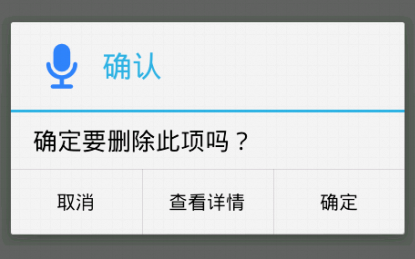
(二)带按钮的AlertDialog
         // 2、带按钮的AlertDialog

             AlertDialog.Builder dialog = new AlertDialog.Builder(this);

             dialog.setTitle("确认");

             dialog.setIcon(R.drawable.dictation2_64);

             dialog.setMessage("确定要删除此项吗?");

             // 设置“确定”按钮,使用DialogInterface.OnClickListener接口参数

             dialog.setPositiveButton("确定",

                     new DialogInterface.OnClickListener() {

                         @Override

                         public void onClick(DialogInterface dialog, int which) {

                             Log.d("Dialog", "点击了“确认”按钮");

                         }

                     });

             // 设置“查看详情”按钮,使用DialogInterface.OnClickListener接口参数

             dialog.setNeutralButton("查看详情",

                     new DialogInterface.OnClickListener() {

                         @Override

                         public void onClick(DialogInterface dialog, int which) {

                             Log.d("Dialog", "点击了“查看详情”按钮");

                         }

                     });

             // 设置“取消”按钮,使用DialogInterface.OnClickListener接口参数

             dialog.setNegativeButton("取消",

                     new DialogInterface.OnClickListener() {

                         @Override

                         public void onClick(DialogInterface dialog, int which) {

                             Log.d("Dialog", "点击了“取消”按钮");

                         }

                     });

             dialog.show();
效果如下:
(三)类似于ListView的AlertDialog
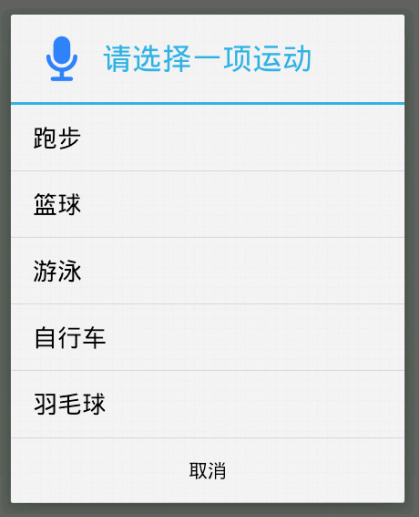
用setItems(CharSequence[] items, final OnClickListener listener)方法来实现类似ListView的AlertDialog。
         // 3、类似ListView的AlertDialog

             AlertDialog.Builder dialog = new AlertDialog.Builder(this);

             dialog.setTitle("请选择一项运动");

             dialog.setIcon(R.drawable.dictation2_64);

             // 设置为false说明当前dialog是不能用返回键取消的

             dialog.setCancelable(false);

             // 列表字符串数组

             final String[] sportsArray = new String[] { "跑步", "篮球", "游泳",

                     "自行车", "羽毛球" };

             // 用于在item的点击事件中,记录选择的是哪一项,初始值设为0.这里用final数组只是因为匿名内部类中只能使用外部终态的变量

             final int selectedIndex[] = { 0 };

             // 用setItems方法来实现

             dialog.setItems(sportsArray, new DialogInterface.OnClickListener() {

                 @Override

                 public void onClick(DialogInterface dialog, int which) {

                     selectedIndex[0] = which;

                     Log.d("Dialog", "选择了:" + sportsArray[selectedIndex[0]]);

                 }

             });

             dialog.setNegativeButton("取消",

                     new DialogInterface.OnClickListener() {

                         @Override

                         public void onClick(DialogInterface dialog, int which) {

                             Log.d("Dialog", "点击了“取消”按钮");

                         }

                     });

             dialog.show();
效果如下:
(四)类似RadioButton的AlertDialog
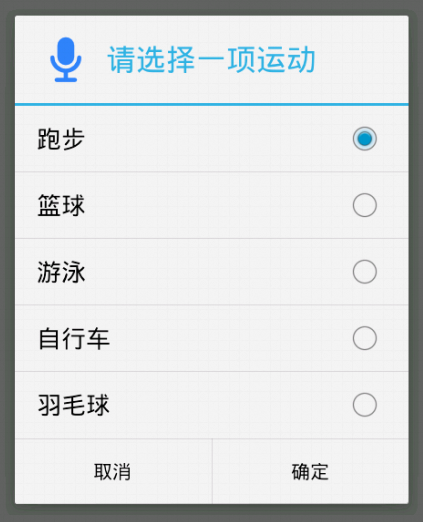
用setSingleChoiceItems(CharSequence[] items, int checkedItem, final OnClickListener listener)方法来实现类似RadioButton的AlertDialog
第一个参数是要显示的数据的数组,第二个参数是初始值(初始被选中的item),第三个参数是点击某个item的触发事件
         // 4、类似RadioButton的AlertDialog

             AlertDialog.Builder dialog = new AlertDialog.Builder(this);

             dialog.setTitle("请选择一项运动");

             dialog.setIcon(R.drawable.dictation2_64);

             // 列表字符串数组

             final String[] sportsArray = new String[] { "跑步", "篮球", "游泳",

                     "自行车", "羽毛球" };

             // 用于在item的点击事件中,记录选择的是哪一项,初始值设为0.这里用final数组只是因为匿名内部类中只能使用外部终态的变量

             final int selectedIndex[] = { 0 };

             // 用setSingleChoiceItems方法来实现

             dialog.setSingleChoiceItems(sportsArray, 0,

                     new DialogInterface.OnClickListener() {

                         @Override

                         public void onClick(DialogInterface dialog, int which) {

                             selectedIndex[0] = which;

                         }

                     });

             dialog.setPositiveButton("确定",

                     new DialogInterface.OnClickListener() {

                         @Override

                         public void onClick(DialogInterface dialog, int which) {

                             Log.d("Dialog", "选择了:"

                                     + sportsArray[selectedIndex[0]]);

                         }

                     });

             dialog.setNegativeButton("取消",

                     new DialogInterface.OnClickListener() {

                         @Override

                         public void onClick(DialogInterface dialog, int which) {

                             Log.d("Dialog", "点击了“取消”按钮");

                         }

                     });

             dialog.show();
效果如下:
(五)类似CheckBox的AlertDialog
用setMultiChoiceItems(CharSequence[] items, boolean[] checkedItems, final OnMultiChoiceClickListener listener)方法来实现类似CheckBox的AlertDialog
第一个参数是要显示的数据的数组,第二个参数是选中状态的数组,第三个参数是点击某个item的触发事件
         // 5、类似CheckBox的AlertDialog

             AlertDialog.Builder dialog = new AlertDialog.Builder(this);

             dialog.setTitle("请选择喜欢的运动(可多选)");

             dialog.setIcon(R.drawable.dictation2_64);

             // 列表字符串数组

             final String[] sportsArray = new String[] { "跑步", "篮球", "游泳",

                     "自行车", "羽毛球" };

             // 用于在item的点击事件中,记录选择了哪些项.

             final boolean[] selectedIndex = { true, true, false, false, false };

             // 用setMultiChoiceItems方法来实现

             dialog.setMultiChoiceItems(sportsArray, selectedIndex,

                     new DialogInterface.OnMultiChoiceClickListener() {

                         @Override

                         public void onClick(DialogInterface dialog, int which,

                                 boolean isChecked) {

                             selectedIndex[which] = isChecked;

                         }

                     });

             dialog.setPositiveButton("确定",

                     new DialogInterface.OnClickListener() {

                         @Override

                         public void onClick(DialogInterface dialog, int which) {

                             for (int i = 0; i < selectedIndex.length; i++) {

                                 if (selectedIndex[i]) {

                                     Log.d("Dialog", "选择了:" + sportsArray[i]);

                                 }

                             }

                         }

                     });

             dialog.setNegativeButton("取消",

                     new DialogInterface.OnClickListener() {

                         @Override

                         public void onClick(DialogInterface dialog, int which) {

                             Log.d("Dialog", "点击了“取消”按钮");

                         }

                     });

             dialog.show();
效果如下:

(六)自定义View的AlertDialog
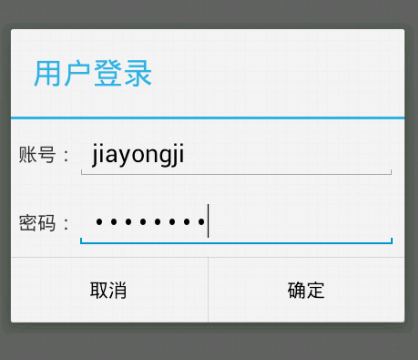
有时候系统自带的AlertDialog风格不能满足我们的需求,就比如说我们要实现一个Login画面,有用户名和密码,这时我们就要用到自定义View的AlertDialog
1、先创建自定义登录框的布局文件my_login_view.xml:
 <?xml version="1.0" encoding="utf-8"?>

 <LinearLayout xmlns:android="http://schemas.android.com/apk/res/android"

     android:layout_width="match_parent"

     android:layout_height="match_parent"

     android:orientation="vertical" >

     <LinearLayout

         android:layout_width="fill_parent"

         android:layout_height="wrap_content"

         android:gravity="center"

         android:padding="5dp" >

         <TextView

             android:layout_width="wrap_content"

             android:layout_height="wrap_content"

             android:text="账号:" />

         <EditText

             android:id="@+id/my_login_account_et"

             android:layout_width="0dip"

             android:layout_height="wrap_content"

             android:layout_weight="1" />

     </LinearLayout>

     <LinearLayout

         android:layout_width="fill_parent"

         android:layout_height="wrap_content"

         android:gravity="center"

         android:padding="5dp" >

         <TextView

             android:layout_width="wrap_content"

             android:layout_height="wrap_content"

             android:text="密码:" />

         <EditText

             android:id="@+id/my_login_password_et"

             android:layout_width="0dip"

             android:layout_height="wrap_content"

             android:layout_weight="1"

             android:inputType="numberPassword" />

     </LinearLayout>

 </LinearLayout>
2、在Activity的合适地方创建自定义的AlertDialog(比如按钮的点击事件中):
         // 6、自定义View的AlertDialog

             AlertDialog.Builder dialog = new AlertDialog.Builder(this);

             dialog.setTitle("用户登录");

             // 取得自定义View

             LayoutInflater layoutInflater = LayoutInflater.from(this);

             final View myLoginView = layoutInflater.inflate(

                     R.layout.my_login_view, null);

             dialog.setView(myLoginView);

             dialog.setPositiveButton("确定",

                     new DialogInterface.OnClickListener() {

                         @Override

                         public void onClick(DialogInterface dialog, int which) {

                             EditText loginAccountEt = (EditText) myLoginView

                                     .findViewById(R.id.my_login_account_et);

                             EditText loginPasswordEt = (EditText) myLoginView

                                     .findViewById(R.id.my_login_password_et);

                             Log.d("MyLogin Dialog", "输入的用户名是:"

                                     + loginAccountEt.getText().toString());

                             Log.d("MyLogin Dialog", "输入的密码是:"

                                     + loginPasswordEt.getText().toString());

                         }

                     });

             dialog.setNegativeButton("取消",

                     new DialogInterface.OnClickListener() {

                         @Override

                         public void onClick(DialogInterface dialog, int which) {

                         }

                     });

             dialog.show();
效果如下:
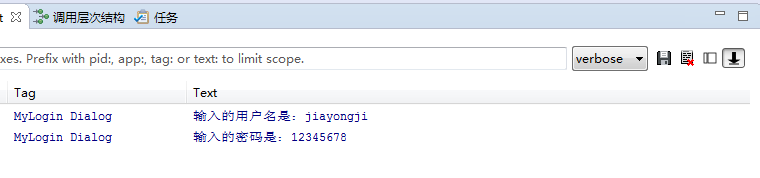
点击“确定”按钮后LogCat中的内容:
随机推荐
- Redis的README.md
This README is just a fast *quick start* document. You can find more detailed documentation at http: ...
- 【转】Android自动化测试(UiAutomator)简要介绍
一.一个BUG引发的问题 如果研发过程中有一个BUG:“不断的切换手机语言出现花屏现象”.这个问题我们如何验证呢?我想,最好的方式应该是自动化测试. 那么,自动化测试可以完成哪些任务呢? ...
- xilinx 赛灵思fpga verilog hdl 教程
http://www.eefocus.com/article/08-03/37231s.html http://wenku.baidu.com/link?url=5mdkMmm4BGGi7gRdgSk ...
- libsvm easy.py ValueError: need more than 0 values to unpack windows下终极解决
现象是: python easy.py train test 输出: Scaling training data...WARNING: original #nonzeros 100389 new #n ...
- 用VS2010进行CMAKE的时候“LINK : fatal error LNK1123: 转换到 COFF 期间失败: 文件无效或损坏”
由于要编译LTP,LTP在MINGW下又不能编译,所以忍痛安装了VS2010+CMAKE. 由于VS在本科时候虐我千百遍,所以一直心存阴影... 转入正题,当cmake的时候, 它提示 “LINK : ...
- python3----字符串格式化(format)
用法: 它通过{}和:来代替传统%方式 1.使用位置参数 要点:从以下例子可以看出位置参数不受顺序约束,且可以为{},只要format里有相对应的参数值即可,参数索引从0开,传入位置参数列表可用*列表 ...
- ios--后台返回信息有字符串和数字组成的,如何获取电话号码,让用户能够点击并且进行拨打?
-(void)callPhone:(NSString*)phoneNumber{ NSString *phoneStr=[NSString stringWithFormat:@"tel:// ...
- 1254 Problem V
问题 V: 光棍的yy 时间限制: 1 Sec 内存限制: 128 MB 提交: 42 解决: 22 [提交][状态][讨论版] 题目描述 yy经常遇见一个奇怪的事情,每当他看时间的时候总会看见1 ...
- linux 下Shell编程(四)
for循环应用实例 for 循环可以对一个记录集中地数据依次集中地数据依次进行处理. #!/bin/bash #4.13.sh for clear #看下图区别 for((i=1:i<1 ...
- ios数据存储方式FMDB
本文转载至 http://blog.csdn.net/chen505358119/article/details/9289489 分类: ios2013-07-10 14:05 2471人阅读 评论( ...