
springboot+mybatis实现登录功能,返回json
1、新建maven项目(pom)
<?xml version="1.0" encoding="UTF-8"?>

<project xmlns="http://maven.apache.org/POM/4.0.0"

         xmlns:xsi="http://www.w3.org/2001/XMLSchema-instance"

         xsi:schemaLocation="http://maven.apache.org/POM/4.0.0 http://maven.apache.org/xsd/maven-4.0.0.xsd">

    <modelVersion>4.0.0</modelVersion>

    <!--自己起的-->

    <groupId>com.weixinone</groupId>

    <artifactId>ssmone</artifactId>

    <version>1.0-SNAPSHOT</version>

    <!-- Inherit defaults from Spring Boot -->

    <parent>

        <groupId>org.springframework.boot</groupId>

        <artifactId>spring-boot-starter-parent</artifactId>

        <version>2.0.1.BUILD-SNAPSHOT</version>

    </parent>

    <!-- Add typical dependencies for a web application -->

    <!--加入web模块-->

    <dependencies>

        <dependency>

            <groupId>org.springframework.boot</groupId>

            <artifactId>spring-boot-starter-web</artifactId>

        </dependency>

        <!--加入mybatis-->

        <dependency>

            <groupId>org.mybatis.spring.boot</groupId>

            <artifactId>mybatis-spring-boot-starter</artifactId>

            <version>1.3.2</version>

        </dependency>

        <!--mysql-->

        <dependency>

            <groupId>mysql</groupId>

            <artifactId>mysql-connector-java</artifactId>

        </dependency>

        <!--gson-->

        <dependency>

            <groupId>com.google.code.gson</groupId>

            <artifactId>gson</artifactId>

            <version>2.8.2</version>

        </dependency>

    </dependencies>

    <!-- Package as an executable jar -->

    <build>

        <plugins>

            <plugin>

                <groupId>org.springframework.boot</groupId>

                <artifactId>spring-boot-maven-plugin</artifactId>

            </plugin>

        </plugins>

    </build>

    <!-- (you don't need this if you are using a .RELEASE version) -->

    <repositories>

        <repository>

            <id>spring-snapshots</id>

            <url>https://repo.spring.io/snapshot</url>

            <snapshots><enabled>true</enabled></snapshots>

        </repository>

        <repository>

            <id>spring-milestones</id>

            <url>https://repo.spring.io/milestone</url>

        </repository>

    </repositories>

    <pluginRepositories>

        <pluginRepository>

            <id>spring-snapshots</id>

            <url>https://repo.spring.io/snapshot</url>

        </pluginRepository>

        <pluginRepository>

            <id>spring-milestones</id>

            <url>https://repo.spring.io/milestone</url>

        </pluginRepository>

    </pluginRepositories>

</project>
2、项目架构

3.源代码
3.1 Mapperer接口
@Mapper

public interface ManMapper {

    @Select("SELECT user, password FROM man WHERE user = #{user}" +

            " AND password = #{password}")

    Man findByState(@Param("user") String username,

                    @Param("password") String password);

}
3.2 Excample类
@RestController

//为 @RequestMapping("/")下面的denglu方法添加映射

@EnableAutoConfiguration

////自动配置应用

@SpringBootApplication

public class Example{

    private final ManMapper manMapper;

//    显示调用,构造器的作用

    public Example(ManMapper manMapper) {

        this.manMapper = manMapper;

    }

    public static void main(String[] args) throws Exception {

        SpringApplication.run(Example.class, args);

    }

    @RequestMapping(value = "/denglu", method = RequestMethod.GET)

    @ResponseBody

    public String denglu(@RequestParam(value = "name", required = true) String name,

                         @RequestParam(value = "pwd", required = true) String pwd) throws Exception {

        Logger.getGlobal().info(pwd);

        Logger.getGlobal().info("结果"+this.manMapper.findByState(name, pwd));

        if (this.manMapper.findByState(name, pwd)!=null){

            String msg="登录成功";

            Gson gson = new Gson();

            return gson.toJson(msg);

        }

        else {

            String msg="登录失败";

            Gson gson = new Gson();

            return gson.toJson(msg);

        }

    }

}
3.3Man类
public  class Man implements Serializable{

    private Long id;

    private String user;

    private String password;

    public Long getId() {

        return id;

    }

    public void setId(Long id) {

        this.id = id;

    }

    public String getUser() {

        return user;

    }

    public void setUser(String user) {

        this.user = user;

    }

    public String getPassword() {

        return password;

    }

    public void setPassword(String password) {

        this.password = password;

    }

    @Override

    public String toString() {

        return "Man{" +

                "id=" + id +

                ", user='" + user + '\'' +

                ", password='" + password + '\'' +

                '}';

    }

}
3.4MySQL
CREATE TABLE IF NOT EXISTS man  (

  id int(11) NOT NULL AUTO_INCREMENT,

  user varchar(255) NOT NULL,

  password varchar(255) NOT NULL,

  PRIMARY KEY (id)

)CHARACTER SET utf8;

INSERT INTO man VALUES (1, 'test', '123');
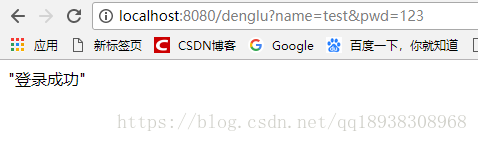
4.运行
springboot+mybatis实现登录功能,返回json的更多相关文章
- springboot+mybatis集成分页功能
1.使用idea搭建srpingboot项目 在pom.xml文件中引入如下的依赖: <dependency> <groupId>org.springframework.boo ...
- springboot+mybatis+shiro——登录认证和权限控制
转载:https://z77z.oschina.io/ 一.引入依赖 shiro-all包含shiro所有的包.shiro-core是核心包.shiro-web是与web整合.shiro-spring ...
- SpringBoot简单实现登录功能
登陆 开发期间模板引擎页面修改以后,要实时生效 1).禁用模板引擎的缓存 # 禁用缓存 spring.thymeleaf.cache=false 2).页面修改完成以后ctrl+f9:重新编译: 登陆 ...
- Spring+Mybatis之登录功能demo
其实工作之后就没有用过Spring+Mybatis的框架了,因为公司有一个自己开发的框架,讲道理,其实这个与Spring+Mybatis整合很是神似.当然性能上还是比不上Spring+Mybatis所 ...
- SpringBoot 之 实现登录功能及登录拦截器
增加登录退出控制器: # src/main/java/com/wu/controller/LoginController.java @Controller public class LoginCont ...
- 利用MYSQL的函数实现用户登录功能,进出都是JSON(第二版)
利用MYSQL的函数实现用户登录功能,进出都是JSON(第二版) CREATE DEFINER=`root`@`%` FUNCTION `uc_session_login`( `reqjson` JS ...
- SpringBoot 02_返回json数据
在SpringBoot 01_HelloWorld的基础上来返回json的数据,现在前后端分离的情况下多数都是通过Json来进行交互,下面就来利用SpringBoot返回Json格式的数据. 1:新建 ...
- 菜鸟级springmvc+spring+mybatis整合开发用户登录功能(上)
由于本人愚钝,整合ssm框架真是费劲了全身的力气,所以打算写下这篇文章,一来是对整个过程进行一个回顾,二来是方便有像我一样的笨鸟看过这篇文章后对其有所帮助,如果本文中有不对的地方,也请大神们指教. 一 ...
- idea+springmvc+spring+mybatis+maven整合返回json数据webapi
首先看一张目录结构图: : 创建步骤: 1.创建maven webapp工程, 创建完后的目录结构为: 2.添加项目依赖(添加jar包) 需要的jar包: spring-webmvc, spring ...
随机推荐
- cancelbubble和stoppraopagation区别
事实上stoppropagation和cancelBubble的作用是一样的,都是用来阻止浏览器默认的事件冒泡行为. 不同之处在于stoppropagation属于W3C标准,试用于Firefox等浏 ...
- [转]Why you shouldn't use set (and what you should use instead)
Why you shouldn't use set (and what you should use instead) --- stl::set和sorted ector对比Matt Austern ...
- jeesite 的提示消息图标
jeesite 的提示消息图标 jeesite 框架的提示信息 保存数据时 总是显示一个叉子图标 不符合要求 原因: 不加成功两字:如下 后来大神说 保存数据提示语句必须加“”“成功” 才会出现正确 ...
- sublime text3文本字体大小设置
1.perferences->settings-user 4·将以下代码粘贴进入即可 { "font_face": "source code pro, " ...
- window平台 php 安装 redis 扩展
1.使用phpinfo() 函数查看PHP的版本信息 <?php phpinfo(); ?> 查看扩展文件版本(特别注意以php版本的 architecture 是x86还是64为准,不能 ...
- [BZOJ 3262]陌上开花
今天写了到偏序问题,发现博主真的是个傻X 传送门 以前的写法 /************************************************************** Probl ...
- docker image rm ubuntu 失败
[root@hadoop14 ~]# docker image rm ubuntu Failed to remove image (ubuntu:v2): Error response from da ...
- C# 调用键盘
首先我们说的键盘指的是:tabtip和osk.但这两个所在的位置不同,样貌也不一样 C:\Windows\System32\osk.exe C:\Program Files\Common Files\ ...
- postgresql 的一些操作
(4)常用数据库命令(mysql为MySQL数据库操作命令,psql为postgresql数据库命令) 手动重启数据库命令:pg_ctl -D /usr/local/var/postgres -l / ...
- PIE SDK元素位置和显示样式的修改
1功能简介 在数据的处理中会出现根据需求进行元素的位置和显示样式的修改,使元素的形状,空间位置得到改变,下面将介绍基于PIE SDK的元素位置和显示样式的修改. 2功能实现说明 2.1.1 实现思路及 ...