
RHEL7 LAMP
准备篇:
RHEL 7.0系统安装配置图解教程:http://www.osyunwei.com/archives/7702.html
一、使用系统镜像文件配置本地yum源
1、使用WinSCP.exe等工具上传系统镜像文件rhel-server-7.0-x86_64-dvd.iso到/usr/local/src目录
2、使用Putty.exe工具远程连接到RHEL服务器
3、挂载系统镜像文件
mkdir /media/cdrom #新建镜像文件挂载目录
cd /usr/local/src #进入系统镜像文件存放目录
ls #列出目录文件,可以看到刚刚上传的系统镜像文件
mount -t iso9660 -o loop /usr/local/src/rhel-server-7.0-x86_64-dvd.iso /media/cdrom #挂载系统镜像
cd /media/cdrom #进入挂载目录,使用ls命令可以看到已经有文件存在了
备注:umount /media/cdrom #卸载系统镜像
4、设置开机自动挂载系统镜像文件
vi /etc/fstab #添加以下代码。实现开机自动挂载
/usr/local/src/rhel-server-7.0-x86_64-dvd.iso /media/cdrom iso9660 defaults,ro,loop 0 0
:wq! #保存退出
备注:iso9660使用df -T 查看
5、配置本地yum源
cd /etc/yum.repos.d/ #进入yum配置目录
touch rhel-media.repo #建立yum配置文件
vi rhel-media.repo #编辑配置文件,添加以下内容
[rhel-media]
name=Red Hat Enterprise Linux 7.0 #自定义名称
baseurl=file:///media/cdrom #本地光盘挂载路径
enabled=1 #启用yum源,0为不启用,1为启用
gpgcheck=1 #检查GPG-KEY,0为不检查,1为检查
gpgkey=file:///media/cdrom/RPM-GPG-KEY-redhat-release #GPG-KEY路径
:wq! #保存退出
6、配置yum命令
yum clean all #清除yum缓存
yum makecache #缓存本地yum源中的软件包信息
现在,已经可以使用yum命令自动安装软件了。
二、配置防火墙,开启80端口、3306端口
RHEL 7.0默认使用的是firewall作为防火墙,这里改为iptables防火墙。
1、关闭firewall:
systemctl stop firewalld.service #停止firewall
systemctl disable firewalld.service #禁止firewall开机启动
2、安装iptables防火墙
yum install iptables-services #安装
vi /etc/sysconfig/iptables #编辑防火墙配置文件
# Firewall configuration written by system-config-firewall
# Manual customization of this file is not recommended.
*filter
:INPUT ACCEPT [0:0]
:FORWARD ACCEPT [0:0]
:OUTPUT ACCEPT [0:0]
-A INPUT -m state --state ESTABLISHED,RELATED -j ACCEPT
-A INPUT -p icmp -j ACCEPT
-A INPUT -i lo -j ACCEPT
-A INPUT -m state --state NEW -m tcp -p tcp --dport 22 -j ACCEPT
-A INPUT -m state --state NEW -m tcp -p tcp --dport 80 -j ACCEPT
-A INPUT -m state --state NEW -m tcp -p tcp --dport 3306 -j ACCEPT
-A INPUT -j REJECT --reject-with icmp-host-prohibited
-A FORWARD -j REJECT --reject-with icmp-host-prohibited
COMMIT
:wq! #保存退出
systemctl restart iptables.service #最后重启防火墙使配置生效
三、关闭SELINUX
vi /etc/selinux/config
#SELINUX=enforcing #注释掉
#SELINUXTYPE=targeted #注释掉
SELINUX=disabled #增加
:wq! #保存退出
setenforce 0 #使配置立即生效
安装篇:
一、安装Apache
yum install httpd #根据提示,输入Y安装即可成功安装
systemctl start httpd.service #启动apache
systemctl stop httpd.service #停止apache
systemctl restart httpd.service #重启apache
systemctl enable httpd.service #设置apache开机启动
二、安装MariaDB
RHEL 7.0中,已经使用MariaDB替代了MySQL数据库
1、安装MariaDB
系统运维 www.osyunwei.com 温馨提醒:qihang01原创内容©版权所有,转载请注明出处及原文链
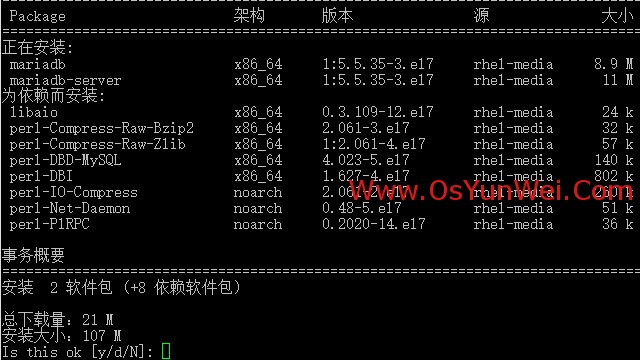
yum install mariadb mariadb-server #询问是否要安装,输入Y即可自动安装,直到安装完成
systemctl start mariadb.service #启动MariaDB
systemctl stop mariadb.service #停止MariaDB
systemctl restart mariadb.service #重启MariaDB
systemctl enable mariadb.service #设置开机启动
cp /usr/share/mysql/my-huge.cnf /etc/my.cnf #拷贝配置文件(注意:如果/etc目录下面默认有一个my.cnf,直接覆盖即可)
2、为root账户设置密码
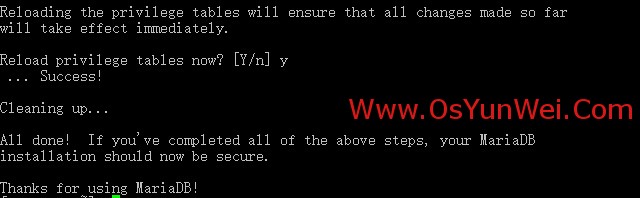
mysql_secure_installation
回车,根据提示输入Y
输入2次密码,回车
根据提示一路输入Y
最后出现:Thanks for using MariaDB!
systemctl restart mariadb.service #重启MariaDB
三、安装PHP
1、安装PHP
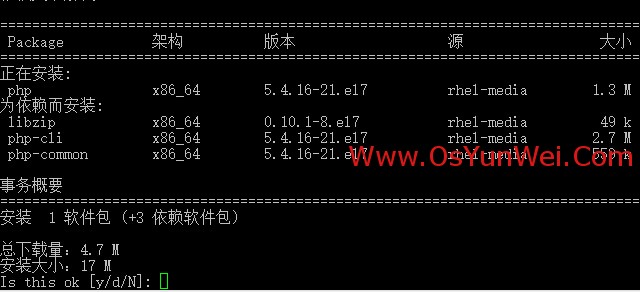
yum install php #根据提示输入Y直到安装完成
2、安装PHP组件,使PHP支持 MariaDB
系统运维 www.osyunwei.com 温馨提醒:qihang01原创内容©版权所有,转载请注明出处及原文链
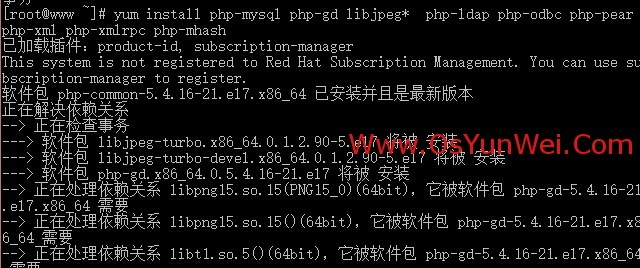
yum install php-mysql php-gd libjpeg* php-ldap php-odbc php-pear php-xml php-xmlrpc php-mhash
#这里选择以上安装包进行安装,根据提示输入Y回车
systemctl restart mariadb.service #重启MariaDB
systemctl restart httpd.service #重启apache
配置篇:
一、Apache配置
vi /etc/httpd/conf/httpd.conf #编辑文件
ServerSignature On #添加,在错误页中显示Apache的版本,Off为不显示
Options Indexes FollowSymLinks #修改为:Options Includes ExecCGI FollowSymLinks(允许服务器执行CGI及SSI,禁止列出目录)
#AddHandler cgi-script .cgi #修改为:AddHandler cgi-script .cgi .pl (允许扩展名为.pl的CGI脚本运行)
AllowOverride None #修改为:AllowOverride All (允许.htaccess)
AddDefaultCharset UTF-8 #修改为:AddDefaultCharset GB2312 (添加GB2312为默认编码)
#Options Indexes FollowSymLinks #修改为 Options FollowSymLinks(不在浏览器上显示树状目录结构)
DirectoryIndex index.html #修改为:DirectoryIndex index.html index.htm Default.html Default.htm index.php(设置默认首页文件,增加index.php)
MaxKeepAliveRequests 500 #添加MaxKeepAliveRequests 500 (增加同时连接数)
:wq! #保存退出
systemctl restart httpd.service #重启apache
rm -f /etc/httpd/conf.d/welcome.conf /var/www/error/noindex.html #删除默认测试页
二、php配置
vi /etc/php.ini #编辑
date.timezone = PRC #把前面的分号去掉,改为date.timezone = PRC
disable_functions = passthru,exec,system,chroot,scandir,chgrp,chown,shell_exec,proc_open,proc_get_status,ini_alter,ini_alter,ini_restore,dl,openlog,syslog,readlink,symlink,popepassthru,stream_socket_server,escapeshellcmd,dll,popen,disk_free_space,checkdnsrr,checkdnsrr,getservbyname,getservbyport,disk_total_space,posix_ctermid,posix_get_last_error,posix_getcwd, posix_getegid,posix_geteuid,posix_getgid, posix_getgrgid,posix_getgrnam,posix_getgroups,posix_getlogin,posix_getpgid,posix_getpgrp,posix_getpid, posix_getppid,posix_getpwnam,posix_getpwuid, posix_getrlimit, posix_getsid,posix_getuid,posix_isatty, posix_kill,posix_mkfifo,posix_setegid,posix_seteuid,posix_setgid, posix_setpgid,posix_setsid,posix_setuid,posix_strerror,posix_times,posix_ttyname,posix_uname
#列出PHP可以禁用的函数,如果某些程序需要用到这个函数,可以删除,取消禁用。
expose_php = Off #禁止显示php版本的信息
magic_quotes_gpc = On #打开magic_quotes_gpc来防止SQL注入
short_open_tag = ON #支持php短标签
open_basedir = .:/tmp/ #设置表示允许访问当前目录(即PHP脚本文件所在之目录)和/tmp/目录,可以防止php木马跨站,如果改了之后安装程序有问题(例如:织梦内容管理系统),可以注销此行,或者直接写上程序的目录/data/www.osyunwei.com/:/tmp/
:wq! #保存退出
systemctl restart mariadb.service #重启MariaDB
systemctl restart httpd.service #重启apache
测试篇:
cd /var/www/html
vi index.php #输入下面内容
<?php
phpinfo();
?>
:wq! #保存退出
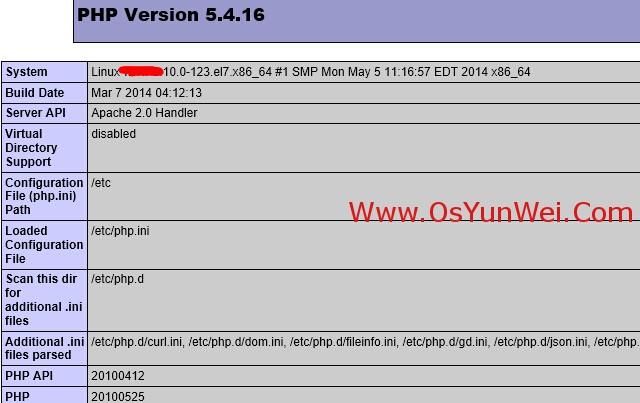
在客户端浏览器输入服务器IP地址,可以看到如下图所示相关的配置信息!
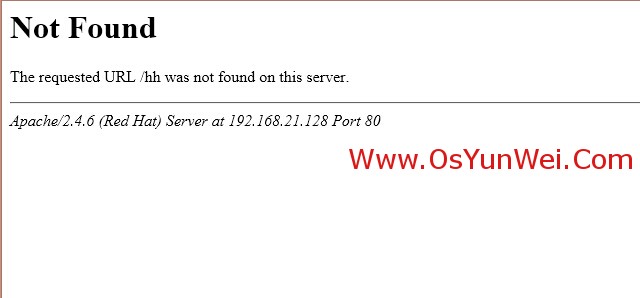
如果页面打不开,请确保firewalld防火墙已经关闭
systemctl stop firewalld.service #停止firewall
systemctl disable firewalld.service #禁止firewall开机启动
注意:apache默认的程序目录是/var/www/html
权限设置:chown apache.apache -R /var/www/html
至此,RHEL 7.0安装配置LAMP服务器(Apache+PHP+MariaDB)教程完成!
RHEL7 LAMP的更多相关文章
- 编译LAMP部署动态网站环境
LAMP动态网站部署架构是由一套 Linux+Apache+MySQL+PHP 组成的动态网站系统解决方案. 以下配置环境为:Linux=RHEL7 --> Apache=2.4.33 --&g ...
- RHEL7配置端口转发和地址伪装
说明:这里是Linux服务综合搭建文章的一部分,本文可以作为Linux上使用firewalld做端口转发和地址伪装以及外网访问内网的参考. 注意:这里所有的标题都是根据主要的文章(Linux基础服务搭 ...
- RHEL7通过Rsyslog搭建集中日志服务器
说明:这里是Linux服务综合搭建文章的一部分,本文可以作为单独搭建rsyslog日志服务器的参考. 注意:这里所有的标题都是根据主要的文章(Linux基础服务搭建综合)的顺序来做的. 如果需要查看相 ...
- 安装 LAMP 环境(yum 版本) shell脚本
#!/bin/bash # 安装 LAMP 环境(yum 版本) # 本脚本适用于 RHEL7(RHEL6 中数据库为 mysql) yum makecache &>/dev/null ...
- Linux安装LAMP开发环境及配置文件管理
Linux主要分为两大系发行版,分别是RedHat和Debian,lamp环境的安装和配置也会有所不同,所以分别以CentOS 7.1和Ubuntu 14.04做为主机(L) Linux下安装软件,最 ...
- Configure a VLAN on top of a team with NetworkManager (nmcli) in RHEL7
SOLUTION VERIFIED September 13 2016 KB1248793 Environment Red Hat Enterprise Linux 7 NetworkManager ...
- Create a Team in RHEL7
SOLUTION VERIFIED September 13 2016 KB2620131 Environment Red Hat Enterprise Linux 7 NetworkManager ...
- Web应用之LAMP源码环境部署
一.LAMP环境的介绍 1.LAMP环境的重要性 思索许久,最终还是决定写一篇详细的LAMP的源码编译安装的实验文档,一来是为了给自己一个交代,把技术进行系统的归纳,将技术以极致的形式呈现出来,做为一 ...
- 【笔记】LAMP 环境无脑安装配置 Centos 6.3
p.p1 { margin: 0.0px 0.0px 5.0px 0.0px; font: 12.0px Times; color: #ff2500 } p.p2 { margin: 0.0px 0. ...
随机推荐
- 求伪逆矩阵c++代码(Eigen库)
非方阵的矩阵的逆矩阵 pseudoInverse 伪逆矩阵是逆矩阵的广义形式,广义逆矩阵 matlab中是pinv(A)-->inv(A). #include "stdafx.h&q ...
- python 推荐算法
每个人都会有这样的经历:当你在电商网站购物时,你会看到天猫给你弹出的“和你买了同样物品的人还买了XXX”的信息:当你在SNS社交网站闲逛时,也会看到弹出的“你可能认识XXX“的信息:你在微博添加关注人 ...
- Achartengine.jar绘制动态图形-饼图
Achartengine.jar绘制动态图形一 --饼图 PS:我们在做安卓程序的时候,免不了会做一些图形,自己可以选择自定义view ,就是用Canvas画,也可以用写好的jar包,就是achart ...
- iphone断点下载,断点续传
本文转载至 http://blog.csdn.net/zaitianaoxiang/article/details/6650469 - (void)loadView { NSURLConnection ...
- python 数学操作符
优先级从高到低 print("2 ** 3 = %d" % 2 ** 3) 2 ** 3 = 8print("7 % 2 = {}".format(7 % 2) ...
- ProgressBar 进度条设置百分比显示
rawable/progressbar <layer-list xmlns:android="http://schemas.android.com/apk/res/android&qu ...
- Windows Azure 免费初体验 - 创建部署网站
前几天在看到有个学Windows Azure课程,送Windows Azure的活动,课程地址:http://www.microsoftvirtualacademy.com/ 在活得体验资格后,就迫不 ...
- JS中的动态合集与静态合集
JS的动态合集 前言 DOM是JavaScript重要组成部分,在DOM中有三个特别的集合分别是NodeList(节点的集合),NamedNodeMap(元素属性的集合)和HTMLCollection ...
- Permutation Descent Counts(递推)
1968: Permutation Descent Counts Submit Page Summary Time Limit: 1 Sec Memory Limit: 128 Mb ...
- PAT 1070. 结绳(25)
给定一段一段的绳子,你需要把它们串成一条绳.每次串连的时候,是把两段绳子对折,再如下图所示套接在一起.这样得到的绳子又被当成是另一段绳子,可以再次对折去跟另一段绳子串连.每次串连后,原来两段绳子的长度 ...