
当我们在安装tensorflow时,我们在安装什么?- Intro to TF, Virtualenv, Docker, CUDA, cuDNN, NCCL, Bazel
(Mainly quoted from its official website)
Summary:
1. TensorFlow™ is an open source software library.
2. Virtualenv is a tool to create isolated Python environments.
3. Docker:
An image is a executable package.
A container is a runtime instance of an image.
4. CUDA® is a parallel computing platform and programming model.
The CUDA Toolkit is used to develop GPU-accelerated applications.
5. cuDNN is a GPU-accelerated library of primitives for deep neural networks.
6. NCCL implements multi-GPU and multi-node collective communication primitives.
7. Bazel is an open-source build and test tool.
------------------------------------------------------------------------------------
TensorFlow™
TensorFlow™ is an open source software library for high performance numerical computation.
Its flexible architecture allows easy deployment of computation across a variety of platforms (CPUs, GPUs, TPUs), and from desktops to clusters of servers to mobile and edge devices.
------------------------------
Virtualenv
Virtualenv is a tool to create isolated Python environments.
e.g. Some applications need python 2.x, while some need python 3.x, so that they cannot share the system default python.
One solution is to use virtualenv to create isolated python environments for different applications.
Usage:
- Create an environment (e.g. venv)
- Use source to enter this environment (e.g. $ source venv/bin/activate)
- Inside the venv, the packages installed by pip will be installed in the venv and will not be influenced by system default python. (e.g. (venv) $ pip install ***)
- Use deactivate to exit the current environment. (e.g. (venv) $ deactivate)
------------------------------
Docker
An image is a lightweight, stand-alone, executable package that includes everything needed to run a piece of software, including the code, a runtime, libraries, environment variables, and config files.
A container is a runtime instance of an image—what the image becomes in memory when actually executed. It runs completely isolated from the host environment by default, only accessing host files and ports if configured to do so.
Container vs. virtual machines
Containers run apps natively on the host machine’s kernel. They have better performance characteristics than virtual machines that only get virtual access to host resources through a hypervisor. Containers can get native access, each one running in a discrete process, taking no more memory than any other executable.

Virtual machines run guest operating systems—note the OS layer in each box. This is resource intensive, and the resulting disk image and application state is an entanglement of OS settings, system-installed dependencies, OS security patches, and other easy-to-lose, hard-to-replicate ephemera. 这是资源密集型的,所产生的磁盘映像和应用程序状态,会导致众多问题的纠缠,如操作系统设置、系统安装依赖项、OS安全修补程序和其他易丢失、因仅短期有效而难以复制的生命期。
Containers can share a single kernel, and the only information that needs to be in a container image is the executable and its package dependencies, which never need to be installed on the host system. These processes run like native processes, and you can manage them individually by running commands like docker ps—just like you would run ps on Linux to see active processes. Finally, because they contain all their dependencies, there is no configuration entanglement; a containerized app “runs anywhere.” 容器可以共享单个内核,并且容器映像中唯一需要的信息是可执行文件及其包依赖项,它们永远不需要安装在主机系统上。 这些进程像本机进程一样运行,您可以通过运行docker ps之类的命令来单独管理它们,就像在Linux上运行ps来查看活动进程一样。 最后,因为它们包含所有依赖项,所以没有配置纠缠; 容器化的应用程序“随处运行”。
With containerization, developers don’t need to write application code into different VMs operating different app components to retrieve compute, storage and networking resources. A complete application component can be executed in its entirety within its isolated environment without affecting other app components or software. Conflicts within libraries or app components do not occur during execution and the application container can move between the cloud or data center instances efficiently.
(https://www.bmc.com/blogs/containers-vs-virtual-machines/)
------------------
Virtualenv vs. Container
Virtualenv is used to isolate different python versions.
Container is used to let different components of a complete application be executed in its entirety within its isolated resources. Each container contains everything needed to run a piece of software.
-----------------------------------
CUDA (https://developer.nvidia.com/cuda-zone)
CUDA® is a parallel computing platform and programming model developed by NVIDIA for general computing on graphical processing units (GPUs). With CUDA, developers are able to dramatically speed up computing applications by harnessing the power of GPUs.
In GPU-accelerated applications, the sequential part of the workload runs on the CPU – which is optimized for single-threaded performance – while the compute intensive portion of the application runs on thousands of GPU cores in parallel. When using CUDA, developers program in popular languages such as C, C++, Fortran, Python and MATLAB and express parallelism through extensions in the form of a few basic keywords.
The CUDA Toolkit from NVIDIA provides everything you need to develop GPU-accelerated applications. The CUDA Toolkit includes GPU-accelerated libraries, a compiler, development tools and the CUDA runtime.
-------------------------------
cuDNN (https://developer.nvidia.com/cudnn)
The NVIDIA CUDA® Deep Neural Network library (cuDNN) is a GPU-accelerated library of primitives for deep neural networks. cuDNN provides highly tuned implementations for standard routines such as forward and backward convolution, pooling, normalization, and activation layers. cuDNN is part of the NVIDIA Deep Learning SDK.
Deep learning researchers and framework developers worldwide rely on cuDNN for high-performance GPU acceleration. It allows them to focus on training neural networks and developing software applications rather than spending time on low-level GPU performance tuning. cuDNN accelerates widely used deep learning frameworks, including Caffe,Caffe2, Chainer, Keras,MATLAB, MxNet, TensorFlow, and PyTorch.
---------------------
NCCL
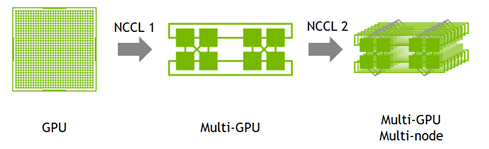
The NVIDIA Collective Communications Library (NCCL) implements multi-GPU and multi-node collective communication primitives that are performance optimized for NVIDIA GPUs. NCCL provides routines such as all-gather, all-reduce, broadcast, reduce, reduce-scatter, that are optimized to achieve high bandwidth over PCIe and NVLink high-speed interconnect.
Developers of deep learning frameworks can rely on NCCL’s highly optimized, MPI compatible and topology aware routines, to take full advantage of all available GPUs within and across multiple nodes. Leading deep learning frameworks such as Caffe,Caffe2, Chainer, MxNet, TensorFlow, and PyTorch have integrated NCCL to accelerate deep learning training on multi-GPU systems.
---------------------
Bazel
Bazel is an open-source build and test tool similar to Make, Maven, and Gradle. It uses a human-readable, high-level build language. Bazel supports projects in multiple languages and builds outputs for multiple platforms. Bazel supports large codebases across multiple repositories, and large numbers of users.
(Can use it to build tensorflow from source.)
当我们在安装tensorflow时,我们在安装什么?- Intro to TF, Virtualenv, Docker, CUDA, cuDNN, NCCL, Bazel的更多相关文章
- 【tensorflow】1.安装Tensorflow开发环境,安装Python 的IDE--PyCharm
================================================== 安装Tensorflow开发环境,安装Python 的IDE--PyCharm 1.PyCharm ...
- Windows下安装程序时提示未安装Microsoft Net FrameWork 2.0
问题描述 安装程序时碰到如下: 现在基本都是用win7.win10系统,缺少环境大多数都是因为系统没有启用. 解决方法 控制面板 - 程序 - 启用或关闭Windows功能 - 把第一项'NET Fr ...
- 安装 tensorflow 时遇到 OSError: [Errno 1] Operation not permitted 的解决办法
Installing collected packages: numpy, scipy, six, pyyaml, Keras, opencv-python, h5py, html5lib, blea ...
- 安装TensorFlow时出现ERROR: Cannot uninstall 'wrapt'问题的解决方案
pip install -U --ignore-installed wrapt enum34 simplejson netaddr pip install -i https://pypi.tuna.t ...
- Winodws安装系统时,通过安装磁盘进行分区
今天使用一个系统盘安装的时候,很奇怪,分区总是分出来一个系统磁盘,一个MBR,剩下的只能分主分区. 这样就导致我在进行windows激活时,激活工具都找不到启动磁盘的盘符(因为自动分出来的系统磁盘和M ...
- ubuntu上安装adt时无法在线安装的问题
安装了新的ubuntu系统之后,就得重新布置android开发环境了. 找了网上的教程,一步一步做,到了在eclipse上在线下载adt总是出现 Unable to connect to reposi ...
- 8-linux 安装 requests 时 pip install 安装不了
安装提示更新:但是必须要sudo才行: sudo pip install --upgrade pip 安装 requests时有报错:这样写可以: sudo python -m pip install ...
- 安装Mysql时提示尚未安装Python 解决方案
我明明安装了python,结果在安装mysql是却提示没有安装python. 原因,没有将python添加到path中. 解决方法:卸载python,然后重装python,在安装界面中勾选将path添 ...
- 解决安装office2013时提示已安装相同版本的office
例如出现如上所示的图: ------------------------------------------------------------------ 在尝试使用官方的卸载清理工具无果后, 终极 ...
随机推荐
- 123. Best Time to Buy and Sell Stock III ——LeetCode
Say you have an array for which the ith element is the price of a given stock on day i. Design an al ...
- java使用JSCH连接FTP(Linux服务器)上传文件到Linux服务器
首先需要用到jsch-0.1.54.jar 包: 链接: https://pan.baidu.com/s/1kZR6MqwpCYht9Pp_D6NKQw 密码: gywx 直接上代码: package ...
- mysql忘记密码重置
一.更改my.cnf配置文件 0.MySQL 版本查看 mysql --version 1.用命令编辑/etc/my.cnf配置文件,即:vim /etc/my.cnf 或者 vi /etc/my.c ...
- yum仓库客户端搭建和NTP时间同步客户端配置
一.yum仓库客户端搭建 yum源仓库搭建分为服务器端和客户端. 服务端主要提供软件(rpm包)和yumlist.也就是提供yum源的位置.一般是通过http或者ftp提供位置. 客户端的配置:yum ...
- windows下上传shell脚本不能运行—将dos模式修改为unix 文件格式
windows下上传shell脚本至linux,其格式将为dos.dos模式的shell脚本将不能再linux下正确运行,需要修改文件模式为unix. 1 查看文件模式方法 linux服务器上,用vi ...
- git 上传到码云
创建分支 在码云里创建好分支 命令行进入项目所在的目录 显示码云上的分支 git pull 选择将要编辑的分支(index-fenzhi) git checkout index-fenzhi 查看分支 ...
- JSP/Servlet开发——第一章 动态网页基础
1.动态网页:在服务端运行的使用程序语言设计的交互网页 : ●动态网站并不是指具有动画功能的网站,而是指网站内容可根据不同情况动态变更的网站(股票网站),一般情况下动态网站通过数据库进行架构. ●动态 ...
- 【TCP/IP实现磁盘资源的分享-----ISCSI(互联网最小应用程序接口)】
Iscsi server: 首先把多块磁盘合并为RAID5,便于后期iscis client访问以及服务端的管理 安装 targted服务端包,以及targtedcli创建iscsi TCP/IP共享 ...
- 深度剖析HBase负载均衡和性能指标
深度剖析HBase负载均衡和性能指标 在分布式系统中,负载均衡是一个非常重要的功能,HBase通过Region的数量实现负载均衡,即通过hbase.master.loadbalancer.class实 ...
- 【Hbase二】环境搭建
此笔记仅用于作者记录复习使用,如有错误地方欢迎留言指正,作者感激不尽,如有转载请指明出处 Hbase环境搭建 Hbase环境搭建 hadoop为HA的Hbase配置 Zookeeper集群的正常部署并 ...