
Ubuntu下使用Git_4
在这个第四个文章中,我将练习GIT的高级阶段了,由于高级阶段的内容转的比较多,我自己的代码除了我自己可以看懂意外,大家可能看不懂,所以我将会按照
http://git.wiki.navisec.it/stepup/stepup2_1.html这里教程里面的内容进行一次截图演示
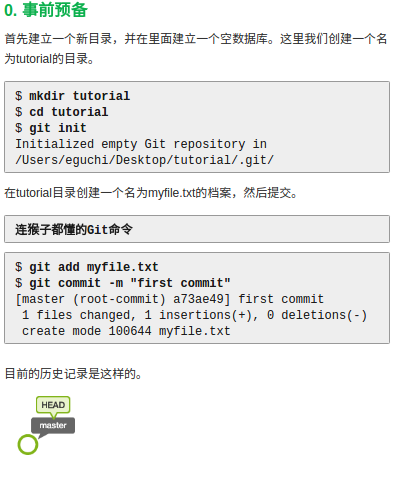
按照教程,我讲先新建一个文件夹,作为本地数据库
$ mkdir tutorial

$ cd tutorial

$ git init

本地数据初始化完毕
下一步就是新建一个文件

剩下步骤就是吧这个文件添加到git的索引下,并且提交
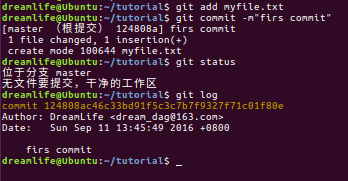
下一步就是建立分支
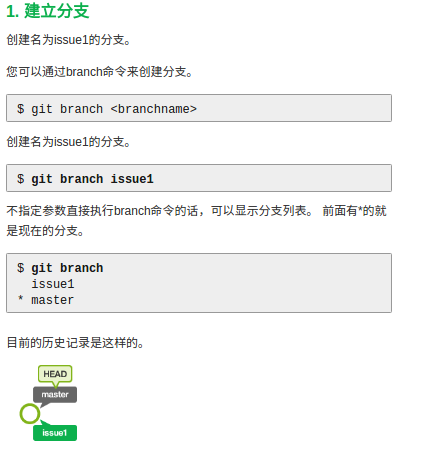
按照教程来
$ git branch issue1

$ git branch
下一步,切换分支
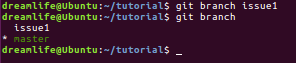
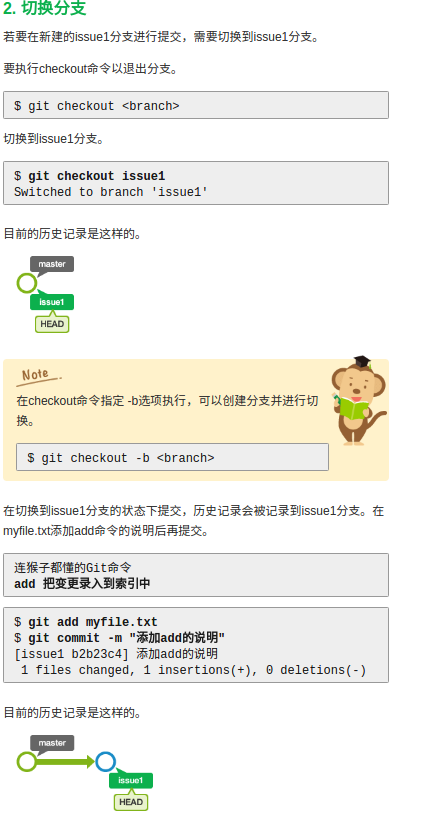
$ git branch issue1

$ git branch
$ git checkout issue1
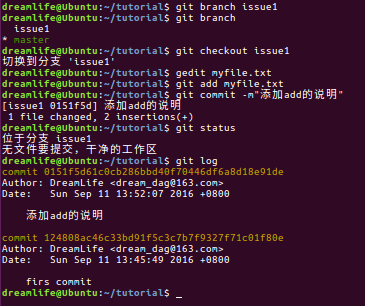
下一步合并分支
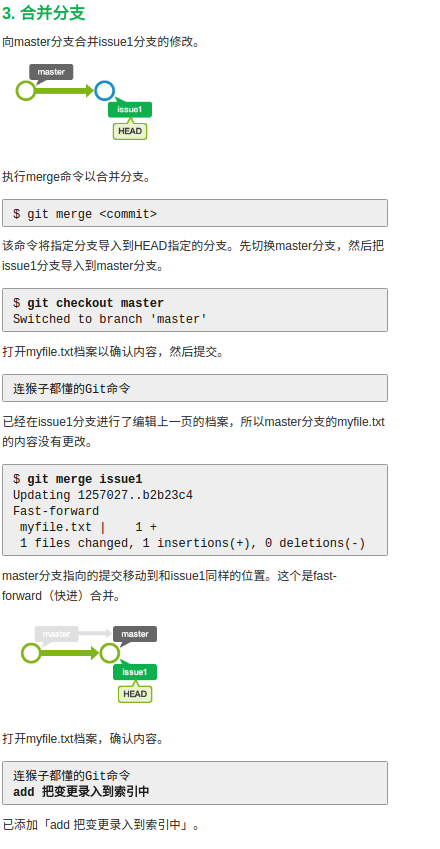
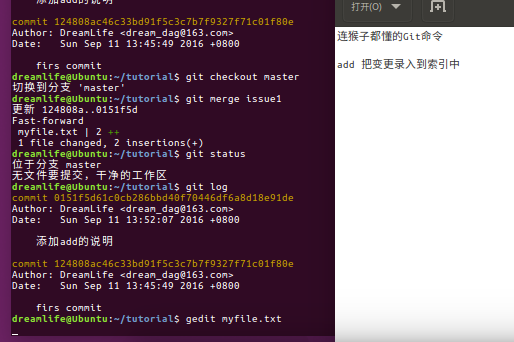
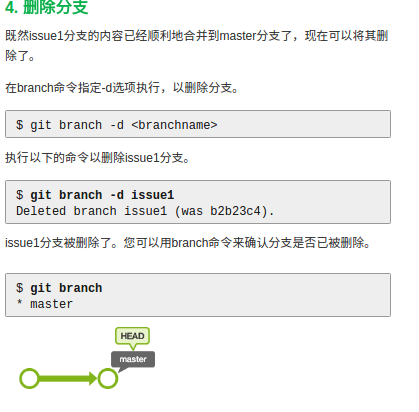
删除分支

下面是最重要的了,就是两个人同时开发的时候,在合并分支的时候,出现合并冲突怎么解决了
和前面的差不多了
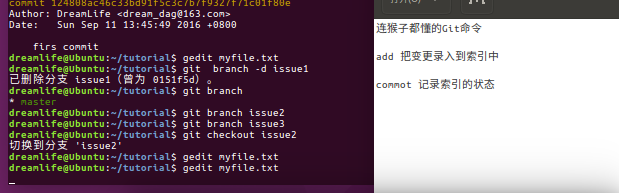
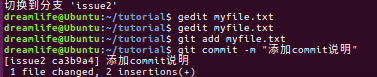
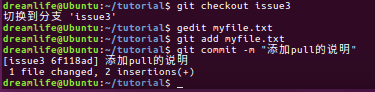
现在在issue2中编辑文件,切换到issue3中编辑文件
下面就是切换到 master分支下合并文件
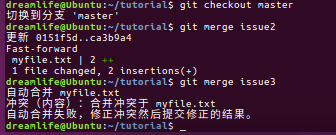
可以看到,我们可以顺利合并issue2,但是在合并issue3的时候提示内容冲突
这里我们只需要打开文件,手动除了一下冲突就好

完成合并
还有一种合并方式,这里实践一下
还原issue3的合并

切换到issue3下面
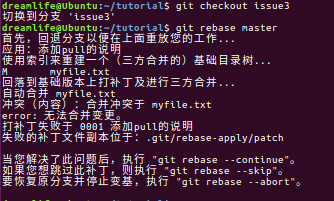
合并的时候,会发现有冲突
下面直接打开就好
下面贴上我的所有操作记录
dreamlife@Ubuntu:~$ mkdir tutorial

dreamlife@Ubuntu:~$ cd tutorial

dreamlife@Ubuntu:~/tutorial$ git init

初始化空的 Git 仓库于 /home/dreamlife/tutorial/.git/

dreamlife@Ubuntu:~/tutorial$ gedit myfile.txt

dreamlife@Ubuntu:~/tutorial$ gedit myfile.txt

dreamlife@Ubuntu:~/tutorial$

dreamlife@Ubuntu:~/tutorial$

dreamlife@Ubuntu:~/tutorial$

dreamlife@Ubuntu:~/tutorial$ git add myfile.txt

dreamlife@Ubuntu:~/tutorial$ git commit -m"firs commit"

[master (根提交) 124808a] firs commit

 1 file changed, 1 insertion(+)

 create mode 100644 myfile.txt

dreamlife@Ubuntu:~/tutorial$ git status

位于分支 master

无文件要提交,干净的工作区

dreamlife@Ubuntu:~/tutorial$ git log

commit 124808ac46c33bd91f5c3c7b7f9327f71c01f80e

Author: DreamLife <dream_dag@163.com>

Date:   Sun Sep 11 13:45:49 2016 +0800

    firs commit

dreamlife@Ubuntu:~/tutorial$ git branch issue1

dreamlife@Ubuntu:~/tutorial$ git branch

  issue1

* master

dreamlife@Ubuntu:~/tutorial$ git checkout issue1

切换到分支 'issue1'

dreamlife@Ubuntu:~/tutorial$ gedit myfile.txt

dreamlife@Ubuntu:~/tutorial$ git add myfile.txt

dreamlife@Ubuntu:~/tutorial$ git commit -m"添加add的说明"

[issue1 0151f5d] 添加add的说明

 1 file changed, 2 insertions(+)

dreamlife@Ubuntu:~/tutorial$ git status

位于分支 issue1

无文件要提交,干净的工作区

dreamlife@Ubuntu:~/tutorial$ git log

commit 0151f5d61c0cb286bbd40f70446df6a8d18e91de

Author: DreamLife <dream_dag@163.com>

Date:   Sun Sep 11 13:52:07 2016 +0800

    添加add的说明

commit 124808ac46c33bd91f5c3c7b7f9327f71c01f80e

Author: DreamLife <dream_dag@163.com>

Date:   Sun Sep 11 13:45:49 2016 +0800

    firs commit

dreamlife@Ubuntu:~/tutorial$ git checkout master

切换到分支 'master'

dreamlife@Ubuntu:~/tutorial$ git merge issue1

更新 124808a..0151f5d

Fast-forward

 myfile.txt | 2 ++

 1 file changed, 2 insertions(+)

dreamlife@Ubuntu:~/tutorial$ git status

位于分支 master

无文件要提交,干净的工作区

dreamlife@Ubuntu:~/tutorial$ git log

commit 0151f5d61c0cb286bbd40f70446df6a8d18e91de

Author: DreamLife <dream_dag@163.com>

Date:   Sun Sep 11 13:52:07 2016 +0800

    添加add的说明

commit 124808ac46c33bd91f5c3c7b7f9327f71c01f80e

Author: DreamLife <dream_dag@163.com>

Date:   Sun Sep 11 13:45:49 2016 +0800

    firs commit

dreamlife@Ubuntu:~/tutorial$ gedit myfile.txt

dreamlife@Ubuntu:~/tutorial$ git  branch -d issue1

已删除分支 issue1(曾为 0151f5d)。

dreamlife@Ubuntu:~/tutorial$ git branch

* master

dreamlife@Ubuntu:~/tutorial$ git branch issue2

dreamlife@Ubuntu:~/tutorial$ git branch issue3

dreamlife@Ubuntu:~/tutorial$ git checkout issue2

切换到分支 'issue2'

dreamlife@Ubuntu:~/tutorial$ gedit myfile.txt

dreamlife@Ubuntu:~/tutorial$ gedit myfile.txt

dreamlife@Ubuntu:~/tutorial$ git add myfile.txt

dreamlife@Ubuntu:~/tutorial$ git commit -m "添加commit说明"

[issue2 ca3b9a4] 添加commit说明

 1 file changed, 2 insertions(+)

dreamlife@Ubuntu:~/tutorial$ git checkout issue3

切换到分支 'issue3'

dreamlife@Ubuntu:~/tutorial$ gedit myfile.txt

dreamlife@Ubuntu:~/tutorial$ git add myfile.txt

dreamlife@Ubuntu:~/tutorial$ git commit -m "添加pull的说明"

[issue3 6f118ad] 添加pull的说明

 1 file changed, 2 insertions(+)

dreamlife@Ubuntu:~/tutorial$ git checkout master

切换到分支 'master'

dreamlife@Ubuntu:~/tutorial$ git merge issue2

更新 0151f5d..ca3b9a4

Fast-forward

 myfile.txt | 2 ++

 1 file changed, 2 insertions(+)

dreamlife@Ubuntu:~/tutorial$ git merge issue3

自动合并 myfile.txt

冲突(内容):合并冲突于 myfile.txt

自动合并失败,修正冲突然后提交修正的结果。

dreamlife@Ubuntu:~/tutorial$ gedit myfile.txt

dreamlife@Ubuntu:~/tutorial$ git add myfile.txt

dreamlife@Ubuntu:~/tutorial$ git commit -m "合并issue3分支"

[master c42c43a] 合并issue3分支

dreamlife@Ubuntu:~/tutorial$ git reset --hard  HEAD`

> ^C

dreamlife@Ubuntu:~/tutorial$ git reset --hard  HEAD~

HEAD 现在位于 ca3b9a4 添加commit说明

dreamlife@Ubuntu:~/tutorial$ gedit myfile.txt

dreamlife@Ubuntu:~/tutorial$ git che

checkout      cherry        cherry-pick

dreamlife@Ubuntu:~/tutorial$ git checkout issue3

切换到分支 'issue3'

dreamlife@Ubuntu:~/tutorial$ git rebase master

首先,回退分支以便在上面重放您的工作...

应用:添加pull的说明

使用索引来重建一个(三方合并的)基础目录树...

M	myfile.txt

回落到基础版本上打补丁及进行三方合并...

自动合并 myfile.txt

冲突(内容):合并冲突于 myfile.txt

error: 无法合并变更。

打补丁失败于 0001 添加pull的说明

失败的补丁文件副本位于:.git/rebase-apply/patch

当您解决了此问题后,执行 "git rebase --continue"。

如果您想跳过此补丁,则执行 "git rebase --skip"。

要恢复原分支并停止变基,执行 "git rebase --abort"。

dreamlife@Ubuntu:~/tutorial$ gedit myfile.txt

dreamlife@Ubuntu:~/tutorial$ git add myfile.txt

dreamlife@Ubuntu:~/tutorial$ git rebase --continue

应用:添加pull的说明

dreamlife@Ubuntu:~/tutorial$ git checkout master

切换到分支 'master'

dreamlife@Ubuntu:~/tutorial$ git merge issue3

更新 ca3b9a4..15c5986

Fast-forward

 myfile.txt | 4 ++++

 1 file changed, 4 insertions(+)

dreamlife@Ubuntu:~/tutorial$

dreamlife@Ubuntu:~/tutorial$
在合并冲突这个地方,我联系了好多次,大家也可以多联系几次,这里还是希望大家看下链接中内容,真的写的很好
http://git.wiki.navisec.it/stepup/stepup2_8.html

Ubuntu下使用Git_4的更多相关文章
- 在Ubuntu下搭建ASP.NET 5开发环境
在Ubuntu下搭建ASP.NET 5开发环境 0x00 写在前面的废话 年底这段时间实在太忙了,各种事情都凑在这个时候,没时间去学习自己感兴趣的东西,所以博客也好就没写了.最近工作上有个小功能要做成 ...
- 在Ubuntu下搭建Spark群集
在前一篇文章中,我们已经搭建好了Hadoop的群集,接下来,我们就是需要基于这个Hadoop群集,搭建Spark的群集.由于前面已经做了大量的工作,所以接下来搭建Spark会简单很多. 首先打开三个虚 ...
- Ubuntu下开启php调试模式,显示报错信息
在Ubuntu下php的缺省设置是不显示错误信息的,如果程序出错会显示“无法处理此请求的错误提示”,这在开发环境下非常不方便. 其实我们只要编辑下apache的配置文件就好 1.我的apache 配置 ...
- 在Ubuntu下安装ovs-dpdk
在Ubuntu下安装ovs-dpdk 参考资料:https://software.intel.com/zh-cn/articles/using-open-vswitch-with-dpdk-on-ub ...
- Ubuntu 下安装QT
Ubuntu 下安装QT 本文使用的环境 QT Library: qt-everywhere-opensource-src-4.7.4.tar.gz QT Creator: qt-creator-li ...
- Torch7在Ubuntu下的安装与配置
Torch7的本系列教程的主要目的是介绍Torch的入门使用.今天首先分享一下Torch7的安装.(在Ubuntu14.04安装torch7) 为什么选择Torch Torch的目标是在建立科学算法的 ...
- Ubuntu 下ibus拼音输入法启用 (ubuntu 16.04
Ubuntu 下ibus拼音输入法启用 我安装的是英文版的ubuntu 16.04,打开只带英文,并没有中文. 设置输入法为iBus 从system settings 进入language suppo ...
- Ubuntu下git的安装与使用
Ubuntu下git的安装与使用 Ubuntu下git的安装与使用与Windows下的大致相同,只不过个人感觉在Ubuntu下使用git更方便. 首先,确认你的系统是否已安装git,可以通过git指令 ...
- 在ubuntu下安装google chrome
由于手上有两台电脑,再加上我那个选择困难症加上纠结劲.所以果断把其中一台电脑只装linux系统,另一台电脑只装windows了.免得我老纠结!于是linux便选择了ubuntu. 由于浏览器一直用的是 ...
随机推荐
- 2018.10.3 MianShiBaoDian JavaWeb后端部分
MSBD 四.JavaWeb后端部分 1.Tomcat的优化经验 去掉对web.xml的监控,吧jsp提前编写成servlet,由于物理内存的情况,加大Tomcat使用的jvm的内存 2.HTTP请求 ...
- on-session问题
.D:\0kecheng\bos\bosv2.0_chapter03.无条件查询. 方法1.@JSON(serialize=false)是注解排除不需要加载的实体类上,找到它的get方法,解决no-s ...
- 【luogu P3931 SAC E#1 - 一道难题 Tree】 题解
题目链接:https://www.luogu.org/problemnew/show/P3931 肉眼观察题目感觉可以跑最大流. 证明是如果拆断一棵树,可以最小割,最小割等于最大流. 注意: 图是无向 ...
- 【Calculus 微积分の一些个人理解】
微积分 微积分(Calculus)是高等数学中研究函数的微分(Differentiation).积分(Integration)以及有关概念和应用的数学分支.它是数学的一个基础学科.内容主要包括极限.微 ...
- normal 普通身份 sysdba 系统管理员身份 sysoper 系统操作员身份 dba和sysdba
as sysdba 就是以sysdba登录,oracle登录身份有三种:normal 普通身份sysdba 系统管理员身份sysoper 系统操作员身份每种身份对应不同的权限 sysdba权限:●启动 ...
- OS_EVENT 信号量
1. OS_EVENT *T2sem=(OS_EVENT *)0; 这句代码的意思是 把OS_EVENT类型的一个指针T2sem赋值为0: 其中 OS_EVENT是数据类型,*代表是指针类型,(O ...
- java面向对象编程思想的理解
1.我们总说java是一门面向对象编程的语言,那什么是面向对象呢? 我是这样理解的,对象是事物存在的实体,如,猪.狗,花早等都是对象,对象由两部分组成.面向对象编程的三大特点:继承,多态,类是封装对象 ...
- 车站分级 (2013noip普及组T4)(树形DP)
题目描述 一条单向的铁路线上,依次有编号为 1,2,…,n 的 n个火车站.每个火车站都有一个级别,最低为 1 级.现有若干趟车次在这条线路上行驶,每一趟都满足如下要求:如果这趟车次停靠了火车站 x ...
- 困扰我的c++语法
以下是我上周学习c++ primer的心得: 1 数组引用作为形参 c++允许将变量定义成数组的引用,以下列代码为例.形参为int (&arr)[10],该参数需分成两部分说明,引用名和 引用 ...
- 小胖办证 wzoi
小胖办证 题目描述: xuzhenyi要办个签证.办证处是一座M层的大楼,1<=M<=100. 每层楼都有N个办公室,编号为1..N(1<=N<=500).每个办公室有一个签证 ...