
CALayer简介(转)
一.简单介绍
在iOS中,你能看得见摸得着的东西基本上都是UIView,比如一个按钮,一个文本标签,一个文本输入框,一个图标等等,这些都是UIView。
其实UIView之所以能显示在屏幕上,完全是因为它内部的一个图层,在创建UIView对象时,UIView内部会自动创建一个图层(即CALayer对象),通过UIView的layer属性可以访问这个层。
当UIView需要显示到屏幕上时,会调用drawRect:方法进行绘图,并且会将所有内容绘制在自己的图层上,绘图完毕后,系统会将图层拷贝到屏幕上,于是就完成了UIView的显示。
换句话说,UIView本身不具备显示的功能,拥有显示功能的是它内部的图层。
二.简单使用
UIView之所以能够显示,完全是因为内部的CALayer对象。因此,通过操作这个CALayer对象,可以很方便地调整UIView的一些界面属性。比如:阴影,圆角大小,边框宽度和颜色等。
1.通过layer设置边框的宽度和颜色
#import "ViewController.h"

#define ScreenWidth          [UIScreen mainScreen].bounds.size.width

#define ScreenHeight         [UIScreen mainScreen].bounds.size.height

#define ViewWidth            100

#define ViewHeight           100

@interface ViewController ()

@property(nonatomic,strong) UIView *customView;

@end

@implementation ViewController

- (void)viewDidLoad {

    [super viewDidLoad];

    _customView = [[UIView alloc] initWithFrame:CGRectMake(ScreenWidth/ - ViewWidth/,

                                                           ScreenHeight/ - ViewHeight/,

                                                           ViewWidth,

                                                           ViewHeight)];

    [self.view addSubview:_customView];

    //设置边框的宽度为20

    _customView.layer.borderWidth = ;

    //设置边框的颜色

    _customView.layer.borderColor = [UIColor greenColor].CGColor;

}

- (void)didReceiveMemoryWarning {

    [super didReceiveMemoryWarning];

}

@end
2.通过layer设置边框为圆角
//设置layer的圆角

_customView.layer.cornerRadius = ;
3.在layer上添加一张图片
#import "ViewController.h"

#define ScreenWidth          [UIScreen mainScreen].bounds.size.width

#define ScreenHeight         [UIScreen mainScreen].bounds.size.height

#define ViewWidth            100

#define ViewHeight           100

@interface ViewController ()

@property(nonatomic,strong) UIView *customView;

@end

@implementation ViewController

- (void)viewDidLoad {

    [super viewDidLoad];

    self.view.backgroundColor = [UIColor yellowColor];

    _customView = [[UIView alloc] initWithFrame:CGRectMake(ScreenWidth/ - ViewWidth/,

                                                           ScreenHeight/ - ViewHeight/,

                                                           ViewWidth,

                                                           ViewHeight)];

    [self.view addSubview:_customView];

    //设置边框的宽度为5

    _customView.layer.borderWidth = ;

    //设置边框的颜色

    _customView.layer.borderColor = [UIColor blackColor].CGColor;

    //设置layer的圆角

    _customView.layer.cornerRadius = ;

    //在view的图层上添加一个image,contents表示接受内容

    _customView.layer.contents = (id)[UIImage imageNamed:@"logo.jpg"].CGImage;

}

- (void)didReceiveMemoryWarning {

    [super didReceiveMemoryWarning];

}

@end
说明:contents是id类型,可以接受内容。
上面的实例让layer显示一张图片,仔细观察可以发现四个圆角的部分露了一个角出来。
那是因为设置的image不是展示在主图层上的,而是显示在子图层上的。可以通过一个范围,设置超出主图层的部分把它给剪切掉。
有两种方法,建议使用layer中的方法
//第一种方法:UI框架中使用的方法

self.customView.clipsToBounds = YES;

//第二种方法

_customView.layer.masksToBounds = YES;
注意:layer中不能直接接受UI框架中的东西。
4.设置阴影
设置阴影,不光需要设置阴影颜色,还应该设置阴影的偏移位和透明度。
因为如果不设置偏移位的话,那么阴影和layer完全重叠,且默认透明度为0(即完全透明)。
- (void)viewDidLoad {

    [super viewDidLoad];

    self.view.backgroundColor = [UIColor yellowColor];

    _customView = [[UIView alloc] initWithFrame:CGRectMake(ScreenWidth/ - ViewWidth/,

                                                           ScreenHeight/ - ViewHeight/,

                                                           ViewWidth,

                                                           ViewHeight)];

    [self.view addSubview:_customView];

    //设置layer的颜色

    _customView.layer.backgroundColor = [UIColor whiteColor].CGColor;

    //设置阴影的颜色

    _customView.layer.shadowColor = [UIColor blackColor].CGColor;

    //设置阴影的偏移量,如果为正数,则代表为往右边偏移

    _customView.layer.shadowOffset = CGSizeMake(, );

    //设置阴影的透明度(0~1之间,0表示完全透明)

    _customView.layer.shadowOpacity = 0.6f;

}
补充说明:如果设置了超过主图层的部分剪掉,则设置阴影不会有显示效果。
5.设置图片的形变属性(transform)
@implementation ViewController

- (void)viewDidLoad {

    [super viewDidLoad];

    self.view.backgroundColor = [UIColor yellowColor];

    _customView = [[UIView alloc] initWithFrame:CGRectMake(ScreenWidth/ - ViewWidth/,

                                                           ScreenHeight/ - ViewHeight/,

                                                           ViewWidth,

                                                           ViewHeight)];

    [self.view addSubview:_customView];

    //设置layer的颜色

    _customView.layer.backgroundColor = [UIColor whiteColor].CGColor;

}

- (void)didReceiveMemoryWarning {

    [super didReceiveMemoryWarning];

}

- (void)touchesBegan:(NSSet<UITouch *> *)touches withEvent:(UIEvent *)event{

    //通过UIView设置(2D效果)

    //_customView.transform = CGAffineTransformMakeTranslation(0, -100);

    //通过layer来设置(3D效果,x,y,z三个方向)

    _customView.layer.transform = CATransform3DMakeTranslation(,,);

}

@end
6.使用KVC进行设置
@interface ViewController ()

@property(nonatomic,strong) UIView *customView;

@end

@implementation ViewController

- (void)viewDidLoad {

    [super viewDidLoad];

    self.view.backgroundColor = [UIColor yellowColor];

    _customView = [[UIView alloc] initWithFrame:CGRectMake(ScreenWidth/ - ViewWidth/,

                                                           ScreenHeight/ - ViewHeight/,

                                                           ViewWidth,

                                                           ViewHeight)];

    [self.view addSubview:_customView];

    //设置layer的颜色

    _customView.layer.backgroundColor = [UIColor whiteColor].CGColor;

}

- (void)didReceiveMemoryWarning {

    [super didReceiveMemoryWarning];

}

- (void)touchesBegan:(NSSet<UITouch *> *)touches withEvent:(UIEvent *)event{

    //通过KVC来设置

    //NSValue *v = [NSValue valueWithCATransform3D:CATransform3DMakeTranslation(100,20,0)];

    //[_customView.layer setValue:v forKey:@"transform"];

    //如果是只需要设置在某一个方向上的移动,可以参考下面的代码

    //在x的方向上向左移动100

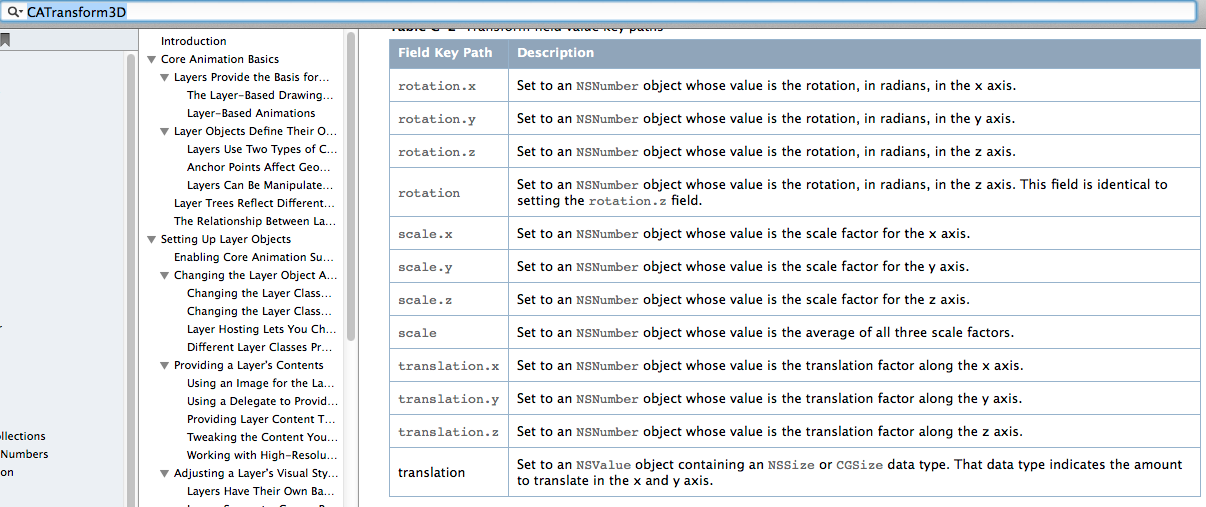
    [_customView.layer setValue:@(-) forKeyPath:@"transform.translation.x"];

}

@end
下面的属性都可以通过KVC进行设置。
7.简单实例
旋转一个弧度
@interface ViewController ()

@property(nonatomic,strong) UIView *customView;

@end

@implementation ViewController

- (void)viewDidLoad {

    [super viewDidLoad];

    self.view.backgroundColor = [UIColor yellowColor];

    _customView = [[UIView alloc] initWithFrame:CGRectMake(ScreenWidth/ - ViewWidth/,

                                                           ScreenHeight/ - ViewHeight/,

                                                           ViewWidth,

                                                           ViewHeight)];

    [self.view addSubview:_customView];

    //设置layer的颜色

    _customView.layer.backgroundColor = [UIColor whiteColor].CGColor;

}

- (void)didReceiveMemoryWarning {

    [super didReceiveMemoryWarning];

}

- (void)touchesBegan:(NSSet<UITouch *> *)touches withEvent:(UIEvent *)event{

    _customView.layer.transform = CATransform3DMakeRotation(M_PI_4, , , 0.5);

}

@end
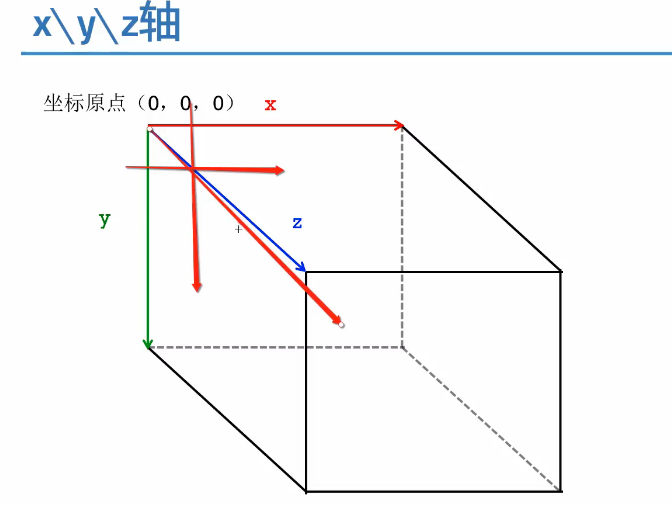
补充:三维坐标系
CALayer简介(转)的更多相关文章
- iOS开发UI篇—CALayer简介
iOS开发UI篇—CALayer简介 一.简单介绍 在iOS中,你能看得见摸得着的东西基本上都是UIView,比如一个按钮.一个文本标签.一个文本输入框.一个图标等等,这些都是UIView. 其实 ...
- CALayer简介
一.什么是CALayer * 在iOS系统中,你能看得见摸得着的东西基本上都是UIView,比如一个按钮.一个文本标签.一个文本输入框.一个图标等等,这些都是UIView. * 其实UIView之所以 ...
- iOS开发——UI进阶篇(十七)CALayer,核心动画基本使用
一.CALayer简介 1.CALayer在iOS中,文本输入框.一个图标等等,这些都是UIView你能看得见摸得着的东西基本上都是UIView,比如一个按钮.一个文本标签.一个其实UIView之所以 ...
- <极客学院>视频教程学习笔记-iOS中CALayer的使用
<1>CALayer简介 1.CALayer一般作为UIView的容器而使用. 2.CALayer是一个管理者图片载体(image-based content)的层结构 3.直接修改单独创 ...
- CALayer的基本操作
CALayer简介: CALayer又称为层. 在每一个UIView内部都有一个Layer这样的属性. UIView之所以能够显示,就是因为它里面有这个一个层,才具有显示的功能. 我们通过操作C ...
- iOS基础 - CALayer
一.CALayer简介 Core Animation是跨平台的,支持iOS环境和Mac OS X环境 凡是支持跨平台的框架,都不能直接使用UIKit框架,因为UIKit框架只能应用在iOS而不能用于M ...
- CALayer---iOS-Apple苹果官方文档翻译之CALayer
CHENYILONG Blog CALayer---iOS-Apple苹果官方文档翻译之CALayer CALayer /*技术博客http://www.cnblogs.com/ChenYilong/ ...
- ios开发之图层与核心动画一:图层CALayer的认识
#import "ViewController.h" @interface ViewController () @property (weak, nonatomic) IBOutl ...
- 转载:iOS开发之让你的应用“动”起来
在iOS中随处都可以看到绚丽的动画效果,实现这些动画的过程并不复杂,今天将带大家一窥iOS动画全貌.在这里你可以看到iOS中如何使用图层精简非交互式绘图,如何通过核心动画创建基础动画.关键帧动画.动画 ...
随机推荐
- hibernate事务管理 (jdbc jta)
hibernate的两种事务管理jdbc 和jta方式.下边说说两者的区别一.说明一下jdbc和jta方式事务管理的区别:JDBC事务由Connnection管理,也就是说,事务管理实际上是在JDBC ...
- 创建 XMLHttpRequest 对象时IE的兼容问题解决办法
为了应对所有的现代浏览器,包括 IE5 和 IE6,请检查浏览器是否支持 XMLHttpRequest 对象.如果支持,则创建 XMLHttpRequest 对象.如果不支持,则创建 ActiveXO ...
- C语言入门(一)环境搭建
1. 下载Code::Blocks(源文本编辑器) 2. 下载编译器MinGW(或者下载好自带编译器的codeblocks) http://jingyan.baidu.com/article/c843 ...
- Java设计模式—访问者模式
原文地址:http://www.cnblogs.com/java-my-life/archive/2012/06/14/2545381.html 总结的太棒啦,导致自己看了都不想总结了...... 在 ...
- 隐藏 google 地图 Logo 隐藏 百度 地图 Logo
Google 地图 var isFirstLoad=true; //地图瓦片加载完成之后的回调 google.maps.event.addListener(map, 'tilesloaded', fu ...
- ASP.NET中引用dll“找不到指定模块"的完美解决办法 z
DllImport是System.Runtime.InteropServices命名空间下的一个属性类,其功能是提供从非托管DLL导出的函数的必要调用信息.DllImport属性应用于方法,要求最少要 ...
- 深入理解linux源码安装三板斧
概述: 根据源码包中 Makefile.in 文件的指示,configure 脚本检查当前的系统环境和配置选项,在当前目录中生成 Makefile 文件(还有其它本文无需关心的文件),然后 make ...
- CSS z-index的用法
理清 position及z-index的用法: static : 无特殊定位,对象遵循HTML定位规则absolute : 将对象从文档流中拖出,使用left,right,top,bottom等属 ...
- diskpart分区
分区知识充电: 主分区:主分区,也称为主磁盘分区,和拓展分区.逻辑分区一样,是一种分区类型.主分区中不能再划分其他类型的分区,因此每个主分区都相当于一个逻辑磁(在这一点上主分区和逻辑分区很相似,但主分 ...
- 使用VM Tools让VMware虚拟机里的ubuntu能够共享Windows系统的文件夹
我们经常有这样的使用场景,在宿主机Windows(Linux)操作系统上通过VMware软件安装了一个Linux(Windows)的虚拟机, 然后需要在两种操作系统中通过某种介质共享数据. 一种比较麻 ...