
Eclipse中Maven的本地仓库引导配置
简单整理一下,方便理解操作。
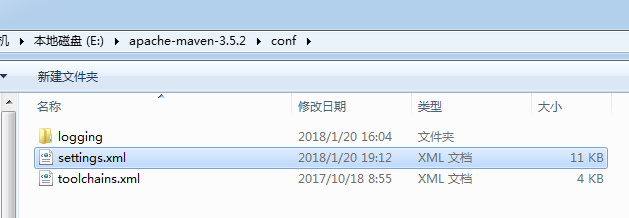
1、本地拷贝maven文件后,打开maven中的.setting 文件:
2、配置文件:
 <?xml version="1.0" encoding="UTF-8"?>

 <!--

 Licensed to the Apache Software Foundation (ASF) under one

 or more contributor license agreements.  See the NOTICE file

 distributed with this work for additional information

 regarding copyright ownership.  The ASF licenses this file

 to you under the Apache License, Version 2.0 (the

 "License"); you may not use this file except in compliance

 with the License.  You may obtain a copy of the License at

     http://www.apache.org/licenses/LICENSE-2.0

 Unless required by applicable law or agreed to in writing,

 software distributed under the License is distributed on an

 "AS IS" BASIS, WITHOUT WARRANTIES OR CONDITIONS OF ANY

 KIND, either express or implied.  See the License for the

 specific language governing permissions and limitations

 under the License.

 -->

 <!--

  | This is the configuration file for Maven. It can be specified at two levels:

  |

  |  1. User Level. This settings.xml file provides configuration for a single user,

  |                 and is normally provided in ${user.home}/.m2/settings.xml.

  |

  |                 NOTE: This location can be overridden with the CLI option:

  |

  |                 -s /path/to/user/settings.xml

  |

  |  2. Global Level. This settings.xml file provides configuration for all Maven

  |                 users on a machine (assuming they're all using the same Maven

  |                 installation). It's normally provided in

  |                 ${maven.conf}/settings.xml.

  |

  |                 NOTE: This location can be overridden with the CLI option:

  |

  |                 -gs /path/to/global/settings.xml

  |

  | The sections in this sample file are intended to give you a running start at

  | getting the most out of your Maven installation. Where appropriate, the default

  | values (values used when the setting is not specified) are provided.

  |

  |-->

 <settings xmlns="http://maven.apache.org/SETTINGS/1.0.0"

           xmlns:xsi="http://www.w3.org/2001/XMLSchema-instance"

           xsi:schemaLocation="http://maven.apache.org/SETTINGS/1.0.0 http://maven.apache.org/xsd/settings-1.0.0.xsd">

   <!-- localRepository

    | The path to the local repository maven will use to store artifacts.

    |

    | Default: ${user.home}/.m2/repository  -->

   <localRepository>E:/repository</localRepository>

   <!-- interactiveMode

    | This will determine whether maven prompts you when it needs input. If set to false,

    | maven will use a sensible default value, perhaps based on some other setting, for

    | the parameter in question.

    |

    | Default: true

   <interactiveMode>true</interactiveMode>

   -->

   <!-- offline

    | Determines whether maven should attempt to connect to the network when executing a build.

    | This will have an effect on artifact downloads, artifact deployment, and others.

    |

    | Default: false

   <offline>false</offline>

   -->

   <!-- pluginGroups

    | This is a list of additional group identifiers that will be searched when resolving plugins by their prefix, i.e.

    | when invoking a command line like "mvn prefix:goal". Maven will automatically add the group identifiers

    | "org.apache.maven.plugins" and "org.codehaus.mojo" if these are not already contained in the list.

    |-->

   <pluginGroups>

     <!-- pluginGroup

      | Specifies a further group identifier to use for plugin lookup.

     <pluginGroup>com.your.plugins</pluginGroup>

     -->

   </pluginGroups>

   <!-- proxies

    | This is a list of proxies which can be used on this machine to connect to the network.

    | Unless otherwise specified (by system property or command-line switch), the first proxy

    | specification in this list marked as active will be used.

    |-->

   <proxies>

     <!-- proxy

      | Specification for one proxy, to be used in connecting to the network.

      |

     <proxy>

       <id>optional</id>

       <active>true</active>

       <protocol>http</protocol>

       <username>proxyuser</username>

       <password>proxypass</password>

       <host>proxy.host.net</host>

       <port>80</port>

       <nonProxyHosts>local.net|some.host.com</nonProxyHosts>

     </proxy>

     -->

   </proxies>

   <!-- servers

    | This is a list of authentication profiles, keyed by the server-id used within the system.

    | Authentication profiles can be used whenever maven must make a connection to a remote server.

    |-->

   <servers>

     <!-- server

      | Specifies the authentication information to use when connecting to a particular server, identified by

      | a unique name within the system (referred to by the 'id' attribute below).

      |

      | NOTE: You should either specify username/password OR privateKey/passphrase, since these pairings are

      |       used together.

      |

     <server>

       <id>deploymentRepo</id>

       <username>repouser</username>

       <password>repopwd</password>

     </server>

     -->

     <!-- Another sample, using keys to authenticate.

     <server>

       <id>siteServer</id>

       <privateKey>/path/to/private/key</privateKey>

       <passphrase>optional; leave empty if not used.</passphrase>

     </server>

     -->

   </servers>

   <!-- mirrors

    | This is a list of mirrors to be used in downloading artifacts from remote repositories.

    |

    | It works like this: a POM may declare a repository to use in resolving certain artifacts.

    | However, this repository may have problems with heavy traffic at times, so people have mirrored

    | it to several places.

    |

    | That repository definition will have a unique id, so we can create a mirror reference for that

    | repository, to be used as an alternate download site. The mirror site will be the preferred

    | server for that repository.

    |-->

   <mirrors>

     <!-- mirror

      | Specifies a repository mirror site to use instead of a given repository. The repository that

      | this mirror serves has an ID that matches the mirrorOf element of this mirror. IDs are used

      | for inheritance and direct lookup purposes, and must be unique across the set of mirrors.

      |

     <mirror>

       <id>mirrorId</id>

       <mirrorOf>repositoryId</mirrorOf>

       <name>Human Readable Name for this Mirror.</name>

       <url>http://my.repository.com/repo/path</url>

     </mirror>

      -->

      <!--<mirror>

         <id>alimaven</id>

         <name>aliyun maven</name>

         <url>http://maven.aliyun.com/nexus/content/groups/public/</url>

         //<mirrorOf>central</mirrorOf>

         <mirrorOf>*</mirrorOf>

     </mirror>-->

   </mirrors>

   <!-- profiles

    | This is a list of profiles which can be activated in a variety of ways, and which can modify

    | the build process. Profiles provided in the settings.xml are intended to provide local machine-

    | specific paths and repository locations which allow the build to work in the local environment.

    |

    | For example, if you have an integration testing plugin - like cactus - that needs to know where

    | your Tomcat instance is installed, you can provide a variable here such that the variable is

    | dereferenced during the build process to configure the cactus plugin.

    |

    | As noted above, profiles can be activated in a variety of ways. One way - the activeProfiles

    | section of this document (settings.xml) - will be discussed later. Another way essentially

    | relies on the detection of a system property, either matching a particular value for the property,

    | or merely testing its existence. Profiles can also be activated by JDK version prefix, where a

    | value of '1.4' might activate a profile when the build is executed on a JDK version of '1.4.2_07'.

    | Finally, the list of active profiles can be specified directly from the command line.

    |

    | NOTE: For profiles defined in the settings.xml, you are restricted to specifying only artifact

    |       repositories, plugin repositories, and free-form properties to be used as configuration

    |       variables for plugins in the POM.

    |

    |-->

   <profiles>

     <!--

     <id>jdk17</id>

     <activation>

         <activeByDefault>true</activeByDefault>

         <jdk>1.7</jdk>

     </activation>

     <properties>

         <maven.compiler.source>1.7</maven.compiler.source>

         <maven.compiler.target>1.7</maven.compiler.target>

         <maven.compiler.compilerVersion>1.7</maven.compiler.compilerVersion>

     </properties>  -->

     <!-- profile

      | Specifies a set of introductions to the build process, to be activated using one or more of the

      | mechanisms described above. For inheritance purposes, and to activate profiles via <activatedProfiles/>

      | or the command line, profiles have to have an ID that is unique.

      |

      | An encouraged best practice for profile identification is to use a consistent naming convention

      | for profiles, such as 'env-dev', 'env-test', 'env-production', 'user-jdcasey', 'user-brett', etc.

      | This will make it more intuitive to understand what the set of introduced profiles is attempting

      | to accomplish, particularly when you only have a list of profile id's for debug.

      |

      | This profile example uses the JDK version to trigger activation, and provides a JDK-specific repo.

     <profile>

       <id>jdk-1.4</id>

       <activation>

         <jdk>1.4</jdk>

       </activation>

       <repositories>

         <repository>

           <id>jdk14</id>

           <name>Repository for JDK 1.4 builds</name>

           <url>http://www.myhost.com/maven/jdk14</url>

           <layout>default</layout>

           <snapshotPolicy>always</snapshotPolicy>

         </repository>

       </repositories>

     </profile>

     -->

     <!--

      | Here is another profile, activated by the system property 'target-env' with a value of 'dev',

      | which provides a specific path to the Tomcat instance. To use this, your plugin configuration

      | might hypothetically look like:

      |

      | ...

      | <plugin>

      |   <groupId>org.myco.myplugins</groupId>

      |   <artifactId>myplugin</artifactId>

      |

      |   <configuration>

      |     <tomcatLocation>${tomcatPath}</tomcatLocation>

      |   </configuration>

      | </plugin>

      | ...

      |

      | NOTE: If you just wanted to inject this configuration whenever someone set 'target-env' to

      |       anything, you could just leave off the <value/> inside the activation-property.

      |

     <profile>

       <id>env-dev</id>

       <activation>

         <property>

           <name>target-env</name>

           <value>dev</value>

         </property>

       </activation>

       <properties>

         <tomcatPath>/path/to/tomcat/instance</tomcatPath>

       </properties>

     </profile>

     -->

   </profiles>

   <!-- activeProfiles

    | List of profiles that are active for all builds.

    |

   <activeProfiles>

     <activeProfile>alwaysActiveProfile</activeProfile>

     <activeProfile>anotherAlwaysActiveProfile</activeProfile>

   </activeProfiles>

   -->

 </settings>
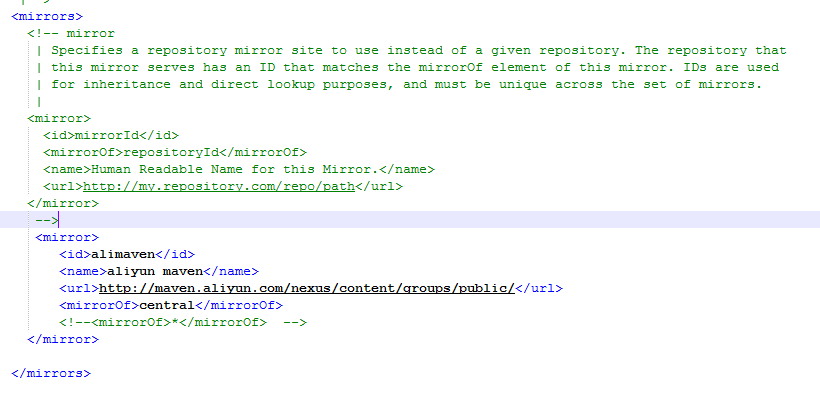
其中两个位置需要注意:本地仓库路径和阿里云maven镜像配置(增加jar包下载速度)

3、Eclipse中配置maven及刚才配置的settings文件。
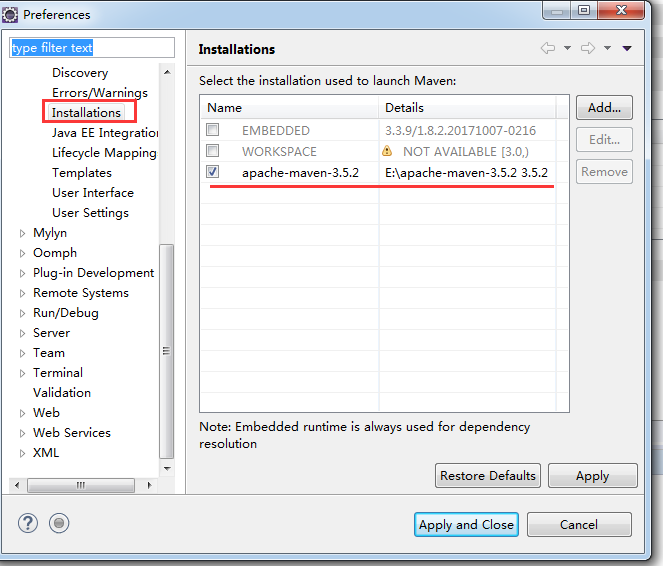
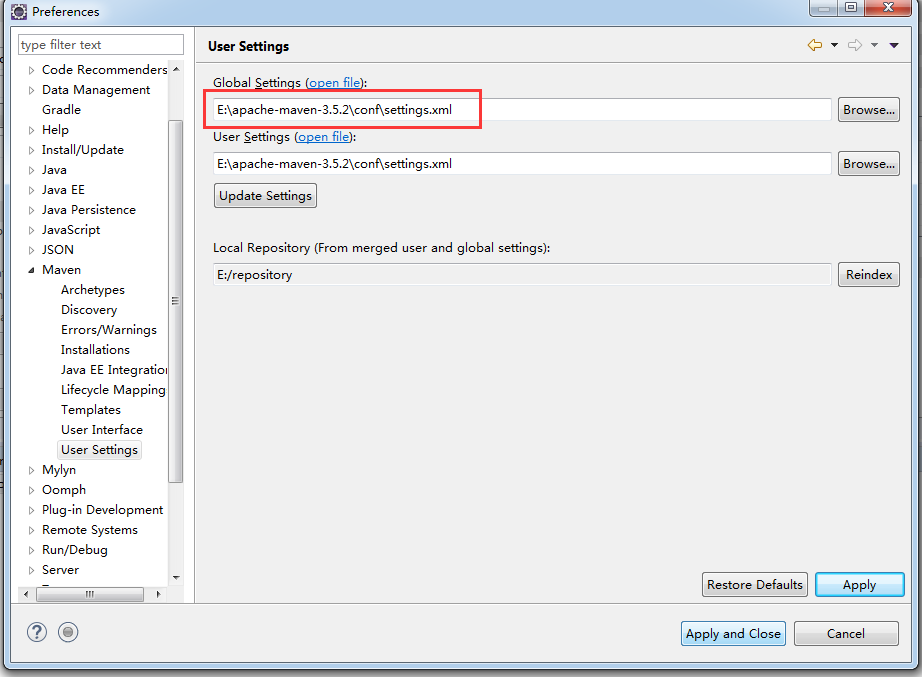
保存即可。
Eclipse中Maven的本地仓库引导配置的更多相关文章
- eclipse中maven项目jar包不会自动下载解决办法
Eclipse中maven从远程仓库中下载jar包有时会很慢,有些甚至进度停止不动,这个时候我们可能会终止当前下载,但是终止jar包下载后会出现一个问题,再次打开Eclipse时,你会发现提示你项目中 ...
- eclipse中maven插件,改变默认仓库位置
一.eclipse中maven默认仓库是当前用户下.m2/repository,需改变默认路径按照下面步骤. 步骤一:安装maven 下载:http://maven.apache.org/ 配置mav ...
- bat批处理文件启动Eclipse和ivy本地仓库的配置
一.bat批处理文件启动Eclipse 所需文件: 1.eclipse 2.jre 3.startup-eclipse.bat 确保以上三个文件夹同级 startup-eclipse.bat: set ...
- eclipse 如何修改maven插件本地仓库jar包默认存储位置
eclipse 如何修改maven插件本地仓库jar包默认存储位置 CreateTime--2018年4月18日11:04:47 Author:Marydon 1.更改eclipse的maven本 ...
- (一)maven之——maven基础及本地仓库的配置
一.初步了解maven Apache Maven是一个软件项目管理的综合工具.基于项目对象模型(POM)的概念,提供了帮助管理构建.文档.报告.依赖.发布等方法,Maven简化和标准化项目建设过程.处 ...
- maven下载,安装与eclipse中maven配置
1.maven下载.安装与环境变量配置 http://blog.csdn.net/jiuqiyuliang/article/details/45390313 2.Eclipse中maven的配置 ht ...
- Eclipse中Maven的配置
Maven 的配置 1. 安装配置Maven: 1.1 从Apache网站 http://maven.apache.org/ 下载并且解压缩安装Apache Maven 1.2 配置 Maven 的c ...
- eclipse中maven本地库和远程阿里库的配置
很久没有写博客了,最近比较闲将最近学的和遇到的问题做一个备忘 1.eclipse中maven本地库的配置 如果只是下载和安装了maven没有指定maven本地库的位置,maven的默认的本地库在c:/ ...
- K.O. -------- Eclipse中Maven的报错处理
----------------------siwuxie095 K.O. -------- Eclipse 中 Maven 的报错处理 ...
随机推荐
- ThreadLocal (二):什么时候使用 InheritableThreadLocal
一.ThreadLocal 在父子线程传递的问题 public class InheritableThreadLocalDemo { // 全局变量 // static ThreadLocal< ...
- 教你管理SQL实例系列(1-15)
全系列转自:51CTO ->jimshu http://jimshu.blog.51cto.com 目录及原本连接如下: 教你管理SQL实例(1)数据库实例 教你管理SQL实例(2)服务启动帐户 ...
- 阿里云免费SSL证书申请及配置过程centos7,Nginx
1:进入购买,等待审核,审核通过后下在一个压缩包 ,里面包含两个文件一个 214979907780888.key 一个214979907780888.pem (如果不在阿里买,也可以在其它平台买,或者 ...
- 博客没内容可写了怎么办?找BD!
博客写了一段时间可能会感觉没内容可以写了,或者说同一个领域的内容写多了感觉有点千篇一律,这时要考虑扩展自己的写作领域,怎么去扩展呢?利用关键词工具可以衍生很多长尾词,当然这个有点牵强,有点为优化而优化 ...
- Ubuntu16.04安装Chrome浏览器及解决root不能打开的问题
1. 安装桌面(emmm,不知道是否只执行第二个命令就行) # apt-get install gonme# apt-get install ubuntu-desktop2. 安装Chrome浏览器 ...
- windows 和rhel,centos双系统安装
1:首先确保你先安装为windows系统,为indows7以上的把. 2:安装好为indows系统后,进入系统后把磁盘分区,分出足够的空间为安装linux. 3:再为windows下使用软碟通等工具制 ...
- 深入理解MVC架构
MVC MVC是一种设计模式(Design pattern),也就是一种解决问题的方法和思路, 是上世纪80年代提出的,到现在已经颇有历史了. MVC的意义在于指导开发者将数据与表现解耦,提高代码,特 ...
- 剑指offer 面试67题
面试67题: 题目: 链接:https://www.nowcoder.com/questionTerminal/1277c681251b4372bdef344468e4f26e?commentTags ...
- Android 工具类 SharedPreferences 封装
SharedPreferences 是 Android 数据存储方式中的一种,特别适合用来存储少量的.格式简单的数据,比如应用程序的各种配置信息,如是否打开音效,是否开启震动等等. SharedPre ...
- grep命令详细解析 --非原创 原作者ggjucheng
简介 grep (global search regular expression(RE) and print out the line,全面搜索正则表达式并把行打印出来)是一种强大的文本搜索工具,它 ...