
apktool 简单使用记录
修改APP:车来了
修改内容:首次启动引导页,中间的点素材修改、样式修改
修改前:未选中为白色,选中为蓝色,间距为5dip
修改后:未选中为红色,选中为黑色,间距为0
前后截图如下:


修改过程:
一、使用apktool反编译apk
apktool安装根据官网进行:https://ibotpeaches.github.io/Apktool/install/
具体操作:
0.首先确保使用java 1.8或以上
1.下载运行脚本并重命名为apktool.bat,下载地址(官网):https://raw.githubusercontent.com/iBotPeaches/Apktool/master/scripts/windows/apktool.bat
2.下载最新的apktool并重命名为apktool.jar,下载地址:https://bitbucket.org/iBotPeaches/apktool/downloads/
3.放在一个文件夹,双击运行apktool.bat,会输出用法
4.反编译apk,命令格式:apktool d [ apk文件名 ]
Apktool v2.4.0 - a tool for reengineering Android apk fileswith smali v2.2.6 and baksmali v2.2.6

Copyright 2014 Ryszard Wiśniewski <brut.alll@gmail.com>

Updated by Connor Tumbleson <connor.tumbleson@gmail.com>

usage: apktool

 -advance,--advanced   prints advance information.

 -version,--version    prints the version then exits

usage: apktool if|install-framework [options] <framework.apk>

 -p,--frame-path <dir>   Stores framework files into <dir>.

 -t,--tag <tag>          Tag frameworks using <tag>.

usage: apktool d[ecode] [options] <file_apk>

 -f,--force              Force delete destination directory.

 -o,--output <dir>       The name of folder that gets written. Default is apk.ou

t

 -p,--frame-path <dir>   Uses framework files located in <dir>.

 -r,--no-res             Do not decode resources.

 -s,--no-src             Do not decode sources.

 -t,--frame-tag <tag>    Uses framework files tagged by <tag>.

usage: apktool b[uild] [options] <app_path>

 -f,--force-all          Skip changes detection and build all files.

 -o,--output <dir>       The name of apk that gets written. Default is dist/name

.apk

 -p,--frame-path <dir>   Uses framework files located in <dir>.

For additional info, see: http://ibotpeaches.github.io/Apktool/

For smali/baksmali info, see: https://github.com/JesusFreke/smali

C:\Users\Administrator>cd C:\Users\apk所在文件夹

C:\Users\apk所在文件夹>apktool d chelaile.apk

I: Using Apktool 2.4.0 on chelaile.apk

I: Loading resource table...

I: Decoding AndroidManifest.xml with resources...

S: WARNING: Could not write to (C:\Users\Administrator\AppData\Local\apktool\framework), using C:\Users\Administrator\AppData\Local\Temp\ instead...

S: Please be aware this is a volatile directory and frameworks could go missing, please utilize --frame-path if the default storage directory is unavailable

I: Loading resource table from file: C:\Users\Administrator\AppData\Local\Temp\1.apk

I: Regular manifest package...

I: Decoding file-resources...

I: Decoding values */* XMLs...

I: Baksmaling classes.dex...

I: Baksmaling classes2.dex...

I: Baksmaling classes3.dex...

I: Baksmaling classes4.dex...

I: Baksmaling assets/AdDex.3.1.0.dex...

I: Copying assets and libs...

I: Copying unknown files...

I: Copying original files...
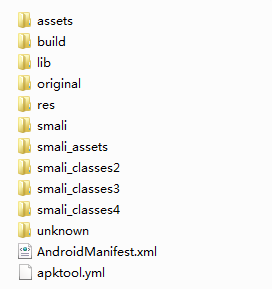
得到了文件夹chelaile,里面有如下文件:
二、寻找和修改
这里是纯粹的凭感觉在搞了
AndroidManifesr.xml 找到<category android:name="android.intent.category.LAUNCHER"/>
猜测启动页面应该是SplashActivity,将其作为本次修改的对象
=> SplashActivity.smali 找到sget p1, Ldev/xesam/chelaile/core/R$layout;->cll_act_splash:I
猜测对应布局文件为cll_act_splash
=> cll_act_splash.xml 发现用了自定义组件GuideView,而且默认设置为gone,在smali文件中有invoke-virtual {v0, v1}, Ldev/xesam/chelaile/app/module/func/GuideView;->setVisibility(I)V,进一步猜测是首次启动才会出现
=> GuideView.smali 找到sget p2, Ldev/xesam/chelaile/core/R$layout;->cll_act_guide:I,猜测对应布局文件为cll_act_guide.xml
=> cll_act_guide.xml里面三个ImageView,应该就是三个点,
根据android:src="@drawable/indicate_dot" 得到对应素材,直接做修改保存;
删除android:padding="5.0dip"(由于这里的修改引起了页面中其他元素在显示上也有变化)
三、重新打包
命令格式:apktool b [ 刚才得到的文件夹 ] -o [ 输出文件名 ]
C:\Users\apk所在文件夹>apktool b chelaile -o newcll.apk

I: Using Apktool 2.4.0

I: Checking whether sources has changed...

I: Smaling smali folder into classes.dex...

I: Checking whether sources has changed...

I: Smaling smali_assets folder into assets.dex...

I: Checking whether sources has changed...

I: Smaling smali_classes2 folder into classes2.dex...

I: Checking whether sources has changed...

I: Smaling smali_classes3 folder into classes3.dex...

I: Checking whether sources has changed...

I: Smaling smali_classes4 folder into classes4.dex...

I: Checking whether resources has changed...

I: Building resources...

S: WARNING: Could not write to (C:\Users\Administrator\AppData\Local\apktool\framework), using C:\Users\Administrator\AppData\Local\Temp\ instead...

S: Please be aware this is a volatile directory and frameworks could go missing, please utilize --frame-path if the default storage directory is unavailable

W: warning: string 'cll_aboard_user_contribution_empty_desc' has no default translation.

W: warning: string 'rc_voice_dialog_cancel_send' has no default translation.

W: warning: string 'rc_voice_dialog_swipe' has no default translation.

W: warning: string 'rc_voice_dialog_time_short' has no default translation.

I: Copying libs... (/lib)

I: Building apk file...

I: Copying unknown files/dir...

I: Built apk...
出现了一些warning,但是问题不大,第一次使用,就不怎么纠结他了
到这里得到了一个apk,但是不能用,需要签名才能正常安装
四、重新签名
用Auto-sign重新签名,这里参考了一个博客,原文链接:https://blog.csdn.net/sxk874890728/article/details/80486223
下载解压Auto-sign,得到的auto-sign文件夹下有以下文件
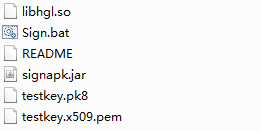
将上一步得到的newcll.apk拷贝到解压好的auto-sign文件夹下,执行命令:
java -jar signapk.jar testkey.x509.pem testkey.pk8 newcll.apk cll_signed.apk
就得到了最终可安装使用的apk
apktool 简单使用记录的更多相关文章
- 如果简单的记录,就可以为这个世界创造更多的财富,那么还有什么理由不去写博客呢? — 读<<黑客与画家>> 有感
上一次博文发文时间是2016.1.15,7个月已经过去了.最近读了一本<>的书,对我触动挺大的!里面有关于技术趋势的探讨,也有关于人生和财富的思考! 开始更新iOS122的文章的初衷是,聚 ...
- Python简单爬虫记录
为了避免自己忘了Python的爬虫相关知识和流程,下面简单的记录一下爬虫的基本要求和编程问题!! 简单了解了一下,爬虫的方法很多,我简单的使用了已经做好的库requests来获取网页信息和Beauti ...
- redis5.0.3单实例简单安装记录
redis5.0.3单实例简单安装记录 日常需要测试使用,索性记录下来,免得临时又麻烦的找资料. yum -y install make gcc-c++ cmake bison-devel ncurs ...
- Oracle触发器简单入门记录
写在前面: 最近,老项目新增了日报优化的需求,丽姐让我用触发器去实现当数据插入或者更新的时候,实现对日报表数据更新操作.嗯嗯嗯呢,之前学习数据库的时候,有碰到过触发器,但都是一跳而过,也没怎么去真正的 ...
- 27:简单错误记录SimpleErrorLog
题目描述 开发一个简单错误记录功能小模块,能够记录出错的代码所在的文件名称和行号. 处理: 1. 记录最多8条错误记录,循环记录,对相同的错误记录(净文件名称和行号完全匹配)只记录一条,错误计数增加: ...
- percona-toolkit 3.0.13 简单安装记录
percona-toolkit 3.0.13 简单安装记录 环境:centos6.x mysql:8.0.17 yum -y install perl-DBIyum -y install perl-D ...
- .Net写txt文件-简单的记录执行日志信息代码
在执行一些批量操作时,想记录一些执行日志信息,越简单方便越好啊.提供一个常用的简单方法,将信息记录在txt文件里: public static void log(string content, str ...
- 测试与开发如何有效沟通,QC11(HP ALM 11)的简单使用记录
笔者所在的项目组使用的缺陷管理工具是HP的QC11,作为测试人员,为了与开发一起跟随Bug的一生,简单的写了使用流程,这里记录一下,主要是让开发人员熟悉一下. 首先使用账户登录QC,如地址: http ...
- 从壹开始前后端分离【 .NET Core2.0 +Vue2.0 】框架之十 || AOP面向切面编程浅解析:简单日志记录 + 服务切面缓存
代码已上传Github+Gitee,文末有地址 上回<从壹开始前后端分离[ .NET Core2.0 Api + Vue 2.0 + AOP + 分布式]框架之九 || 依赖注入IoC学习 + ...
随机推荐
- 转)ZooKeeper的实现分析
最近在大量看关于Zookeeper的博客,发现一篇讲解ZK实现很详细的博客,特此转载一下: 原博客地址: http://my.oschina.net/zhengyang841117/blog/1866 ...
- 你必须知道的EntityFramework 6.x和EntityFramework Core变更追踪状态
前言 只要有时间就会时不时去看最新EF Core的进展情况,同时也会去看下基础,把握好基础至关重要,本节我们对比看看如标题EF 6.x和EF Core的不同,希望对正在学习EF Core的同行能有所帮 ...
- (细节)My SQL中主键为0和主键自排约束的关系
开始不设置主键 表的设计如下: 如果id的位置有好几个0的话:设置主键并且自动排序时,0会从1开始递增: Insert 进去 id = 0的数据,数据会从实际的行数开始增加,和从0变化不一样: 现在主 ...
- spring-boot-oracle spring-batch
Install/Configure Oracle express Oracle xe installer for linux (I don't care if you're running linux ...
- 在线OJ的小demo
牛课网OJ规则 用readLine()代替read_line() 用readLine()代替read_line() 用readLine()代替read_line() 用readLine()代替read ...
- CentOS安装JAVA
http://hermosa-young.iteye.com/blog/1798026 每次都要搜索一下太麻烦了,留个底,方便以后查询 一般情况下,我们都要将linux自带的OPENJDK卸载掉,然后 ...
- TestNG教程网站
比较简明的一些TestNG教程网站 : https://www.jianshu.com/p/74816a200221 http://www.yiibai.com/testng/parameterize ...
- [论文解读]CNN网络可视化——Visualizing and Understanding Convolutional Networks
概述 虽然CNN深度卷积网络在图像识别等领域取得的效果显著,但是目前为止人们对于CNN为什么能取得如此好的效果却无法解释,也无法提出有效的网络提升策略.利用本文的反卷积可视化方法,作者发现了AlexN ...
- compare.go
package clientv3 import ( pb "github.com/coreos/etcd/etcdserver/etcdserverpb" ) type C ...
- google cache源码详解
一.引子 缓存有很多种解决方案,常见的是: 1.存储在内存中 : 内存缓存顾名思义直接存储在JVM内存中,JVM宕机那么内存丢失,读写速度快,但受内存大小的限制,且有丢失数据风险. 2.存储在磁盘中: ...