
使用d3.v5实现条形图
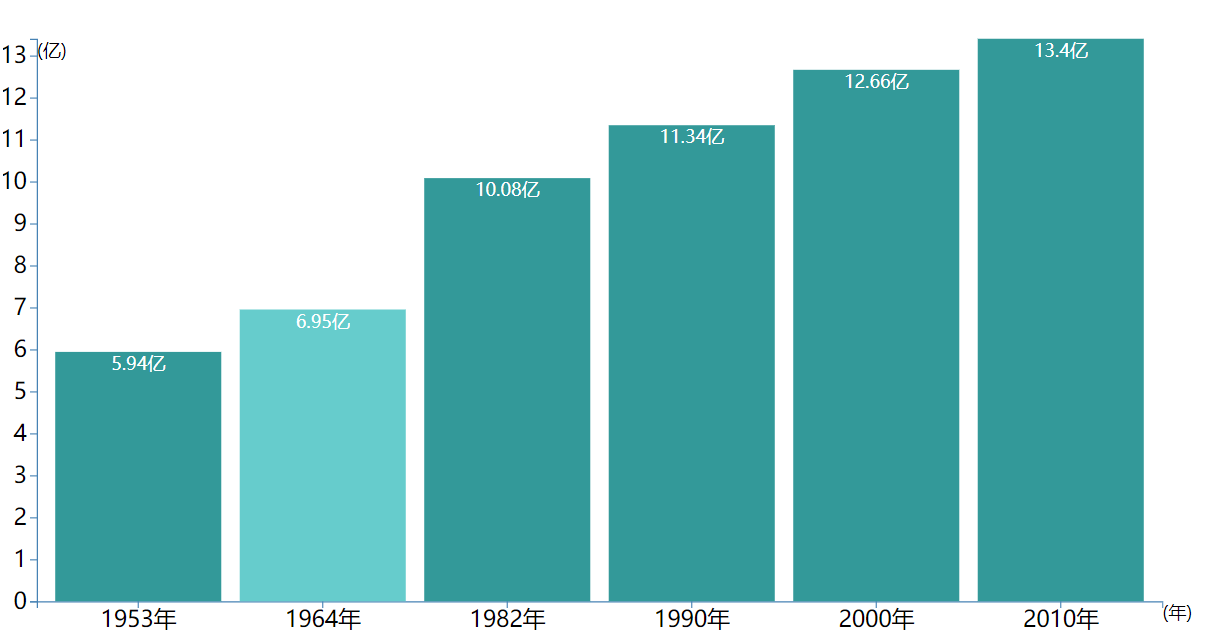
效果图:
条形图:
目录结构:

<!DOCTYPE html>

<html lang="en">

<head>

    <meta charset="UTF-8">

    <link href="css/style.css" media="screen" rel="stylesheet" type="text/css"/>

    <title>Linechart1</title>

</head>

<body>

    <div id="container"></div>

    <script src="https://d3js.org/d3.v5.min.js"></script>

    <script src="js/index.js"></script>

</body>

</html>
index.html
svg rect{

    fill:#339999;

}

svg rect:hover {

    cursor: pointer;

    fill: #66cccc;

}
style.css
year,population

1953,5.94

1964,6.95

1982,10.08

1990,11.34

2000,12.66

2010,13.40
data.csv
/垂直Bar,加刻度

d3.csv("Data/data.csv",function (d) {

    return {

        // year: new Date(+d.year, 0, 1), // convert "Year" column to Date

        year: d.year+"年",

        population: +d.population // convert "population" column to number

    };

}).then(function (data) {

    console.log(data);

    var //data=[1,8,5,6,8,9,3,5,2,20],

        width=1000,

        height=500,

        margin={left:30,top:30,right:30,bottom:30},

        svg_width=width+margin.left+margin.right,

        svg_height=height+margin.top+margin.bottom;

    //离散缩放 population=>[0,width]

    var scale_x=d3.scaleBand()

        .domain(data.map(function (d) {

            return d.year;

        }))

        .range([0,width])

        .padding(0.1);

    //线性缩放

    var scale_y=d3.scaleLinear()

        .domain([0,d3.max(data,function (d) {

            return d.population;

        })])

        .range([height,0])

    var svg=d3.select("#container")

        .append("svg")

        .attr("width",svg_width)

        .attr("height",svg_height)

    var chart=svg.append("g")

        .attr("transform","translate("+margin.left+","+margin.top+")");

    var x_axis_color="steelblue",

        y_axis_color="steelblue";

    var x_axis=chart.append('g')

        .call(d3.axisBottom(scale_x))

        .attr("transform","translate(0,"+height+")");

    x_axis.selectAll("path")

        .attr("stroke",x_axis_color)

    x_axis.selectAll("line")

        .attr("stroke",x_axis_color)

    x_axis.selectAll("text")

        .attr("font-size",'2em')

    var y_axis=chart.append('g')

        .call(d3.axisLeft(scale_y));

    y_axis.selectAll("path")

        .attr("stroke",y_axis_color)

    y_axis.selectAll("line")

        .attr("stroke",y_axis_color)

    y_axis.selectAll("text")

        .attr("font-size",'2em')

    //Y轴注解

    chart.append("text")

        .text("(亿)")

        // .attr("text-anchor","end")

        // .attr("transform","rotate(-90)")

        .attr("dy","1em")

    //X轴注解

    chart.append("text")

        .text("(年)")

        // .attr("text-anchor","end")

        .attr("transform","translate("+width+","+height+")")

        .attr("dy","1em")

    var bar=chart.selectAll(".bar")

        .data(data)

        .enter()

        .append("g")

        .attr("transform",function (d,i) {

            return "translate("+scale_x(d.year)+",0)"

        })

    bar.append("rect")

        .attr("y",function (d) {

            return scale_y(d.population);

        })

        .attr("height",function (d) {

            return height-scale_y(d.population);

        })

        .attr("width",scale_x.bandwidth() )

        .attr("class",".rect")

    bar.append("text")

        .text(function (d) {

            return d.population+"亿";

        })

        .attr("y",function (d) {

            return scale_y(d.population);

        })

        .attr("x",scale_x.bandwidth() /2)

        .attr("dy","1em")

        .style("text-anchor","middle")

        .style("fill","white")

})
index.js
参考教程:https://www.imooc.com/learn/103
使用d3.v5实现条形图的更多相关文章
- 使用d3.v5实现饼状图
效果图: 饼状图: 目录结构: <!DOCTYPE html> <html lang="en"> <head> <meta charset ...
- 使用d3.v5实现折线图与面积图
d3最新是V5版的,比起V2的API变动了不少,写下我实现过程 效果图: 面积图: 折线图: 目录结构: <!DOCTYPE html> <html lang="en&qu ...
- D3(v5) in TypeScript 坐标轴之 饼状图生成
饼状图生成时依旧遇到了类型问题,记录如下: import * as d3 from 'd3'; import * as React from 'react'; class TestGraph exte ...
- D3(v5) in TypeScript 坐标轴之 scaleBand用法
在学习d3时候,发现在TS中实现D3的坐标轴中遇到一些错误,而这些错误却不会存在于js(因为ts的类型检查)写法中,因此做下笔记: import * as d3 from 'd3';import * ...
- Vue整合d3.v5.js制作--柱状图(rect)
先上效果图: 图中柱状图变成纯蓝色是鼠标滑动过的颜色(颜色可改,本人配色能力十分的强,建议直接用默认设置即可 ( ᖛ ̫ ᖛ )ʃ)) 1.环境说明 Vue版本:"vue": &q ...
- Vue整合d3.v5.js制作--折线图(line)
先上效果图(x轴固定为时间轴): 图中出现的悬浮框是鼠标悬停效果 1.环境说明: vue版本:"vue": "^2.5.2" d3版本:"d3&quo ...
- ASP.NET+d3.js实现Sqlserver数据库的可视化展示
效果: 数据库端: 前端展示: 实现原理: 1.在数据段建立两个存储过程 queryUserAnsawer(id) 根据用户ID返回每一题的得分,主要是bcp exe时不能直接在sqlserver中执 ...
- 使用D3.js构建实时图形
首先你需要在计算机上安装Node和npm. 数据的可视化表示是传递复杂信息的最有效手段之一,D3.js提供了创建这些数据可视化的强大工具和灵活性. D3.js是一个JavaScript库,用于使用SV ...
- 使用JavaScript和D3.js实现数据可视化
欢迎大家前往腾讯云+社区,获取更多腾讯海量技术实践干货哦~ 本文由独木桥先生发表于云+社区专栏 介绍 D3.js是一个JavaScript库.它的全称是Data-Driven Documents(数据 ...
随机推荐
- 高质量的内容是SEO的关键
内容是最有效的SEO策略,但也是最难执行的 正确的目录对SEO(搜索引擎优化:search engine optimization)关乎重大.根据Ascend2在2014年4月对全球营销专业人士做的调 ...
- EXCEL解析之终极方法WorkbookFactory
Selenium做自动化测试当然不能避免和Excel打交道. 由于Excel版本的关系,文件扩展名分xls和xlsx, 以往的经验都是使用HSSFWorkbook和XSSFWorkbook来分别处理. ...
- echart css样式弄了几个月了,样式一直都没有好好解决,好激动
legend 图例,每个图表最多仅有一个图例.try this » 名称 默认值 描述 {string} orient 'horizontal' 布局方式,默认为水平布局,可选为:'horizonta ...
- 图解HTTPS建立过程
阅读目录 准备工作(对应图中prepare1234) 发起链接 最后 关于网络安全加密的介绍可以看之前文章: 1. 网络安全——数据的加密与签名,RSA介绍2. Base64编码.MD5.SHA1-S ...
- jQuery中 $.ajax()方法详解
$.ajax()方法详解 jquery中的ajax方法参数总是记不住,这里记录一下. 1.url: 要求为String类型的参数,(默认为当前页地址)发送请求的地址. 2.type: 要求为Strin ...
- 如何添加“在这里打开PowerShell”到Windows中的上下文菜单
It was only a matter of time, right? Due to my recent infatuation passionate love affair with PowerS ...
- 一个简单的例子实现自己的AOP
AOP是Aspect Oriented Programming的缩写,意思是面向切面编程,与OOP(Object Oriented Programming)面向对象编程对等,都是一种编程思想. 从OO ...
- version.go
package blog4go const ( // 版本号 VERSION = "0.5.6" )
- bzoj3812&uoj37 主旋律
正着做不好做,于是我们考虑反着来,如何计算一个点集s的答案呢,一定是所有的方案减去不合法的方案,不合法的方案一定是缩完点后是一个DAG,那么就一定有度数为0的scc,于是我们枚举s的子集,就是说这些点 ...
- bzoj 3680 吊打xxx 模拟退火
第一道模拟退火 重心嘛,就是要找到一个点,使其到所有点距离*该点权值和最小 思路:初始化一个T,mint,当T大于mint时,每次随机一个解,如果解比当前解优,直接转移,否则,以某概率(与T正相关)转 ...