
ssh_maven之controller层开发
我们已经完成了前两层的开发,现在 只剩下我们的controller层了,对于这一层,我们需要创建一个动作类CustomerAction,另外就是我们的strutss.xml以及我们的applicationContext-web.xml,还有我们的web.xml中,我们需要配置我们的配置我们的struts的核心过滤器StrutsPrepareAndExecutorFilter,除此之外,就是spring的监听器以及对spring中的参数的配置
我们是maven项目,我们需要引入我们的service,下面是我们的pom.xml
<project xmlns="http://maven.apache.org/POM/4.0.0" xmlns:xsi="http://www.w3.org/2001/XMLSchema-instance" xsi:schemaLocation="http://maven.apache.org/POM/4.0.0 http://maven.apache.org/xsd/maven-4.0.0.xsd">

  <modelVersion>4.0.0</modelVersion>

  <parent>

    <groupId>com.itheima</groupId>

    <artifactId>ssh_parent</artifactId>

    <version>0.0.1-SNAPSHOT</version>

  </parent>

  <artifactId>ssh_controller</artifactId>

  <packaging>war</packaging>

  <dependencies>

      <dependency>

          <groupId>com.itheima</groupId>

          <artifactId>ssh_service</artifactId>

          <version>0.0.1-SNAPSHOT</version>

      </dependency>

  </dependencies>

</project>
开始写我们的CustomerAction
package com.itheima.web.action;

import java.util.List;

import com.itheima.entity.Customer;

import com.itheima.service.CustomerService;

import com.opensymphony.xwork2.ActionSupport;

public class CustomerAction extends ActionSupport {

    private CustomerService customerService;

    private List<Customer> customers;

    public List<Customer> getCustomers() {

        return customers;

    }

    public void setCustomers(List<Customer> customers) {

        this.customers = customers;

    }

    public void setCustomerService(CustomerService customerService) {

        this.customerService = customerService;

    }

    public String findAllCustomer(){

        customers = customerService.findAllCustomer();

        return this.SUCCESS;

    }

    public String saveCustomerUI(){

        return this.SUCCESS;

    }

}
然后写我们的applicationContext-web.xml
<?xml version="1.0" encoding="UTF-8"?>

<beans xmlns="http://www.springframework.org/schema/beans"

    xmlns:xsi="http://www.w3.org/2001/XMLSchema-instance" xmlns:aop="http://www.springframework.org/schema/aop"

    xmlns:context="http://www.springframework.org/schema/context" xmlns:tx="http://www.springframework.org/schema/tx"

    xsi:schemaLocation="

        http://www.springframework.org/schema/beans http://www.springframework.org/schema/beans/spring-beans.xsd

        http://www.springframework.org/schema/tx http://www.springframework.org/schema/tx/spring-tx.xsd

        http://www.springframework.org/schema/context http://www.springframework.org/schema/context/spring-context.xsd

        http://www.springframework.org/schema/aop http://www.springframework.org/schema/aop/spring-aop.xsd">

     <import resource="classpath:applicationContext-service.xml"/>

    <bean id="customerAction" class="com.itheima.web.action.CustomerAction">

        <property name="customerService" ref="customerService"></property>

    </bean>

</beans>
随后是我们的struts.xml文件
<?xml version="1.0" encoding="UTF-8" ?>

<!DOCTYPE struts PUBLIC

    "-//Apache Software Foundation//DTD Struts Configuration 2.3//EN"

    "http://struts.apache.org/dtds/struts-2.3.dtd">

<struts>

    <package name="customer" namespace="/customer" extends="struts-default">

        <action name="findAllCustomer" class="customerAction" method="findAllCustomer">

            <result name="success">/jsp/customer/list.jsp</result>

        </action>

        <action name="saveCustomerUI" class="customerAction" method="saveCustomerUI">

            <result name="success">/jsp/customer/add.jsp</result>

        </action>

    </package>

</struts>
这样的话,就剩下我们的web.xml文件了
<?xml version="1.0" encoding="UTF-8"?>

<web-app xmlns:xsi="http://www.w3.org/2001/XMLSchema-instance" xmlns="http://java.sun.com/xml/ns/javaee" xsi:schemaLocation="http://java.sun.com/xml/ns/javaee http://java.sun.com/xml/ns/javaee/web-app_2_5.xsd" version="2.5">

  <display-name>ssh_controller</display-name>

  <welcome-file-list>

    <welcome-file>index.html</welcome-file>

    <welcome-file>index.htm</welcome-file>

    <welcome-file>index.jsp</welcome-file>

    <welcome-file>default.html</welcome-file>

    <welcome-file>default.htm</welcome-file>

    <welcome-file>default.jsp</welcome-file>

  </welcome-file-list>

  <!-- 配置struts的过滤器 -->

  <filter>

      <filter-name>struts</filter-name>

      <filter-class>org.apache.struts2.dispatcher.ng.filter.StrutsPrepareAndExecuteFilter</filter-class>

  </filter>

  <filter-mapping>

      <filter-name>struts</filter-name>

      <url-pattern>/*</url-pattern>

  </filter-mapping>

  <!-- 配置spring的监听器 -->

  <listener>

      <listener-class>org.springframework.web.context.ContextLoaderListener</listener-class>

  </listener>

  <!-- 监听器启动的参数 -->

  <context-param>

      <param-name>contextConfigLocation</param-name>

      <param-value>classpath:applicationContext-web.xml</param-value>

  </context-param>

</web-app>
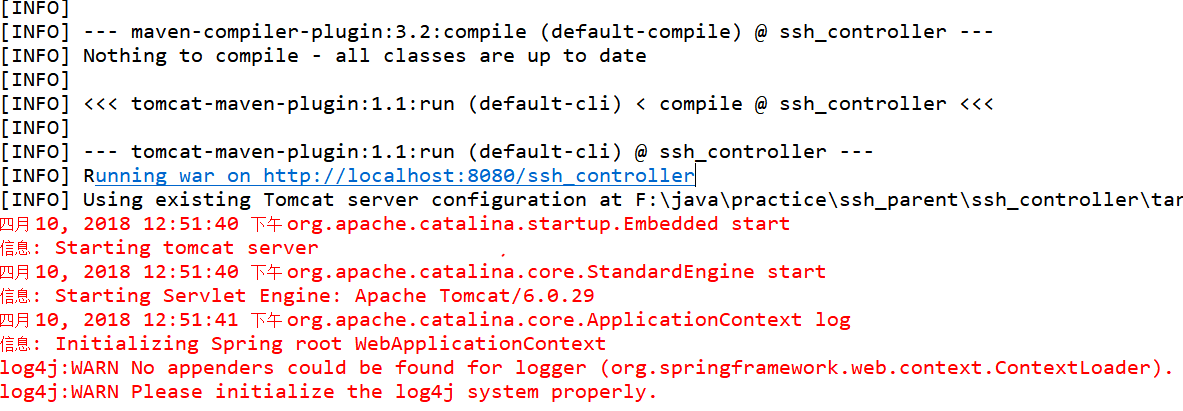
这样的话,我们的controller层也OK了,现在我们可以使用我们的maven命令运行我们的项目tomcat:run
点键我们的父工程,即右键ssh_parent,->Run AS->Maven builder..在出来的页面中输入我们的命令即可
这样的话,我们在浏览器访问我们的路径http://localhost:8080/ssh_controller,我们的页面还是使用之前的页面
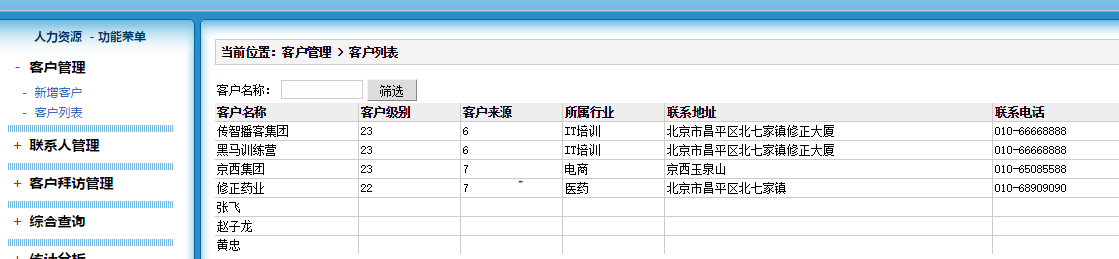
这样我们的一个完整的ssh结合maven就整合完成了!
ssh_maven之controller层开发的更多相关文章
- SpringMVC综合使用手机管理系统Controller层开发
1. beans.xml的配置 <?xml version="1.0" encoding="UTF-8"?> <beans xmlns=&qu ...
- DAO层,Service层,Controller层、View层 的分工合作
DAO层:DAO层主要是做数据持久层的工作,负责与数据库进行联络的一些任务都封装在此,DAO层的设计首先是设计DAO的接口,然后在Spring的配置文件中定义此接口的实现类,然后就可在模块中调用此接口 ...
- [转]DAO层,Service层,Controller层、View层
来自:http://jonsion.javaeye.com/blog/592335 DAO层 DAO 层主要是做数据持久层的工作,负责与数据库进行联络的一些任务都封装在此,DAO层的设计首先是设计DA ...
- DAO(Repository),Service,Controller层之间的相互关系
DAO层:DAO层主要是做数据持久层的工作,负责与数据库进行联络的一些任务都封装在此,DAO层的设计首先是设计DAO的接口,然后在Spring的配置文件中定义此接口的实现类,然后就可在模块中调用此接口 ...
- 【统一异常处理】@ControllerAdvice + @ExceptionHandler 全局处理 Controller 层异常
1.利用springmvc注解对Controller层异常全局处理 对于与数据库相关的 Spring MVC 项目,我们通常会把 事务 配置在 Service层,当数据库操作失败时让 Service ...
- ssm框架中Controller层的junit测试_我改
Controller测试和一般其他层的junit测试可以共用一个BaseTest 一.BaseTest如下: @RunWith(SpringJUnit4ClassRunner.class) @WebA ...
- DAO层,Service层,Controller层、View层
DAO层:DAO层主要是做数据持久层的工作,负责与数据库进行联络的一些任务都封装在此,DAO层的设计首先是设计DAO的接口,然后在Spring的配置文件中定义此接口的实现类,然后就可在模块中调用此接口 ...
- 分层 DAO层,Service层,Controller层、View层
前部分摘录自:http://blog.csdn.net/zdwzzu2006/article/details/6053006 DAO层:DAO层主要是做数据持久层的工作,负责与数据库进行联络的一些任务 ...
- DAO层,Service层,Controller层、View层介绍
来自:http://jonsion.javaeye.com/blog/592335 DAO层 DAO 层主要是做数据持久层的工作,负责与数据库进行联络的一些任务都封装在此,DAO层的设计首先是设计DA ...
随机推荐
- 发个2012年用java写的一个控制台小游戏
时间是把杀狗刀 突然发现了12年用java写的控制台玩的一个文字游戏,有兴趣的可以下载试试哈汪~ 里面难点当时确实遇到过,在计算倒计时的时候用了多线程,当时还写了好久才搞定.很怀念那个时间虽然不会做游 ...
- Ubuntu Mininet环境搭建
我们通过源码方式搭建mininet仿真平台,使用git下载mininet源码 git clone git://github.com/mininet/mininet 下载完成之后,使用下面命令选择安装版 ...
- Pick up lines搭讪
1.In a bar Do you come here often? I've never seen you here before. What do you think of this bar? A ...
- 笔记:Hibernate DML
Hibernate 提供的HQL(Hibernate Query Language)语句也支持批量 update 和 delete 语法,语法格式如下: [UPDATE | DELETE] FROM ...
- JAVA基本数据类型和引用数据类型的区别
[基本数据类型] 基本数据类型:声明时直接在栈内存中开辟空间,并直接在当前内存中存放数据,赋值时传递的是变量中的值,总的来说,基本数据类型是传值的. [引用数据类型] 声明引用数据类型(数组或对象), ...
- 【Python】 更多数据类型collections&简易数据文件shelve
■collections collections在python内建的数据类型基础上新增一些实用的数据类型,其目的在于增加代码的可读性?(虽然我自己没怎么用过..) ① deque 双端队列 q = d ...
- webpack学习
// 一个常见的`webpack`配置文件 const webpack = require('webpack'); const HtmlWebpackPlugin = require('html-we ...
- 多线程&定时器Timer&同步&线程通信&ThreadLocal
1.多线程 线程状态分为:新建状态.就绪状态.运行状态.阻塞状态.死亡状态 对象等待池的阻塞状态:运行状态执行了wait方法 对向锁池的阻塞状态:试图获得某个同步锁,已经被其他线程占用,就会放到对象的 ...
- iptables.sh 初始化防火墙配置
#!/bin/bash iptables -F iptables -X iptables -Z iptables -A INPUT -i lo -j ACCEPT iptables -A INPUT ...
- C#编程语言之委托与事件(一)—— C/C++函数指针和C#委托初步
相信正在学习C#的人都有学习过C或C++的经验,本文要讲的第一个要点是C#中的委托(delegate,有些资料也叫代表).什么是委托,很多人都能自然而然地想到C/C++中的函数指针,事实上很多书和资料 ...