
前端利用百度开发文档给的web服务接口实现对某个区域周边配套的检索
最近项目需要实现地图功能,以便于实现对房源周边配套设施的检索。内容如下
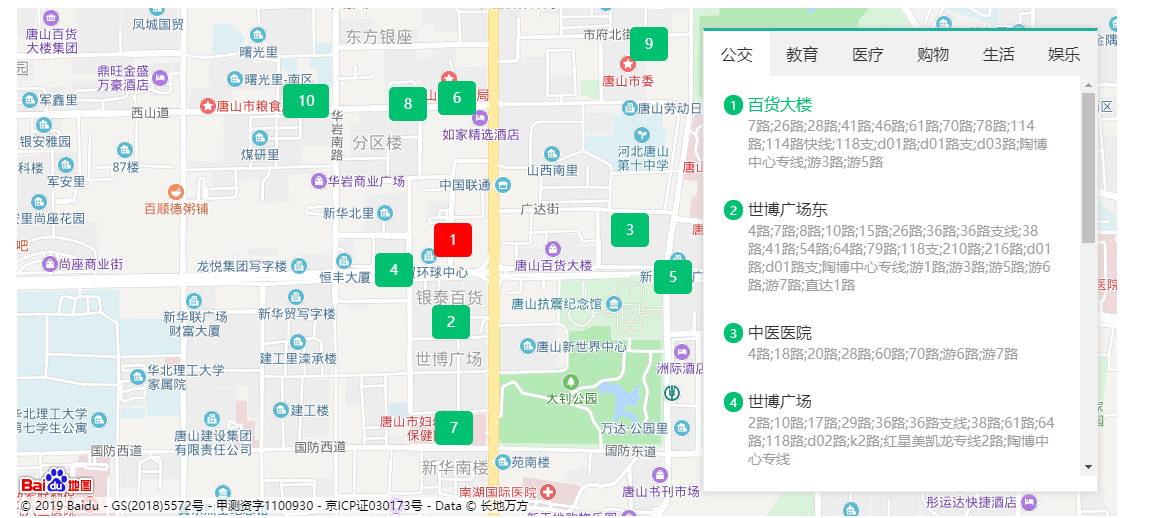
其实百度官方有对应的api,但是对于一个网站来说这样的样式难免有些难看
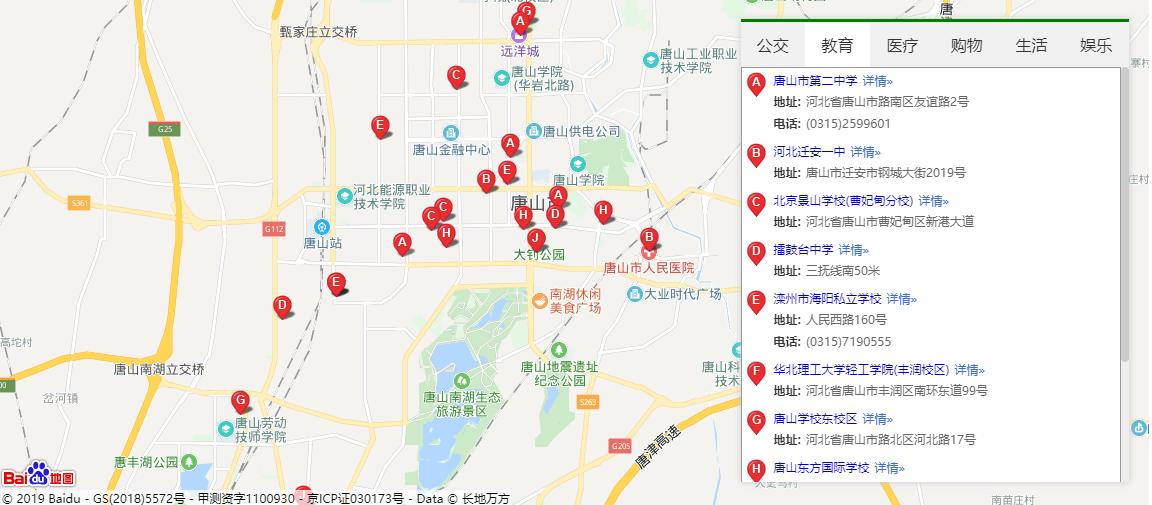
这样的结果显然不能满足当下的需求,所以我决定利用官方给的web服务接口加上覆盖物实现对应的效果。
由于我们用的vue框架,所以我采用了基于百度地图封装的插件:vue-baidu-map 实现,对应版本号是:0.21.18,项目安装依赖如下:
npm install vue-baidu-map --save
然后在main.js中注入依赖即可:
import BaiduMap from 'vue-baidu-map'

Vue.use(BaiduMap, {

  ak: '申请的百度秘钥'

})
这里的ak需要去官方申请秘钥,地址在这里,需要注意的是,申请完成之后会给你两个秘钥,我们需要给调起服务主机的ip加到白名单里,不然会有访问权限错误,由于现在是开发环境,所以我设置的是通配符*,也就是所有的主机,但是正是环境就不推荐这么做了,原因是前端代码容易泄露AK,被其他网站非法调用。
打开控制台,步骤如下:
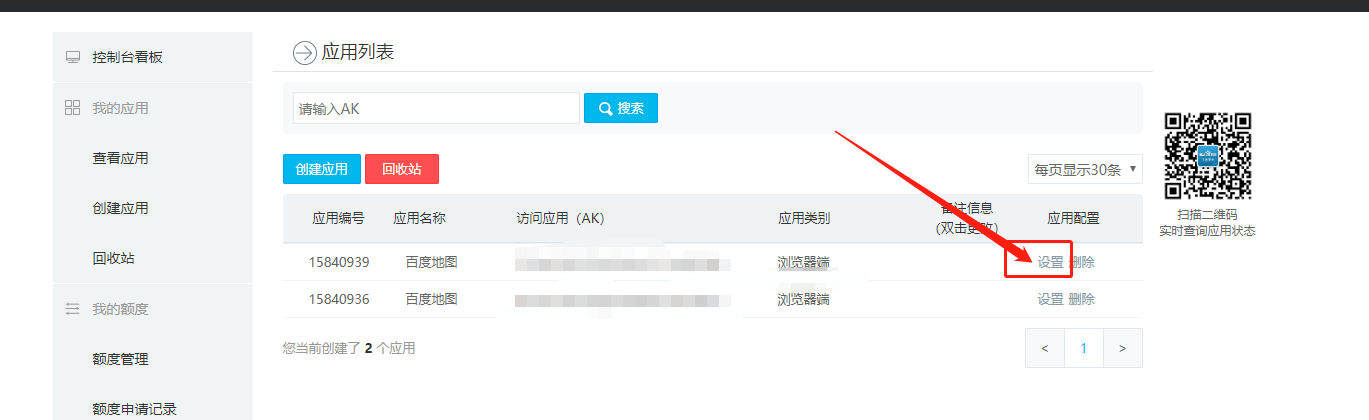
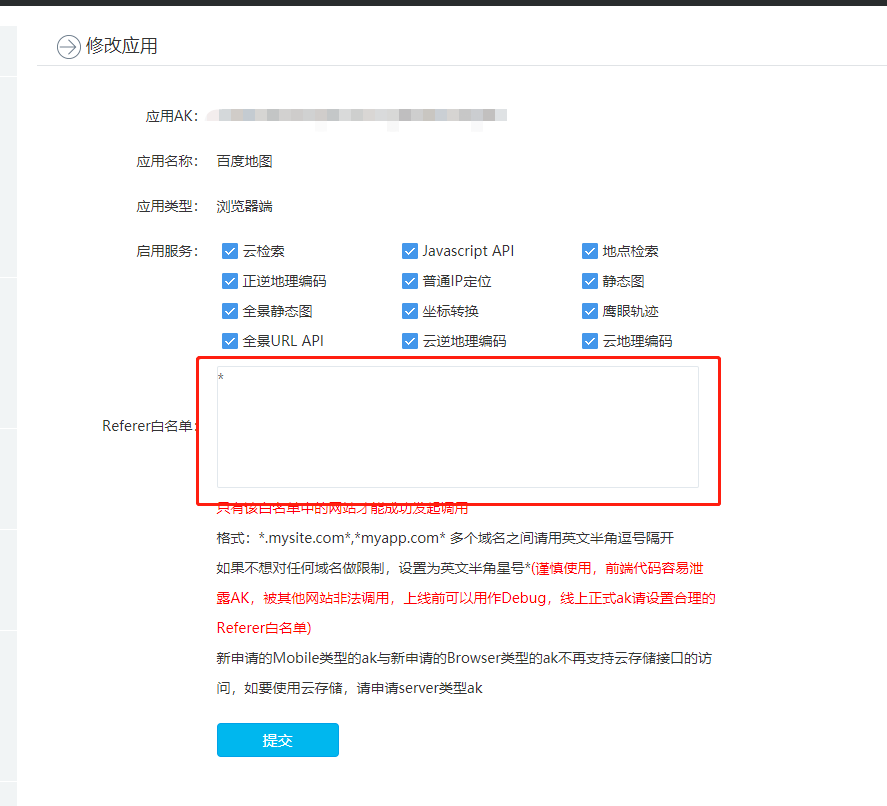
白名单设置好以后,就能开始调用web服务了;
首先要注意一个问题,由于同源策略,我们直接调用百度官方的接口会出现跨域问题,关于什么是跨域,这里不多解释。那么前端处理跨域最理想的方案是jsonp,也就是利用script天生的优势(他可以动态获取src属性),那么vue项目不同于传统html,所以这里我用到了一个插件,也就是vue-jsonp,他是一个基于promise封装的请求库,使用方法也很简单,具体如下:
首先是安装:
npm install vue-jsonp --save
安装完成之后注入要vue实例中:
import jsonp from "vue-jsonp"

Vue.use(jsonp)
使用起来也很方便:
this.$jsonp('url',params).then(()=> {

   // 成功之后的回调

}).catch(() => {

 // 失败之后的回调

})
下面就正是开始搭建地图了,首先开始写地图容器,按照vue-baidu-map官方的方法构建即可,注意要开启滚轮操作,还要设置地图展开的深度zoom
<template>

    <div class="map-plus">

        <!-- 地图容器 -->

        <baidu-map

            class="baidu-map"

            id="map"

            :double-click-zoom="false"

            :min-zoom="10"

            :max-zoom="18"

            :scroll-wheel-zoom="true"

            :center="center"

            :zoom="zoom"

            @ready="handler">

        </baidu-map>

    </div>

</template>

<script>

export default {

  methods: {

    // 地图组件渲染完毕时触发

    handler({ BMap, map }) {

      this.center.lng = 118.186882019043;

      this.center.lat = 39.63203811645508;

      this.zoom = 16;

    }

  }

};

</script>

<style lang="scss">

.map-plus {

  position: relative;

}

#map {

  width: 1100px;

  height: 508px;

  margin-top: 200px;

  margin-left: 50px;

}

</style>
这里我想主要说一下覆盖物的封装:
首先由于左右是一个联动的过程,这里我的思路是按照索引,也就是设置一个激活的索引,如果和当前点击的索引一样的话实现激活效果,还有一点体验性的问题,由于我想点击某个漂浮物的时候让该漂浮物回到地图中间,所以每次点击我根据百度服务给的经纬度赋值给当前地图的中心,覆盖物的封装如下:
<template>

  <bm-overlay

    ref="customOverlay"

    class="happy-layer"

    pane="labelPane"

    @draw="draw">

    <div class="content"

         :class="{active: busActiveIndex == title+1}"

         @click="handleClick">

        {{title+1}}

    </div>

  </bm-overlay>

</template>

<script>

export default {

  props: [

    // 位置

    'position',

    // 是否激活

    'active',

    // 内容

    'title',

    // 激活的索引

    'busActiveIndex'

  ],

  watch: {

    position: {

      handler () {

        this.$refs.customOverlay.reload()

      },

      deep: true

    }

  },

  methods: {

    handleClick () {

      this.$emit('change',this.title)

    },

    draw ({el, BMap, map}) {

      const {lng, lat} = this.position

      const pixel = map.pointToOverlayPixel(new BMap.Point(lng, lat))

      el.style.left = pixel.x - 60 + 'px'

      el.style.top = pixel.y - 20 + 'px'

    }

  }

}

</script>

<style lang="scss">

.happy-layer {

    position: absolute;

    z-index: 99;

    &:hover {

        z-index: 999;

    }

}

    .content {

        padding: 10px 15px;

        font-size: 14px;

        color: #fff;

        background-color: #00c170;

        cursor: pointer;

        border-radius: 5px;

        &:hover {

            background-color: red;

        }

    }

.active {

    background-color: red;

}

</style>
调用他就比较简单了,只要把从服务端拿到的结果遍历一下绑定到组件上就行了
 <happy-layer v-for="(item,index) in layerList" :key=index

                     :position="{lng: item.location.lng , lat: item.location.lat}"

                     :title=index

                     :busActiveIndex="busActiveIndex"

                     @change="overLayClick"></happy-layer>
关于获取周边配套,我用到两个方法,一个负责接收参数调用服务,另一个负责获取数据
 // 获取周边接口

    getRound: function (key) {

        let ak = "F7XhtYsBvOZeQUbrmCCuy0KGNVCZApB8";

        return this.$jsonp(`http://api.map.baidu.com/place/v2/search?query=${key}&location=39.63203811645508,118.186882019043&radius=2000&output=json&ak=${ak}`)

    },

    // 获取周边信息

    getMsg: function(a) {

      this.getRound(a).then(res => {

        this.layerList = []

        res.results.forEach(el => el.location && this.layerList.push(el));

      });

    },
最后就剩下列表的搭建了,这个就不说了,直接上源码吧:
地图容器父组件:
<template>

    <div class="map-plus">

        <!-- 地图容器 -->

        <baidu-map

            class="baidu-map"

            id="map"

            :double-click-zoom="false"

            :min-zoom="10"

            :max-zoom="18"

            :scroll-wheel-zoom="true"

            :center="center"

            :zoom="zoom"

            @ready="handler">

            <!-- 覆盖物组件 -->

            <happy-layer v-for="(item,index) in layerList" :key=index

                     :position="{lng: item.location.lng , lat: item.location.lat}"

                     :title=index

                     :busActiveIndex="busActiveIndex"

                     @change="overLayClick"></happy-layer>

        </baidu-map>

        <!-- 右侧搜索 -->

        <div class="search-wrap">

            <!-- 标签 -->

            <div class="tags">

                <div class="tag_item"

                     :class="{'tag-active': activeIndex == index}"

                     v-for="(item,index) in tagsArr"

                     :key="index"

                     @click="tagsClick(index,item)">{{item.name}}</div>

            </div>

            <!-- 列表 -->

            <div class="list">

                <div class="list-top"

                        v-for="(bus,indexs) in layerList"

                        :key="indexs"

                        @click="chooseListItem(bus,indexs)">

                    <div class="title"

                            :class="{'active-bus': busActiveIndex == indexs+1}">

                        <span class="indexs">{{indexs+1}}</span>

                        <span>{{bus.name}}</span>

                    </div>

                    <div class="bus-num">

                        {{bus.address}}

                    </div>

                </div>

            </div>

        </div>

    </div>

</template>

<script>

export default {

  data() {

    return {

        active: false,

      // 左边中心

      center: { lng: 0, lat: 0 },

      // 深度

      zoom: 3,

    //   标签激活索引

      activeIndex: 0,

    //   漂浮物激活索引

      busActiveIndex:1,

    //   数据结果

      layerList: [],

    //   标签数组

      tagsArr: [

        {

          name: "公交"

        },

        {

          name: "教育"

        },

        {

          name: "医疗"

        },

        {

          name: "购物"

        },

        {

          name: "生活"

        },

        {

          name: "娱乐"

        }

      ]

    };

  },

  mounted() {

      this.getMsg('公交');

  },

  methods: {

    // 地图组件渲染完毕时触发

    handler({ BMap, map }) {

      this.center.lng = 118.186882019043;

      this.center.lat = 39.63203811645508;

      this.zoom = 16;

    },

    // 标签激活

    tagsClick: function(index, item) {

      this.activeIndex = index

      this.getMsg(item.name)

    },

    // 获取周边接口

    getRound: function (key) {

        let ak = 你申请的秘钥;

        return this.$jsonp(`http://api.map.baidu.com/place/v2/search?query=${key}&location=39.63203811645508,118.186882019043&radius=2000&output=json&ak=${ak}`)

    },

    // 获取周边信息

    getMsg: function(a) {

      this.getRound(a).then(res => {

        this.layerList = []

        res.results.forEach(el => el.location && this.layerList.push(el));

      });

    },

    // 覆盖物点击激活

    overLayClick: function (num) {

        this.busActiveIndex = num + 1

    },

    // 选择列表某一项

    chooseListItem: function (bus,indexs) {

        this.busActiveIndex = indexs+1

        this.center = bus.location

    }

  }

};

</script>

<style lang="scss">

.map-plus {

  position: relative;

}

#map {

  width: 1100px;

  height: 508px;

  margin-top: 200px;

  margin-left: 50px;

}

.search-wrap {

  width: 393px;

  height: 460px;

  border: 1px solid #eee;

  background-color: #fff;

  position: absolute;

  left: 736px;

  top: 220px;

  box-shadow: 0 0 10px #ccc;

  border-top: 3px solid #1fb19e;

  .list {

      height: 400px;

      overflow-y: scroll;

      .list-top {

          color: #333;

          padding: 20px 20px 10px 20px;

          cursor: pointer;

          .indexs {

              padding: 2px 6px;

              font-size: 12px;

              border-radius: 50%;

              background-color: #00c170;

              color: #fff;

          }

          &:hover {

              color: #00c170;

          }

          .bus-num {

            font-size: 14px;

            margin: 5px 0 0 24px;

            color: #9c9fa1;

            line-height: 18px;

        }

      }

  }

  .active-bus {

          color: #00c170;

      }

  .tags {

    line-height: 45px;

    height: 45px;

    background-color: #f1f1f1;

    display: flex;

    justify-content: space-between;

    .tag_item {

      width: 66px;

      text-align: center;

      cursor: pointer;

    }

    .tag-active {

      background-color: #fff;

    }

  }

}

</style>
覆盖物子组件:
<template>

  <bm-overlay

    ref="customOverlay"

    class="happy-layer"

    pane="labelPane"

    @draw="draw">

    <div class="content"

         :class="{active: busActiveIndex == title+1}"

         @click="handleClick">

        {{title+1}}

    </div>

  </bm-overlay>

</template>

<script>

export default {

  props: [

    // 位置

    'position',

    // 是否激活

    'active',

    // 内容

    'title',

    // 激活的索引

    'busActiveIndex'

  ],

  watch: {

    position: {

      handler () {

        this.$refs.customOverlay.reload()

      },

      deep: true

    }

  },

  methods: {

    handleClick () {

      this.$emit('change',this.title)

    },

    draw ({el, BMap, map}) {

      const {lng, lat} = this.position

      const pixel = map.pointToOverlayPixel(new BMap.Point(lng, lat))

      el.style.left = pixel.x - 60 + 'px'

      el.style.top = pixel.y - 20 + 'px'

    }

  }

}

</script>

<style lang="scss">

.happy-layer {

    position: absolute;

    z-index: 99;

    &:hover {

        z-index: 999;

    }

}

    .content {

        padding: 10px 15px;

        font-size: 14px;

        color: #fff;

        background-color: #00c170;

        cursor: pointer;

        border-radius: 5px;

        &:hover {

            background-color: red;

        }

    }

.active {

    background-color: red;

}

</style>
前端利用百度开发文档给的web服务接口实现对某个区域周边配套的检索的更多相关文章
- 【原创】Odoo开发文档学习之:构建接口扩展(Building Interface Extensions)(边Google翻译边学习)
构建接口扩展(Building Interface Extensions) 本指南是关于为Odoo的web客户创建模块. 要创建有Odoo的网站,请参见建立网站;要添加业务功能或扩展Odoo的现有业务 ...
- [翻译]开发文档:android Bitmap的高效使用
内容概述 本文内容来自开发文档"Traning > Displaying Bitmaps Efficiently",包括大尺寸Bitmap的高效加载,图片的异步加载和数据缓存 ...
- AFC项目开发文档整理
AFC项目开发文档整理 PHPCMS 的确是一个伟大的CMS,我对它爱不释手. 标签嵌套无法loop获取的解决办法.关键代码如下: /\*后台添加\*/ $str = preg_replace ( & ...
- QM项目开发文档整理
QM项目开发文档整理 前言 在W公司工作4个多月,庆幸接触到的全是"硬"项目,真枪实干,技术.经验.能力都得到了很大提升. QM项目 此项目WEB前端学到的东西很多,对PHP项目的 ...
- 若快打码平台python开发文档修改版
一.打码的作用 在进行爬虫过程中,部分网站的登录验证码是比较简单的,例如四个英文数字随机组合而成的验证码,有的是全数字随机组成的验证码,有的是全中文随机组成的验证码.为了爬虫进行自动化,需要解决自动登 ...
- 《转》CXF WebService 开发文档-目录索引
CXF WebService 开发文档-目录索引 上次介绍了Axis的WebService,现在我们来看看CXF是怎么完成WebService的. Axis1 WebService 在线博文: htt ...
- jssip中文开发文档(完整版)
jsSip开发文档 (官网地址:http://www.jssip.net/) 完整案例demo下载地址: http://download.csdn.net/download/qq_39421580/1 ...
- WSTMart开发文档
WSTMart开发文档页面 PC版 开源版 授权版 序言 WSTMart安装协议 WSTMart电商系统安装 商城前台安装操作指南 用户中心指南 商家中心操作指南 ...
- So注入工具TsoInject开发文档
So注入工具TsoInject开发文档 导语: 作为一个软件安全从业者而言,我们需要对某个App的关键函数就行Hook, 对于android而言,Smali层我们使用Xposed Hook框架,So层 ...
随机推荐
- Drupal7.8的安装注意的问题
首先推荐在安装之前,首先阅读一下官方的Installation guide ,说实话话,这玩意安装没有Joomla安装那么平滑,大多数问题,guide都会提到.我是先安装后看的这个guide,比较折腾 ...
- unix中的rm,rmdir的使用
一.rm的使用 1.基本用法:用于删除文件 rm filename 2.可加属性值 (1)-v rm -v filename 作用:提示删除的情况 (2)-f rm -f filename 作用:删 ...
- 【python进阶】深入理解系统进程2
前言 在上一篇[python进阶]深入理解系统进程1中,我们讲述了多任务的一些概念,多进程的创建,fork等一些问题,这一节我们继续接着讲述系统进程的一些方法及注意点 multiprocessing ...
- 使用Android Studio Gradle实现友盟多渠道打包
最新项目中要求在友盟后台看到不同渠道的统计,Android大大小小的应用市场要几百个,要一个一个手工打包那一天也干不完,还好是有大牛的,弄出了好多解决方法,就Gradle做一下记录和分享,首先看一些理 ...
- Eclipse常用插件 + Eclipse快捷键
J2EE开发IDE,常用的有Eclipse.Myeclipse.Intellij IDEA 版本(Luna):http://www.eclipse.org/downloads/ 版本(2015 ...
- java web 开发实战经典(一)
一.jsp三种Scriptlet(脚本小程序) 1.<% %> :定义局部变量.编写语句等. <% String str = "hello world!";// ...
- 架构之高可用性(HA)集群(Keepalived)
Keepalived简介 Keepalived是Linux下一个轻量级别的高可用解决方案.高可用(High Avalilability,HA),其实两种不同的含义:广义来讲,是指整个系统的高可用行,狭 ...
- Python的logging日志
日志级别:critical > error > warning > info > debug,notset级别越高打印的日志越少,反之亦然,即debug : 打印全部的日志(n ...
- bugku login2 writeup 不使用vps的方法
0x00前言 这个题是sql注入与命令执行相结合的一个题,思路有两个: 一.:sql注入登录web系统,命令执行反弹公网IP监听端口(需要vps),此种方法详见链接:http://www.bugku. ...
- JS方法:数字转换为千分位字符
/** * 数字转为千分位字符 * @param {Number} num * @param {Number} point 保留几位小数,默认2位 */ function parseToThousan ...