
win7下,使用django运行django-admin.py无法创建网站
安装django的步骤:
1、安装python,选择默认安装在c盘即可。设置环境变量path,值添加python的安装路径。
2、下载ez_setup.py,下载地址:http://peak.telecommunity.com/dist/ez_setup.py
放在某个文件夹下,在cmd里进入该文件夹,运行python ez_setup.py install
3、下载Django ,下载地址:https://www.djangoproject.com/download/
下载后解压,在cmd里进入Django所在的目录,运行python setup.py install,然后开始安装,Django将要被安装到Python的Lib下site-packages。
4、设置Django的环境变量,在path里添加C:\Python33\Lib\site-packages\Django-1.7.1-py3.3.egg\django\bin
创建一个网站:
先进入要创建网站的目录,比如我要在E:\website 里创建一个站点,则用cmd进入该目录,再使用django-admin.py startproject mysite 命令,如果没有任何提示,则再打开该目录,是否多了mysite文件夹,如果没有出现该文件夹,则说明 .py 文件默认打开方式不是下图第一个
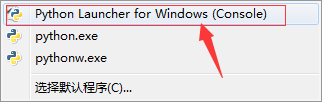
随意选中一个python文件,右键选择打开方式,将其默认打开方式设置成上面第一个。在cmd里再次运行django-admin.py startproject mysite 命令,注意这个命令是不加.pyd的。我快被各位网友给搞死了。应该是django-admin startproject mysite。。如果加了.py,就会打开django-admin.py这个程序。
网友们:下次抄别人博客的时候,能不能自己试一遍,走点心???
你会发现在E:\website 里创建了mysite文件夹。ok,问题解决了。
补充:
有网友也会通过另一个方法解决:换这个命令python django-admin startproject mysite,其实也就是使用python执行。这样就不需要修改python默认打开方式
顺便贴一下官方使用目录https://docs.djangoproject.com/en/1.10/intro/tutorial01/#creating-the-polls-app
目前我遇到的最简单的安装方式:
pip install -e django/

贴一下官方使用文档
Writing your first Django app, part 1
Let’s learn by example.
Throughout this tutorial, we’ll walk you through the creation of a basic poll application.
It’ll consist of two parts:
- A public site that lets people view polls and vote in them.
- An admin site that lets you add, change, and delete polls.
We’ll assume you have Django installed already. You can tell Django is installed and which version by running the following command:
$ python -m django --version
If Django is installed, you should see the version of your installation. If it isn’t, you’ll get an error telling “No module named django”.
This tutorial is written for Django 1.10 and Python 3.4 or later. If the Django version doesn’t match, you can refer to the tutorial for your version of Django by using the version switcher at the bottom right corner of this page, or update Django to the newest version. If you are still using Python 2.7, you will need to adjust the code samples slightly, as described in comments.
See How to install Django for advice on how to remove older versions of Django and install a newer one.
Where to get help:
If you’re having trouble going through this tutorial, please post a message to django-users or drop by#django on irc.freenode.net to chat with other Django users who might be able to help.
Creating a project
If this is your first time using Django, you’ll have to take care of some initial setup. Namely, you’ll need to auto-generate some code that establishes a Django project – a collection of settings for an instance of Django, including database configuration, Django-specific options and application-specific settings.
From the command line, cd into a directory where you’d like to store your code, then run the following command:
$ django-admin startproject mysite
This will create a mysite directory in your current directory. If it didn’t work, see Problems running django-admin.
Note
You’ll need to avoid naming projects after built-in Python or Django components. In particular, this means you should avoid using names like django (which will conflict with Django itself) or test (which conflicts with a built-in Python package).
Where should this code live?
If your background is in plain old PHP (with no use of modern frameworks), you’re probably used to putting code under the Web server’s document root (in a place such as /var/www). With Django, you don’t do that. It’s not a good idea to put any of this Python code within your Web server’s document root, because it risks the possibility that people may be able to view your code over the Web. That’s not good for security.
Put your code in some directory outside of the document root, such as /home/mycode.
Let’s look at what startproject created:
mysite/

    manage.py

    mysite/

        __init__.py

        settings.py

        urls.py

        wsgi.py
These files are:
- The outer
mysite/root directory is just a container for your project. Its name doesn’t matter to Django; you can rename it to anything you like. manage.py: A command-line utility that lets you interact with this Django project in various ways. You can read all the details aboutmanage.pyin django-admin and manage.py.- The inner
mysite/directory is the actual Python package for your project. Its name is the Python package name you’ll need to use to import anything inside it (e.g.mysite.urls). mysite/__init__.py: An empty file that tells Python that this directory should be considered a Python package. If you’re a Python beginner, read more about packages in the official Python docs.mysite/settings.py: Settings/configuration for this Django project. Django settings will tell you all about how settings work.mysite/urls.py: The URL declarations for this Django project; a “table of contents” of your Django-powered site. You can read more about URLs in URL dispatcher.mysite/wsgi.py: An entry-point for WSGI-compatible web servers to serve your project. See How to deploy with WSGIfor more details.
The development server
Let’s verify your Django project works. Change into the outer mysite directory, if you haven’t already, and run the following commands:
$ python manage.py runserver
You’ll see the following output on the command line:
Performing system checks...

System check identified no issues (0 silenced).

You have unapplied migrations; your app may not work properly until they are applied.

Run 'python manage.py migrate' to apply them.

October 01, 2016 - 15:50:53

Django version 1.10, using settings 'mysite.settings'

Starting development server at http://127.0.0.1:8000/

Quit the server with CONTROL-C.
Note
Ignore the warning about unapplied database migrations for now; we’ll deal with the database shortly.
You’ve started the Django development server, a lightweight Web server written purely in Python. We’ve included this with Django so you can develop things rapidly, without having to deal with configuring a production server – such as Apache – until you’re ready for production.
Now’s a good time to note: don’t use this server in anything resembling a production environment. It’s intended only for use while developing. (We’re in the business of making Web frameworks, not Web servers.)
Now that the server’s running, visit http://127.0.0.1:8000/ with your Web browser. You’ll see a “Welcome to Django” page, in pleasant, light-blue pastel. It worked!
Changing the port
By default, the runserver command starts the development server on the internal IP at port 8000.
If you want to change the server’s port, pass it as a command-line argument. For instance, this command starts the server on port 8080:
$ python manage.py runserver 8080
If you want to change the server’s IP, pass it along with the port. So to listen on all public IPs (useful if you want to show off your work on other computers on your network), use:
$ python manage.py runserver 0.0.0.0:8000
Full docs for the development server can be found in the runserver reference.
Automatic reloading of runserver
The development server automatically reloads Python code for each request as needed. You don’t need to restart the server for code changes to take effect. However, some actions like adding files don’t trigger a restart, so you’ll have to restart the server in these cases.
Creating the Polls app
Now that your environment – a “project” – is set up, you’re set to start doing work.
Each application you write in Django consists of a Python package that follows a certain convention. Django comes with a utility that automatically generates the basic directory structure of an app, so you can focus on writing code rather than creating directories.
Projects vs. apps
What’s the difference between a project and an app? An app is a Web application that does something – e.g., a Weblog system, a database of public records or a simple poll app. A project is a collection of configuration and apps for a particular website. A project can contain multiple apps. An app can be in multiple projects.
Your apps can live anywhere on your Python path. In this tutorial, we’ll create our poll app right next to your manage.py file so that it can be imported as its own top-level module, rather than a submodule of mysite.
To create your app, make sure you’re in the same directory as manage.py and type this command:
$ python manage.py startapp polls
That’ll create a directory polls, which is laid out like this:
polls/

    __init__.py

    admin.py

    apps.py

    migrations/

        __init__.py

    models.py

    tests.py

    views.py
This directory structure will house the poll application.
Write your first view
Let’s write the first view. Open the file polls/views.py and put the following Python code in it:
from django.http import HttpResponse

def index(request):

    return HttpResponse("Hello, world. You're at the polls index.")
This is the simplest view possible in Django. To call the view, we need to map it to a URL - and for this we need a URLconf.
To create a URLconf in the polls directory, create a file called urls.py. Your app directory should now look like:
polls/

    __init__.py

    admin.py

    apps.py

    migrations/

        __init__.py

    models.py

    tests.py

    urls.py

    views.py
In the polls/urls.py file include the following code:
from django.conf.urls import url

from . import views

urlpatterns = [

    url(r'^$', views.index, name='index'),

]
The next step is to point the root URLconf at the polls.urls module. In mysite/urls.py, add an import fordjango.conf.urls.include and insert an include() in the urlpatterns list, so you have:
from django.conf.urls import include, url

from django.contrib import admin

urlpatterns = [

    url(r'^polls/', include('polls.urls')),

    url(r'^admin/', admin.site.urls),

]
The include() function allows referencing other URLconfs. Note that the regular expressions for the include() function doesn’t have a $ (end-of-string match character) but rather a trailing slash. Whenever Django encounters include(), it chops off whatever part of the URL matched up to that point and sends the remaining string to the included URLconf for further processing.
The idea behind include() is to make it easy to plug-and-play URLs. Since polls are in their own URLconf (polls/urls.py), they can be placed under “/polls/”, or under “/fun_polls/”, or under “/content/polls/”, or any other path root, and the app will still work.
When to use include()
You should always use include() when you include other URL patterns. admin.site.urls is the only exception to this.
Doesn’t match what you see?
If you’re seeing include(admin.site.urls) instead of just admin.site.urls, you’re probably using a version of Django that doesn’t match this tutorial version. You’ll want to either switch to the older tutorial or the newer Django version.
You have now wired an index view into the URLconf. Lets verify it’s working, run the following command:
$ python manage.py runserver
Go to http://localhost:8000/polls/ in your browser, and you should see the text “Hello, world. You’re at the polls index.”, which you defined in the index view.
The url() function is passed four arguments, two required: regex and view, and two optional: kwargs, and name. At this point, it’s worth reviewing what these arguments are for.
url() argument: regex
The term “regex” is a commonly used short form meaning “regular expression”, which is a syntax for matching patterns in strings, or in this case, url patterns. Django starts at the first regular expression and makes its way down the list, comparing the requested URL against each regular expression until it finds one that matches.
Note that these regular expressions do not search GET and POST parameters, or the domain name. For example, in a request to https://www.example.com/myapp/, the URLconf will look for myapp/. In a request tohttps://www.example.com/myapp/?page=3, the URLconf will also look for myapp/.
If you need help with regular expressions, see Wikipedia’s entry and the documentation of the re module. Also, the O’Reilly book “Mastering Regular Expressions” by Jeffrey Friedl is fantastic. In practice, however, you don’t need to be an expert on regular expressions, as you really only need to know how to capture simple patterns. In fact, complex regexes can have poor lookup performance, so you probably shouldn’t rely on the full power of regexes.
Finally, a performance note: these regular expressions are compiled the first time the URLconf module is loaded. They’re super fast (as long as the lookups aren’t too complex as noted above).
url() argument: view
When Django finds a regular expression match, Django calls the specified view function, with an HttpRequest object as the first argument and any “captured” values from the regular expression as other arguments. If the regex uses simple captures, values are passed as positional arguments; if it uses named captures, values are passed as keyword arguments. We’ll give an example of this in a bit.
url() argument: kwargs
Arbitrary keyword arguments can be passed in a dictionary to the target view. We aren’t going to use this feature of Django in the tutorial.
url() argument: name
Naming your URL lets you refer to it unambiguously from elsewhere in Django, especially from within templates. This powerful feature allows you to make global changes to the URL patterns of your project while only touching a single file.
When you’re comfortable with the basic request and response flow, read part 2 of this tutorial to start working with the database.
win7下,使用django运行django-admin.py无法创建网站的更多相关文章
- django运行django-admin.py无法创建网站
安装django的步骤: 1.安装python,选择默认安装在c盘即可.设置环境变量path,值添加python的安装路径. 2.下载ez_setup.py,下载地址:http://peak.tele ...
- django 运行python manage.py sqlall books 时报错 app has migration
出现这个问题的原因是版本之前的不兼容,我用的django版本是1.8.6 而 这条python manage.py sqlall books 是基于django1.0版本的. 在django1.8.6 ...
- Macos下用pycharm运行django项目死活安装不上mysqlclient怎么办!!??
花了我三天时间,佛了 我刚从win过渡到mac,想着把代码迁移一下. 然后看到依赖里面有一个mysqlclient,然后pip3 install死活装不上 解决方案: 在这里写上这个 然后就好,死了
- win7下php7.1运行getenv('REMOTE_ADDR')fastcgi停止运行
// 本地环境phpStudy, PHP7.1.13nts+nginx,切换Apache也不行//ps:php版本<=7.0正常echo "<pre>";// $ ...
- win7 以管理员身份运行cmd, windows services 的创建和删除
以 http 协议访问svn repository 搭建可用http访问的svn(windows) http://blog.csdn.net/yangyangrenren/article/detail ...
- Django之model admin自定义后台管理
Admin管理界面是django的杀手级应用.它读取你模式中的元数据,然后提供给你一个强大而且可以使用的界面,网站管理者可以用它立即向网站中添加内容. 比如,数据表如下: from django.db ...
- django复习-1-环境搭建和创建项目
一.虚拟环境搭建 1. 创建虚拟环境,需要联网 mkvirtualenv django_py3_1.11 -p python3 2. 安装Django 使用django 1.11.11版本,注意需要联 ...
- django博客项目3:创建 Django 博客的数据库模型
设计博客的数据库表结构 博客最主要的功能就是展示我们写的文章,它需要从某个地方获取博客文章数据才能把文章展示出来,通常来说这个地方就是数据库.我们把写好的文章永久地保存在数据库里,当用户访问我们的博客 ...
- 【Django】Django迁移数据库
我们已经编写了博客数据库模型的代码,但那还只是 Python 代码而已,Django 还没有把它翻译成数据库语言,因此实际上这些数据库表还没有真正的在数据库中创建 为了让 Django 完成翻译,创建 ...
随机推荐
- 关于access_token过期的解决办法
最近在做微信的发送模版消息,在测试的时候发现有的时候能够发送,有时候无法发送,查了相关的日志(日志记录发送结果很重要!!),看到了微信返回的错误消息,发现是 invalid credential, a ...
- 【NOIP2014】【洛谷1941】【CJOJ1672】飞扬的小鸟
题面 描述 Flappy Bird 是一款风靡一时的休闲手机游戏.玩家需要不断控制点击手机屏幕的频率来调节小鸟的飞行高度,让小鸟顺利通过画面右方的管道缝隙.如果小鸟一不小心撞到了水管或者掉在地上的话, ...
- 细说css中的position属性
有过css开发经验的同学,对于position这个属性一定不会陌生,然而这个熟悉的属性确是面试题中的常客,也就说明了该属性在css的世界是有一定的江湖地位的,那么我们就来详细的说说position这个 ...
- PHP随机函数-集锦
1 PHP随机函数收藏 function random_string($len = 6) { $chars = array( "a", "b", "c ...
- Python机器学习中文版目录
建议Ctrl+D保存到收藏夹,方便随时查看 人工智能(AI)学习资料库 Python机器学习简介 第一章 让计算机从数据中学习 将数据转化为知识 三类机器学习算法 第二章 训练机器学习分类算法 透过人 ...
- VirboxLM许可管理平台,一站式软件保护解决方案
安全,易用,灵活 轻松解决开发者软件版权保护难题 Virbox LM为企业提供安全易用的软件保护管理平台,实现高安全强度的软件防护,防止盗版及逆向工程.实现便捷.安全的软件授权,包括创建灵活的许可模式 ...
- ECMAScript 6入门 - 变量的解构赋值
定义 ES6允许按照一定模式,从数组和对象中提取值,对变量进行赋值,这被称为解构(Destructuring). 解构赋值不仅适用于var命令,也适用于let和const命令. 解构赋值的规则是,只要 ...
- 15.C++-操作符重载
首先回忆下以前学的函数重载 函数重载 函数重载的本质为相互独立的不同函数 通过函数名和函数参数来确定函数调用 无法直接通过函数名得到重载函数的入口地址 函数重载必然发生在同一个作用域中 类中的函数重载 ...
- JavaSE中常见的工具类
Arrays 用来操作数组, 常用方法是 sort()和toString()方法 Iterator 我们常说的迭代器就是这哥们,专门用来操作集合元素的工具类 常用方法是: hasNex()t和next ...
- 使用TensorFlow实现回归预测
这一节使用TF搭建一个简单的神经网络用于回归预测,首先随机生成一组数据 import tensorflow as tf import numpy as np import matplotlib.pyp ...