
Pandas与Matplotlib基础
.png)
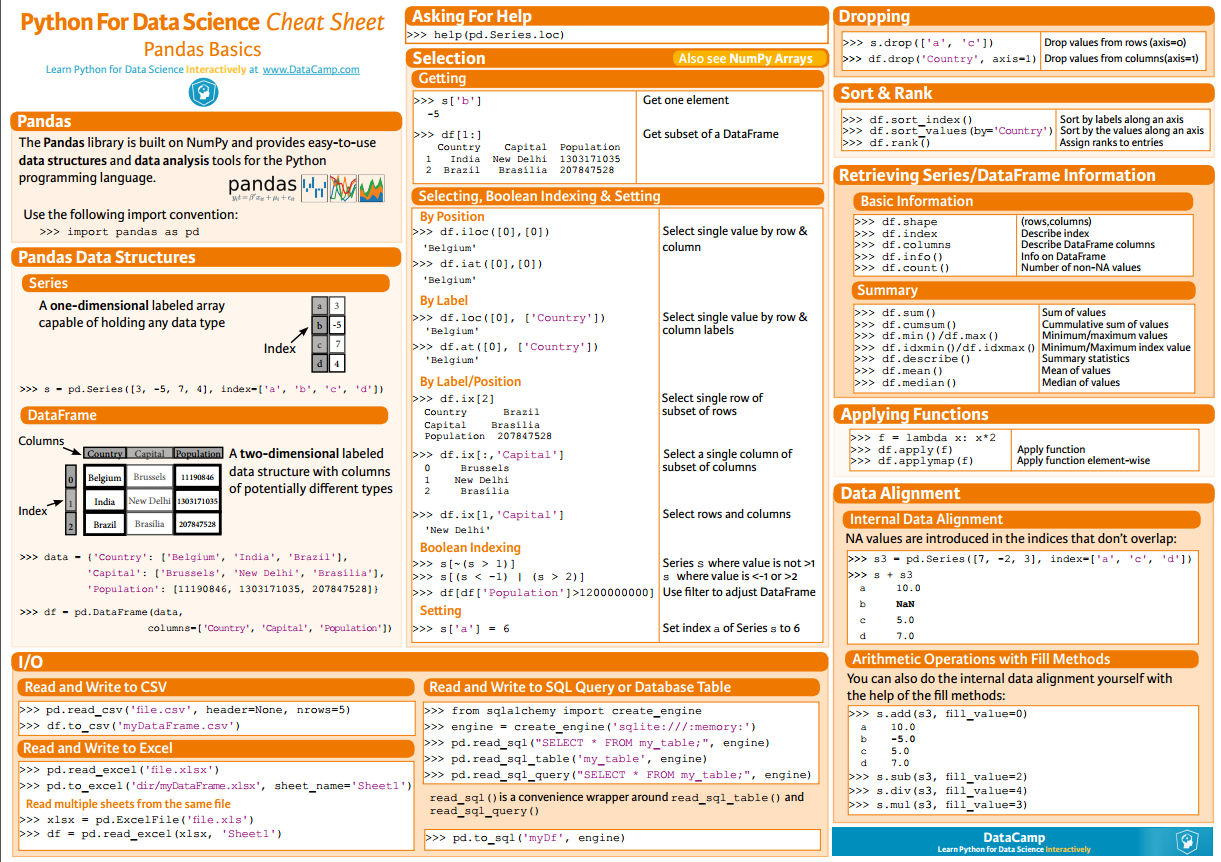
pip install pandas
.png)
s = pd.Series([3, -5, 7, 4], index=['a', 'b', 'c', 'd'])

print(s)

# result

a    3

b   -5

c    7

d    4

dtype: int64
s.index = ['A', 'B', 'C', 'D']

print(s)

# result

A    3

B   -5

C    7

D    4

dtype: int64
data = {

    'Country': ['Belgium', 'India', 'Brazil'],

    'Capital': ['Brussels', 'New Delhi', 'Brasília'],

    'Population': [11190846, 1303171035, 207847528]

}

df = pd.DataFrame(data, columns=['Country', 'Capital', 'Population'])

print(df)

# result

   Country    Capital  Population

0  Belgium   Brussels    11190846

1    India  New Delhi  1303171035

2   Brazil   Brasília   207847528
print(df.shape)

# result

(260, 218)
print(df.columns)

print(df.index)

# result

Index(['Life expectancy', '', '', '', '', '', '',

       '', '', '',

       ...

       '', '', '', '', '', '', '', '', '',

       ''],

      dtype='object', length=218)

Int64Index([  0,   1,   2,   3,   4,   5,   6,   7,   8,   9,

            ...

            250, 251, 252, 253, 254, 255, 256, 257, 258, 259],

           dtype='int64', length=260)
print(df.info())

# result

<class 'pandas.core.frame.DataFrame'>

Int64Index: 260 entries, 0 to 259

Columns: 218 entries, Life expectancy to 2016

dtypes: float64(217), object(1)

memory usage: 444.8+ KB
print(df.head())

# result

         Life expectancy   1800   1801   1802   1803   1804   1805   1806  \

0               Abkhazia    NaN    NaN    NaN    NaN    NaN    NaN    NaN

1            Afghanistan  28.21  28.20  28.19  28.18  28.17  28.16  28.15

2  Akrotiri and Dhekelia    NaN    NaN    NaN    NaN    NaN    NaN    NaN

3                Albania  35.40  35.40  35.40  35.40  35.40  35.40  35.40

4                Algeria  28.82  28.82  28.82  28.82  28.82  28.82  28.82

    1807   1808  ...        2016

0    NaN    NaN  ...    0    NaN

1  28.14  28.13  ...    1  52.72

2    NaN    NaN  ...    2    NaN

3  35.40  35.40  ...    3  78.10

4  28.82  28.82  ...    4  76.50

[5 rows x 218 columns]
print(df.tail())

# result

    Life expectancy   1800   1801   1802   1803   1804   1805   1806   1807  \

255      Yugoslavia    NaN    NaN    NaN    NaN    NaN    NaN    NaN    NaN

256          Zambia  32.60  32.60  32.60  32.60  32.60  32.60  32.60  32.60

257        Zimbabwe  33.70  33.70  33.70  33.70  33.70  33.70  33.70  33.70

258           ?land    NaN    NaN    NaN    NaN    NaN    NaN    NaN    NaN

259     South Sudan  26.67  26.67  26.67  26.67  26.67  26.67  26.67  26.67

      1808  ...     2016

255    NaN  ...      NaN

256  32.60  ...    57.10

257  33.70  ...    61.69

258    NaN  ...      NaN

259  26.67  ...    56.10

[5 rows x 218 columns]
selected_cols = ['', '', '']

date_df = df[selected_cols]

print(date_df.head())

# result

   2010  2011  2012

0   NaN   NaN   NaN

1  53.6  54.0  54.4

2   NaN   NaN   NaN

3  77.2  77.4  77.5

4  76.0  76.1  76.2
print(df.loc[250, 'Life expectancy'])

# result

250                  Vietnam

Name: Life expectancy, dtype: object
df.iloc[:10, -2:]

# result

   2015   2016

0   NaN    NaN

1  53.8  52.72

2   NaN    NaN

3  78.0  78.10

4  76.4  76.50

5  72.9  73.00

6  84.8  84.80

7  59.6  60.00

8   NaN    NaN

9  76.4  76.50
mask = df > 50

print(df[mask].head())

#result

         Life expectancy  1800  1801  1802  1803  1804  1805  1806  1807  \

0               Abkhazia   NaN   NaN   NaN   NaN   NaN   NaN   NaN   NaN

1            Afghanistan   NaN   NaN   NaN   NaN   NaN   NaN   NaN   NaN

2  Akrotiri and Dhekelia   NaN   NaN   NaN   NaN   NaN   NaN   NaN   NaN

3                Albania   NaN   NaN   NaN   NaN   NaN   NaN   NaN   NaN

4                Algeria   NaN   NaN   NaN   NaN   NaN   NaN   NaN   NaN

   1808  ...    2007  2008  2009  2010  2011  2012  2013  2014  2015   2016

0   NaN  ...     NaN   NaN   NaN   NaN   NaN   NaN   NaN   NaN   NaN    NaN

1   NaN  ...    52.4  52.8  53.3  53.6  54.0  54.4  54.8  54.9  53.8  52.72

2   NaN  ...     NaN   NaN   NaN   NaN   NaN   NaN   NaN   NaN   NaN    NaN

3   NaN  ...    76.6  76.8  77.0  77.2  77.4  77.5  77.7  77.9  78.0  78.10

4   NaN  ...    75.3  75.5  75.7  76.0  76.1  76.2  76.3  76.3  76.4  76.50

[5 rows x 218 columns]
heights = [59.0, 65.2, 62.9, 65.4, 63.7]

data = {

    'height': heights, 'sex': 'Male',

}

df_heights = pd.DataFrame(data)

print(df_heights)

# result

   height   sex

0    59.0  Male

1    65.2  Male

2    62.9  Male

3    65.4  Male

4    63.7  Male
df_heights.columns = ['HEIGHT', 'SEX']

df_heights.index = ['david', 'bob', 'lily', 'sara', 'tim']

print(df_heights)

# result

       HEIGHT   SEX

david    59.0  Male

bob      65.2  Male

lily     62.9  Male

sara     65.4  Male

tim      63.7  Male
print(df_heights.sum())

# result

HEIGHT                   316.2

SEX       MaleMaleMaleMaleMale

dtype: object
print(df_heights.cumsum())

# result

      HEIGHT                   SEX

david     59                  Male

bob    124.2              MaleMale

lily   187.1          MaleMaleMale

sara   252.5      MaleMaleMaleMale

tim    316.2  MaleMaleMaleMaleMale
print(df_heights.max())

# result

HEIGHT    65.4

SEX       Male

dtype: object
print(df_heights.min())

# result

HEIGHT      59

SEX       Male

dtype: object
print(df_heights.mean())

# result

HEIGHT    63.24

dtype: float64
print(df_heights.median())

# result

HEIGHT    63.7

dtype: float64
print(df_heights.describe())

# result

          HEIGHT

count   5.000000

mean   63.240000

std     2.589015

min    59.000000

25%    62.900000

50%    63.700000

75%    65.200000

max    65.400000
df_heights.drop(['david', 'tim'])
print(df_heights)

# result
df_heights = df_heights.drop(['david', 'tim'])

print(df_heights)

# result

      HEIGHT   SEX

bob     65.2  Male

lily    62.9  Male

sara    65.4  Male
print(df_heights.drop('SEX', axis=1))

# result

HEIGHT

david 177.0

bob 195.6

lily 188.7

sara 196.2

tim 191.1
print(df_heights.sort_index())

# result

       HEIGHT   SEX

bob      65.2  Male

david    59.0  Male

lily     62.9  Male

sara     65.4  Male

tim      63.7  Male
print(df_heights.sort_values(by='HEIGHT'))

# result

       HEIGHT   SEX

david    59.0  Male

lily     62.9  Male

tim      63.7  Male

bob      65.2  Male

sara     65.4  Male
print(df_heights.rank())

# result

       HEIGHT  SEX

david     1.0  3.0

bob       4.0  3.0

lily      2.0  3.0

sara      5.0  3.0

tim       3.0  3.0
df_heights = df_heights.apply(lambda height: height*3)

print(df_heights)

# result

       HEIGHT           SEX

david   177.0  MaleMaleMale

bob     195.6  MaleMaleMale

lily    188.7  MaleMaleMale

sara    196.2  MaleMaleMale

tim     191.1  MaleMaleMale
df = pd.read_csv("tips.csv")

print(df.info())

# result

<class 'pandas.core.frame.DataFrame'>

RangeIndex: 244 entries, 0 to 243

Data columns (total 8 columns):

total_bill    244 non-null float64

tip           244 non-null float64

sex           244 non-null object

smoker        244 non-null object

day           244 non-null object

time          244 non-null object

size          244 non-null int64

fraction      244 non-null float64

dtypes: float64(3), int64(1), object(4)

memory usage: 15.3+ KB
df = pd.read_csv('tips.csv', header=None, names=column_names)
df = pd.read_csv('tips.csv', header=None, names=column_names, na_values={'DAY': '-1'})
date_df = pd.read_csv('created_date.csv', parse_dates=[[3, 4, 5]])
.png)
import pandas as pd

import matplotlib.pyplot as plt

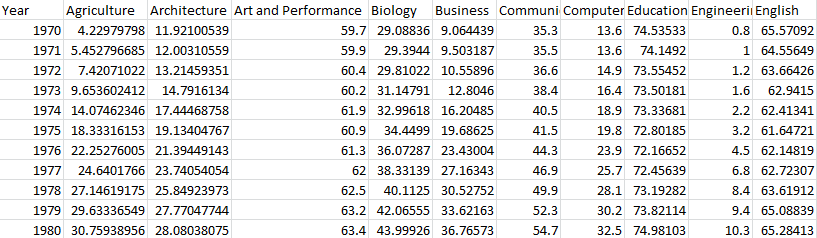
df = pd.read_csv('percent-bachelors-degrees-women-usa.csv', index_col='Year')

print(df.info())

print(df.head())

# result

      Agriculture  Architecture  Art and Performance    Biology   Business  \ ... ...         Social Sciences and History

Year                                                                          ... ...   Year

1970     4.229798     11.921005                 59.7  29.088363   9.064439    ... ...   1970                         36.8

1971     5.452797     12.003106                 59.9  29.394403   9.503187    ... ...   1971                         36.2

1972     7.420710     13.214594                 60.4  29.810221  10.558962    ... ...   1972                         36.1

1973     9.653602     14.791613                 60.2  31.147915  12.804602    ... ...   1973                         36.4

1974    14.074623     17.444688                 61.9  32.996183  16.204850    ... ...   1974                         37.3

<class 'pandas.core.frame.DataFrame'>

Int64Index: 42 entries, 1970 to 2011

Data columns (total 17 columns):

Agriculture                      42 non-null float64

Architecture                     42 non-null float64

Art and Performance              42 non-null float64

Biology                          42 non-null float64

Business                         42 non-null float64

Communications and Journalism    42 non-null float64

Computer Science                 42 non-null float64

Education                        42 non-null float64

Engineering                      42 non-null float64

English                          42 non-null float64

Foreign Languages                42 non-null float64

Health Professions               42 non-null float64

Math and Statistics              42 non-null float64

Physical Sciences                42 non-null float64

Psychology                       42 non-null float64

Public Administration            42 non-null float64

Social Sciences and History      42 non-null float64

dtypes: float64(17)

memory usage: 5.9 KB
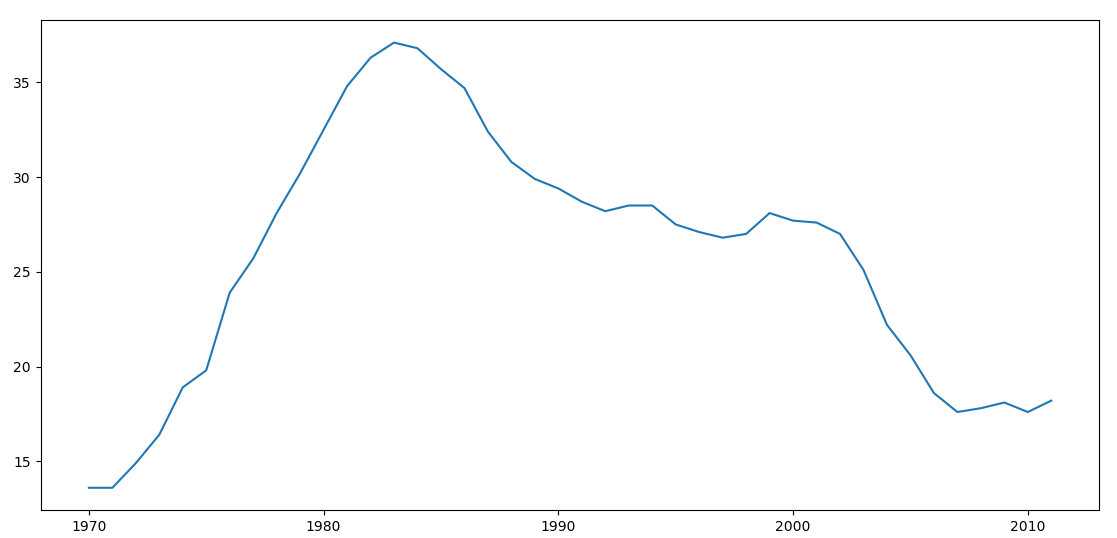
df_CS = df['Computer Science']

plt.plot(df_CS)

plt.show()
.png)
df_CS = df['Computer Science']

plt.plot(df_CS)

# 为图表添加标题

plt.title("Percentage of Computer Science's degrees awarded to women in the USA")

# 为X轴添加标签

plt.xlabel("Years")

# 为Y轴添加标签

plt.ylabel("Percentage")

plt.show()
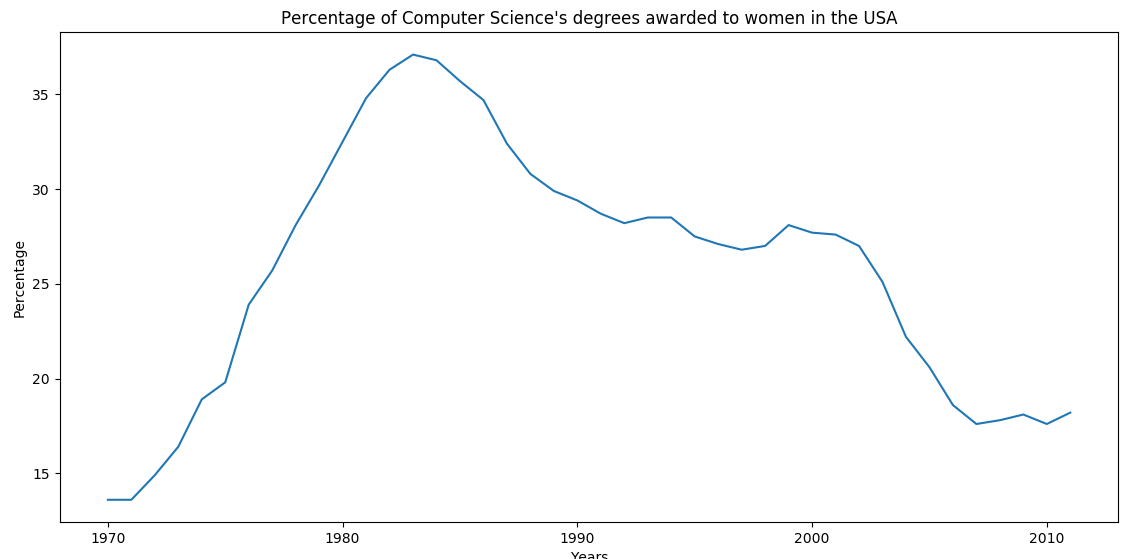
.png)
df_CS = df['Computer Science']

df_MS = df['Math and Statistics']

# 可以通过DataFrame的plot()方法直接绘制

# color指定线条的颜色

# style指定线条的样式

# legend指定是否使用标识区分

df_CS.plot(color='b', style='.-', legend=True)

df_MS.plot(color='r', style='-', legend=True)

plt.title("Percentage of Computer Science's degrees VS Math and Statistics's")

plt.xlabel("Years")

plt.ylabel("Percentage")

plt.show()
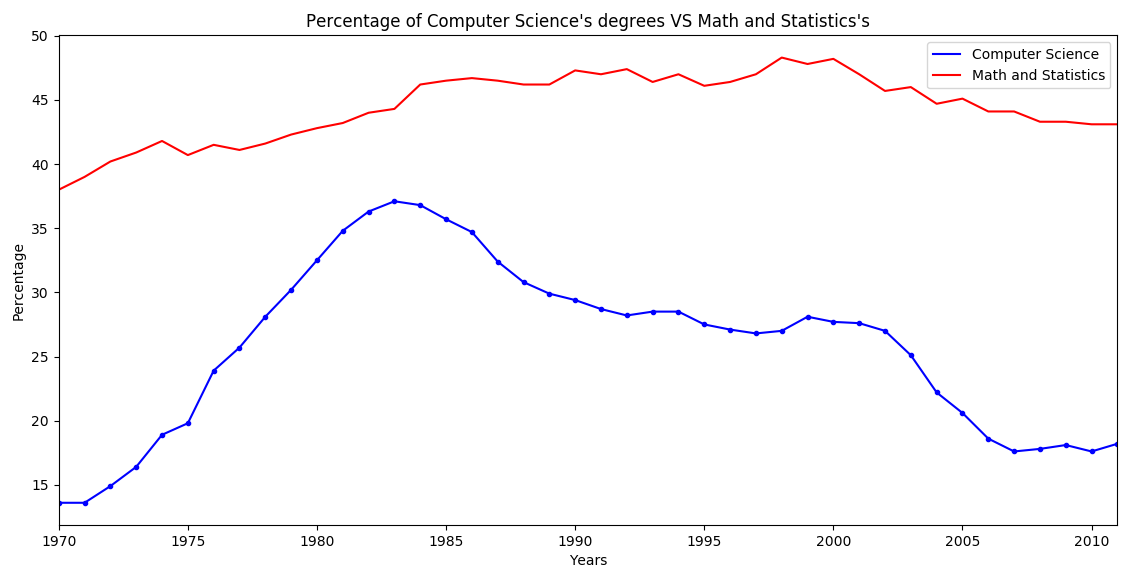
.png)
# alpha指定透明度(0~1)

df.plot(alpha=0.7)

plt.title("Percentage of bachelor's degrees awarded to women in the USA")

plt.xlabel("Years")

plt.ylabel("Percentage")

# axis指定X轴Y轴的取值范围

plt.axis((1970, 2000, 0, 200))

plt.show()

.png)
iris = pd.read_csv("iris.csv")

# 源数据中没有给column,所以需要手动指定一下

iris.columns = ['sepal_length', 'sepal_width', 'petal_length', 'petal_width', 'species']

# kind表示图形的类型

# x, y 分别指定X, Y 轴所指定的数据

iris.plot(kind='scatter', x='sepal_length', y='sepal_width')

plt.xlabel("sepal length in cm")

plt.ylabel("sepal width in cm")

plt.title("iris data analysis")

plt.show()

.png)
iris.plot(kind='box', y='sepal_length')

plt.ylabel("sepal length in cm")

plt.show()
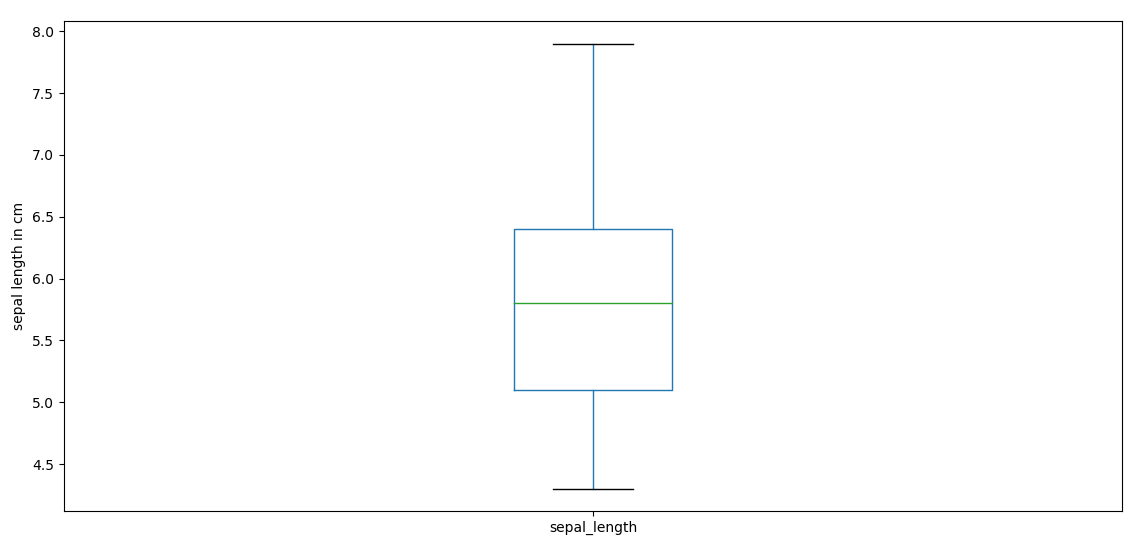
.png)
# 使用mask取出子集

mask = (iris.species == 'Iris-setosa')

setosa = iris[mask]

# bins指定柱状图的个数

# range指定X轴的取值范围

setosa.plot(kind='hist', bins=50, range=(0, 8), alpha=0.5)

plt.title("setosa in iris")

plt.xlabel("CM")

plt.show()
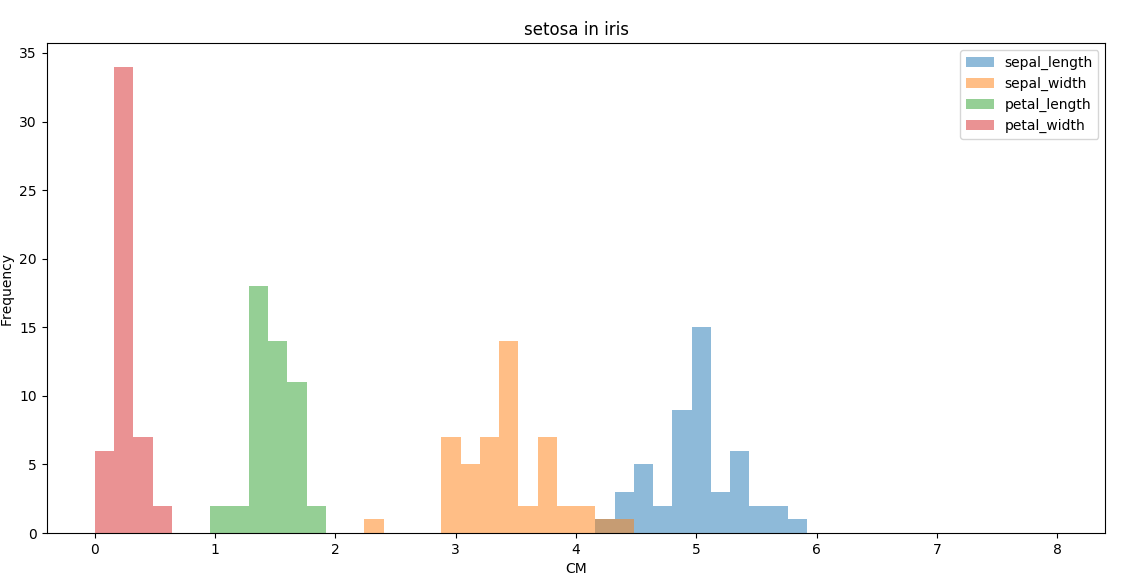
.png)
Pandas与Matplotlib基础的更多相关文章
- Pandas与Matplotlib
Pandas与Matplotlib基础 pandas是Python中开源的,高性能的用于数据分析的库.其中包含了很多可用的数据结构及功能,各种结构支持相互转换,并且支持读取.保存数据.结合matplo ...
- Matplotlib基础知识
Matplotlib基础知识 Matplotlib中的基本图表包括的元素 x轴和y轴 axis水平和垂直的轴线 x轴和y轴刻度 tick刻度标示坐标轴的分隔,包括最小刻度和最大刻度 x轴和y轴刻度标签 ...
- Matplotlib基础使用
matplotlib 一.Matplotlib基础知识 Matplotlib中的基本图表包括的元素 x轴和y轴 axis 水平和垂直的轴线 x轴和y轴刻度 tick 刻度标示坐标轴的分隔,包括最小刻度 ...
- 模块简介与matplotlib基础
模块简介与matplotlib基础 1.基本概念 1.1数据分析 对已知的数据进行分析,提取出一些有价值的信息. 1.2数据挖掘 对大量的数据进行分析与挖掘,得到一些未知的,有价值的信息. 1.3数据 ...
- 用Python的Pandas和Matplotlib绘制股票KDJ指标线
我最近出了一本书,<基于股票大数据分析的Python入门实战 视频教学版>,京东链接:https://item.jd.com/69241653952.html,在其中给出了MACD,KDJ ...
- 数据分析与展示——Matplotlib基础绘图函数示例
Matplotlib库入门 Matplotlib基础绘图函数示例 pyplot基础图表函数概述 函数 说明 plt.plot(x,y,fmt, ...) 绘制一个坐标图 plt.boxplot(dat ...
- Matplotlib基础图形之散点图
Matplotlib基础图形之散点图 散点图特点: 1.散点图显示两组数据的值,每个点的坐标位置由变量的值决定 2.由一组不连续的点组成,用于观察两种变量的相关性(正相关,负相关,不相关) 3.例如: ...
- numpy,scipy,pandas 和 matplotlib
numpy,scipy,pandas 和 matplotlib 本文会介绍numpy,scipy,pandas 和 matplotlib 的安装,环境为Windows10. 一般情况下,如果安装了Py ...
- linux下安装numpy,pandas,scipy,matplotlib,scikit-learn
python在数据科学方面需要用到的库: a.Numpy:科学计算库.提供矩阵运算的库. b.Pandas:数据分析处理库 c.scipy:数值计算库.提供数值积分和常微分方程组求解算法.提供了一个非 ...
随机推荐
- Windows系统上FFMpeg-PHP的使用
这几天做项目,其中一个需求是用户上传视频文件到服务器,然后服务器自动截取该视频的一帧作为该视频对应的缩略图,服务器端语言采用php编写,找了半天资料,发现ffmpeg-php可以满足该需求,所以下面简 ...
- SQL注入漏洞产生的原因是什么?怎么防止?XSS呢?
SQL注入产生的原因:程序开发过程中不注意规范书写sql语句和对特殊字符进行过滤,导致客户端可以通过全局变量POST和GET提交一些sql语句正常执行. 防止SQL注入: 1.开启配置文件中的magi ...
- MySQL的BlackHole引擎在主从架构中的作用
MySQL在5.x系列提供了Blackhole引擎–“黑洞”. 其作用正如其名字一样:任何写入到此引擎的数据均会被丢弃掉, 不做实际存储:Select语句的内容永远是空. 和Linux中的 /dev/ ...
- 沉淀,再出发——安装windows10和ubuntu kylin15.04双系统心得体会
安装windows10和ubuntu kylin15.04双系统心得体会 一.安装次序 很简单,两种安装次序,"先安装windows后安装linux:先安装linux后安装wind ...
- Linux sed 和 awk的用法
sed用法: 原文链接:http://www.cnblogs.com/dong008259/archive/2011/12/07/2279897.html sed是一个很好的文件处理工具,本身是一个管 ...
- ubuntu14.04 安装Jenkins
wget -q -O - http://pkg.jenkins-ci.org/debian/jenkins-ci.org.key | sudo apt-key add - sudo sh -c 'ec ...
- vue项目中遇到的问题
在 export defaul new Router({ )} 这个路由配置中一定要加mode : 'history' 否者就会在路由前面默认添加# 路由跳转的几种方式: 在VUE中使用less来编译 ...
- C#调用WebService时插入cookie
SOAPUI插入Cookie的方法 SOAP插入cookie的方法如下,点击Head,点击加号,然后直接设置就可以了. C#中调用webService时插入Cookie 由于调用的时候必须要带上coo ...
- R语言与格式、日期格式、格式转化
每每以为攀得众山小,可.每每又切实来到起点,大牛们,缓缓脚步来俺笔记葩分享一下吧,please~ --------------------------- R语言的基础包中提供了两种类型的时间数据,一类 ...
- 错误代码: 1327 Undeclared variable: p_film_count
1.错误描述 1 queries executed, 0 success, 1 errors, 0 warnings 查询:SELECT FOUND_ROWS() INTO p_film_count ...