
Gedit : 我的开场白 [TPLY]
为什么用Gedit
先放一个高配emacs配置
(global-set-key [f9] 'compile-file)

(global-set-key [f10] 'gud-gdb)

(global-set-key (kbd "C-s") 'save-buffer)

(global-set-key (kbd "C-z") 'undo)

(global-set-key (kbd "RET") 'newline-and-indent)

(global-set-key (kbd "C-q") 'zone)

(global-linum-mode t)

(show-paren-mode t)

(define-key key-translation-map (kbd "C-d") (kbd "M-p M-y"))

(global-set-key (kbd "M-p M-y") 'kill-whole-line)

(define-key key-translation-map (kbd "C-a") (kbd "C-x h"))

(setq c-default-style "awk")

;;;考场必备

(ido-mode t)

(setq default-frame-alist

             '((vertical-scroll-bars)

               (top . 25)

               (left . 45)

               (width . 120)

               (height . 40)

               (background-color . "grey15")

               (foreground-color . "grey")

               (cursor-color . "gold1")

               (mouse-color . "gold1")

               (tool-bar-lines . 0)

               (menu-bar-lines . 1)

               (scroll-bar-lines . 0)

               (right-fringe)

               (left-fringe)))

(global-hl-line-mode 1)

(set-face-background 'highlight "gray5")

(set-face-foreground 'region "cyan")

(set-face-background 'region "blue")

(set-face-foreground 'secondary-selection "skyblue")

(set-face-background 'secondary-selection "darkblue")

;;;;;设置org模式

(setq org-startup-indented t)

;(setq org-log-done 'time)

;(s.etq org-log-done 'note)

;

;;;无关紧要

(set-cursor-color "wheat")

(set-mouse-color "wheat")

(global-font-lock-mode t);;高亮

;;;;;设置编译信息

(defun compile-file ()

  (interactive)

  (compile (format "g++ -o %s %s -g -lm -Wall"  (file-name-sans-extension (buffer-name))(buffer-name))))

;;(global-set-key (kbd "<f9>") 'compile-file)

;;;;;设置一键调试

;;;;;改变emacs标题栏的标题

(setq frame-title-format "%b By SYCstudio")

;;;;;允许emacs和外部其他程序的粘贴

(setq x-select-enable-clipboard t)

;; 显示列号

(setq column-number-mode t)

;;设置tab为2个空格的宽度

(setq default-tab-width 4)

(setq c-basic-offset 4)

;;;;;启用时间显示设置,在minibuffer上面的那个杠上(忘了叫什么来着)

(display-time-mode 1)

;;;;;时间使用24小时制

(setq display-time-24hr-format t)

;;;;;时间显示包括日期和具体时间

(setq display-time-day-and-date t)

;;;;;时间的变化频率,单位多少来着?

(setq display-time-interval 10)

;;;;;是用滚轴鼠标

(mouse-wheel-mode t)

;;;;;备份设置

;;;;;emacs还有一个自动保存功能,默认在~/.emacs.d/auto-save-list里,这个非常有用,我这里没有改动,具体可以参见Sams teach yourself emacs in 24hours(我简称为sams24)

;;;;;备份设置方法,直接拷贝

(setq backup-by-copying t)

;; 自动存盘

(setq auto-save-mode t)

;;;;;去掉烦人的警告铃声

(setq visible-bell nil)

(setq ring-bell-function 'ignore)

;;;;;指针不要闪,我得眼睛花了

(blink-cursor-mode -1)

;;;;;滚动页面时比较舒服,不要整页的滚动

(setq scroll-step 1

        scroll-margin 3

        scroll-conservatively 10000)

;;;;;设定删除保存记录为200,可以方便以后无限恢复

(setq kill-ring-max 200)

;;;;;修改透明度

(set-frame-parameter (selected-frame) 'alpha (list 85 50))

(add-to-list 'default-frame-alist (cons 'alpha (list 85 50)))

(setq-default cursor-type 'bar)

(show-paren-mode 1);;括号匹配

(fset 'yes-or-no-p 'y-or-n-p);;酱油的

(setq make-backup-files nil)

(global-auto-revert-mode t);自动reload文件

(global-set-key (kbd "<f8>") 'gdb-many-windows)

(custom-set-variables

 ;; custom-set-variables was added by Custom.

 ;; If you edit it by hand, you could mess it up, so be careful.

 ;; Your init file should contain only one such instance.

 ;; If there is more than one, they won't work right.

 '(blink-cursor-mode nil)

 '(column-number-mode t)

 '(cua-mode t nil (cua-base))

 '(display-time-mode t)

 '(inhibit-startup-screen t)

 '(show-paren-mode t))

(custom-set-faces

 ;; custom-set-faces was added by Custom.

 ;; If you edit it by hand, you could mess it up, so be careful.

 ;; Your init file should contain only one such instance.

 ;; If there is more than one, they won't work right.

 '(default ((t (:family "Ubuntu Mono" :foundry "unknown" :slant normal :weight normal :height 143 :width normal)))))

(auto-insert-mode)  ;;; Adds hook to find-files-hook

(setq auto-insert-directory "~/.emacs.d/mytemplates/") ;;; Or use custom, *NOTE* Trailing slash important

(setq auto-insert-query nil) ;;; If you don't want to be prompted before insertion

(define-auto-insert "\." "moban.cpp")
如果不打配置,考场上的emacs绝对丑哭你
而如果你偷工减料,emacs功能肯定不全
当然你要把配置背下来我绝对不拦你 _
手把手配置GEDIT
配置环境
GEDIT可以说是麻雀虽小,五脏俱全。
在桌面上建好一个cpp文件
打开看,嗯,是很丑,名不虚传
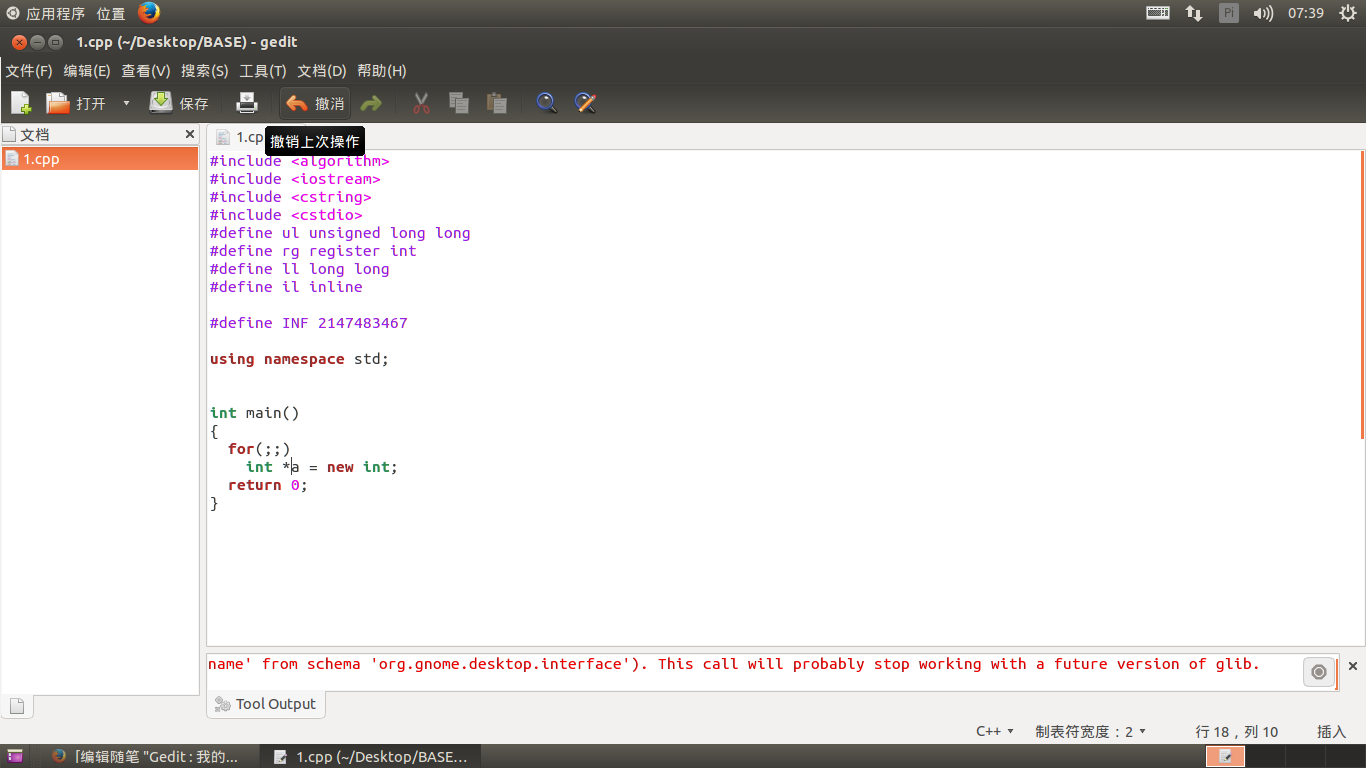
在上方点击【编辑】(E) => 【首选项】(E) 打开后看到这样
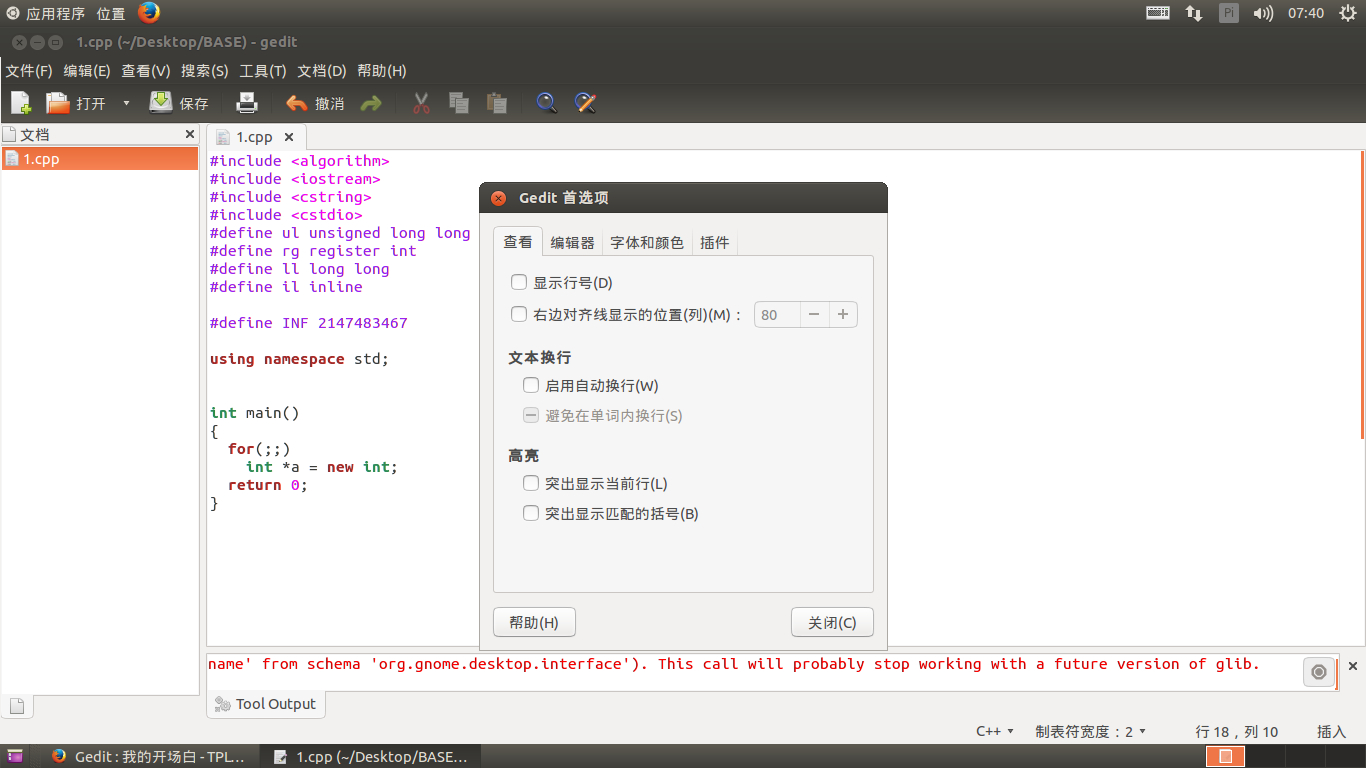
我的是这么设置的
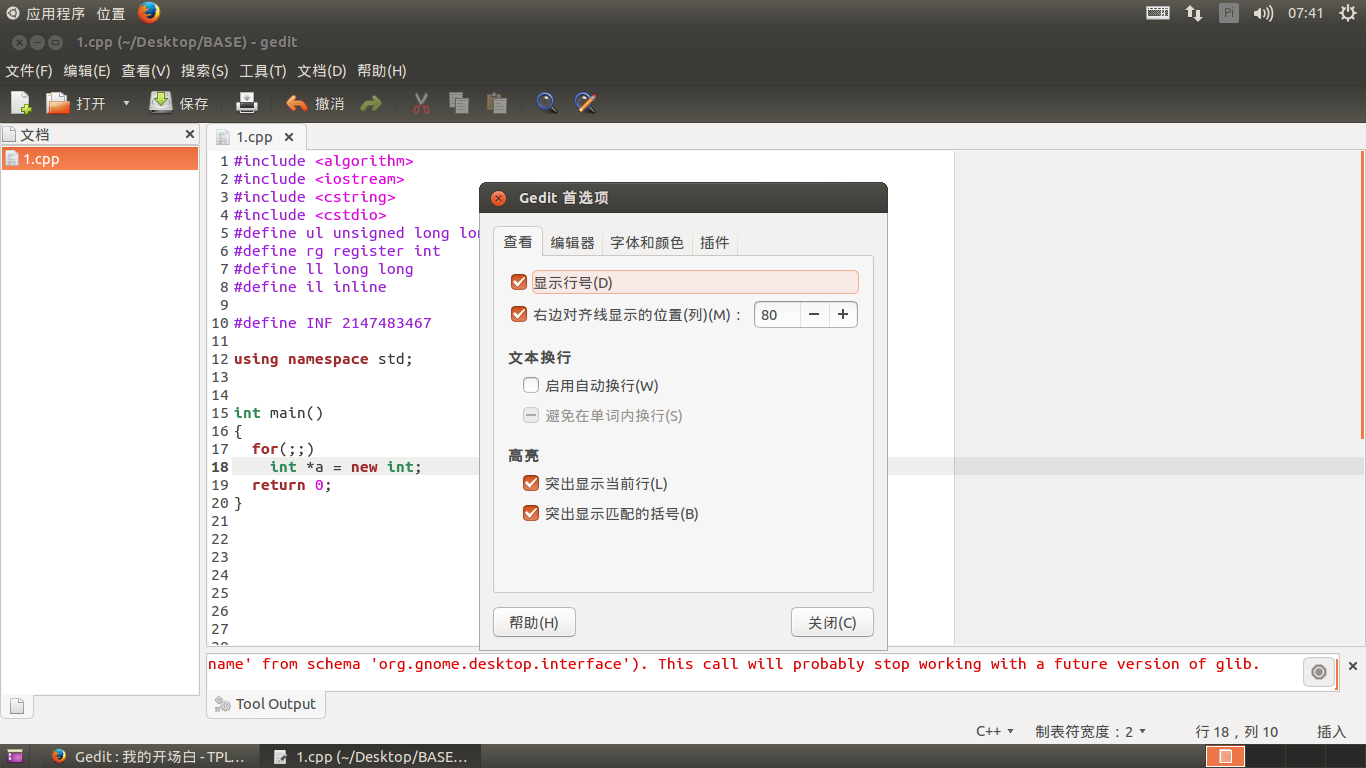
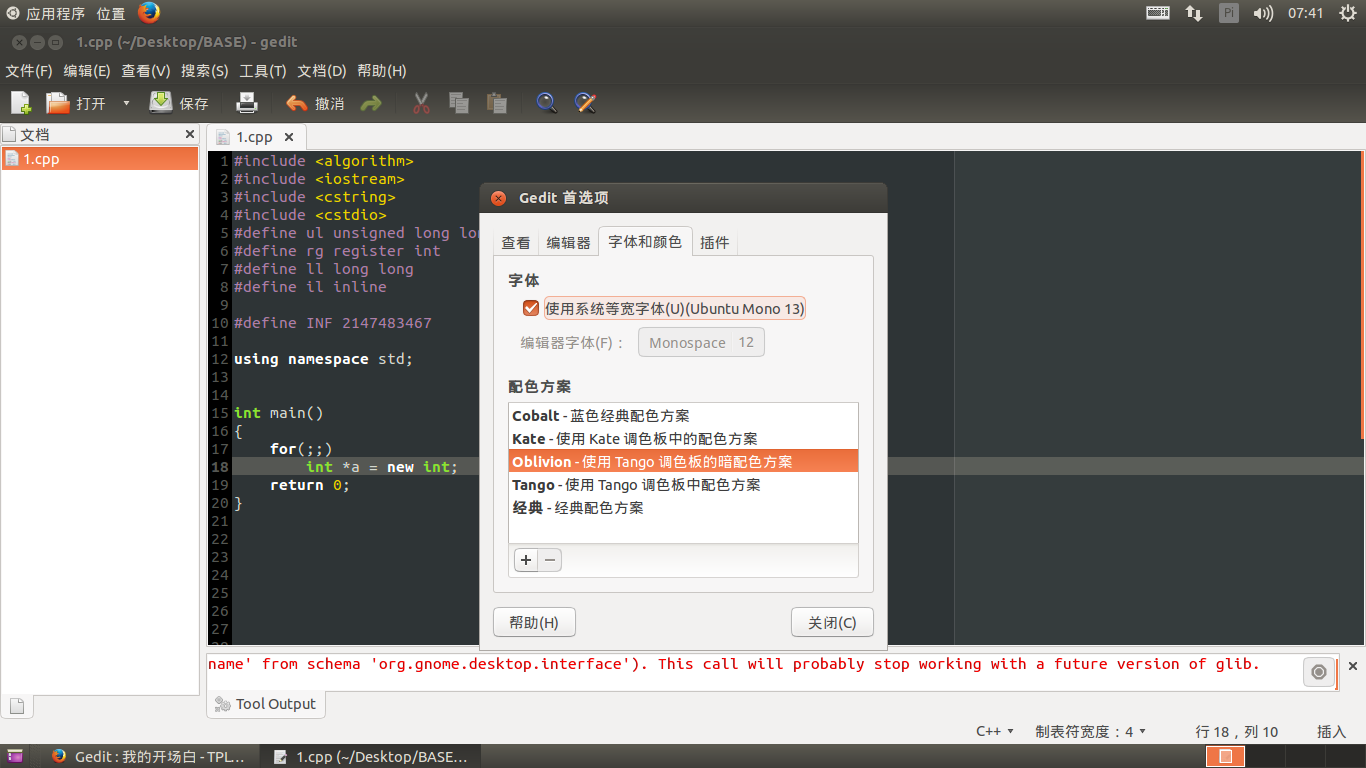
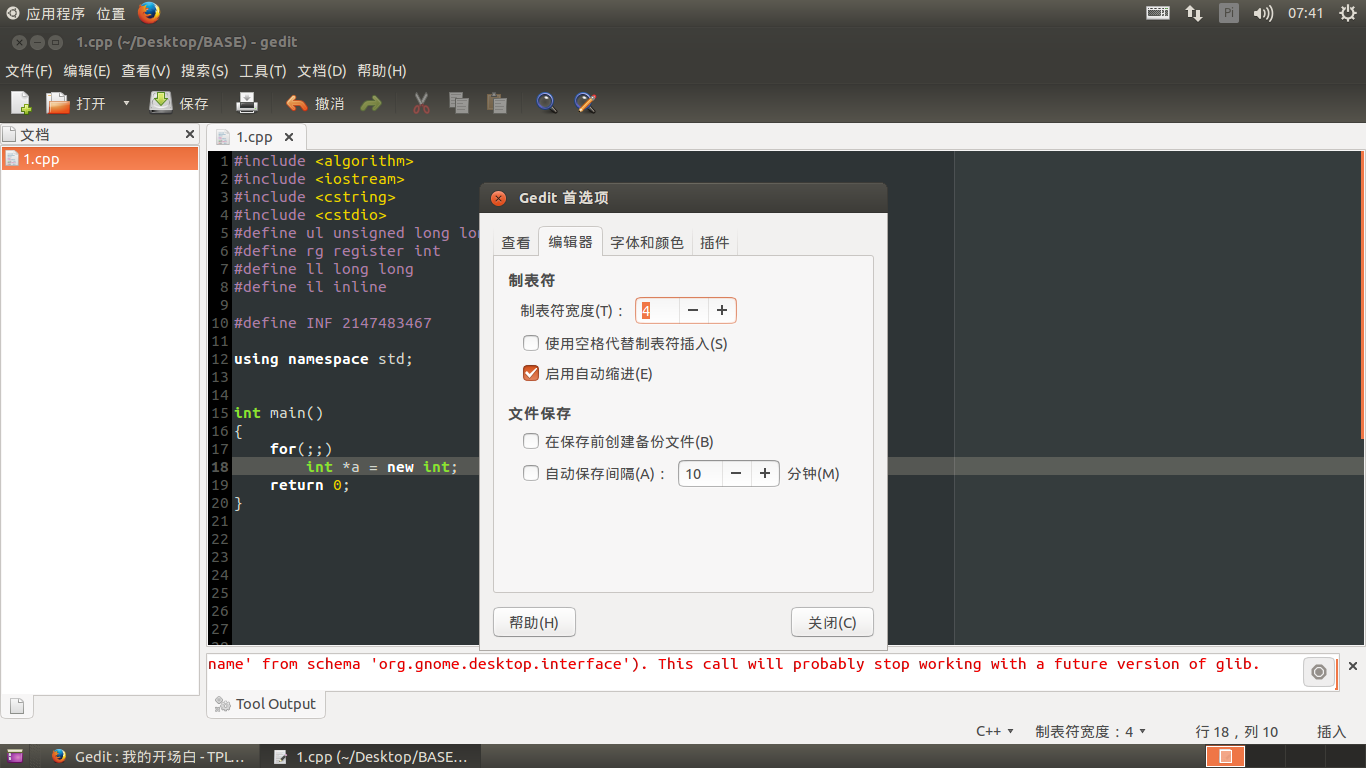
然后就好看多了
配置编译运行
对了!还有编程。
让我们回到首选项,在【插件】一栏选择【外部工具】
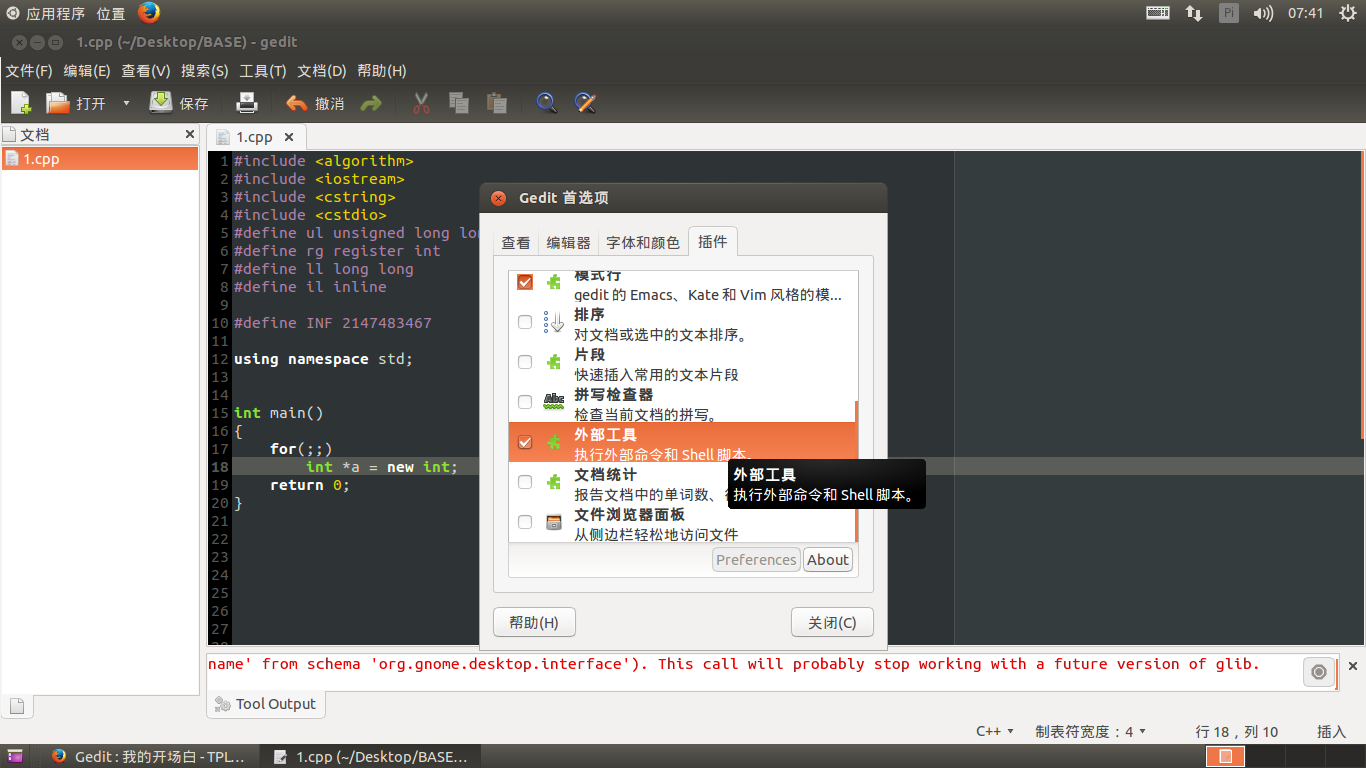
关闭首选项,在上方点击【工具】(T) => 【Manage External Tools...】
选择在此处打开终端
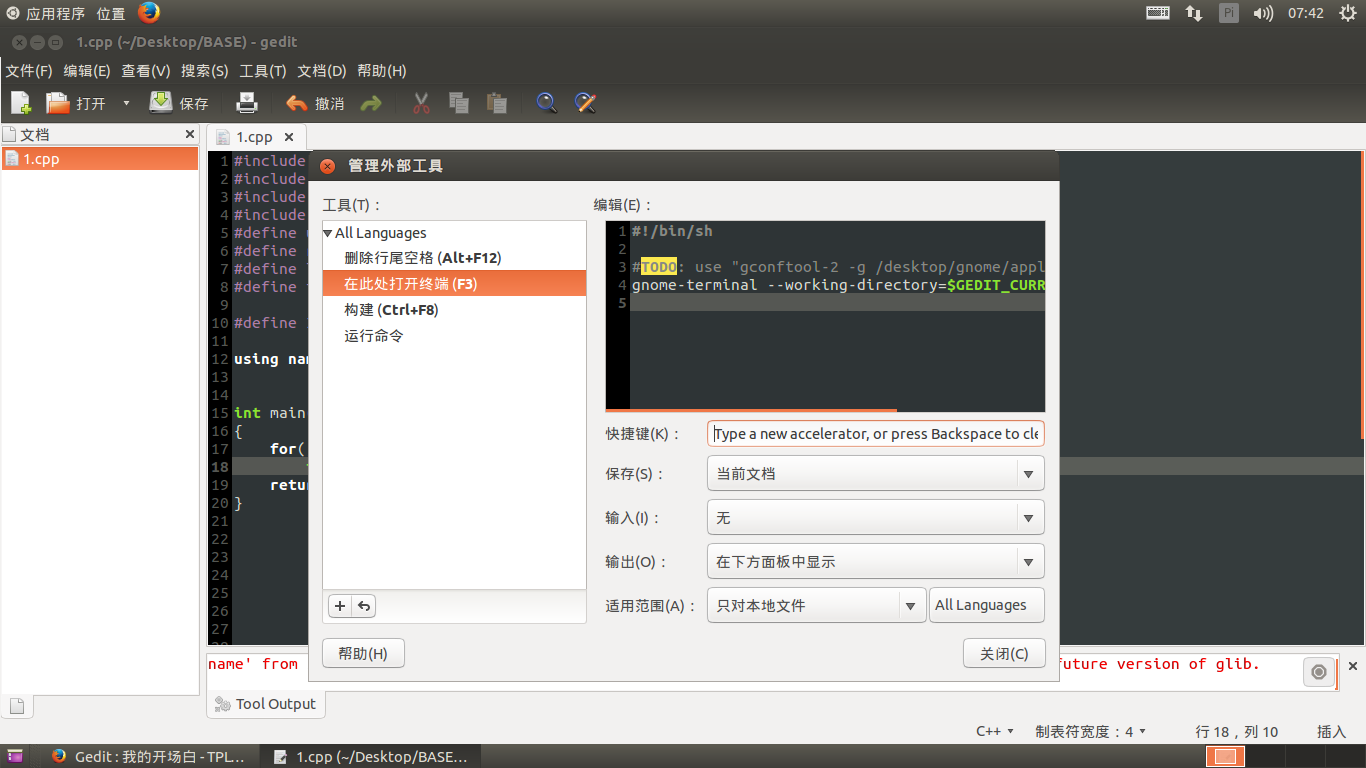
将如下复制到上面去(你其实可以对照一下[在此处打开终端]的配置代码,其实很多是可以直接copy的,这无疑给我们带来了很大的便捷)
然后根据你的习惯选择快捷键 (我一般是按,F2很方便)
#!/bin/sh

dir=$GEDIT_CURRENT_DOCUMENT_DIR

nam=$GEDIT_CURRENT_DOCUMENT_NAME

gnome-terminal --working-directory=$dir -x bash -c "g++ $nam -g -o te;

echo 'DONE';

./te;

echo;

echo 'END';

read"
总结
好了,这样就大功告成啦。
你编写好一个程序,按下F2
如果你有错误,会在弹出的终端上显示--到时候你对着改就行了。
编译成功,会显示DONE
程序运行完,会显示END
按回车键终端便会消失。
GEDIT配置真的很快,本人在noip考场上只用了2分钟配置完成。并且调试程序也很便捷。总而言之,gedit也是noip考场IDE的很好地选择。
Gedit : 我的开场白 [TPLY]的更多相关文章
- gedit 乱码问题
因为不同文本的编码方式不同,比如windows下编码方式为GB18030编码 (中文简体环境中的ANSI为GB18030编码,用2个或4个字节表示中文.) 但gedit初始设置并没有自动识别文本的编码 ...
- Gedit 解决中文显示乱码问题
详细请参考:http://wiki.ubuntu.org.cn/Gedit%E4%B8%AD%E6%96%87%E4%B9%B1%E7%A0%81 具体原因是Gedit的默认编码设置没有添加中文编码所 ...
- ubuntu下安装gedit插件
因为gedit-plugins : 依赖: gir1.2-zeitgeist-2.0 所以首先 sudo apt-get install gir1.2-zeitgeist-2.0 如果报错可以先 su ...
- gedit 没有preference项,使preference回归,并用命令行设置行号,text wrapping等
1.最简单的,使preference选项回来: gsettings set org.gnome.settings-daemon.plugins.xsettings overrides '@a{sv} ...
- GNOME编辑器--gedit 构建基本脚本
gedit factorial.sh myprog.c 当你启动gedit外带多个文件时,它会将所有的文件都加载到不同的缓冲区并在主编辑器窗口中按标签化的窗口来显示每个文件. shell脚本的关键在于 ...
- Ubuntu12.04解决gedit中文乱码问题
Ubuntu12.04,终端中分别输入下面两条指令: gsettings set org.gnome.gedit.preferences.encodings auto-detected “['GB18 ...
- 【转】Linux Mint 17.2 gedit中文乱码
转自:linux mint 14 gedit 中文乱码 Mint默认没安装gconf-editor,搜了下,找到如下解决办法 在终端下执行语句: gconftool- --set --type=lis ...
- gedit脚本
明天ctsc,赶紧学了一下gedit的配置 以下假设你只在/home/zzq下写代码(用户名自己改) 首先在/home/zzq下建一个runner.sh,内容如下: #!/bin/bash echo ...
- ubuntu下gedit中文乱码
gsettings set org.gnome.gedit.preferences.encodings auto-detected "['GB18030', 'GB2312', 'GBK', ...
随机推荐
- 自己写的一个vii总结
#include<stdlib.h>#include<stdio.h>#include<unistd.h>#include<errno.h>#inclu ...
- 使用Dism备份和全新恢复系统
1.使用WinPE启动,winPE制作可以参考我的另一文章http://www.cnblogs.com/karl-F/p/6934086.html 2.捕获C盘镜像 (1)查看磁盘 在PE提示符:输入 ...
- CentOS 7 安装Maven
Maven的下载地址是:http://maven.apache.org/download.cgi 安装Maven非常简单,只需要将下载的压缩文件解压就可以了. cd /data wget http:/ ...
- yii2 源码分析Event类分析 (三)
转载请注明链接:http://www.cnblogs.com/liuwanqiu/p/6739880.html Event是所有事件的基类,它继承Object类 Event类上面的注释的大致意思: * ...
- Chrome浏览器的自动安装下载工具
链接 https://www.google.com/chrome/browser/desktop/index.html?brand=CHWL&utm_campaign=en&utm_s ...
- win7本地连接消失
可能原因一 驱动程序错误: 右键"计算机"图标 - "属性" - 设备管理器现在在设备管理器下面找到"网络适配器",在下面的网卡驱动中发现有 ...
- CENTOS6.6下mysql5.7.11带boost和不带boost的源码安装
本文来自我的github pages博客http://galengao.github.io/ 即www.gaohuirong.cn Mysql5.7版本更新后有很多变化,比如json等,连安装都有变化 ...
- JavaScript面向对象学习笔记
JavaScript 常被描述为一种基于原型的语言 (prototype-based language)--每个对象拥有一个原型对象,对象以其原型为模板.从原型继承方法和属性.原型对象也可能拥有原型, ...
- Thinkpad USB 经典键盘使用体验
先上图,这就是一个键盘,不是笔记本电脑. 优点: 1. 键盘完胜各类巧克力式键盘. 2. 小红点和老thinkpad 上的小红点一样好用. 3. ESC 和Delete 放大后,盲摸很方便. 缺点: ...
- Shell脚本报错:-bash: ./switch.sh: /bin/bash^M: bad interpreter: No such file or directory
在学习shell中测试case参数命令代码如下 #!/bin/bash #switch测试 case $1 in start) echo 'start' ;; ...