
Activiti之 Exclusive Gateway
一、Exclusive Gateway
Exclusive Gateway(也称为XOR网关或更多技术基于数据的排他网关)经常用做决定流程的流转方向。当流程到达该网关的时候,所有的流出序列流到按照已定义好的顺序依次执行。当序列流条件的求值结果为true(或没有条件集的时候,在概念上有定义一个“true”定义序列流),就会选择该序列继续的处理。Exclusive Gateway的图标就是菱形里面有一个X符合,如下所示:
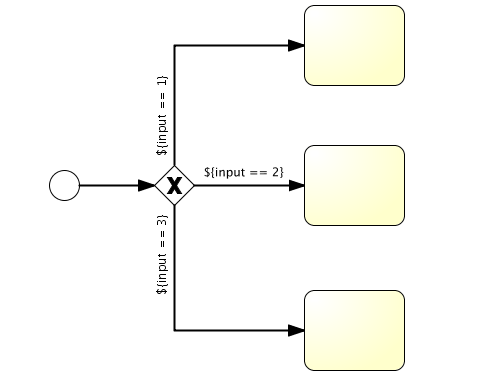
XML的代码为:
<exclusiveGateway id="exclusiveGw" name="Exclusive Gateway" />

<sequenceFlow id="flow2" sourceRef="exclusiveGw" targetRef="theTask1">

  <conditionExpression xsi:type="tFormalExpression">${input == 1}</conditionExpression>

</sequenceFlow>

<sequenceFlow id="flow3" sourceRef="exclusiveGw" targetRef="theTask2">

  <conditionExpression xsi:type="tFormalExpression">${input == 2}</conditionExpression>

</sequenceFlow>

<sequenceFlow id="flow4" sourceRef="exclusiveGw" targetRef="theTask3">

  <conditionExpression xsi:type="tFormalExpression">${input == 3}</conditionExpression>

</sequenceFlow>
二、示例
本例子以请假流程为例,流程设计图如下图所示:

当员工提出的请假时间大于2天的时候由总经理审批,当请假时间不大于2天的时候由经理审批。
1、leave.bpmn内容如下:
<?xml version="1.0" encoding="UTF-8"?>
<definitions xmlns="http://www.omg.org/spec/BPMN/20100524/MODEL" xmlns:xsi="http://www.w3.org/2001/XMLSchema-instance" xmlns:xsd="http://www.w3.org/2001/XMLSchema" xmlns:activiti="http://activiti.org/bpmn" xmlns:bpmndi="http://www.omg.org/spec/BPMN/20100524/DI" xmlns:omgdc="http://www.omg.org/spec/DD/20100524/DC" xmlns:omgdi="http://www.omg.org/spec/DD/20100524/DI" typeLanguage="http://www.w3.org/2001/XMLSchema" expressionLanguage="http://www.w3.org/1999/XPath" targetNamespace="http://www.activiti.org/test">
<process id="leave" name="请假流程图" isExecutable="true">
<documentation>请假流程图</documentation>
<startEvent id="startevent1" name="Start"></startEvent>
<endEvent id="endevent1" name="End"></endEvent>
<!-- ${employeeId} 中的employeeId 在启动流程实例的时候,就设置employeeId变量。再根据employeeId获取员工请假任务,最后设置请假时间进行提交-->
<userTask id="usertask1" name="员工请假" activiti:assignee="${employeeId}"></userTask>
<userTask id="usertask2" name="经理审批" activiti:candidateGroups="manager"></userTask>
<userTask id="usertask3" name="总经理审批" activiti:candidateGroups="boss"></userTask>
<sequenceFlow id="flow1" sourceRef="startevent1" targetRef="usertask1"></sequenceFlow>
<sequenceFlow id="flow2" name="${flag == true}" sourceRef="usertask2" targetRef="endevent1">
<conditionExpression xsi:type="tFormalExpression"><![CDATA[${flag == true}]]></conditionExpression>
</sequenceFlow>
<sequenceFlow id="flow3" name="${flag == true}" sourceRef="usertask3" targetRef="endevent1">
<conditionExpression xsi:type="tFormalExpression"><![CDATA[${flag == true}]]></conditionExpression>
</sequenceFlow>
<sequenceFlow id="flow4" name="${flag == false}" sourceRef="usertask2" targetRef="usertask1">
<conditionExpression xsi:type="tFormalExpression"><![CDATA[${flag == false}]]></conditionExpression>
</sequenceFlow>
<sequenceFlow id="flow5" name="${flag == false}" sourceRef="usertask3" targetRef="usertask1">
<conditionExpression xsi:type="tFormalExpression"><![CDATA[${flag == false}]]></conditionExpression>
</sequenceFlow>
<exclusiveGateway id="exclusivegateway1" name="Exclusive Gateway"></exclusiveGateway>
<sequenceFlow id="flow6" sourceRef="usertask1" targetRef="exclusivegateway1"></sequenceFlow>
<sequenceFlow id="flow7" name="${day <= 2}" sourceRef="exclusivegateway1" targetRef="usertask2">
<conditionExpression xsi:type="tFormalExpression"><![CDATA[${day <= 2}]]></conditionExpression>
</sequenceFlow>
<sequenceFlow id="flow8" name="${day > 2}" sourceRef="exclusivegateway1" targetRef="usertask3">
<conditionExpression xsi:type="tFormalExpression"><![CDATA[${day > 2}]]></conditionExpression>
</sequenceFlow>
</process>
<bpmndi:BPMNDiagram id="BPMNDiagram_leave">
<bpmndi:BPMNPlane bpmnElement="leave" id="BPMNPlane_leave">
<bpmndi:BPMNShape bpmnElement="startevent1" id="BPMNShape_startevent1">
<omgdc:Bounds height="35.0" width="35.0" x="355.0" y="48.0"></omgdc:Bounds>
</bpmndi:BPMNShape>
<bpmndi:BPMNShape bpmnElement="endevent1" id="BPMNShape_endevent1">
<omgdc:Bounds height="35.0" width="35.0" x="355.0" y="362.0"></omgdc:Bounds>
</bpmndi:BPMNShape>
<bpmndi:BPMNShape bpmnElement="usertask1" id="BPMNShape_usertask1">
<omgdc:Bounds height="55.0" width="105.0" x="320.0" y="112.0"></omgdc:Bounds>
</bpmndi:BPMNShape>
<bpmndi:BPMNShape bpmnElement="usertask2" id="BPMNShape_usertask2">
<omgdc:Bounds height="55.0" width="105.0" x="170.0" y="240.0"></omgdc:Bounds>
</bpmndi:BPMNShape>
<bpmndi:BPMNShape bpmnElement="usertask3" id="BPMNShape_usertask3">
<omgdc:Bounds height="55.0" width="105.0" x="480.0" y="242.0"></omgdc:Bounds>
</bpmndi:BPMNShape>
<bpmndi:BPMNShape bpmnElement="exclusivegateway1" id="BPMNShape_exclusivegateway1">
<omgdc:Bounds height="40.0" width="40.0" x="352.0" y="247.0"></omgdc:Bounds>
</bpmndi:BPMNShape>
<bpmndi:BPMNEdge bpmnElement="flow1" id="BPMNEdge_flow1">
<omgdi:waypoint x="372.0" y="83.0"></omgdi:waypoint>
<omgdi:waypoint x="372.0" y="112.0"></omgdi:waypoint>
</bpmndi:BPMNEdge>
<bpmndi:BPMNEdge bpmnElement="flow2" id="BPMNEdge_flow2">
<omgdi:waypoint x="222.0" y="295.0"></omgdi:waypoint>
<omgdi:waypoint x="222.0" y="379.0"></omgdi:waypoint>
<omgdi:waypoint x="355.0" y="379.0"></omgdi:waypoint>
<bpmndi:BPMNLabel>
<omgdc:Bounds height="14.0" width="100.0" x="183.0" y="309.0"></omgdc:Bounds>
</bpmndi:BPMNLabel>
</bpmndi:BPMNEdge>
<bpmndi:BPMNEdge bpmnElement="flow3" id="BPMNEdge_flow3">
<omgdi:waypoint x="532.0" y="297.0"></omgdi:waypoint>
<omgdi:waypoint x="532.0" y="379.0"></omgdi:waypoint>
<omgdi:waypoint x="390.0" y="379.0"></omgdi:waypoint>
<bpmndi:BPMNLabel>
<omgdc:Bounds height="14.0" width="100.0" x="483.0" y="309.0"></omgdc:Bounds>
</bpmndi:BPMNLabel>
</bpmndi:BPMNEdge>
<bpmndi:BPMNEdge bpmnElement="flow4" id="BPMNEdge_flow4">
<omgdi:waypoint x="222.0" y="240.0"></omgdi:waypoint>
<omgdi:waypoint x="222.0" y="139.0"></omgdi:waypoint>
<omgdi:waypoint x="320.0" y="139.0"></omgdi:waypoint>
<bpmndi:BPMNLabel>
<omgdc:Bounds height="14.0" width="100.0" x="170.0" y="191.0"></omgdc:Bounds>
</bpmndi:BPMNLabel>
</bpmndi:BPMNEdge>
<bpmndi:BPMNEdge bpmnElement="flow5" id="BPMNEdge_flow5">
<omgdi:waypoint x="532.0" y="242.0"></omgdi:waypoint>
<omgdi:waypoint x="532.0" y="139.0"></omgdi:waypoint>
<omgdi:waypoint x="425.0" y="139.0"></omgdi:waypoint>
<bpmndi:BPMNLabel>
<omgdc:Bounds height="14.0" width="100.0" x="485.0" y="191.0"></omgdc:Bounds>
</bpmndi:BPMNLabel>
</bpmndi:BPMNEdge>
<bpmndi:BPMNEdge bpmnElement="flow6" id="BPMNEdge_flow6">
<omgdi:waypoint x="372.0" y="167.0"></omgdi:waypoint>
<omgdi:waypoint x="372.0" y="247.0"></omgdi:waypoint>
</bpmndi:BPMNEdge>
<bpmndi:BPMNEdge bpmnElement="flow7" id="BPMNEdge_flow7">
<omgdi:waypoint x="352.0" y="267.0"></omgdi:waypoint>
<omgdi:waypoint x="275.0" y="267.0"></omgdi:waypoint>
<bpmndi:BPMNLabel>
<omgdc:Bounds height="14.0" width="100.0" x="283.0" y="247.0"></omgdc:Bounds>
</bpmndi:BPMNLabel>
</bpmndi:BPMNEdge>
<bpmndi:BPMNEdge bpmnElement="flow8" id="BPMNEdge_flow8">
<omgdi:waypoint x="392.0" y="267.0"></omgdi:waypoint>
<omgdi:waypoint x="480.0" y="269.0"></omgdi:waypoint>
<bpmndi:BPMNLabel>
<omgdc:Bounds height="14.0" width="100.0" x="400.0" y="247.0"></omgdc:Bounds>
</bpmndi:BPMNLabel>
</bpmndi:BPMNEdge>
</bpmndi:BPMNPlane>
</bpmndi:BPMNDiagram>
</definitions>
2、测试类LeaveTest代码如下:
 package com.shh.test;

 import java.util.HashMap;

 import java.util.List;

 import java.util.Map;

 import org.activiti.engine.HistoryService;

 import org.activiti.engine.ProcessEngine;

 import org.activiti.engine.ProcessEngineConfiguration;

 import org.activiti.engine.RepositoryService;

 import org.activiti.engine.RuntimeService;

 import org.activiti.engine.TaskService;

 import org.activiti.engine.history.HistoricProcessInstanceQuery;

 import org.activiti.engine.task.Task;

 import org.junit.Before;

 import org.junit.Test;

 /**

  * 请假流程

  */

 public class LeaveTest {

     ProcessEngine processEngine = null;

     RepositoryService repositoryService = null;

     RuntimeService runtimeService = null;

     TaskService taskService = null;

     /**

      * 加载配置文件

      */

     @Before

     public void init() {

         processEngine = ProcessEngineConfiguration.createProcessEngineConfigurationFromResource("activiti.cfg.xml")

                 .buildProcessEngine();

         repositoryService = processEngine.getRepositoryService();

         runtimeService = processEngine.getRuntimeService();

         taskService = processEngine.getTaskService();

     }

     /**

      * 部署流程定义

      */

     @Test

     public void deploy(){

         repositoryService.createDeployment().addClasspathResource("diagrams/leave.bpmn").deploy();

         System.out.println("***************部署流程定义完成***************");

     }

     /**

      * 启动一个请假流程

      */

     @Test

     public void start() {

         Map<String, Object> variables = new HashMap<String, Object>();

         variables.put("employeeId", "Kermit"); //请假人

         String processId = runtimeService.startProcessInstanceByKey("leave", variables).getId();

         System.out.println("***************启动一个请假流程完成***************" + processId);

     }

     /**

      * 提交请假申请

      */

     @Test

     public void apply(){

         System.out.println("***************提交请假申请开始***************");

         List<Task> tasks = taskService.createTaskQuery().taskAssignee("Kermit").list();

         System.out.println(tasks.size());

         for (Task task : tasks) {

             System.out.println("Kermit的任务taskname:" + task.getName() + ",id:" + task.getId());

             taskService.setVariable(task.getId(), "day", 4);//设置请假天数

             taskService.complete(task.getId());//完成任务

             System.out.println("请假4 天");

         }

         System.out.println("***************提交请假申请完成***************");

     }

     @Test

     public void step2manager() {

         System.out.println("***************经理组审批流程开始***************");

         List<Task> tasks = taskService.createTaskQuery().taskCandidateGroup("manager").list();// 经理组的任务

         System.out.println("经理组的任务:" + tasks.size());

         for (Task task : tasks) {

             System.out.println("经理组的任务taskname:" + task.getName() + ",id:" + task.getId());

             taskService.claim(task.getId(), "李四");//申领任务

             taskService.setVariable(task.getId(), "flag", false);//true批准,false不批准

             Object applyUser = taskService.getVariable(task.getId(), "employeeId");

             Object day = taskService.getVariable(task.getId(), "day");

             System.out.println(String.format("%s请假%s天", applyUser, day));

             taskService.complete(task.getId());//完成任务

         }

         System.out.println("***************经理组审批流程结束***************");

     }

     @Test

     public void step2Boss() {

         System.out.println("***************总经理组审批流程开始***************");

         List<Task> tasks = taskService.createTaskQuery().taskCandidateGroup("boss").list();// 总经理组的任务

         System.out.println("总经理组的任务:" + tasks.size());

         for (Task task : tasks) {

             System.out.println("manager的任务taskname:" + task.getName() + ",id:" + task.getId());

             taskService.claim(task.getId(), "王五");//申领任务

             taskService.setVariable(task.getId(), "flag", true);//true批准,false不批准

             Object applyUser = taskService.getVariable(task.getId(), "employeeId");

             Object day = taskService.getVariable(task.getId(), "day");

             System.out.println(String.format("%s请假%s天", applyUser, day));

             taskService.complete(task.getId());//完成任务

         }

         System.out.println("***************总经理组审批流程结束***************");

     }

 }
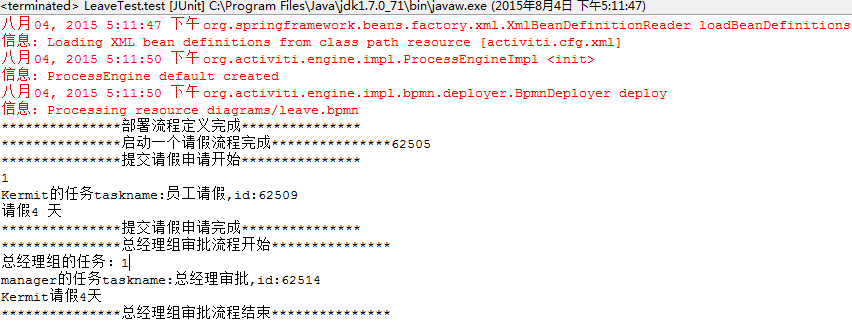
依次运行deploy()、start()、apply()方法之后,因为申请的请假天数为4天,所以流程已经到了总经理角色,此时运行step2Boss()方法,一个完整的请假流程就已经完成。运行结果如下图所示:
也可对代码进行修改,总经理不批准
taskService.setVariable(task.getId(), "flag", false);
流程就回到员工那里,员工继续申请,设置天数为2
taskService.setVariable(task.getId(), "day", 4);//设置请假天数
此时流程到达经理角色,经理批准,流程也就结束
taskService.setVariable(task.getId(), "flag", true);
Activiti之 Exclusive Gateway的更多相关文章
- activiti搭建(五)BPMN介绍
转载请注明源地址:http://www.cnblogs.com/lighten/p/5931207.html 对于BPMN我也不是十分清楚,目前也只是因为对于Modeler中不熟悉的组件查询,来对这部 ...
- activiti参考5-任务TASK
一.概要 1,设计TASK的表主要是:ACT_RU_TASK,ACT_HI_TASKINST(见参考-activiti表): 2,任务主要有:人工任务(usertask),服务任务(serviceta ...
- activiti任务TASK
一.概要 设计TASK的表主要是:ACT_RU_TASK,ACT_HI_TASKINST(见参考-activiti表): 任务主要有:人工任务(usertask),服务任务(servicetask)等 ...
- 【应用篇】Activiti显示器(抽象)简单的应用程序和服务的颗粒结合(两)
Activiti简单的应用程序,业务颗粒与工作流程结合.让流程带动业务颗粒运行的过程.此次的监听我们应用抽象的监听来实现,也就是说全部的普通业务类均应用此抽象监听,而不须要每个类一个监听的来操作. 新 ...
- 工作流引擎Activiti 专题
https://github.com/Activiti/Activiti Quick Start Guide This quick start assumes: Familiarity with Ma ...
- Activiti工作流学习笔记
先从工作流的启动开始讲,Activiti提供了四种工作流的启动方式 1.空启动事件 2.定时启动事件 3.异常启动事件 4.消息启动事件 空启动事件中标签内没有任何其他元素的定义 <startE ...
- Liferay7 BPM门户开发之2: BPMN 2.0 规范入门 (Activiti BPMN extensions)
Liferay最大的问题是BPM弱,如果做企业开发,BPM必不可少,所以直入主题,做个BPMN2入门. 本文参考地址:http://activiti.org/userguide/index.html# ...
- Activiti 5.1.4最佳实践
1.简单介绍 Activiti是一个开源的工作流引擎,它实现了BPMN 2.0规范,可以发布设计好的流程定义,并通过api进行流程调度. Activiti 作为一个遵从 Apache 许可的工作流和业 ...
- 最近学习工作流 推荐一个activiti 的教程文档
全文地址:http://www.mossle.com/docs/activiti/ Activiti 5.15 用户手册 Table of Contents 1. 简介 协议 下载 源码 必要的软件 ...
随机推荐
- 点我吧工作总结(技术篇) Velocity
1. 什么是velocity Velocity[vəˈlɑ:səti],名称字面翻译为:速度.速率.迅速.该项目的开源地址:http://velocity.apache.org/,它是一个基于Java ...
- MYSQL 练习
导出现有数据库数据: mysqldump -u用户名 -p密码 数据库名称 >导出文件路径 # 结构+数据 mysqldump -u用户名 -p密码 -d 数据库名称 > ...
- [翻译] Autofac 中注册的概念
原文链接:http://docs.autofac.org/en/latest/register/registration.html 所谓注册组件,是指创建 ContainerBuilder 的实例,并 ...
- 不可小觑的SQL语句
在前面学的我们通过点鼠标给数据表插数据,虽然这种方法很靠谱,但是有那么的一些缺点,就是比较麻烦和效率不高.所以现在我们的好好学SQL语句,来弥补这么的一个漏洞,能提高我们工作的效率. SQL语句能做什 ...
- HTML5 模拟现实物理效果,感受 Web 技术魅力
Ball Pool 是一个基于 HTML5 技术的实验,模拟现实物理效果,让你在 Web 中感受自然物体的运动.玩法介绍:可以随意拖动圆球.点击页面背景.晃动浏览器.双击页面背景或者按住鼠标左键,有不 ...
- CSS之详解:active选择器
Active的一段话 active的英文解释为"积极的",表现在鼠标上就是点击的意思.关于active选择器最多的示例恐怕就是应用在链接上面的,然而打开链接是一个一瞬间的动作,这不 ...
- 拖放 js
之前被小伙伴问自己能不能写一个简单的原生的 我稍微犹豫了下 这次重新学习下拖拽的过程 分享下 参考 JavaScript高级程序设计 必要的准备 自定义事件(实现事件模型) 简单来说事件模型就 ...
- JavaScript学习笔记-函数实例
函数实例 var p = { a:15, b:'5', f1:function(){ var self = this; console.log(self.a+self.b); f2(); functi ...
- 高清VGA编码器|上海视涛科技
VGA编码器(E200)简介 高清VGA编码器是上海视涛科技出品的高性能VGA编码产品.该VGA编码器是上海视涛科技完全自主研发,并适用于VGA信号的编码采集及网络传输的专用硬件设备.可兼容各厂家的N ...
- ContentProvider实现流程
个人记录 public class DataBaseContentProvider extends ContentProvider { private SQLiteOpenHelper mSQLite ...