
Windows Azure Cloud Service (44) 将Cloud Service加入Virtual Network Subnet,并固定Virtual IP Address(VIP)
《Windows Azure Platform 系列文章目录》
在之前的文章中,笔者已经详细介绍了如何将Virtual Machine加入Virtual Network,并且绑定固定的Private IP和Virtual IP Address (公网IP地址)
Windows Azure Virtual Network (5) 设置Azure Virtual Machine固定Private IP
Windows Azure Virtual Network (6) 设置Azure Virtual Machine固定公网IP (Virtual IP Address, VIP) (1)
Windows Azure Virtual Network (7) 设置Azure Virtual Machine固定公网IP (Virtual IP Address, VIP) (2)
但是以上的功能仅限于IaaS,如果我们需要在PaaS Cloud Service设置Private IP和Virtual IP Address,应该如何设置?
再想象一个场景,当我们前端使用PaaS Cloud Service (Web Server)实现横向扩展,后端使用2台SQL Server Virtual Machine (Always-On)做数据库服务器。
这种混合PaaS+IaaS的场景,如何让PaaS Cloud Service加入Virtual Network,使用内部IP地址与SQL Server VM进行通信呢?
本章内容分为以下三个部分:
一.管理Virtual IP Address(公网IP地址)
二.管理Virtual Network
三.配置Azure Cloud Service
一.管理Virtual IP Address(公网IP地址)
我们可以通过Azure PowerShell来申请Virtual IP Address,具体读者可以参考之前的Blog:
国外使用Azure Global的用户,可以参考:
Windows Azure Virtual Network (6) 设置Azure Virtual Machine固定公网IP (Virtual IP Address, VIP) (1)
Windows Azure Virtual Network (7) 设置Azure Virtual Machine固定公网IP (Virtual IP Address, VIP) (2)
国内使用世纪互联运维的Azure China用户,可以参考:
Azure China (8) 使用Azure PowerShell创建虚拟机,并设置固定Virtual IP Address和Private IP
如果读者用的是百度查询IP地址,经常会发现Azure上海的IP地址经常会显示来自北京,这是由于百度的IP库比较老,请读者注意
这里笔者不想申请新的Reserved IP Address,我们使用命令:
Get-AzureReservedIP
可以查看到之前已经申请的Reserved IP Address,如下图:

我们就继续使用上面的LeiTestVMReservedIP,这个地址是191.234.18.61
上图中,InUse状态为False,没有被占用
二.管理Azure Virtual Network
我们创建一个新的Azure Virtual Network,命名为PaaSVNet
增加2个subnet,命名为Web-Subnet和DB-Subnet,如下图:
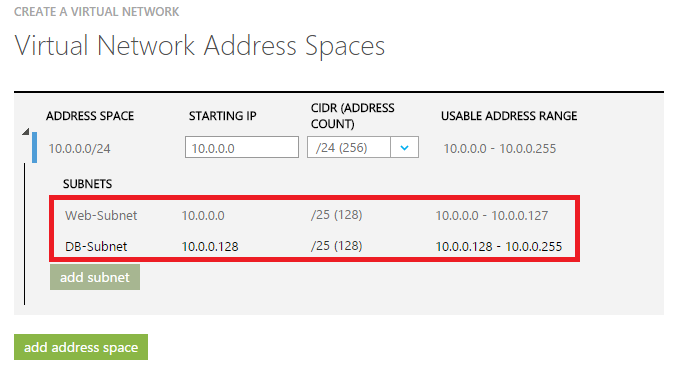
Web-Subnet IP Rang为10.0.0.0-10.0.0.127
DB-Subnet IP Rang为10.0.0.128-10.0.0.255
三.配置Azure Cloud Service
我们新建一个Cloud Service,项目命名为LeiPaaSReservedIP,只添加WebRole即可,截图略。
1.将Instance Count数量修改为2
2.修改ServiceConfiguration.Cloud.cscfg文件配置,增加以下内容:

上图中的设置中:
(1)Instance Count为2,需要2个Instance
(2)VirtualNetworksSite节点,设置为虚拟机网络名称,PaaSVNet
(3)InstanceAddress节点设置为WebRole1
(4)Subnet设置为步骤二中的子网名称,为Web-Subnet
(5)ReservedIP设置为我们在步骤一中的Reserved IP Name (LeiTestVMReservedIP)
然后我们将我们的Cloud Service部署到Azure平台上,观察Reserved IP Address,已经使用在步骤一的Public IP:191.234.18.61)

然后我们观察虚拟网络PaaSVNet中的Private IP使用情况

Web Role已经加入了Web-Subnet子网
因为将Instance Count设置为2,这2个PaaS Instance占用了10.0.0.4和10.0.0.5这2个IP地址
参考资料: https://msdn.microsoft.com/library/azure/jj156091.aspx
Windows Azure Cloud Service (44) 将Cloud Service加入Virtual Network Subnet,并固定Virtual IP Address(VIP)的更多相关文章
- Windows Azure Virtual Network (6) 设置Azure Virtual Machine固定公网IP (Virtual IP Address, VIP) (1)
<Windows Azure Platform 系列文章目录> 注意:本文介绍的是Global Azure (http://www.windowsazure.com),如果你使用的是由世纪 ...
- Windows Azure Virtual Network (7) 设置Azure Virtual Machine固定公网IP (Virtual IP Address, VIP) (2)
<Windows Azure Platform 系列文章目录> 本文介绍的是,当用户在创建Azure Virtual Machine的时候,忘记绑定公网IP,需要重新绑定公网IP的具体操作 ...
- [Windows Azure] Create and use a reporting service in Windows Azure SQL Reporting
Create and use a reporting service in Windows Azure SQL Reporting In this tutorial you will learn ab ...
- [Windows Azure] What is a cloud service?
What is a cloud service? When you create an application and run it in Windows Azure, the code and co ...
- 比较Windows Azure 网站(Web Sites), 云服务(Cloud Services)and 虚机(Virtual Machines)
Windows Azure提供了几个部署web应用程序的方法,比如Windows Azure网站.云服务和虚拟机.你可能无法确定哪一个最适合您的需要,或者你可能清楚的概念,比如IaaS vs PaaS ...
- [Windows Azure] How to use the Queue Storage Service
How to use the Queue Storage Service version 1.7 version 2.0 This guide will show you how to perform ...
- [Windows Azure] Building the web role for the Windows Azure Email Service application - 3 of 5
Building the web role for the Windows Azure Email Service application - 3 of 5. This is the third tu ...
- [Windows Azure] Configuring and Deploying the Windows Azure Email Service application - 2 of 5
Configuring and Deploying the Windows Azure Email Service application - 2 of 5 This is the second tu ...
- [Windows Azure] Windows Azure Web Sites, Cloud Services, and VMs: When to use which?
This document provides guidance on how to make an informed decision in choosing between Windows Azur ...
随机推荐
- ABP框架详解(七)Caching
在ABP框架中存在一个缓存机制,使用ICache的继承类来存储最终需要缓存的数据,可以吧ICache看成一个字典对象,使用Key作为真实数据的具有唯一性的表示.使用上与字典对象完全相同,Get方法传递 ...
- JAVA学习博客---2015-6
JAVA核心技术卷一第一遍看得差不多了,应该是五月初开始看的,用了两个月的中午时间看完的,一共七百多页,接下来还是需要再看一遍,不懂的还是有很多. JAVA和C++一样是面向对象OOP的语言,不同于命 ...
- highcharts 当Y轴全部没有数据的时候 数据标签显示最下面 而不是居中显示
yAxis: {min: 0,minRange: 1}
- 快速学习C语言二: 编译自动化, 静态分析, 单元测试,coredump调试,性能剖析
上次的Hello world算是入门了,现在学习一些相关工具的使用 编译自动化 写好程序,首先要编译,就用gcc就好了,基本用法如下 gcc helloworld.c -o helloworld.o ...
- Visual Studio Xamarin编译Android项目出错的解决办法
安装完Xamarin后,编译Android项目时,你会发现好长时间进度都不动,当你取消编译后,会发现其实是出错了,就是因在Android项目在第一次编译时要去google网站上下一个andorid s ...
- FFmpeg 2.1 发布
FFmpeg是一套可以用来记录.转换数字音频.视频,并能将其转化为流的开源计算机程序.它包括了目前领先的音/视频编码库 libavcodec. FFmpeg是在Linux下开发出来的,但它可以在包括W ...
- node.js-session问题
在使用express使用session时发现怎么使用session都是undefined最后发现 app.use(express.cookieParser()); app.use(express.se ...
- JavaFX結合 JDBC, Servlet, Swing, Google Map及動態產生比例圖 (3):部署設定及應用 (转帖)
說明:這一篇主要是說明如何將程式部署到Application Server,以及程式如何運作,產生的檔案置於何處,以及如何以瀏覽器呈現(Applet),或是當成桌面應用程式,或是 桌面Applet,這 ...
- 如何基于RabbitMQ实现优先级队列
概述 由于种种原因,RabbitMQ到目前为止,官方还没有实现优先级队列,只实现了Consumer的优先级处理. 但是,迫于种种原因,应用层面上又需要优先级队列,因此需求来了:如何为RabbitMQ加 ...
- C#面向对象编程进阶(一) ——实现栈
如何用C#编写一个栈类? 关键在于这样的一个类应该如何设计呢?首先要确立面向对象的编程思想,即类是对实体进行合理地抽象和建模,而这种思想将贯彻在我们编程的整个过程中.下面我们一步一步来做. 1.类方法 ...