
Windows Azure Cloud Service (44) 将Cloud Service加入Virtual Network Subnet,并固定Virtual IP Address(VIP)
《Windows Azure Platform 系列文章目录》
在之前的文章中,笔者已经详细介绍了如何将Virtual Machine加入Virtual Network,并且绑定固定的Private IP和Virtual IP Address (公网IP地址)
Windows Azure Virtual Network (5) 设置Azure Virtual Machine固定Private IP
Windows Azure Virtual Network (6) 设置Azure Virtual Machine固定公网IP (Virtual IP Address, VIP) (1)
Windows Azure Virtual Network (7) 设置Azure Virtual Machine固定公网IP (Virtual IP Address, VIP) (2)
但是以上的功能仅限于IaaS,如果我们需要在PaaS Cloud Service设置Private IP和Virtual IP Address,应该如何设置?
再想象一个场景,当我们前端使用PaaS Cloud Service (Web Server)实现横向扩展,后端使用2台SQL Server Virtual Machine (Always-On)做数据库服务器。
这种混合PaaS+IaaS的场景,如何让PaaS Cloud Service加入Virtual Network,使用内部IP地址与SQL Server VM进行通信呢?
本章内容分为以下三个部分:
一.管理Virtual IP Address(公网IP地址)
二.管理Virtual Network
三.配置Azure Cloud Service
一.管理Virtual IP Address(公网IP地址)
我们可以通过Azure PowerShell来申请Virtual IP Address,具体读者可以参考之前的Blog:
国外使用Azure Global的用户,可以参考:
Windows Azure Virtual Network (6) 设置Azure Virtual Machine固定公网IP (Virtual IP Address, VIP) (1)
Windows Azure Virtual Network (7) 设置Azure Virtual Machine固定公网IP (Virtual IP Address, VIP) (2)
国内使用世纪互联运维的Azure China用户,可以参考:
Azure China (8) 使用Azure PowerShell创建虚拟机,并设置固定Virtual IP Address和Private IP
如果读者用的是百度查询IP地址,经常会发现Azure上海的IP地址经常会显示来自北京,这是由于百度的IP库比较老,请读者注意
这里笔者不想申请新的Reserved IP Address,我们使用命令:
Get-AzureReservedIP
可以查看到之前已经申请的Reserved IP Address,如下图:

我们就继续使用上面的LeiTestVMReservedIP,这个地址是191.234.18.61
上图中,InUse状态为False,没有被占用
二.管理Azure Virtual Network
我们创建一个新的Azure Virtual Network,命名为PaaSVNet
增加2个subnet,命名为Web-Subnet和DB-Subnet,如下图:
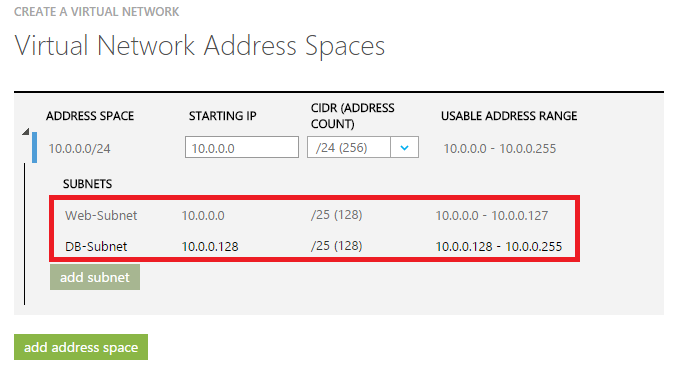
Web-Subnet IP Rang为10.0.0.0-10.0.0.127
DB-Subnet IP Rang为10.0.0.128-10.0.0.255
三.配置Azure Cloud Service
我们新建一个Cloud Service,项目命名为LeiPaaSReservedIP,只添加WebRole即可,截图略。
1.将Instance Count数量修改为2
2.修改ServiceConfiguration.Cloud.cscfg文件配置,增加以下内容:

上图中的设置中:
(1)Instance Count为2,需要2个Instance
(2)VirtualNetworksSite节点,设置为虚拟机网络名称,PaaSVNet
(3)InstanceAddress节点设置为WebRole1
(4)Subnet设置为步骤二中的子网名称,为Web-Subnet
(5)ReservedIP设置为我们在步骤一中的Reserved IP Name (LeiTestVMReservedIP)
然后我们将我们的Cloud Service部署到Azure平台上,观察Reserved IP Address,已经使用在步骤一的Public IP:191.234.18.61)

然后我们观察虚拟网络PaaSVNet中的Private IP使用情况

Web Role已经加入了Web-Subnet子网
因为将Instance Count设置为2,这2个PaaS Instance占用了10.0.0.4和10.0.0.5这2个IP地址
参考资料: https://msdn.microsoft.com/library/azure/jj156091.aspx
Windows Azure Cloud Service (44) 将Cloud Service加入Virtual Network Subnet,并固定Virtual IP Address(VIP)的更多相关文章
- Windows Azure Virtual Network (6) 设置Azure Virtual Machine固定公网IP (Virtual IP Address, VIP) (1)
<Windows Azure Platform 系列文章目录> 注意:本文介绍的是Global Azure (http://www.windowsazure.com),如果你使用的是由世纪 ...
- Windows Azure Virtual Network (7) 设置Azure Virtual Machine固定公网IP (Virtual IP Address, VIP) (2)
<Windows Azure Platform 系列文章目录> 本文介绍的是,当用户在创建Azure Virtual Machine的时候,忘记绑定公网IP,需要重新绑定公网IP的具体操作 ...
- [Windows Azure] Create and use a reporting service in Windows Azure SQL Reporting
Create and use a reporting service in Windows Azure SQL Reporting In this tutorial you will learn ab ...
- [Windows Azure] What is a cloud service?
What is a cloud service? When you create an application and run it in Windows Azure, the code and co ...
- 比较Windows Azure 网站(Web Sites), 云服务(Cloud Services)and 虚机(Virtual Machines)
Windows Azure提供了几个部署web应用程序的方法,比如Windows Azure网站.云服务和虚拟机.你可能无法确定哪一个最适合您的需要,或者你可能清楚的概念,比如IaaS vs PaaS ...
- [Windows Azure] How to use the Queue Storage Service
How to use the Queue Storage Service version 1.7 version 2.0 This guide will show you how to perform ...
- [Windows Azure] Building the web role for the Windows Azure Email Service application - 3 of 5
Building the web role for the Windows Azure Email Service application - 3 of 5. This is the third tu ...
- [Windows Azure] Configuring and Deploying the Windows Azure Email Service application - 2 of 5
Configuring and Deploying the Windows Azure Email Service application - 2 of 5 This is the second tu ...
- [Windows Azure] Windows Azure Web Sites, Cloud Services, and VMs: When to use which?
This document provides guidance on how to make an informed decision in choosing between Windows Azur ...
随机推荐
- 基于资源的权限系统-API设计
概述 权限系统需要和别的系统集成,因此,良好的API是易用性的保证. 这里只设计一些权限相关的核心 API,关于用户,组织,导入导出之类的后续再逐步补充 API 设计 围绕权限有以下 4 类 API: ...
- Restful.Data 开源持久层组件项目最新进展和使用说明
Restful.Data 经过 博客园 和 CSDN 的宣传,目前参与该项目的人数已达到 114 人(群号:338570336),虽大部分并不参与实际开发,但他们所提出的意见和建议以及在试用过程中发现 ...
- dijit样式定制之TextBox(一)
参考资料:http://dojotoolkit.org/reference-guide/1.9/dijit/themes.html http://archive.dojotoolkit.org/nig ...
- 《C#图解教程》读书笔记之三:方法
本篇已收录至<C#图解教程>读书笔记目录贴,点击访问该目录可获取更多内容. 一.方法那些事儿 (1)方法的结构:方法头—指定方法的特征,方法体—可执行代码的语句序列: (2)方法的调用:参 ...
- 冲刺阶段 day 10
项目进展 目前我们已经完成了系部管理,教师管理,班级管理,学生管理这四大部分代码的编写及数据库的搭建与连接.就差最后专业管理这一部分了. 存在问题 其实我们从开始这个项目到现在,最大的问题还是在代码编 ...
- windbg 基础命令实战 - 简单程序破解
以前玩游戏遇到一些实在过不去的管卡,经常会找一些游戏修改软件来修改游戏,让自己变得无比强大,将boss一路砍瓜切菜过足游戏瘾.其实游戏修改软件的功能大多都比较简单,我们可以通过windbg的一些简单命 ...
- java提高篇(三)-----java的四舍五入
Java小事非小事!!!!!!!!!!!! 四舍五入是我们小学的数学问题,这个问题对于我们程序猿来说就类似于1到10的加减乘除那么简单了.在讲解之间我们先看如下一个经典的案例: public stat ...
- Unity3D ogg下载并播放
那天说了c#不好弄ogg和mp3的解码,然后就发现打脸了. 找到了一些开源的解码器,由于ogg的音质容量比要明显好于mp3,主要弄ogg的播放. 由于自带解码器,可以实现全平台下载并播放,甚至可以实现 ...
- Linux下Java开发环境搭建—CentOS下Mysql安装教程
本人学习Linux时使用的是CentOs5.5版本,在该环境中,Mysql的安装方法有很多种,下面我只讲我这次成功了的方法,作为一个记录,供大家参考,同时给自己做一个笔记. MySQL下载 1.进入网 ...
- 如何在JavaScript中正确引用某个方法(bind方法的应用)
在JavaScript中,方法往往涉及到上下文,也就是this,因此往往不能直接引用,就拿最常见的console.log("info…")来说,避免书写冗长的console,直接用 ...