
Android移动APP开发笔记——Cordova(PhoneGap)通过CordovaPlugin插件调用 Activity 实例
引言
Cordova(PhoneGap)采用的是HTML5+JavaScript混合模式来开发移动手机APP,因此当页面需要获取手机内部某些信息时(例如:联系人信息,坐标定位,短信等),程序就需要调用手机内部的API跟页面进行信息交换。Cordova 特别为此定制了完善的解决方案,以方便用户进行程序编辑。在这一章里将为大家逐一介绍Cordova与Actitity通讯的实现原理。
目录
二、页面通过 cordova.exec 函数调用 CordovaPlugin 插件
四、页面通过CordovaPlugin插件调用Activity开发实例
一、CordovaPlugin类简介
CordovaPlugin是Cordova插件的父类,用户自定义的插件必须继承父类,它的主要常用属性如下
| 属性 | 详细说明 |
| CordovaWebView | 视图管理器,当中包括PluginManager、CordovaWebViewEngine、ICordovaCookieManager等多个对象,用于管理界面渲染,视图加载过程中的生命周期 |
| CordovaInterface | 定义startActivityForResult、setActivityResultCallback等主要方法,获取调用上下文中的Activity对象 |
| CordovaPreferences | 用于管理bundle中的属性值 |
表格1.1
CordovaPlugin的常用方法如下
| 方法 | 详细说明 |
| void privateInitialize(String serviceName, CordovaInterface cordova, CordovaWebView webView, CordovaPreferences preferences) | 插件初始化时执行,用于定义service名称,cordovaInterface接口,CodovaWebView视图,CordovaPreferences 属性等值 |
| boolean execute(String action, String rawArgs, CallbackContext callbackContext) | 在开发插件时,用户的自定义方法,当页面调用插件时系统首先将会运行此方法 |
| boolean execute(String action, JSONArray args, CallbackContext callbackContext) | 同上 |
| boolean execute(String action, CordovaArgs args, CallbackContext callbackContext) | 同上 |
| void onActivityResult(int requestCode, int resultCode, Intent intent) | 在开发插件时,用户的自定义方法,插件调用startActivityForResult后的回调函数。 |
| String getServiceName() | 获取在config文件中该服务的名称 |
| Boolean shouldAllowRequest(String url) | 判断是否允许此请求 |
| Boolean shouldAllowNavigation(String url) | 判断是否允许此导航 |
| Boolean shouldOpenExternalUrl(String url) | 判断是否打开外部链接 |
| boolean onReceivedHttpAuthRequest(CordovaWebView view, ICordovaHttpAuthHandler handler, String host, String realm) | |
| boolean onReceivedClientCertRequest(CordovaWebView view, ICordovaClientCertRequest request) |
表格1.2
CordovaPlugin的详细解析可参考官网
二、页面调用 CordovaPlugin 插件实例
大概了解 CordovaPlugin 类的使用方法后,下面为大家介绍一下页面调用插件的例子。首先打开文件res/xml/config.xml为插件进行配置。
<preference/>可用于运行环境中的常用参数,例如:全屏设置,滚动条设置,背景色设置等等
<preference name="Fullscreen" value="true" />
<preference name="DisallowOverscroll" value="true"/>
<preference name="BackgroundColor" value="0xff0000ff"/>
<feature></feature>节点用于设置插件描述,feature的name属性是设置插件的唯一标示,在页面调用插件时将通过name找到此插件
在开发插件时,先为此插件添加一个<feature>节点,在<param>中绑定插件的后台执行文件ShowMessagePlugin.java
<param name="android-package" value="org.apache.cordova.showmessage.ShowMessagePlugin" />
 <?xml version='1.0' encoding='utf-8'?>

 <widget id="com.sun.androidapp" version="0.0.1" xmlns="http://www.w3.org/ns/widgets" xmlns:cdv="http://cordova.apache.org/ns/1.0">

     <!--设置运行环境中的参数值  -->

     <preference name="loglevel" value="DEBUG" />

     <!-- 插件描述 -->

     <feature name="Whitelist">

         <param name="android-package" value="org.apache.cordova.whitelist.WhitelistPlugin" />

         <param name="onload" value="true" />

     </feature>

     <feature name="ShowMessage">

         <param name="android-package" value="org.apache.cordova.showmessage.ShowMessagePlugin" />

     </feature>

     <allow-intent href="market:*" />

     <!-- 该APP名称 -->

     <name>AndroidTest</name>

     <!-- APP描述 -->

     <description>

         A sample Apache Cordova application that responds to the deviceready event.

     </description>

     <!-- 作者信息描述 -->

     <author email="dev@cordova.apache.org" href="http://cordova.io">

         Apache Cordova Team

     </author>

     <!-- 默认启动页面 -->

     <content src="index.html" />

     <!-- 指定app可进行通信的域名,*为所有 -->

     <access origin="*" />

     <!-- App默认只请允许通过手机端直接打开,若想通过网站,SMS等方式调用APP,则需要设置allow-intent配置 -->

     <allow-intent href="http://*/*" />

     <allow-intent href="https://*/*" />

     <allow-intent href="tel:*" />

     <allow-intent href="sms:*" />

     <allow-intent href="mailto:*" />

     <allow-intent href="geo:*" />

 </widget>
建立org.apache.cordova.showmessage.ShowMessagePlugin类,且继承CordovaPlugin基类,并实现
bool execute(action,args,callbackcontext) 方法。当页面调用此插件时,默认执行此方法。
action 是唯一标识符,系统可根据不同的action进行不同的操作。
args是页面传入的参数,支持String, JsonArray,CordovaArgs 等三种不同的类型。
callbackcontext是系统的上下文,当完成操作后调用callbackcontext.success(支持多类型参数)方法,表示插件操作已完成,并把参数返还到页面。最终返回true代表插件执行成功,false代表执行失败
 package org.apache.cordova.showmessage;

 public class ShowMessagePlugin extends CordovaPlugin {

     @Override

     public boolean execute(String action,JSONArray args,CallbackContext context)

             throws JSONException{

         if(action.equals("mydream")){

             String msg=args.getString(0)+"'s dream is to become a "+args.getString(1);

             context.success(msg);

             return true;

         }

         return false;

     }

 }
在 cordova.js 包中,最常用的是 cordova.exec(success,failed,service,action,args)函数,页面正是通过此函数调用插件。
success 用于绑定插件执行成功后回调的回调函数
failed用于绑定执行失败的回调函数
service与config.xml配置文件中feature字节的name属性相对应
action与ShowMessagePlugin对象boolean excute方法中action参数对应,用于分辨插件执行的方法类型,插件可根据action类型的不同作出分类处理。
args为输入参数
Name: <input type="text" id="txt1"/>
Dream:<input type="text" id="txt2"/>
<input type="button" onclick="btnclick()" name="btn" value="Click"/> <br/>
<label id="label"></label> <script type="text/javascript"> function btnclick(){
var name=$("#txt1").val();
var dream=$("#txt2").val();
//通过 cordova.exec (success,failed,serviceName,action,args)函数调用插件
cordova.exec(success,failed,"ShowMessage","mydream",[name,dream])
} //成功调用插件,获取返回值后的页面处理函数
function success(result){
if(result!=null)
$("#label").html(result);
else
alert("no message");
} //调用失败后的处理函数
function failed(msg){
......
}
</script>
测试结果

三、CordovaInterface接口说明
CordovaInterface 接口默认是由 CordovaInterfaceImpl 类实现的,当中包括了一个Activity对象。当打开APP时 Cordova 会默认启动此 Activity 以承载 Cordova 核心引擎对程序进行管理。ExecutorService 则负责对象对线程池进行管理,PluginManager则负责对插件进行管理,CordovaPlugin则是Cordova插件的父类,所有插件都必须继承CordovaPlugin。
| 属性 | 详细说明 |
| Activity | 打开APP时 Cordova 会默认启动此 Activity 以承载 Cordova 核心引擎对程序进行管理 |
| ExecutorService | 对线程池进行管理 |
| PluginManager | 插件管理器,用于管理插件的生成,运行,结束等生命周期 |
| CordovaPlugin | 通过startActivityForResult方法绑定CordovaPlugin插件 |
| ActivityResultHolder | 内部类,封装了requestCode, resultCode, intent等对象 |
表格2.1
CordovaInterfaceImpl定义了三个最常用方法
| 方法 | 详细说明 |
| void startActivityForResult(CordovaPlugin command, Intent intent, int requestCode) | 绑定CordovaPlugin参数,并调用Activity对象的startActivityForResult(intent, requestCode)方法,根据 intent 绑定值跳转到对应的activity |
| void setActivityResultCallback(CordovaPlugin plugin) | 激发CordovaPlugin对象的onActivityResult事件 |
| boolean onActivityResult(int requestCode, int resultCode, Intent intent) | 封装Acticity对象的onActivityResult回调函数, 激发CordovaPlugin对象的onActivityResult事件 |
表格2.2
四、页面通过CordovaPlugin插件调用Activity开发实例
类似于第一节实例,在页面通过cordova.exec(success,failed,service,action,args)方法调用插件,返回时调用success函数进行处理显示结果
        出游省份:

        <select id="select1">

           <option value='1' selected='selected'>黑龙江</option>

           <option value='2'>吉林</option>

           <option value='3'>辽宁</option>

        </select>

        <input type="button" onclick="btnclick()" name="btn" value="查找"/> <br/>

        路线景点:

        <label id="label"></label><br/>

        <script type="text/javascript">

             function btnclick(){

                  var province=$("#select1").val();

                  //通过 cordova.exec (success,failed,serviceName,actionName,args)函数调用插件

                  cordova.exec(success,null,"ShowMessage","showMessage",[province]);

             }

             //成功调用插件,获取返回值后的页面处理函数

             function success(result){

                  if(result!=null)

                      $("#label").html(result);

                  else

                      alert("no message");

             }

        </script>

插件通过判断action参数判断进行不同的处理,然后通过Intent对象绑定将要启动的Activity,最后通过CordovaInterface中的startActivityForResult(cordovaPlugin,intent,int)方法启动该Activity。当 Activity 结束后,系统将调用回调函数 onActivityResult(int requestCode, int resultCode, Intent intent)
在此说明一下Intent类的用途,此类主要用于绑定当前的活动与子活动之间关系,当中包含6种构造函数。
1、Intent() 空构造函数
2、Intent(Intent o) 拷贝构造函数
3、Intent(String action) 指定action类型的构造函数
4、Intent(String action, Uri uri) 指定Action类型和Uri的构造函数,URI主要是结合程序之间的数据共享ContentProvider
5、Intent(Context packageContext, Class<?> cls) 传入组件的构造函数,也就是此例子中使用到的
6、Intent(String action, Uri uri, Context packageContext, Class<?> cls) 前两种结合体
Intent 类中封装了一个Bundle 对象 mExtras,可用于主活动与子活动之间传值,系统可通过 putExtra 方法把参数传入mExtras, 也可通过 getShortExtra、getIntExtra、getBooleanExtra、getByteExtra 等多个方法从mExtras 获取参数值。
 public class ShowMessagePlugin extends CordovaPlugin {

     private CallbackContext context;

     @Override

     public boolean execute(String action,JSONArray args,CallbackContext context)

              throws JSONException{

         this.context=context;

         //根据action判断调用方法

         if(action.equals("showMessage")){

             //通过Intent绑定将要调用的Activity

             Intent intent=new Intent(this.cordova.getActivity(),SpotActivity.class);

             //加入将要传输到activity中的参数

             intent.putExtra("province", args.getString(0));

             //启动activity

             this.cordova.startActivityForResult(this, intent, 0);

         }

         return true;

     }

     @Override

     public void onActivityResult(int requestCode, int resultCode, Intent intent) {

         // 根据resultCode判断处理结果

         if(resultCode==Activity.RESULT_OK){

             String spot=intent.getStringExtra("spot");

             context.success(spot);

         }

     }

 }
Activity 被触发后先通过 setContentView 方法绑定视图,再从intent 对象中获取输入参数进行处理。
完成操作后,通过 Activity 类 setResult(int resultCode, Intent data) 方法绑定返回值,其中resultCode可被 cordovaPlugin 插件用作判断返回值的处理结果。
最后调用 Activity 对象的 finish 方法关闭 SpotActivity,把返回值回传到 CordovaPlugin。
 public class SpotActivity extends Activity{

     private CheckBox chk1,chk2,chk3;

     @Override

     public void onCreate(Bundle savedInstanceState){

         super.onCreate(savedInstanceState);

         //绑定视图

         setContentView(R.layout.goods_list);

         //从intent中获取输入参数

         Integer province=Integer.parseInt(this.getIntent().getStringExtra("province"));

         setSpots(province);

     }

     private void setSpots(Integer n){

         this.chk1=(CheckBox)this.findViewById(R.id.checkBox1);

         this.chk2=(CheckBox)this.findViewById(R.id.checkBox2);

         this.chk3=(CheckBox)this.findViewById(R.id.checkBox3);

         switch(n){

             case 1:

                 chk1.setText("漠河");

                 chk2.setText("北极村");

                 chk3.setText("九曲十八湾");

                 break;

             case 2:

                 chk1.setText("长白山");

                 chk2.setText("雾凇岛");

                 chk3.setText("朝鲜自治州");

                 break;

             case 3:

                 chk1.setText("鸭绿江");

                 chk2.setText("笔架山");

                 chk3.setText("凤凰山");

                 break;

             default:

                 break;

         }

     }

     public void btn_onClick(View view){

         String spot="";

         if(chk1.isChecked())

             spot+=chk1.getText();

         if(chk2.isChecked())

             spot+=" "+chk2.getText();

         if(chk3.isChecked())

             spot+=" "+chk3.getText();

         //通过setResult绑定返回值

         Intent intent=new Intent();

         intent.putExtra("spot",spot);

         setResult(RESULT_OK,intent);

         //关闭该activity,把返回值传回到cordovaPlugin插件

         this.finish();

     }

 }
Activity 视图
 <?xml version="1.0" encoding="utf-8"?>

 <LinearLayout xmlns:android="http://schemas.android.com/apk/res/android"

     android:layout_width="match_parent"

     android:layout_height="match_parent"

     android:layout_alignParentBottom="true"

     android:orientation="vertical" >

     <TextView

         android:layout_width="wrap_content"

         android:layout_height="wrap_content"

         android:text="选择景点"

         android:layout_marginTop="80dp"/>

     <CheckBox

         android:id="@+id/checkBox1"

         android:layout_width="wrap_content"

         android:layout_height="wrap_content"/>

     <CheckBox

         android:id="@+id/checkBox2"

         android:layout_width="wrap_content"

         android:layout_height="wrap_content"/>

     <CheckBox

         android:id="@+id/checkBox3"

         android:layout_width="wrap_content"

         android:layout_height="wrap_content"/>

     <Button

         android:id="@+id/button1"

         style="?android:attr/buttonStyleSmall"

         android:layout_width="wrap_content"

         android:layout_height="40dp"

         android:text="确认"

         android:layout_marginTop="20dp"

         android:onClick="btn_onClick"/>

 </LinearLayout>
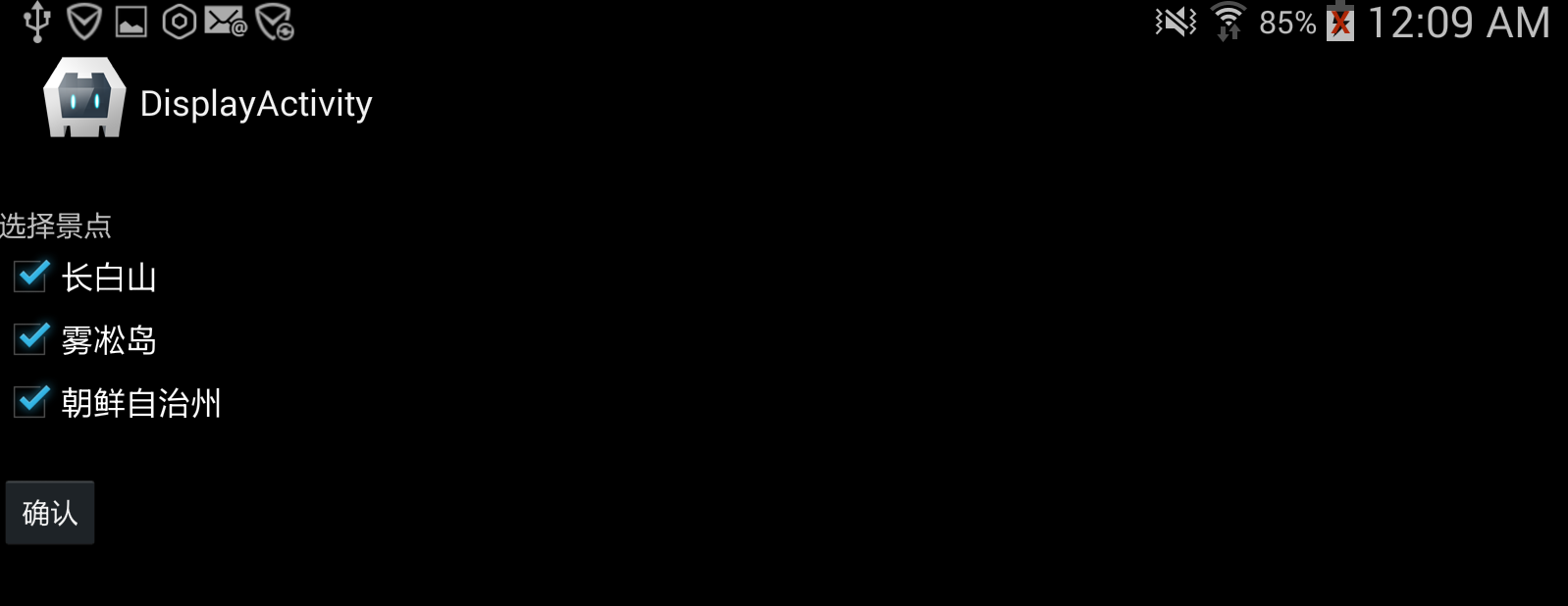
activity 关闭后,cordovaPlugin 插件将调用回调函数 onActivityResult(int requestCode, int resultCode, Intent intent),回调函数中可根据 resultCode 参数判断处理情况,根据不同的结果对intent 中的返回值 bundler 对象进行不同处理。 最后使用 callbackContext 对象中的 success(string) 方法把处理结果回传到页面;
处理结果:

Android移动APP开发笔记——Cordova(PhoneGap)通过CordovaPlugin插件调用 Activity 实例的更多相关文章
- Android移动APP开发笔记——最新版Cordova 5.3.1(PhoneGap)搭建开发环境
引言 简单介绍一下Cordova的来历,Cordova的前身叫PhoneGap,自被Adobe收购后交由Apache管理,并将其核心功能开源改名为Cordova.它能让你使用HTML5轻松调用本地AP ...
- android模块化app开发笔记-2插件间布局文件共享
android编程时布局文件,图片资源等都是放在同一个文件夹下,这样照成一个问题就是我们想重用UI布局文件和图片时就还需要其分离这些资料,相信大部分android程序员都遇到过这样的问题,其痛苦程度不 ...
- Android 开发笔记(一) 按钮事件调用Activity
UI创建按钮及事件 Button mEmailSignInButton = (Button) findViewById(R.id.email_sign_in_button);mEmailSignInB ...
- Android APP开发笔记
环境搭建 windows系统上需要以下软件: android SDK -- app开发工具包, 开发运行环境(包括SDK管理工具,和虚拟设备管理). JDK -- java 开发工具包, 负责app代 ...
- 混合开发 Hybird Cordova PhoneGap web 跨平台 MD
Markdown版本笔记 我的GitHub首页 我的博客 我的微信 我的邮箱 MyAndroidBlogs baiqiantao baiqiantao bqt20094 baiqiantao@sina ...
- Windows 8.1 store app 开发笔记
原文:Windows 8.1 store app 开发笔记 零.简介 一切都要从博彦之星比赛说起.今年比赛的主题是使用Bing API(主要提到的有Bing Map API.Bing Translat ...
- Android菜鸟的成长笔记(10)——使用Bundle在Activity之间传值
原文:[置顶] Android菜鸟的成长笔记(10)——使用Bundle在Activity之间传值 前面我们了解了如何启动一个Activity,一个Activity在启动另外一个Activity的时候 ...
- [Phonegap+Sencha Touch] 移动开发77 Cordova Hot Code Push插件实现自己主动更新App的Web内容
原文地址:http://blog.csdn.net/lovelyelfpop/article/details/50848524 插件地址:https://github.com/nordnet/cord ...
- 小学英语课文朗读APP开发笔记(一):创建Win7虚拟机
1 缘起 以小米盒子为代表的OTT机顶盒.智能电视的快速普及,快速推动了Android技术在机顶盒.智能电视领域的普及.既然都是用的Android操作系统,那么从技术上来说应该是大同小异的,当然和手机 ...
随机推荐
- freeCodeCamp:Mutations
蛤蟆可以吃队友,也可以吃对手. 如果数组第一个字符串元素包含了第二个字符串元素的所有字符,函数返回true. 举例,["hello", "Hello"]应该返回 ...
- layout优化实践
昨天确定了启动时,inflate耗时太多,当时不知道怎么回事,去Trinea的博客一逛,发现原来是需要进行layout优化,跟着他们的步伐,做了下面的修改. 1.据说在lint前是一款layout工具 ...
- 修改win7电脑中所有文件的默认查看方式
怎么修改win7电脑中所有文件的默认查看方式 如何设置才可以得到如下的效果:比如说打开一个盘符或者一个文件夹,进行设置之后,这个盘符里或者这个文件夹下的所有子文件夹.所有子文件夹里的所有文件都以“ ...
- C# 加密
一.RSA加密解密 using System; using System.Collections.Generic; using System.IO; using System.Linq; using ...
- How to copy remote computer files quickly to local computer
if we want copy file from VM(Remote VM) to local computer. Always can not easy copy file so easy. no ...
- Asp.net使用代码修改配置文件的节点值
使用代码修改配置文件的方法: 1.打开配置文件写入的权限 2.先按节点名称长到要修改的节点,然后删除,紧接着将有新值的节点添加回去 3.关闭配置文件写入的权限 修改Appsetting节点的值,修改其 ...
- 第十四章:降维:奇异值分解SVD
- mysql 查询每个班级成绩前两名
- IE 浏览器 如何关闭令人讨厌的“此网站需要运行以下加载项:XXX。如果您信任该网站和该加载项并允许运行该加载项,请单击这里...
1.运行gpedit.msc 2.在打开的组策略中打开用户配置——管理模板——Windows组件——Internet Explorer 3.选择“关闭ActiveX选择启用提示”,将其状态改为“已启用 ...
- 手机移动端confirm替换方案
//弹框 ;(function () { var ConfirmBox = function (options){ this.defaults = { title:"", topT ...