
C++ Windows 下 根据进程名获取进程ID 以及该进程下所有窗口的句柄
#include <windows.h>

#include <stdint.h>

#include <tlhelp32.h>

#include <stdio.h>

#include <iostream>

#include <vector>

typedef struct EnumHWndsArg

{

    std::vector<HWND> *vecHWnds;

    DWORD dwProcessId;

}EnumHWndsArg, *LPEnumHWndsArg;

HANDLE GetProcessHandleByID(int nID)//通过进程ID获取进程句柄

{

    return OpenProcess(PROCESS_ALL_ACCESS, FALSE, nID);

}

DWORD GetProcessIDByName(const char* pName)

{

    HANDLE hSnapshot = CreateToolhelp32Snapshot(TH32CS_SNAPPROCESS, );

    if (INVALID_HANDLE_VALUE == hSnapshot) {

        return NULL;

    }

    PROCESSENTRY32 pe = { sizeof(pe) };

    for (BOOL ret = Process32First(hSnapshot, &pe); ret; ret = Process32Next(hSnapshot, &pe)) {

        if (strcmp(pe.szExeFile, pName) == ) {

            CloseHandle(hSnapshot);

            return pe.th32ProcessID;

        }

        //printf("%-6d %s\n", pe.th32ProcessID, pe.szExeFile);

    }

    CloseHandle(hSnapshot);

    return ;

}

BOOL CALLBACK lpEnumFunc(HWND hwnd, LPARAM lParam)

{

    EnumHWndsArg *pArg = (LPEnumHWndsArg)lParam;

    DWORD  processId;

    GetWindowThreadProcessId(hwnd, &processId);

    if (processId == pArg->dwProcessId)

    {

        pArg->vecHWnds->push_back(hwnd);

        //printf("%p\n", hwnd);

    }

    return TRUE;

}

void GetHWndsByProcessID(DWORD processID, std::vector<HWND> &vecHWnds)

{

    EnumHWndsArg wi;

    wi.dwProcessId = processID;

    wi.vecHWnds = &vecHWnds;

    EnumWindows(lpEnumFunc, (LPARAM)&wi);

}

int32_t main()

{

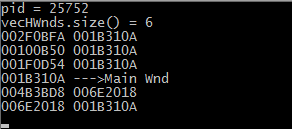
    DWORD pid = GetProcessIDByName("notepad++.exe");

    printf("pid = %u\n", pid);

    if (pid != )

    {

        std::vector<HWND> vecHWnds;

        GetHWndsByProcessID(pid, vecHWnds);

        printf("vecHWnds.size() = %u\n", vecHWnds.size());

        for (const HWND &h : vecHWnds)

        {

            HWND parent = GetParent(h);

            if (parent == NULL)

            {

                printf("%p --->Main Wnd\n", h);

            }

            else

            {

                printf("%p %p\n", h, parent);

            }

        }

    }

    getchar();

    return S_OK;

}
C++ Windows 下 根据进程名获取进程ID 以及该进程下所有窗口的句柄的更多相关文章
- linux与windows查看占用端口的进程ID并杀死进程
有时候tomcat出现端口被占用,需要查出进程ID并杀死进程. 1.查找占用端口的进程ID(windows与linux一样 8005也可以加上引号 grep可以用findstr替换) 6904就 ...
- Linux进程ID号--Linux进程的管理与调度(三)【转】
Linux 内核使用 task_struct 数据结构来关联所有与进程有关的数据和结构,Linux 内核所有涉及到进程和程序的所有算法都是围绕该数据结构建立的,是内核中最重要的数据结构之一. 该数据结 ...
- Linux进程ID号--Linux进程的管理与调度(三)
转自:http://blog.csdn.net/gatieme/article/category/6225543 日期 内核版本 架构 作者 GitHub CSDN 2016-05-12 Linux- ...
- 进程的基本属性:进程ID、父进程ID、进程组ID、会话和控制终端
摘要:本文主要介绍进程的基本属性,基本属性包含:进程ID.父进程ID.进程组ID.会话和控制终端. 进程基本属性 1.进程ID(PID) 函数定义: #include <sys/typ ...
- windows下根据进程ID强制杀死进程
[windows 进程ID PID]NTSD命令详解 1. ntsd -c q -p PID 2. ntsd -c q -pn ImageName 比如:ntsd -c q -pn qq.exe -c ...
- 【转】iis解决应用程序池**提供服务的进程意外终止进程ID是**。进程退出代码是'0x80'
转自:http://blog.sina.com.cn/s/blog_56a68d5501013xdd.html 我们公司旗下的红黑互联会遇到这种问题 事件类型: 警告事件来源: W3SVC事件种类: ...
- cmd下查询端口占用以及根据进程id名称结束进程
cmd窗口中: C:\Users\insentek>netstat -aon|findstr "1099" TCP 0.0.0.0:1099 0.0.0.0:0 LISTEN ...
- 根据关键词获取进程ID然后杀掉进程
例如需要杀掉监听进程,如下: [oracle@kel ~]$ ps -ef|grep lsnr oracle 4973 1 1 19:40 ? 00:00:00 /home/oracle/produc ...
- windows根据进程id杀死任务进程
然后打开任务管理器找出来结束进程即可
随机推荐
- Centos7 安装配置Mysql
Centos7默认自带的mariadb数据库,它是MySQL的一个分支,主要由开源社区在维护,采用GPL授权许可 MariaDB的目的是完全兼容MySQL,包括API和命令行,使之能轻松成为MySQL ...
- DIV+CSS 清除浮动方法总结
DIV+CSS 清除浮动是页面布局中常见的问题,相信各位高手也都有自己的方法,今天在这里对常见的几种方法进行总结(PS:谈不上是原创,这里是我自己做的归纳总结,也是我自己内化的过程),希望对您能够有所 ...
- python_配置
代码示例:https://pan.baidu.com/s/1pLjLPSv 1.自动补全功能 许多人都知道 iPython 有很好的自动补全能力,但是就未必知道 python 也同样可以 Tab 键补 ...
- xml 基础学习备忘
<?xml version="1.0" encoding="UTF-8"? standalone="yes"> 这里的encod ...
- layer弹出层 layer源码
下载源码:点击下载 ;!function(window, undefined){ "use strict"; var pathType = true, //是否采用自动获取绝对路径 ...
- [Unity3D]NGUI用Sprite动画和屏幕自适应做游戏开始场景
我们在玩任何一款手游产品时,都是先上来个logo界面,游戏欢迎界面等,这就意味着我们要做一款游戏需要多个场景,场景之间来回切换实现游戏逻辑,unity也不例外,所以从本篇开始将会介绍如何搭建多个场景, ...
- 使用Navicat 导入导出Mysql数据库
1 导出 另外一种方式 2 导入,新建数据名称 3 导入,运行sql文件(步骤1中的) 推荐使用SQLyog进行导入数据比较好
- LeetCode——Best Time to Buy and Sell Stock II (股票买卖时机问题2)
问题: Say you have an array for which the ith element is the price of a given stock on day i. Design a ...
- Useful links
Better JavaScript with ES6 Pt.IPopular Features pt.II A Deep Dive into Classes pt.III Cool Collectio ...
- Leetcode N-Queens
The n-queens puzzle is the problem of placing n queens on an n×n chessboard such that no two queens ...