
关于java中创建文件,并且写入内容
以下内容完全为本人原创,如若转载,请注明出自:http://www.cnblogs.com/XiOrang/
前两天在项目中因为要通过http请求获取一个比较大的json数据(300KB左右)并且保存,思来想去,最后还是决定将获取到的json数据以文件的形式保存下来,每次使用的时候去读取文件就可以了。
废话不多说了,直接上代码。
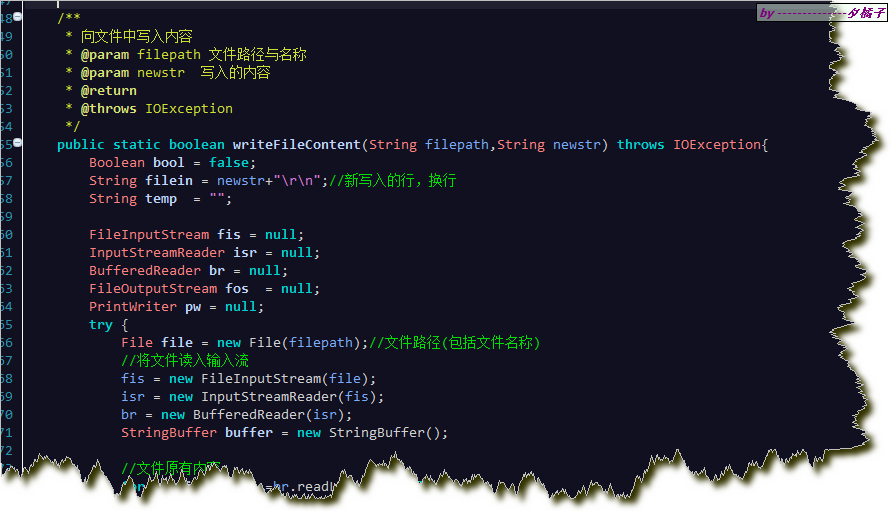
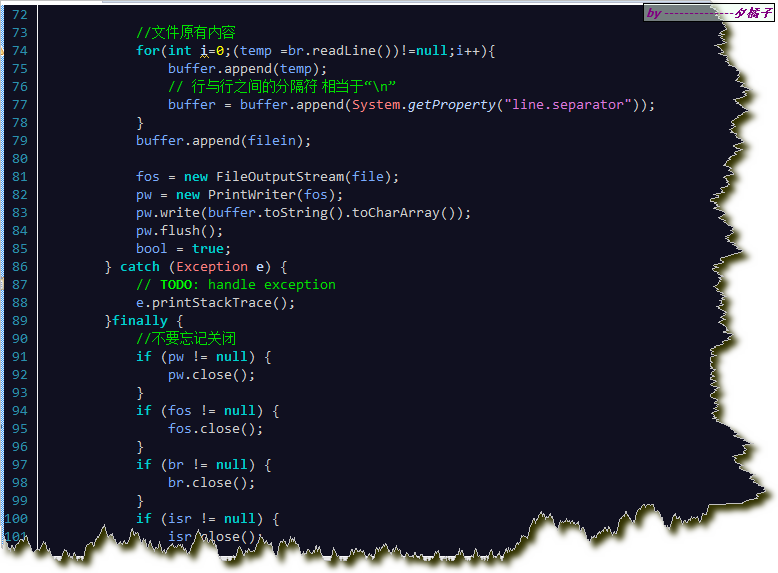
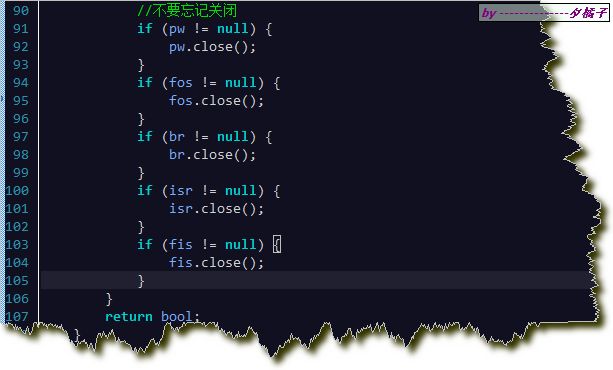
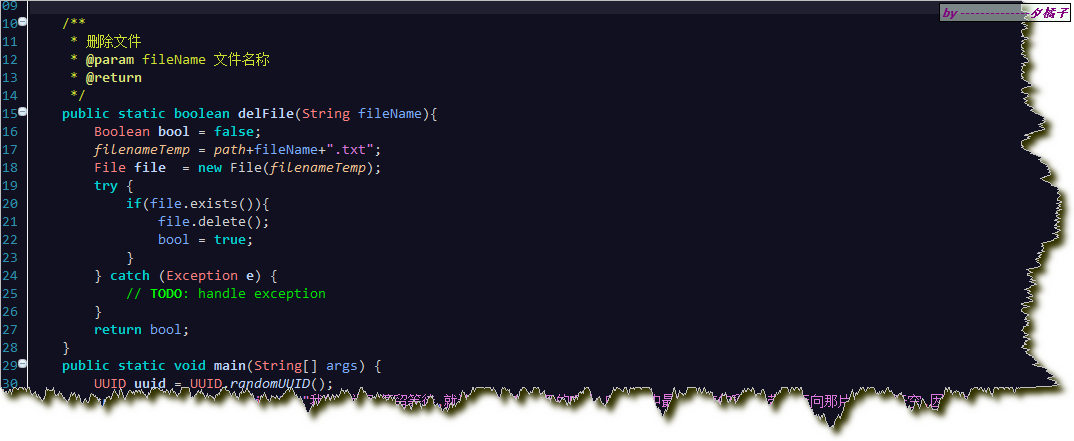
以下是代码截图,文章结尾会有完成的代码文件可供下载。
创建文件方法:

写入文件内容方法:
删除文件方法:
测试:

关于文件创建,写入内容,删除。可以根据自己的情况再稍作修改。
以下是代码类。
package com.file.run;

import java.io.BufferedReader;

import java.io.File;

import java.io.FileInputStream;

import java.io.FileOutputStream;

import java.io.IOException;

import java.io.InputStreamReader;

import java.io.PrintWriter;

import java.util.UUID;

/**

* @author 夕橘子-O

* @version 2016年7月8日 上午10:38:49

*/

public class ForFile {

    //生成文件路径

    private static String path = "D:\\file\\";

    //文件路径+名称

    private static String filenameTemp;

    /**

     * 创建文件

     * @param fileName  文件名称

     * @param filecontent   文件内容

     * @return  是否创建成功,成功则返回true

     */

    public static boolean createFile(String fileName,String filecontent){

        Boolean bool = false;

        filenameTemp = path+fileName+".txt";//文件路径+名称+文件类型

        File file = new File(filenameTemp);

        try {

            //如果文件不存在,则创建新的文件

            if(!file.exists()){

                file.createNewFile();

                bool = true;

                System.out.println("success create file,the file is "+filenameTemp);

                //创建文件成功后,写入内容到文件里

                writeFileContent(filenameTemp, filecontent);

            }

        } catch (Exception e) {

            e.printStackTrace();

        }

        return bool;

    }

    /**

     * 向文件中写入内容

     * @param filepath 文件路径与名称

     * @param newstr  写入的内容

     * @return

     * @throws IOException

     */

    public static boolean writeFileContent(String filepath,String newstr) throws IOException{

        Boolean bool = false;

        String filein = newstr+"\r\n";//新写入的行,换行

        String temp  = "";

        FileInputStream fis = null;

        InputStreamReader isr = null;

        BufferedReader br = null;

        FileOutputStream fos  = null;

        PrintWriter pw = null;

        try {

            File file = new File(filepath);//文件路径(包括文件名称)

            //将文件读入输入流

            fis = new FileInputStream(file);

            isr = new InputStreamReader(fis);

            br = new BufferedReader(isr);

            StringBuffer buffer = new StringBuffer();

            //文件原有内容

            for(int i=0;(temp =br.readLine())!=null;i++){

                buffer.append(temp);

                // 行与行之间的分隔符 相当于“\n”

                buffer = buffer.append(System.getProperty("line.separator"));

            }

            buffer.append(filein);

            fos = new FileOutputStream(file);

            pw = new PrintWriter(fos);

            pw.write(buffer.toString().toCharArray());

            pw.flush();

            bool = true;

        } catch (Exception e) {

            // TODO: handle exception

            e.printStackTrace();

        }finally {

            //不要忘记关闭

            if (pw != null) {

                pw.close();

            }

            if (fos != null) {

                fos.close();

            }

            if (br != null) {

                br.close();

            }

            if (isr != null) {

                isr.close();

            }

            if (fis != null) {

                fis.close();

            }

        }

        return bool;

    }

    /**

     * 删除文件

     * @param fileName 文件名称

     * @return

     */

    public static boolean delFile(String fileName){

        Boolean bool = false;

        filenameTemp = path+fileName+".txt";

        File file  = new File(filenameTemp);

        try {

            if(file.exists()){

                file.delete();

                bool = true;

            }

        } catch (Exception e) {

            // TODO: handle exception

        }

        return bool;

    }

    public static void main(String[] args) {

        UUID uuid = UUID.randomUUID();

        createFile(uuid+"myfile", "我的梦说别停留等待,就让光芒折射泪湿的瞳孔,映出心中最想拥有的彩虹,带我奔向那片有你的天空,因为你是我的梦 我的梦");

    }

}
关于java中创建文件,并且写入内容的更多相关文章
- 【HDFS API编程】查看HDFS文件内容、创建文件并写入内容、更改文件名
首先,重点重复重复再重复: /** * 使用Java API操作HDFS文件系统 * 关键点: * 1)创建 Configuration * 2)获取 FileSystem * 3)...剩下的就是 ...
- HDFS上创建文件、写入内容
1.创建文件 hdfs dfs -touchz /aaa/aa.txt 2.写入内容 echo "<Text to append>" | hdfs dfs -appen ...
- Java之创建文件并写入数据
应用场景:以OJ项目为例,创建对应的.in或.out文件,并将相关的数据写入. 核心代码如下: /** * 创建文件 * @param data * @param basedir * @param n ...
- 总结java中创建并写文件的5种方式
在java中有很多的方法可以创建文件写文件,你是否真的认真的总结过?下面笔者就帮大家总结一下java中创建文件的五种方法. Files.newBufferedWriter(Java 8) Files. ...
- Java中创建操作文件和文件夹的工具类
Java中创建操作文件和文件夹的工具类 FileUtils.java import java.io.BufferedInputStream; import java.io.BufferedOutput ...
- Java中读取文件
Java中读取文件,去除一些分隔符,保存在多维数组里面 public void readFile(String filePath) { File file=new File(filePath); Ar ...
- Java中的文件操作(一)RandomAccessFile
今天,学到的是java中的文件操作. Java.IO.File Java中操作文件用到RandomAccessFile类,既可以读取文件内容,也可以向文件输出数据,但不同与普通输入/输出流的是Rand ...
- 3,Java中的文件IO流
1,File类 ··· 概念:File对象可以表示一个文件或目录.可以对其进行增删改查. ··· 常用方法: File f = new File("."); 判断是 ...
- Java学习-022-Properties 文件数据写入
Properties 配置文件写入主要通过 Properties.setProperty 和 Properties.store 两个方法,此文以一个简单的 properties 文件写入源码做示例. ...
随机推荐
- 关于sqlserver 2008 无法远程连接的问题
Sqlserver 2008 无法远程连接,原因无非如下: 1. Sql未配置为允许TCP/IP登录: 2. 防火墙未允许端口1433(或者其他在SQL配置中指定的端口): 3. 命名实例导致的无法连 ...
- uwsgi出现invalid request block size: 21573 (max 4096)...skip解决办法
buffer-size uwsgi内部解析的数据包大小,默认4k. 如果准备接收大请求,你可以增长到64k. 允许uwsgi接收到32k,更大的会被丢弃. xweb.ini [uwsgi]socket ...
- Creating Dialogs
#ifndef DIALOG_H #define DIALOG_H #include <QtWidgets> //#include <QDialog> //#include & ...
- java中类的初始化和对象的初始化
静态的属于全局静态区,这个部分独立存在,不管是成员还是块,都是静态的,大家地位相等,先到先得. 然后是成员初始化,这个部分在类的构造函数前初始化,因为编译器(或者设计者)可能认为构造函数调用了这个成员 ...
- centos 6.4 升级python到版本2.7.12
注意:需要root权限 查看python版本:python --version 1.下载Python-2.7.12wget https://www.python.org/ftp/python/2.7. ...
- 一位程序员如何修炼成CTO
几乎整个互联网行业都缺CTO,特别是一些草根背景的创业者,这个问题更加显著.从我自己的感受,身边各种朋友委托我找CTO的需求,嗯,算下来超过两位数了,光最近一个月就有3个,而且这三家都是刚拿了A轮的. ...
- c++实现简单的链表
注:我是一个编程菜鸟,哪个大神看出来缺陷提点一下,感激不尽. 链表由一个个的节点串联而成,同一由first头指针管理,属于线性表中相比于数组,添加删除方便,但访问又有点慢的数据结构. 第一步:节点 N ...
- spring监听器
1,web.xml中配,因为tomcat启动web项目时先加载web.xml. 2,spring需要启动IOC容器才能为其他框架提供服务,spring是通过监听器来启动容器,初始化 这边启动它,也得告 ...
- 【C语言训练】尼科彻斯定理
题目描述验证尼科彻斯定理,即:任何一个正整数的立方都可以写成一串连续奇数的和. 输入任一正整数 输出该数的立方分解为一串连续奇数的和 样例输入13样例输出13*13*13=2197=157+159+1 ...
- 剑指offer三: 斐波拉契数列
斐波拉契数列是指这样一个数列: F(1)=1; F(2)=1; F(n)=F(n-1)+F(n); public class Solution { public int Fibonacci(int n ...