
.netcore跨平台 之 windows上编译,ubuntu上运行
1 下载并安装netcore sdk
下载地址 https://github.com/dotnet/cli

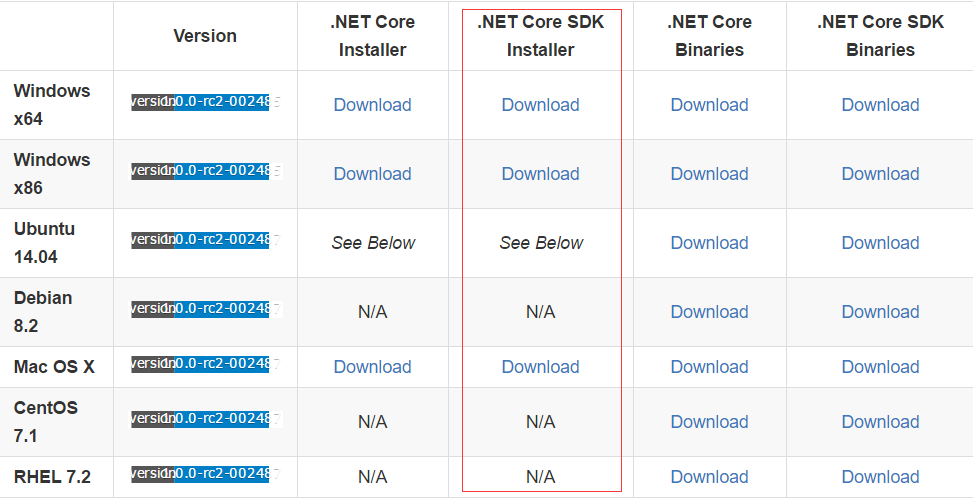
选取合适的版本下载安装即可
打开 CMD ,输入dotnet,出现以下信息说明已安装好
C:\Users\>dotnet

Usage: dotnet [--help | app.dll]
2 新建一个项目
新建项目在cmd 里输入dotnet new 即可
C:\Users\>mkdir demo

C:\Users\>cd demo

C:\Users\\demo>dotnet new

Created new C# project in C:\Users\\demo.

C:\Users\\demo>dir

 驱动器 C 中的卷没有标签。

 卷的序列号是 3A94-0B71

 C:\Users\\demo 的目录

--  :    <DIR>          .

--  :    <DIR>          ..

--  :                Program.cs

--  :                project.json

                个文件             字节

                个目录 ,,, 可用字节
可以看到共生成了两个文件 program.cs和project.json 以下是内容
Program.cs
using System;

namespace ConsoleApplication

{

    public class Program

    {

        public static void Main(string[] args)

        {

            Console.WriteLine("Hello World!");

        }

    }

}
project.json
{

  "version": "1.0.0-*",

  "compilationOptions": {

    "emitEntryPoint": true

  },

  "dependencies": {

    "Microsoft.NETCore.App": {

      "type": "platform",

      "version": "1.0.0-rc2-3002485"

    }

  },

  "frameworks": {

    "netcoreapp1.0": {

      "imports": "dnxcore50"

    }

  }

}
很简单的两个文件 ,就是要输出hello world
3 修改project.json 来支持交叉编译
{

  "version": "1.0.0-*",

  "compilationOptions": {

    "emitEntryPoint": true

  },

  "dependencies": {

    "Microsoft.NETCore.App": {

      "type": "platform",     //此处去掉,加上的话发布的时候不会netcore的运行环境和基础类库一块发布,需要在目标平台上安装netcore ,去掉的话就不用在目标平台上安装netcore了
    "version": "1.0.0-rc2-3002485"

    }

  },

  "frameworks": {

    "netcoreapp1.0": {

      "imports": "dnxcore50"

    }

  },
  "runtimes":{"ubuntu.15.04-x64":{}} //加入runtimes

}
4保存文件,还原引用包 运行dotnet restore
C:\Users\\demo>dotnet restore

log  : Restoring packages for C:\Users\\demo\project.json...

info :   GET https://api.nuget.org/v3-flatcontainer/microsoft.netcore.dotnethostresolver/index.json

info :   CACHE https://dotnetmyget.blob.core.windows.net/artifacts/dotnet-core/nuget/v3/flatcontainer/microsoft.netcore.dotnethostresolver/index.json

info :   NotFound https://api.nuget.org/v3-flatcontainer/microsoft.netcore.dotnethostresolver/index.json 1208ms

info :   CACHE https://dotnetmyget.blob.core.windows.net/artifacts/dotnet-core/nuget/v3/flatcontainer/microsoft.netcore.dotnethost/index.json

info :   GET https://api.nuget.org/v3-flatcontainer/microsoft.netcore.dotnethost/index.json

info :   NotFound https://api.nuget.org/v3-flatcontainer/microsoft.netcore.dotnethost/index.json 1935ms

info : Committing restore...

log  : Writing lock file to disk. Path: C:\Users\\demo\project.lock.json

log  : C:\Users\\demo\project.json

log  : Restore completed in 7649ms.

NuGet Config files used:

    C:\Users\\NuGet.Config

    C:\Users\\AppData\Roaming\NuGet\NuGet.Config

Feeds used:

    https://www.myget.org/F/dotnet-core/api/v3/index.json

    https://api.nuget.org/v3/index.json
5 编译代码 dotnet build -r ubuntu.15.04-x64
C:\Users\71700\demo>dotnet build -r ubuntu.15.04-x64
Compiling demo for .NETCoreApp,Version=v1.0
Compilation succeeded.
0 Warning(s)
0 Error(s)
Time elapsed 00:00:01.4677989
6发布程序 dotnet publish -r ubuntu.15.04-x64
C:\Users\\demo>dotnet publish -r ubuntu.15.04-x64

Publishing demo for .NETCoreApp,Version=v1./ubuntu.15.04-x64

Project demo (.NETCoreApp,Version=v1.) was previously compiled. Skipping compilation.

publish: Published to C:\Users\\demo\bin\Debug\netcoreapp1.\ubuntu.15.04-x64\publish

Published / projects successfully
查看下publish文件夹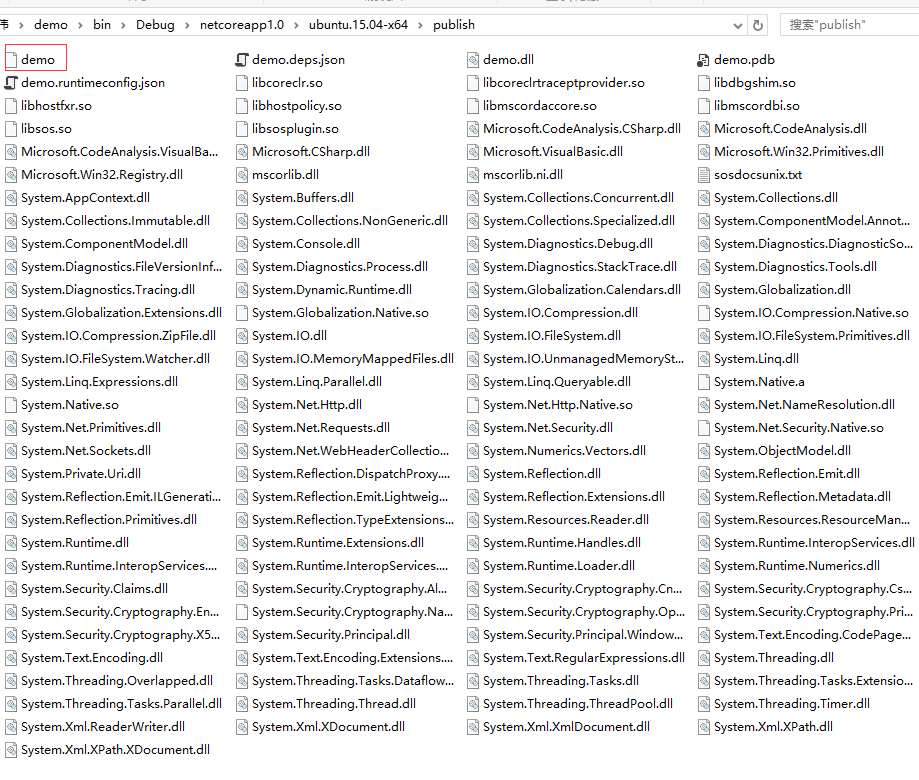
文件很多,其中demo是ubuntu上的可执行文件
7把publish文件加拷贝的共享文件夹里面 并挂载到ubuntu上 运行demo
先ls查看下文件里面的内容
root@lius-Virtual-Machine:/mnt/share/publish# ls

demo                                     System.Net.Http.dll

demo.deps.json                           System.Net.Http.Native.so

demo.dll                                 System.Net.NameResolution.dll

demo.pdb                                 System.Net.Primitives.dll

demo.runtimeconfig.json                  System.Net.Requests.dll

libcoreclr.so                            System.Net.Security.dll

libcoreclrtraceptprovider.so             System.Net.Security.Native.so

libdbgshim.so                            System.Net.Sockets.dll

libhostfxr.so                            System.Net.WebHeaderCollection.dll

libhostpolicy.so                         System.Numerics.Vectors.dll

libmscordaccore.so                       System.ObjectModel.dll

libmscordbi.so                           System.Private.Uri.dll

libsosplugin.so                          System.Reflection.DispatchProxy.dll

libsos.so                                System.Reflection.dll

Microsoft.CodeAnalysis.CSharp.dll        System.Reflection.Emit.dll

Microsoft.CodeAnalysis.dll               System.Reflection.Emit.ILGeneration.dll

Microsoft.CodeAnalysis.VisualBasic.dll   System.Reflection.Emit.Lightweight.dll

Microsoft.CSharp.dll                     System.Reflection.Extensions.dll

Microsoft.VisualBasic.dll                System.Reflection.Metadata.dll

Microsoft.Win32.Primitives.dll           System.Reflection.Primitives.dll

Microsoft.Win32.Registry.dll             System.Reflection.TypeExtensions.dll

mscorlib.dll                             System.Resources.Reader.dll

mscorlib.ni.dll                          System.Resources.ResourceManager.dll

sosdocsunix.txt                          System.Runtime.dll

System.AppContext.dll                    System.Runtime.Extensions.dll

System.Buffers.dll                       System.Runtime.Handles.dll

System.Collections.Concurrent.dll        System.Runtime.InteropServices.dll

System.Collections.dll                   System.Runtime.InteropServices.PInvoke.dll

System.Collections.Immutable.dll         System.Runtime.InteropServices.RuntimeInformation.dll

System.Collections.NonGeneric.dll        System.Runtime.Loader.dll

System.Collections.Specialized.dll       System.Runtime.Numerics.dll

System.ComponentModel.Annotations.dll    System.Security.Claims.dll

System.ComponentModel.dll                System.Security.Cryptography.Algorithms.dll

System.Console.dll                       System.Security.Cryptography.Cng.dll

System.Diagnostics.Debug.dll             System.Security.Cryptography.Csp.dll

System.Diagnostics.DiagnosticSource.dll  System.Security.Cryptography.Encoding.dll

System.Diagnostics.FileVersionInfo.dll   System.Security.Cryptography.Native.so

System.Diagnostics.Process.dll           System.Security.Cryptography.OpenSsl.dll

System.Diagnostics.StackTrace.dll        System.Security.Cryptography.Primitives.dll

System.Diagnostics.Tools.dll             System.Security.Cryptography.X509Certificates.dll

System.Diagnostics.Tracing.dll           System.Security.Principal.dll

System.Dynamic.Runtime.dll               System.Security.Principal.Windows.dll

System.Globalization.Calendars.dll       System.Text.Encoding.CodePages.dll

System.Globalization.dll                 System.Text.Encoding.dll

System.Globalization.Extensions.dll      System.Text.Encoding.Extensions.dll

System.Globalization.Native.so           System.Text.RegularExpressions.dll

System.IO.Compression.dll                System.Threading.dll

System.IO.Compression.Native.so          System.Threading.Overlapped.dll

System.IO.Compression.ZipFile.dll        System.Threading.Tasks.Dataflow.dll

System.IO.dll                            System.Threading.Tasks.dll

System.IO.FileSystem.dll                 System.Threading.Tasks.Extensions.dll

System.IO.FileSystem.Primitives.dll      System.Threading.Tasks.Parallel.dll

System.IO.FileSystem.Watcher.dll         System.Threading.Thread.dll

System.IO.MemoryMappedFiles.dll          System.Threading.ThreadPool.dll

System.IO.UnmanagedMemoryStream.dll      System.Threading.Timer.dll

System.Linq.dll                          System.Xml.ReaderWriter.dll

System.Linq.Expressions.dll              System.Xml.XDocument.dll

System.Linq.Parallel.dll                 System.Xml.XmlDocument.dll

System.Linq.Queryable.dll                System.Xml.XPath.dll

System.Native.a                          System.Xml.XPath.XDocument.dll

System.Native.so
执行dome
root@lius-Virtual-Machine:/mnt/share/publish# ./demo

Hello World!
成功输出 helloworld
.netcore跨平台 之 windows上编译,ubuntu上运行的更多相关文章
- .NET跨平台:在CentOS上编译dnx并运行ASP.NET 5示例程序
在之前的博文中我们在 Ubuntu 上成功编译出了 dnx ,并且用它成功运行了 ASP.NET 5 示例程序.在这篇博文中我们将 Ubuntu 换成 CentOS. 目前 dnx 的编译需要用到 m ...
- Windows远程连接Ubuntu上的MySQL数据库
原因:mysql安装好后,默认监听3306端口,并且只允许localhost访问,只允许root用户在localhost上登录. 我的环境: Ubuntu16.04 ...
- 在win7 windows 上编译 beego 上传到 linux 去执行
在beego的项目目录下,执行: GOOS=linux GOARCH=amd64 go build So easy!但是却搞了好久! 参考连接:http://blog.csdn.net/changji ...
- 在 WSL Ubuntu 上使用 .NET 进行跨平台开发新手入门
翻译自 haydenb 2020年6月3日的文章<Getting started with cross-platform development using .NET on Ubuntu on ...
- golang 跨平台编译——go 在windows上编译Linux平台的程序(Cross Compilation from Windows to Linux/Ubuntu)
Go Cross Compilation from Windows to Linux/Ubuntu I have GO 1.7 installed on my Windows 10. I create ...
- .NET跨平台:在Ubuntu上用自己编译的dnx运行ASP.NET 5示例程序
在 Linux Ubuntu 上成功编译 dnx 之后,会在 artifacts/build/ 文件夹中生成 dnx-coreclr-linux-x64/ 与 dnx-mono/ 这2个文件夹,前者是 ...
- .NET跨平台:在Linux Ubuntu上编译coreclr/corefx/dnx(20150617)
编译时间:北京2015年6月17日上午 操作系统:Ubuntu 14.04.2 LTS Mono版本:Mono JIT compiler version 4.3.0 (master/3445ac5 T ...
- 在Mac/Linux/Windows上编译corefx遇到的问题及解决方法
这两天尝试在Mac/Linux/Windows三大平台上编译.NET跨平台三驾马车(coreclr/corefx/dnx)之一的corefx(.NET Core Framework),结果三个平台的编 ...
- ubuntu上安装mysql 编译安装
为什么要折腾?首先说明的是ubuntu上安装mysql等软件是非常容易简单的,其简单的程度盖过windows上的安装,一句sudo apt-get install就可以搞定.如果想用最简便的方法安装m ...
随机推荐
- C4.5学习及源码阅读
下面是C4.5源码的下载地址: http://www.rulequest.com/Personal/ 这里先立一个flag,后续更新...... 恕我孤陋寡闻,第一次看到这样的主函数: #includ ...
- python http代理代码
googlecode :https://code.google.com/archive/p/python-proxy/source/default/source # -*- coding: cp125 ...
- 利用反卷积神经网络可视化CNN
http://blog.csdn.net/hjimce/article/details/51762046 http://arxiv.org/pdf/1311.2901.pdf Visualizing ...
- Linux内核创建一个新进程
张雨梅 原创作品转载请注明出处 <Linux内核分析>MOOC课程http://mooc.study.163.com/course/USTC-10000 创建新进程 如果同一个程序被多 ...
- javascript高级编程3第二章:在html中使用javascript
2.1 <script>元素 向html页面中插入javascript的主要方法,就是使用<script>元素.这个元素被加入到正式的html规范中.html4.01为< ...
- kali更新源
原文链接:http://www.cnblogs.com/dunitian/p/4712852.html kali2.0官方下载地址: https://www.kali.org/downloads/ 可 ...
- 有用的css片段
1.背景渐变动画 CSS中最具诱惑的一个功能是能添加动画效果,除了渐变,你可以给背景色.透明度.元素大小添加动画.目前,你不能为渐变添加动画,但下面的代码可能有帮助.它通过改变背景位置,让它看起来有动 ...
- Virtualbox安装USB2.0/3.0
系统:Ubuntu16.04 软件:Virtualbox5.1 1.打开Virtualbox,不启动虚拟系统. 2.点击设置->USB->启动usb2.0. 3.若发现不能启用,则到官网下 ...
- 前端MV*框架的意义
经常有人质疑,在前端搞MV*有什么意义?也有人提出这样的疑问:以AngularJS,Knockout,BackBone为代表的MV*框架,它跟jQuery这样的框架有什么区别?我jQuery用得好好的 ...
- Sprint 2
成员 团队贡献分 许佳仪 22 柯晓君 23 卓宇靖 18 赖文亮 17 浏览书籍 查询书籍(可分别按照图书名和价格进行查询)