
Springboot整合 mybatis-generator
1.pom.xml文件中 生成依赖
<plugin>
   <groupId>org.mybatis.generator</groupId>
   <artifactId>mybatis-generator-maven-plugin</artifactId>
   <version>1.3.2</version>
   <executions>
      <execution>
         <id>Generate MyBatis Artifacts</id>
         <goals>
            <goal>generate</goal>
         </goals>
      </execution>
   </executions>
   <configuration>
      <!-- generator 工具配置文件的位置 -->
      <configurationFile>src/main/resources/generatorConfig.xml</configurationFile>
      <verbose>true</verbose>
      <overwrite>true</overwrite>
   </configuration>
   <dependencies>
      <dependency>
         <groupId>mysql</groupId>
         <artifactId>mysql-connector-java</artifactId>
         <version>5.1.34</version>
      </dependency>
      <!-- https://mvnrepository.com/artifact/org.mybatis.generator/mybatis-generator-core -->
      <dependency>
         <groupId>org.mybatis.generator</groupId>
         <artifactId>mybatis-generator-core</artifactId>
         <version>1.3.5</version>
      </dependency>

   </dependencies>
</plugin>
2.编写配置文件 generatorConfig.xml
<?xml version="1.0" encoding="UTF-8"?><!DOCTYPE generatorConfiguration PUBLIC
        "-//mybatis.org//DTD MyBatis Generator Configuration 1.0//EN"
        "http://mybatis.org/dtd/mybatis-generator-config_1_0.dtd">
<generatorConfiguration>
    <properties resource="application.properties"></properties>
    <context id="DB2Tables" targetRuntime="MyBatis3">
        <!--去掉注释-->
        <commentGenerator>
            <property name="suppressAllComments" value="true"/>
        </commentGenerator>
        <!--需要配置数据库连接-->
        <jdbcConnection driverClass="com.mysql.jdbc.Driver"
                        connectionURL="jdbc:mysql://47.xx.xx.xx:3306/wx_review?characterEncoding=utf-8"
                        userId="root"
                        password="W_angxx">
        </jdbcConnection>
        <javaTypeResolver >
            <property name="forceBigDecimals" value="false" />
        </javaTypeResolver>

        <!--指定entity生成的位置-->
        <javaModelGenerator targetPackage="cn.unicom.com.domain" targetProject="./src/main/java">
            <property name="enableSubPackages" value="true" />
            <property name="trimStrings" value="true" />
        </javaModelGenerator>

        <!--sql映射文件生成的位置 mapper.xml-->
        <sqlMapGenerator targetPackage="mapper"  targetProject="./src/main/resources">
            <property name="enableSubPackages" value="true" />
        </sqlMapGenerator>

        <!--指定DaoMapper生成的位置 mapper.java-->
        <javaClientGenerator type="XMLMAPPER" targetPackage="cn.unicom.com.mapper" targetProject="./src/main/java">
            <property name="enableSubPackages" value="true" />
        </javaClientGenerator>

        <!--table是指定每个表的生成策略-->
        <!--<table tableName="department" domainObjectName="Department"></table>-->
        <!--<table tableName="group_teacher_rel" domainObjectName="Group_teacher_rel"></table>-->
        <!--<table tableName="groups" domainObjectName="Groups"></table>-->
        <!--<table tableName="specialty" domainObjectName="Specialty"></table>-->
        <!--<table tableName="student" domainObjectName="Student"></table>-->
        <!--<table tableName="teacher" domainObjectName="Teacher"></table>-->
<!--        <table tableName="video" domainObjectName="Video" enableCountByExample="false" enableUpdateByExample="false" enableDeleteByExample="false" enableSelectByExample="false" selectByExampleQueryId="false"></table>
        <table tableName="user" domainObjectName="User" enableCountByExample="false" enableUpdateByExample="false" enableDeleteByExample="false" enableSelectByExample="false" selectByExampleQueryId="false"></table>
        <table tableName="video_order" domainObjectName="ViderOrder"  enableCountByExample="false" enableUpdateByExample="false" enableDeleteByExample="false" enableSelectByExample="false" selectByExampleQueryId="false"></table>
        <table tableName="episode" domainObjectName="Episode"  enableCountByExample="false" enableUpdateByExample="false" enableDeleteByExample="false" enableSelectByExample="false" selectByExampleQueryId="false"></table>
        <table tableName="comment" domainObjectName="Comment"  enableCountByExample="false" enableUpdateByExample="false" enableDeleteByExample="false" enableSelectByExample="false" selectByExampleQueryId="false"></table>
        <table tableName="chapter" domainObjectName="Chapter"  enableCountByExample="false" enableUpdateByExample="false" enableDeleteByExample="false" enableSelectByExample="false" selectByExampleQueryId="false"></table>-->
        <table tableName="video_order" domainObjectName="ViderOrder"  enableCountByExample="false" enableUpdateByExample="false" enableDeleteByExample="false" enableSelectByExample="false" selectByExampleQueryId="false"></table>

    </context>
</generatorConfiguration>
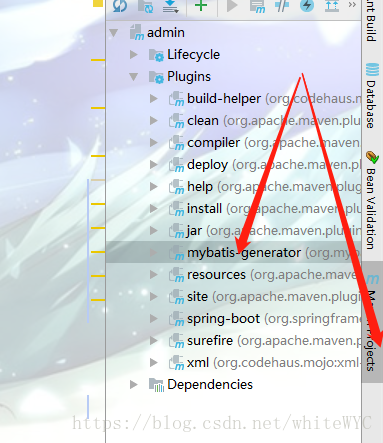
3.执行。
Springboot整合 mybatis-generator的更多相关文章
- springboot整合mybatis+generator
源码地址:springboot-integration 如果你觉得解决了你使用的需求,欢迎fork|star.
- springboot整合mybatis通用Mapper
参考: https://blog.csdn.net/x18707731829/article/details/82814095 https://www.jianshu.com/p/6d2103451d ...
- springboot学习随笔(四):Springboot整合mybatis(含generator自动生成代码)
这章我们将通过springboot整合mybatis来操作数据库 以下内容分为两部分,一部分主要介绍generator自动生成代码,生成model.dao层接口.dao接口对应的sql配置文件 第一部 ...
- spingBoot整合mybatis+generator+pageHelper
spingBoot整合mybatis+generator+pageHelper 环境/版本一览: 开发工具:Intellij IDEA 2018.1.4 springboot: 2.0.4.RELEA ...
- SpringBoot整合mybatis、shiro、redis实现基于数据库的细粒度动态权限管理系统实例
1.前言 本文主要介绍使用SpringBoot与shiro实现基于数据库的细粒度动态权限管理系统实例. 使用技术:SpringBoot.mybatis.shiro.thymeleaf.pagehelp ...
- springboot整合mybatis,利用mybatis-genetor自动生成文件
springboot整合mybatis,利用mybatis-genetor自动生成文件 项目结构: xx 实现思路: 1.添加依赖 <?xml version="1.0" e ...
- SpringBoot整合Mybatis之项目结构、数据源
已经有好些日子没有总结了,不是变懒了,而是我一直在奋力学习springboot的路上,现在也算是完成了第一阶段的学习,今天给各位总结总结. 之前在网上找过不少关于springboot的教程,都是一些比 ...
- SpringBoot整合Mybatis【非注解版】
接上文:SpringBoot整合Mybatis[注解版] 一.项目创建 新建一个工程 选择Spring Initializr,配置JDK版本 输入项目名 选择构建web项目所需的state ...
- SpringBoot整合Mybatis注解版---update出现org.apache.ibatis.binding.BindingException: Parameter 'XXX' not found. Available parameters are [arg1, arg0, param1, param2]
SpringBoot整合Mybatis注解版---update时出现的问题 问题描述: 1.sql建表语句 DROP TABLE IF EXISTS `department`; CREATE TABL ...
- springboot整合mybatis出现的一些问题
springboot整合mybatis非常非常的简单,简直简单到发指.但是也有一些坑,这里我会详细的指出会遇到什么问题,并且这些配置的作用 整合mybatis,无疑需要mapper文件,实体类,dao ...
随机推荐
- scp上传文件到远程服务器
scp -P 22 E:/download/2028792_www.yeves.cn_nginx/cloud.pem root@ip:/usr/local/src
- db2 with用法
最近在研究db2 递归查询时想到了with,一直以为with只是用来查询递归,但是实际with功能强大,还有更加强大的功能,偶然读到一位大神的文章,对with做了很详细的解读,特贴出来供大家学习研究 ...
- (3)你的第一个python程序
Life is short,you need python!人生苦短,你需要python!好吧,干了这碗鸡汤................. hello world 没错,几乎是所有程序猿的第一个程 ...
- [USACO15FEB]Superbull 超级牛
题意概况 题目描述 \(Bessie\)和她的朋友们正在一年一度的\(Superbull\)锦标赛中打球,而\(Farmer John\)负责让比赛尽可能激动人心. 总共有 \(N\) 支队伍 \(1 ...
- CSS基础学习 20.CSS媒体查询
- Permission denied (publickey,gssapi-keyex,gssapi-with-mic)
当出现警告的时候,恭喜你,你已经离成功很近了. 远程主机这里设为slave2,用户为Hadoop. 本地主机设为slave1 以下都是在远程主机slave2上的配置,使得slave1可以免密码连接到s ...
- Mybatis中的拦截器
作者:moshenglv的专栏 拦截器的一个作用就是我们可以拦截某些方法的调用,我们可以选择在这些被拦截的方法执行前后加上某些逻辑,也可以在执行这些被拦截的方法时执行自己的逻辑而不再执行被拦截的方法. ...
- log4j.xml常用配置
Log4J的配置文件(Configuration File)就是用来设置记录器的级别.存放器和布局的,它可接key=value格式的设置或xml格式的设置信息.通过配置,可以创建出Log4J的运行环境 ...
- nginx+tomcat遇到的https重定向到http问题
nginx做反向代理时,需要把请求头信息一起发送给tomcat,不然tomcat中的域名绑定就无法发挥作用了. 今天又遇到https请求被拦截器重定向到登陆页居然变成http的问题,导致小程序无法访问 ...
- Huffman树、霍夫曼编码
Huffman树指的是带权路径长度WPL最小的二叉树 WPL=路径*权值 Huffman常用于压缩编码,正常传输ABCDEF这些字母需要3位二进制树来描述,但由于一篇文章中ABCDEF这些字母出现的概 ...