
bat 读取 ini 文件
bat 读取 ini 文件
参考链接:https://stackoverflow.com/questions/2866117/windows-batch-script-to-read-an-ini-file
这个 bat 支持 ini 的键值与=号之间存在空格,例如 key1 = value1
readini.bat:
@if (@a==@b) @end /* -- batch / JScript hybrid line to begin JScript comment

:: --------------------

:: ini.bat

:: ini.bat /? for usage

:: --------------------

@echo off

setlocal enabledelayedexpansion

goto begin

:: color code by jeb -- https://stackoverflow.com/a/5344911/1683264

:c

set "param=^%~2" !

set "param=!param:"=\"!"

findstr /p /A:%1 "." "!param!\..\X" nul

<nul set /p ".=%DEL%%DEL%%DEL%%DEL%%DEL%%DEL%%DEL%"

exit /b

:: but it doesn't handle slashes.  :(

:s

<NUL set /p "=/"&exit /b

:usage

for /F "tokens=1,2 delims=#" %%a in ('"prompt #$H#$E# & echo on & for %%b in (1) do rem"') do set "DEL=%%a"

<nul > X set /p ".=."

echo Usage:

call :c 07 "   query:"

call :c 0F " %~nx0 "&call :s&call :c 0F "i item ["&call :s&call :c 0F "s section] inifile"&echo;

call :c 07 "   create or modify:"

call :c 0F " %~nx0 "&call :s&call :c 0F "i item "&call :s&call :c 0F "v value ["&call :s&call :c 0F "s section] inifile"&echo;

call :c 07 "   delete:"

call :c 0F " %~nx0 "&call :s&call :c 0F "d item ["&call :s&call :c 0F "s section] inifile"&echo;

echo;

echo Take the following ini file for example:

echo;

echo    [Config]

echo    password=1234

echo    usertries=0

echo    allowterminate=0

echo;

echo To read the "password" value:

call :c 0F "   %~nx0 "&call :s&call :c 0F "s Config "&call :s&call :c 0F "i password inifile"&echo;

echo;

echo To modify the "usertries" value to 5:

call :c 0F "   %~nx0 "&call :s&call :c 0F "s Config "&call :s&call :c 0F "i usertries "&call :s&call :c 0F "v 5 inifile"&echo;

echo;

echo To add a "timestamp" key with a value of the current date and time:

call :c 0F "   %~nx0 "&call :s&call :c 0F "s Config "&call :s&call :c 0F "i timestamp "&call :s&call :c 0F "v ""%DEL%%%%%date%%%% %%%%time%%%%""%DEL% inifile"&echo;

echo;

echo To delete the "allowterminate" key:

call :c 0F "   %~nx0 "&call :s&call :c 0F "s Config "&call :s&call :c 0F "d allowterminate inifile"&echo;

echo;

call :c 07 "In the above examples, "&call :s

call :c 0F "s Config "

echo is optional, but will allow the selection of

echo a specific item where the ini file contains similar items in multiple sections.

del X

goto :EOF

:begin

if "%~1"=="" goto usage

for %%I in (item value section found) do set %%I=

for %%I in (%*) do (

    if defined next (

        if !next!==/i set "item=%%~I"

        if !next!==/v (

            set modify=true

            set "value=%%~I"

        )

        if !next!==/d (

            set "item=%%~I"

            set modify=true

            set delete=true

        )

        if !next!==/s set "section=%%~I"

        set next=

    ) else (

        for %%x in (/i /v /s /d) do if "%%~I"=="%%x" set "next=%%~I"

        if not defined next (

            set "arg=%%~I"

            if "!arg:~0,1!"=="/" (

                1>&2 echo Error: Unrecognized option "%%~I"

                1>&2 echo;

                1>&2 call :usage

                exit /b 1

            ) else set "inifile=%%~I"

        )

    )

)

for %%I in (item inifile) do if not defined %%I goto usage

if not exist "%inifile%" (

    1>&2 echo Error: %inifile% not found.

    exit /b 1

)

cscript /nologo /e:jscript "%~f0" "%inifile%" "!section!" "!item!" "!value!" "%modify%" "%delete%"

exit /b %ERRORLEVEL%

:: Begin JScript portion */

var inifile = WSH.Arguments(0),

section = WSH.Arguments(1),

item = WSH.Arguments(2),

value = WSH.Arguments(3),

modify = WSH.Arguments(4),

del = WSH.Arguments(5),

fso = new ActiveXObject("Scripting.FileSystemObject"),

stream = fso.OpenTextFile(inifile, 1),

// (stream.ReadAll() will not preserve blank lines.)

data = [];

while (!stream.atEndOfStream) { data.push(stream.ReadLine()); }

stream.Close();

// trims whitespace from edges

String.prototype.trim = function() { return this.replace(/^\s+|\s+$/,'') }

// trim + toLowerCase

String.prototype.unify = function() { return this.trim().toLowerCase(); };

// unquotes each side of "var"="value"

String.prototype.splitEx = function(x) {

    for (var i=0, ret = this.split(x) || []; i<ret.length; i++) {

        ret[i] = ret[i].replace(/^['"](.*)['"]$/, function(m,$1){return $1});

    };

    return ret;

}

// splices a new element into an array just after the last non-empty element.  If first arg is a number, start at that position and look backwards.

Array.prototype.cram = function() {

    for (var args=[], i=0; i<arguments.length; i++) { args.push(arguments[i]); }

    var i = (typeof args[0] == "number" && Math.floor(args[0]) == args[0]) ? args.shift() : this.length;

    while (i>0 && !this[--i].length) {};

    for (var j=0; j<args.length; j++) this.splice(++i, 0, args[j]);

}

function saveAndQuit() {

    while (data && !data[data.length - 1].length) data.pop();

    var stream = fso.OpenTextFile(inifile, 2, true);

    stream.Write(data.join('\r\n') + '\r\n');

    stream.Close();

    WSH.Quit(0);

}

function fatal(err) {

    WSH.StdErr.WriteLine(err);

    WSH.Quit(1);

}

if (section && !/^\[.+\]$/.test(section)) section = '[' + section + ']';

if (modify) {

    if (section) {

        for (var i=0; i<data.length; i++) {

            if (data[i].unify() == section.unify()) {

                for (var j=i + 1; j<data.length; j++) {

                    if (/^\s*\[.+\]\s*$/.test(data[j])) break;

                    var keyval = data[j].splitEx('=');

                    if (keyval.length < 2) continue;

                    var key = keyval.shift(), val = keyval.join('=');

                    if (key.unify() == item.unify()) {

                        if (del) data.splice(j, 1);

                        else {

                            data[j] = item + '=' + value;

                            WSH.Echo(value.trim());

                        }

                        saveAndQuit();

                    }

                }

                if (del) fatal(item + ' not found in ' + section + ' in ' + inifile);

                data.cram(j ,item + '=' + value);

                WSH.Echo(value.trim());

                saveAndQuit();

            }

        }

        if (del) fatal(section + ' not found in ' + inifile);

        data.cram('\r\n' + section, item + '=' + value);

        WSH.Echo(value.trim());

        saveAndQuit();

    }

    else { // if (!section)

        for (var i=0; i<data.length; i++) {

            var keyval = data[i].splitEx('=');

            if (keyval.length < 2) continue;

            var key = keyval.shift(), val = keyval.join('=');

            if (key.unify() == item.unify()) {

                if (del) data.splice(i, 1);

                else {

                    data[i] = item + '=' + value;

                    WSH.Echo(value.trim());

                }

                saveAndQuit();

            }

        }

        if (del) fatal(item + ' not found in ' + inifile);

        data.cram(item + '=' + value);

        WSH.Echo(value.trim());

        saveAndQuit();

    }

}

else if (section) { // and if (!modify)

    for (var i=0; i<data.length; i++) {

        if (data[i].unify() == section.unify()) {

            for (var j=i + 1; j<data.length; j++) {

                if (/^\s*\[.+\]\s*$/.test(data[j])) fatal(item + ' not found in ' + section + ' in ' + inifile);

                var keyval = data[j].splitEx('=');

                if (keyval.length < 2) continue;

                var key = keyval.shift(), val = keyval.join('=');

                if (key.unify() == item.unify()) {

                    WSH.Echo(val.trim());

                    WSH.Quit(0);

                }

            }

        }

    }

    fatal(section + ' not found in ' + inifile);

}

else { // if (item) and nothing else

    for (var i=0; i<data.length; i++) {

        var keyval = data[i].splitEx('=');

        if (keyval.length < 2) continue;

        var key = keyval.shift(), val = keyval.join('=');

        if (key.unify() == item.unify()) {

            WSH.Echo(val.trim());

            WSH.Quit(0);

        }

    }

    fatal(item + ' not found in ' + inifile);

}
readini.bat
在其它bat中读取 ini,并把值赋予变量:
@echo off

for /f "delims=" %%a in ('call readini.bat /s section1 /i key1 "test.ini"') do (

    set val=%%a

)

echo %val%

pause
test.ini:
[section1]

key1 = 123

[section2]

key1 = 456
test.ini
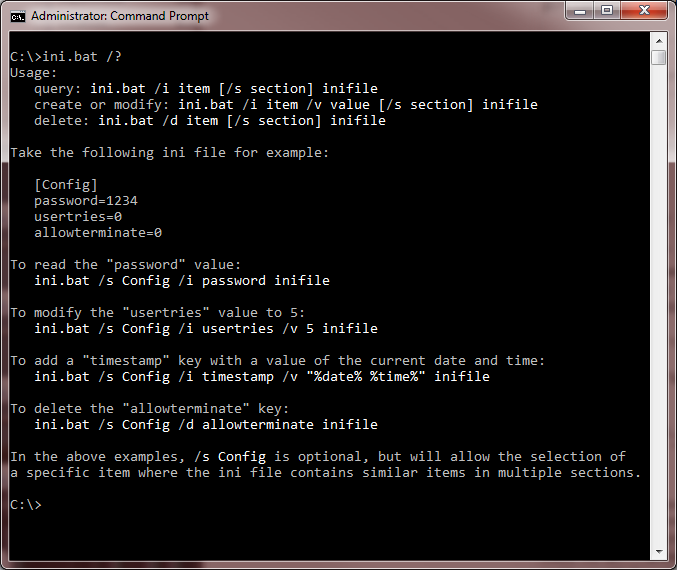
用法:
注意:ini.bat 改为自己的 bat 名字
bat 读取 ini 文件的更多相关文章
- bat 读取 ini 配置文件
bat 读取 ini 配置文件 config.ini: abc=abc a=a localpath=D:\local\path .bat: @echo off setlocal enabledelay ...
- C#读取ini文件的方法
最近项目用到ini文件,读取ini文件,方法如下: using System; using System.Collections.Generic; using System.Linq; using S ...
- VS VC 读取 INI文件
1.获取应程序同极目录下的config.ini路劲 void GetConfigFilePath(char *path,int len, char *file) { char module[256] ...
- C# 读取ini文件,读不出来原因
先赋上相关读取ini文件代码 public class INIHelper { public string inipath; [DllImport("kernel32")] pri ...
- C# 通过api函数GetPrivateProfileString读取ini文件,取不到值
通过api函数GetPrivateProfileString读取ini文件,取不到值,测试了好长时间,都不行 确认程序,ini文件都没有错误的情况,最后发现是ini文件编码的原因. 将ini文件的编码 ...
- C# 读取ini文件 百度问问学习文档
C# 读取ini文件 10 有多个section,现想读取整个ini文件和指定section下所有内容 补充: 发布答案可以,请对准题目啊,我不要指定节点的内容,我知道!我要的是读取指定区域的内容,假 ...
- python中configparser模块读取ini文件
python中configparser模块读取ini文件 ConfigParser模块在python中用来读取配置文件,配置文件的格式跟windows下的ini配置文件相似,可以包含一个或多个节(se ...
- java读取ini文件
ini工具类; import java.io.BufferedReader; import java.io.File; import java.io.FileInputStream; import j ...
- Python基础之读取ini文件
基本使用方法 第一步:准备一份INI文件.如test1.ini [ITEMS] item1=1 item2=2 item3=3 item4=4 [ITEM1] test1=aaa [ITEM2] te ...
随机推荐
- Redis安装与配置问题
Redis是一个key-value存储系统.和Memcached类似,它支持存储的value类型相对更多,包括string(字符串).list(链表).set(集合).zset(sorted set ...
- spring中@Conditional注解
@Conditional是Spring4新提供的注解,它的作用是根据某个条件加载特定的bean. 我们需要创建实现类来实现Condition接口,这是Condition的源码 public inter ...
- 日常工作问题解决:记一次centos7上的lvm表错误解决过程
问题描述: 公司大数据hadoop2服务器采用电信云服务器,后来故障,电信恢复该服务器,需要重新部署程序,需要扩展lvm分区,但是使用pvsan命令发现有报错信息,需要解决以防重启后,因挂载问题,无法 ...
- centos7 安装jmeter5.1
前提条件:安装了jdk1.8.因为jmeter5.1需要的环境就是jdk1.8,官网有写的. 1.下载jmeter5.1的安装包 下载地址:https://jmeter.apache.org/down ...
- [转载]ASP.NET Core文件上传与下载(多种上传方式)
ASP.NET Core文件上传与下载(多种上传方式) 前言 前段时间项目上线,实在太忙,最近终于开始可以研究研究ASP.NET Core了. 打算写个系列,但是还没想好目录,今天先来一篇,后面在 ...
- mysql中比较实用的几个函数
1.曾有这样的需求: 可以使用如下函数: 语法:FIND_IN_SET(str,strlist). 定义: 1. 假如字符串str在由N子链组成的字符串列表strlist中,则返回值的范围在1到N之间 ...
- mysql 连接远程连接服务器 1130错误
今天在用sqlyog连接非本地的Mysql服务器的数据库,居然无法连接很奇怪,报1130错误, ERROR 1130: Host 192.168.3.100 is not allowed to con ...
- redis集群搭建及一些问题
redis 1.简化版redis (本套Redis集群为简化版安装部署,只需解压至普通用户家目录下或者任意目录,解压后修改脚本,执行脚本后即可使用.) 注意,此版本需要在redis配置文件中添加 pr ...
- 6.Linux查看哪个进程占用磁盘IO
$ iotop -oP命令的含义:只显示有I/O行为的进程
- SysInternals提供了一个工具RamMap,可以查看内存的具体使用情况
SysInternals提供了一个工具RamMap,可以查看内存的具体使用情况.如果发现是Paged Pool和Nonpaged Pool占用过大,可以用另一个工具poolmon来查看占用内存的驱动T ...