
富文本编辑器+可粘贴word内容
Chrome+IE默认支持粘贴剪切板中的图片,但是我要发布的文章存在word里面,图片多达数十张,我总不能一张一张复制吧 ?
?
我希望打开文档doc直接复制粘贴到富文本编辑器,直接发布
感觉这个似乎很困难,因为Ueditor本身不支持,粘贴后直接就是空白,这里面一定有原因。
好,开始尝试UMeditor,Chrome只能获得本地路径,无法读取文件。
https://ueditor.baidu.com/website/umeditor.html(有兴趣可以试试)
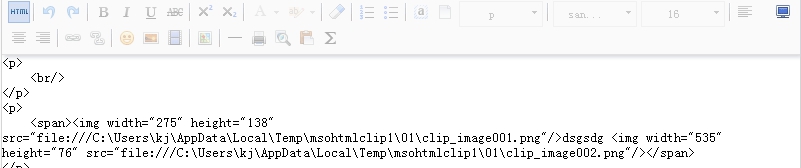
难道就这么失败了?
不,但是我意外发现UMeditor竟然支持 粘贴word中的多张图片(仅支持IE11,不支持IE10以下版本、以及Chrome等)
切换HTML,会看到你的图片被组织成base64
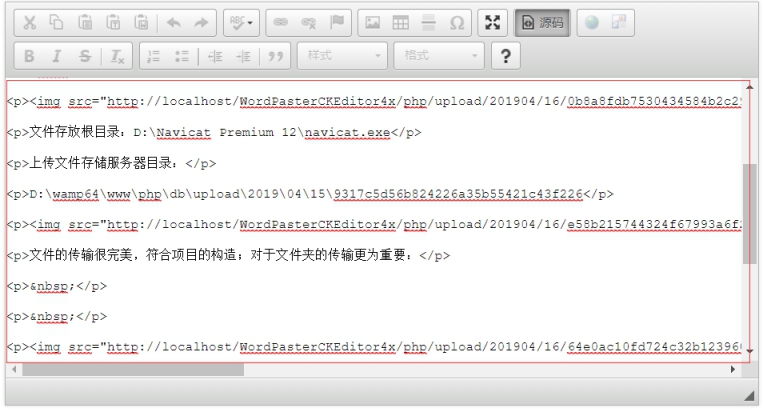
nice,机会来了,既然IE支持复制word中的多张图片直接粘贴base64,既然有了base64我们就有办法上传转图片啦!
那么我们来改造Ueditor,让他支持IE11(总比没得用强吧)
打开你的ueditor.all.js(1.4.3版本以下行号根据自己使用的版本可能不同)
1、注释掉14679行(暂时不明确有什么不良影响)
//执行默认的处理
//me.filterInputRule(root);
2、在28725行插入以下代码(如果是使用IE11粘贴会得到base64,先用占位符占位,再逐个把base64专成Blob文件并上传,上传完成再替换为你的img属性src为服务器图片url)
this.WordParser_PasteWord = function (json)
{
this.postType = WordPasteImgType.word;
this.EditorContent = json.word;
for (var i = 0, l = json.imgs.length; i < l; ++i)
{
this.addImgLoc(json.imgs[i]);
}
this.OpenDialogFile();
};
this.WordParser_PasteExcel = function (json)
{
this.postType = WordPasteImgType.word;
this.EditorContent = json.word;
for (var i = 0, l = json.imgs.length; i < l; ++i)
{
this.addImgLoc(json.imgs[i]);
}
this.OpenDialogFile();
};
this.WordParser_PasteHtml = function (json)
{
this.postType = WordPasteImgType.word;
this.InsertHtml(json.word);//
this.working = false;
};
this.WordParser_PasteFiles = function (json)
{
this.postType = WordPasteImgType.local;
for (var i = 0, l = json.imgs.length; i < l; ++i)
{
var task = this.addImgLoc(json.imgs[i]);
task.PostLocalFile = true;//
}
this.OpenDialogFile();
};
this.WordParser_PasteImage = function (json)
{
this.OpenDialogPaste();
this.imgMsg.text("开始上传");
this.imgPercent.text("1%");
};
this.WordParser_PasteAuto = function (json)
{
this.postType = WordPasteImgType.network;
for (var i = 0, l = json.imgs.length; i < l; ++i)
{
this.addImgLoc(json.imgs[i]);
}
this.OpenDialogFile();
};
this.WordParser_PostComplete = function (json)
{
this.imgPercent.text("100%");
this.imgMsg.text("上传完成");
var img = "<img src=\"";
img += json.value;
img += "\" />";
this.InsertHtml(img);
this.CloseDialogPaste();
this.working = false;
};
this.WordParser_PostProcess = function (json)
{
this.imgPercent.text(json.percent);
};
this.WordParser_PostError = function (json)
{
this.OpenDialogPaste();
this.imgMsg.text(WordPasterError[json.value]);
this.imgIco.src = this.Config["IcoError"];
this.imgPercent.text("");
};
this.File_PostComplete = function (json)
{
var up = this.fileMap[json.id];
up.postComplete(json);
delete up;//
};
this.File_PostProcess = function (json)
{
var up = this.fileMap[json.id];
up.postProcess(json);
};
this.File_PostError = function (json)
{
var up = this.fileMap[json.id];
up.postError(json);
};
this.Queue_Complete = function (json)
{
//上传网络图片
if (_this.postType == WordPasteImgType.network)
{
_this.GetEditor().setData(json.word);
} //上传Word图片时才替换内容
elseif (_this.postType == WordPasteImgType.word)
{
_this.InsertHtml(json.word);//
}
this.CloseDialogFile();
_this.working = false;
};
this.load_complete_edge = function (json)
{
_this.app.init();
};
this.state_change = function (json) {
if (json.value == "parse_document")
{
this.OpenDialogFile();
this.filesPanel.text("正在解析文档");
}
elseif (json.value == "process_data") {
this.filesPanel.text("正在处理数据");
}
elseif (json.value == "process_data_end")
{
this.filesPanel.text("");
}
};
this.load_complete = function (json)
{
var needUpdate = true;
if (typeof (json.version) != "undefined")
{
this.setuped = true;
if (json.version == this.Config.Version) {
needUpdate = false;
}
}
if (needUpdate) this.need_update();
//else { $.skygqbox.hide(); }
};
this.recvMessage = function (msg)
{
var json = JSON.parse(msg);
if (json.name == "Parser_PasteWord") _this.WordParser_PasteWord(json);
elseif (json.name == "Parser_PasteExcel") _this.WordParser_PasteExcel(json);
elseif (json.name == "Parser_PasteHtml") _this.WordParser_PasteHtml(json);
elseif (json.name == "Parser_PasteFiles") _this.WordParser_PasteFiles(json);
elseif (json.name == "Parser_PasteImage") _this.WordParser_PasteImage(json);
elseif (json.name == "Parser_PasteAuto") _this.WordParser_PasteAuto(json);
elseif (json.name == "Parser_PostComplete") _this.WordParser_PostComplete(json);
elseif (json.name == "Parser_PostProcess") _this.WordParser_PostProcess(json);
elseif (json.name == "Parser_PostError") _this.WordParser_PostError(json);
elseif (json.name == "File_PostProcess") _this.File_PostProcess(json);
elseif (json.name == "File_PostComplete") _this.File_PostComplete(json);
elseif (json.name == "File_PostError") _this.File_PostError(json);
elseif (json.name == "load_complete") _this.load_complete(json);
elseif (json.name == "Queue_Complete") _this.Queue_Complete(json);
elseif (json.name == "load_complete_edge") _this.load_complete_edge(json);
elseif (json.name == "state_change") _this.state_change(json);
};
服务端上传代码
using System;
using System.Web;
using System.IO;
namespace WordPasterCK4
{
publicpartialclassupload : System.Web.UI.Page
{
protectedvoid Page_Load(object sender, EventArgs e)
{
string fname = Request.Form["UserName"];
int len = Request.ContentLength;
if (Request.Files.Count > 0)
{
DateTime timeNow = DateTime.Now;
string uploadPath = "/upload/" + timeNow.ToString("yyyyMM") + "/" + timeNow.ToString("dd") + "/";
string folder = Server.MapPath(uploadPath);
//自动创建目录
if (!Directory.Exists(folder)) Directory.CreateDirectory(folder);
HttpPostedFile file = Request.Files.Get(0);
//原始文件名称,由控件自动生成。
string nameOri = file.FileName;
string ext = Path.GetExtension(nameOri).ToLower();
string filePathSvr = Path.Combine(folder, nameOri);
Response.Write(uploadPath + nameOri);
}
}
}
}
处理后的效果,能够批量上传word中所有的图片
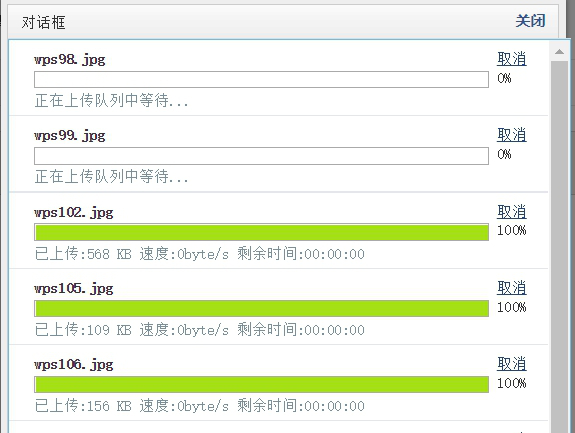
图片上传后保存在服务器端

3、处理ueditor提供的uploadimage方法
客户已经使用半年,没有问题,非常有用,非常方便的功能
有需要的朋友可以下载:http://blog.ncmem.com/wordpress/2019/08/07/ueditor复制word图片粘贴上传-2/
富文本编辑器+可粘贴word内容的更多相关文章
- 富文本编辑器复制粘贴word
tinymce是很优秀的一款富文本编辑器,可以去官网下载.https://www.tiny.cloud 这里分享的是它官网的一个收费插件powerpaste的旧版本源码,但也不影响功能使用. http ...
- 富文本编辑器直接从 word 中复制粘贴公式
在之前在工作中遇到在富文本编辑器中粘贴图片不能展示的问题,于是各种网上扒拉,终于找到解决方案,在这里感谢一下知乎中众大神以及TheViper. 通过知乎提供的思路找到粘贴的原理,通过TheViper找 ...
- 富文本编辑器实现从word中复制图片(外挂)
1问题 基于web的富文本编辑器的功能普遍较弱,而word是公认的宇宙第一好用的文档编辑器,所以许多人都习惯先在word中编辑,然后再将内容粘到web富文本编辑器中. 但是,这种操作有一个问题:图片带 ...
- 关于百度富文本编辑器UEdit的初始化内容失败问题
百度富文本编辑器毫无疑问是强大的,但也会出问题.这个问题是在脚本中普遍存在的,由异步性导致的加载顺序问题. 我们使用 var ue = UE.getEditor('editor', {}); 创建实例 ...
- php 解析富文本编辑器中的hmtl内容,富文本样式正确输出
说明:富文本编辑器中的内容在直接获获取后需要解析以后才能在页面中正确显示 我在后端这样处理: $content = htmlspecialchars_decode($info['intro']); h ...
- layedit富文本编辑器获取纯文字内容和全部内容
- 如何从word文档复制内容到富文本编辑器
在之前在工作中遇到在富文本编辑器中粘贴图片不能展示的问题,于是各种网上扒拉,终于找到解决方案,在这里感谢一下知乎中众大神以及TheViper. 通过知乎提供的思路找到粘贴的原理,通过TheViper找 ...
- 【ThinkPHP学习】ThinkPHP自己主动转义存储富文本编辑器内容导致读取出错
RT. ThinkPHP的conf文件里的Convention.php有一个配置选项 'DEFAULT_FILTER' => 'htmlspecialchars', // 默认參数过滤方法 用于 ...
- summernote富文本编辑器配合validate表单验证无法进行表单提交的问题
1.使用summernote富文本编辑器提交图片到服务器 在使用bootstrap中,我们用到了summernote富文本编辑器,使用summernote将图片上传到服务器中,参考我的上篇文章http ...
随机推荐
- Linux中request_irq()中断申请与处理说明
1. 中断的理解 中断你可以理解为就是一种电信号,是由硬件设备产生的然后发送给处理器,处理器接收到中断后,就会马上向操作系统反映此信号,之后就是系统的工作了. 这里有两个注意的地方,第一中断是随时都 ...
- Map、FlatMap 和 Reduce
Map 作用是生成一个新数组,遍历原数组,将每个元素拿出来做一些变换然后 append 到新的数组中. [1, 2, 3].map((v) => v + 1) // -> [2, 3, 4 ...
- js图片向下流动
<div id=demo style=overflow:hidden;height:;width:;background:#f4f4f4;color:#ffffff><div id= ...
- Spring Cloud Alibaba学习笔记(15) - 整合Spring Cloud Gateway
Spring Cloud Gateway 概述 Spring Cloud Gateway 是 Spring Cloud 的一个全新项目,该项目是基于Netty.Reactor以及WEbFlux构建,它 ...
- hdu 2181.。。。
哈密顿绕行世界问题 Time Limit: 3000/1000 MS (Java/Others) Memory Limit: 32768/32768 K (Java/Others)Total S ...
- java 线程实现、线程暂停和终止 、线程联合join、线程基本信息获取和设置、线程优先级
转载地址:速学堂 https://www.sxt.cn/Java_jQuery_in_action/eleven-inheritthread.html 1. 通过继承Thread类实现多线程 继承Th ...
- springmvc+mybatis的增删改查入门
先到官网了解mybatis的语法:https://mybatis.org/mybatis-3/zh/sqlmap-xml.html 前端用了thymeleaf和vue.js,效果图和demo地址:ht ...
- AJAX with JSP and Servlet(代码)
欢迎任何形式的转载,但请务必注明出处. 本章内容来自YouTube需翻墙(点击进入视频学习) 服务器配置等可以参看我其他文章.注释等后续再加 效果图 结构 <body> <fie ...
- iview-admin本地测试上线登陆问题和文件路径找不到问题
在项目中vue.config.js下修改上线路径(图中我修改为:根目录路径) 测试本地上线登陆出现问题: 在main.js下if (process.env.NODE_ENV !== 'producti ...
- CEIWEI CommTone串口调试精灵7.1 串口调试 串口工具
CEIWEI CommTone串口调试精灵 是一款功能强大的串行端口通信调试软件,内嵌超过100种标准的CRC校验功能,并支校验结果高低位字节前导转换:支持批量协议调试,并支持文件.16进制.UN ...