
EventLoop介绍
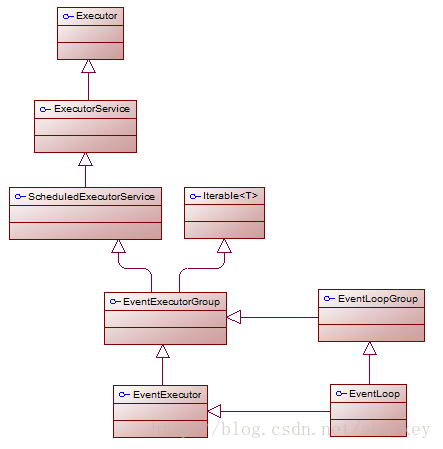
可以进行各种骚操作
        //nio

        java.nio.channels.SocketChannel mySocket = java.nio.channels.SocketChannel.open();

        //netty

        SocketChannel ch = new NioSocketChannel(mySocket);

        EventLoopGroup group = new NioEventLoopGroup();

        //register channel

        ChannelFuture registerFuture = group.register(ch);

        //de-register channel

        ChannelFuture deregisterFuture = ch.deregister();
EventLoop.register(...)和Channel.deregister(...)都是非阻塞异步的,也就是说它们可能不会理解执行完成,可能稍后完成。它们返回ChannelFuture,我们在需要进一步操作或确认完成操作时可以添加一个ChannelFutureLister或在ChannelFuture上同步等待至完成;选择哪一种方式看实际需求,一般建议使用ChannelFutureLister,应避免阻塞。
挂起IO处理
        EventLoopGroup group = new NioEventLoopGroup();

        Bootstrap bootstrap = new Bootstrap();

        bootstrap.group(group).channel(NioSocketChannel.class)

                .handler(new SimpleChannelInboundHandler<ByteBuf>() {

                    @Override

                    protected void channelRead0(ChannelHandlerContext ctx,

                            ByteBuf msg) throws Exception {

                        //remove this ChannelHandler and de-register

                        ctx.pipeline().remove(this);

                        ctx.deregister();

                    }

                });

        ChannelFuture future = bootstrap.connect(

                new InetSocketAddress("www.baidu.com", 80)).sync();

        //....

        Channel channel = future.channel();

        //re-register channel and add ChannelFutureLister

        group.register(channel).addListener(new ChannelFutureListener() {

            @Override

            public void operationComplete(ChannelFuture future) throws Exception {

                if(future.isSuccess()){

                    System.out.println("Channel registered");

                }else{

                    System.out.println("register channel on EventLoop fail");

                    future.cause().printStackTrace();

                }

            }

        });
迁移通道到另一个事件循环
- 当前EventLoop太忙碌,需要将Channel移到一个不是很忙碌的EventLoop;
- 终止EventLoop释放资源同时保持活跃Channel可以继续使用;
- 迁移Channel到一个执行级别较低的非关键业务的EventLoop中。
        EventLoopGroup group = new NioEventLoopGroup();

        final EventLoopGroup group2 = new NioEventLoopGroup();

        Bootstrap b = new Bootstrap();

        b.group(group).channel(NioSocketChannel.class)

                .handler(new SimpleChannelInboundHandler<ByteBuf>() {

                    @Override

                    protected void channelRead0(ChannelHandlerContext ctx,

                            ByteBuf msg) throws Exception {

                        // remove this channel handler and de-register

                        ctx.pipeline().remove(this);

                        ChannelFuture f = ctx.deregister();

                        // add ChannelFutureListener

                        f.addListener(new ChannelFutureListener() {

                            @Override

                            public void operationComplete(ChannelFuture future)

                                    throws Exception {

                                // migrate this handler register to group2

                                group2.register(future.channel());

                            }

                        });

                    }

                });

        ChannelFuture future = b.connect("www.baidu.com", 80);

        future.addListener(new ChannelFutureListener() {

            @Override

            public void operationComplete(ChannelFuture future)

                    throws Exception {

                if (future.isSuccess()) {

                    System.out.println("connection established");

                } else {

                    System.out.println("connection attempt failed");

                    future.cause().printStackTrace();

                }

            }

        });
EventLoop介绍的更多相关文章
- Netty 核心组件 EventLoop 源码解析
前言 在前文 Netty 启动过程源码分析 (本文超长慎读)(基于4.1.23) 中,我们分析了整个服务器端的启动过程.在那篇文章中,我们重点关注了启动过程,而在启动过程中对核心组件并没有进行详细介绍 ...
- 【Netty】Netty核心组件介绍
一.前言 前篇博文体验了Netty的第一个示例,下面接着学习Netty的组件和其设计. 二.核心组件 2.1. Channel.EventLoop和ChannelFuture Netty中的核心组件包 ...
- 深入理解javascript中的事件循环event-loop
前面的话 本文将详细介绍javascript中的事件循环event-loop 线程 javascript是单线程的语言,也就是说,同一个时间只能做一件事.而这个单线程的特性,与它的用途有关,作为浏览器 ...
- Netty源码分析(五):EventLoop
上一篇主要介绍了一下EventLoopGroup,本篇详细看下它的成员EventLoop. 类结构 NioEventLoop继承自SingleThreadEventLoop,而SingleThread ...
- Netty重要概念介绍
Netty重要概念介绍 Bootstrap Netty应用程序通过设置bootstrap(引导)类开始,该类提供了一个用于网络成配置的容器. 一种是用于客户端的Bootstrap 一种是用于服务端的S ...
- Qt 之 模态、非模态、半模态窗口的介绍及 实现QDialog的exec()方法
一.简述 先简单介绍一下模态与非模态对话框. 模态对话框 简单一点讲就是在弹出模态对话框时,除了该对话框整个应用程序窗口都无法接受用户响应,处于等待状态,直到模态对话框被关闭.这时一般需要点击对话框中 ...
- swoole的EventLoop学习
我们先使用php来写一个socket的服务端.先从最开始的模型开始将起逐步引申到为何要使用eventloop 1.最简单的socket服务端,直接按照官方文档来执行 <?php $sock = ...
- Netty源码细节IO线程(EventLoop)(转)
原文:http://budairenqin.iteye.com/blog/2215896 源码来自Netty5.x版本, 本系列文章不打算从架构的角度去讨论netty, 只想从源码细节展开, 又不想通 ...
- EventLoop(netty源码死磕4)
精进篇:netty源码 死磕4-EventLoop的鬼斧神工 目录 1. EventLoop的鬼斧神工 2. 初识 EventLoop 3. Reactor模式回顾 3.1. Reactor模式的组 ...
随机推荐
- 【原创】go语言之打印目录
package main import ( "fmt" "io/ioutil" "log" ) func listFiles(dirname ...
- CentOS7安装Airflow
实验环境: centos7python3.6 安装配置: 1.看看是否有gcc,没有的话需要进行安装: yum install gcc (后续安装airflow如果不成功,可以再次执行,它会更新包) ...
- Java 8的Time包常用API
Date.Canlender.SimpleDateFormat类在新的Time包面前几乎没有优势 日期LocalDate,时间LocalTime,日期时间LocalDateTime. 时区ZoneId ...
- hashCode 的常规协定是:
hashCode 的常规协定是: . 在 Java 应用程序执行期间,在同一对象上多次调用 hashCode 方法时,必须一致地返回相同的整数,前提是对象上 equals 比较中所用的信息没有被修改 ...
- Dockerfile 指令 WORKDIR介绍
Dockerfile中的WORKDIR指令用于指定容器的一个目录, 容器启动时执行的命令会在该目录下执行. 相当于设置容器的工作目录了.我们来看一个dockerfile文件 #test FROM ub ...
- GitHub的SSH免密连接
1.进入当前用户的家目录 $ cd ~ 2.删除.ssh 目录 $ rm -rvf .ssh 3.运行命令生成.ssh 密钥目录 $ ssh-keygen -t rsa -C [GitHub邮箱] [ ...
- Linux信号使用及自定义信号
linux自定义信号:https://www.cnblogs.com/bigben0123/p/3186661.html linux信号.值及解释:https://blog.csdn.net/luot ...
- Oracle 中的 Profile
一.目的: Oracle系统中的profile可以用来对用户所能使用的数据库资源进行限制,使用Create Profile命令创建一个Profile,用它来实现对数据库资源的限制使用,如果把该prof ...
- vue实现滚动条滚到相应高度触发动画的操作
一.vue项目引入animate.css 第一步:在命令行中执行: npm install animate.css --save 第二步:引入及使用: main.js中: import animate ...
- 40 Flutter仿京东商城项目签名验证原理、签名验证算法
加群452892873 下载对应40课文件,运行方法,建好项目,直接替换lib目录 pubspec.yaml crypto: ^ SignServices.dart import 'dart:conv ...