
(十一)web服务与javaweb结合(2)
一、解决问题及解决方法
- 解决问题:上章节用监听器的方式是有缺陷的:web服务的端口和web工程的端口不能一致。
- 解决方案:将webService绑定到web工程中,使得共用一个端口。
二、案例
2.1 创建一个web工程名:web_webService
2.2 编写两个服务接口
- 注意:
- 本例使用apache CXF3.2.0的框架来架构webService服务
- 在接口定义之前加上@WebService标注,表明这是一个WebService服务,否则在生成服务端时不能找到相应的接口;
- 这里@WebService标注的targetNamespace一定要填写内容,不然在生成WebService服务端的时候会报如下的错误,这个命名空间起始就是包名的倒序。
package www.shyroke.com;

import javax.jws.WebParam;

import javax.jws.WebResult;

import javax.jws.WebService;

@WebService(targetNamespace="http://service.shyroke.com/")

public interface IFirst {

    @WebResult(name="addResult")

    public int add(@WebParam(name="x")int x,@WebParam(name="y")int y);

}
package www.shyroke.com;

import javax.jws.WebResult;

import javax.jws.WebService;

/**

 * 锟节讹拷锟斤拷锟接口凤拷锟斤拷

 * 锟斤拷锟节伙拷取锟斤拷前系统时锟斤拷

 * @author Administrator

 *

 */

@WebService(targetNamespace="http://service.shyroke.com/")

public interface ISecond {

    @WebResult(name="getSysTimeResult")

    public String getSysTime();

}
2.2 编写服务接口实现类
package www.shyroke.com;

import javax.jws.WebService;

@WebService(endpointInterface="www.shyroke.com.IFirst")

public class FirstImpl implements IFirst {

    @Override

    public int add(int x, int y) {

        return x+y;

    }

}
package www.shyroke.com;

import java.text.DateFormat;

import java.text.SimpleDateFormat;

import java.util.Date;

import javax.jws.WebService;

@WebService(endpointInterface = "com.shyroke.service.ISecond")

public class SecondImpl implements ISecond {

    @Override

    public String getSysTime() {

        DateFormat dateFormat = new SimpleDateFormat("yyyy-MM-dd HH:mm:ss");

        Date date = new Date();

        return dateFormat.format(date);

    }

}
2.3 发布服务并把服务绑定到web工程
- 生成webService服务 : File->New->Other->Web Services->WebService,在Service implementation中选择提供服务的实现类。
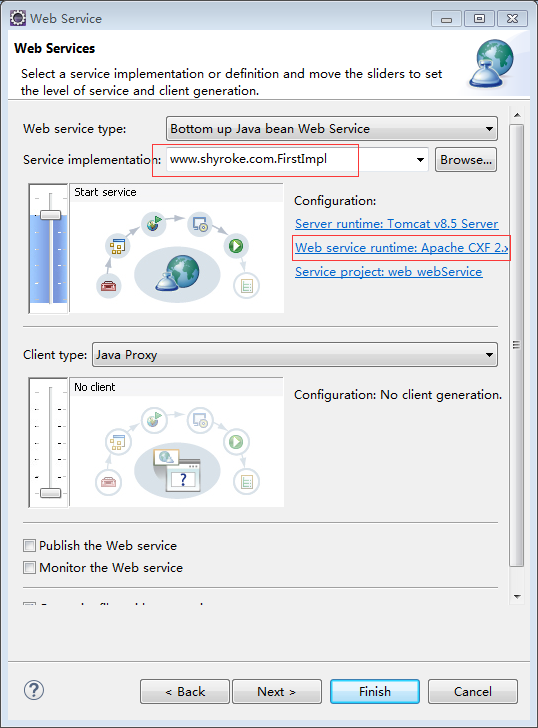
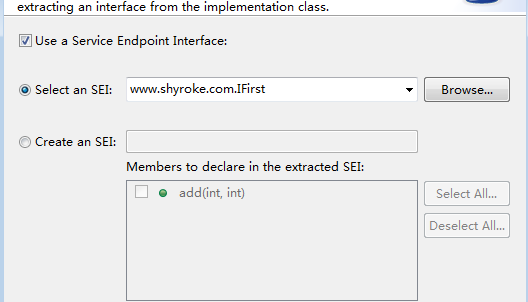
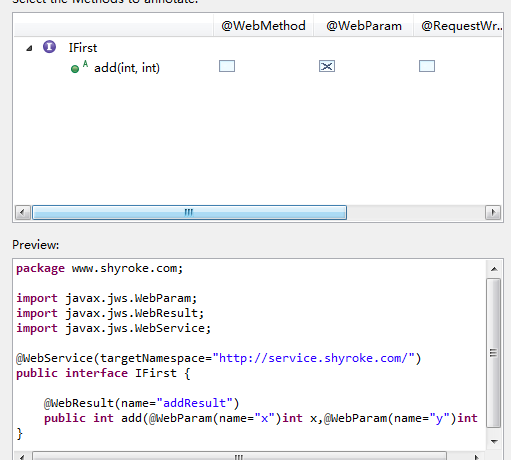

- 上述发布了第一个服务并绑定到了web工程,第二个服务的发布也按照上面图的操作来做即可。
- 发布完两个服务的项目结构为下图:
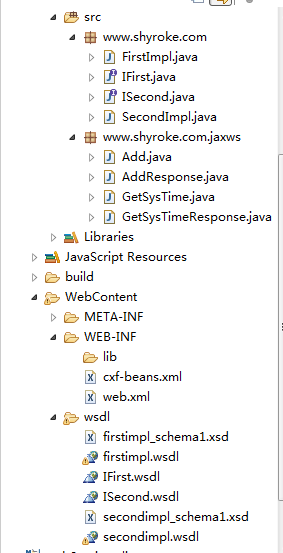
- 注意: 1. 到现在为止如果开启服务器会报错,因为工具在cxf-beans.xml中生成了如下,而我们在该目录下并没有,所以要把这三行去掉:
<import resource="classpath:META-INF/cxf/cxf.xml" />

    <import resource="classpath:META-INF/cxf/cxf-extension-soap.xml" />

    <import resource="classpath:META-INF/cxf/cxf-servlet.xml" />
- 注意: 2. 在cxf-beans.xml中把<jaxws:endpoint>属性里面有serviceName的属性和endpointName和address属性去掉,如下:
<?xml version="1.0" encoding="UTF-8"?>

<beans xmlns="http://www.springframework.org/schema/beans"

    xmlns:xsi="http://www.w3.org/2001/XMLSchema-instance" xmlns:jaxws="http://cxf.apache.org/jaxws"

    xsi:schemaLocation="http://www.springframework.org/schema/beans http://www.springframework.org/schema/beans/spring-beans-2.5.xsd http://cxf.apache.org/jaxws http://cxf.apache.org/schemas/jaxws.xsd">

    <jaxws:endpoint xmlns:tns="http://service.shyroke.com/"

        id="first" implementor="www.shyroke.com.FirstImpl" wsdlLocation="wsdl/firstimpl.wsdl">

        <jaxws:features>

            <bean class="org.apache.cxf.feature.LoggingFeature" />

        </jaxws:features>

    </jaxws:endpoint>

    <jaxws:endpoint xmlns:tns="http://service.shyroke.com/"

        id="second" implementor="www.shyroke.com.SecondImpl" wsdlLocation="wsdl/secondimpl.wsdl">

        <jaxws:features>

            <bean class="org.apache.cxf.feature.LoggingFeature" />

        </jaxws:features>

    </jaxws:endpoint>

</beans>
- 注意:3. 修改 firstimpl.wsdl和secondimpl.wsdl文件中的端口号,不能和tomcat工程一致(本例中的tomcat端口号为8080)
- firstimpl.wsdl
<?xml version="1.0" encoding="UTF-8"?>

<wsdl:definitions name="FirstImplService" targetNamespace="http://com.shyroke.www/" xmlns:wsdl="http://schemas.xmlsoap.org/wsdl/" xmlns:tns="http://com.shyroke.www/" xmlns:xsd="http://www.w3.org/2001/XMLSchema" xmlns:soap12="http://schemas.xmlsoap.org/wsdl/soap12/" xmlns:ns1="http://service.shyroke.com/">

  <wsdl:import namespace="http://service.shyroke.com/" location="IFirst.wsdl">

    </wsdl:import>

  <wsdl:binding name="FirstImplServiceSoapBinding" type="ns1:IFirst">

    <soap12:binding style="document" transport="http://schemas.xmlsoap.org/soap/http"/>

    <wsdl:operation name="add">

      <soap12:operation soapAction="" style="document"/>

      <wsdl:input name="add">

        <soap12:body use="literal"/>

      </wsdl:input>

      <wsdl:output name="addResponse">

        <soap12:body use="literal"/>

      </wsdl:output>

    </wsdl:operation>

  </wsdl:binding>

  <wsdl:service name="FirstImplService">

    <wsdl:port name="FirstImplPort" binding="tns:FirstImplServiceSoapBinding">

      <soap12:address location="http://localhost:8082/web_webService/services/FirstImplPort"/>

    </wsdl:port>

  </wsdl:service>

</wsdl:definitions>
- secondimpl.wsdl
<?xml version="1.0" encoding="UTF-8"?>

<wsdl:definitions name="SecondImplService" targetNamespace="http://com.shyroke.www/" xmlns:wsdl="http://schemas.xmlsoap.org/wsdl/" xmlns:tns="http://com.shyroke.www/" xmlns:xsd="http://www.w3.org/2001/XMLSchema" xmlns:soap12="http://schemas.xmlsoap.org/wsdl/soap12/" xmlns:ns1="http://service.shyroke.com/">

  <wsdl:import namespace="http://service.shyroke.com/" location="ISecond.wsdl">

    </wsdl:import>

  <wsdl:binding name="SecondImplServiceSoapBinding" type="ns1:ISecond">

    <soap12:binding style="document" transport="http://schemas.xmlsoap.org/soap/http"/>

    <wsdl:operation name="getSysTime">

      <soap12:operation soapAction="" style="document"/>

      <wsdl:input name="getSysTime">

        <soap12:body use="literal"/>

      </wsdl:input>

      <wsdl:output name="getSysTimeResponse">

        <soap12:body use="literal"/>

      </wsdl:output>

    </wsdl:operation>

  </wsdl:binding>

  <wsdl:service name="SecondImplService">

    <wsdl:port name="SecondImplPort" binding="tns:SecondImplServiceSoapBinding">

      <soap12:address location="http://localhost:8081/web_webService/services/SecondImplPort"/>

    </wsdl:port>

  </wsdl:service>

</wsdl:definitions>
2.4 启动服务
- 查看web.xml ,可知webservice的端口url-pattern
<?xml version="1.0" encoding="UTF-8"?>

<web-app xmlns:xsi="http://www.w3.org/2001/XMLSchema-instance" xmlns="http://java.sun.com/xml/ns/javaee" xsi:schemaLocation="http://java.sun.com/xml/ns/javaee http://java.sun.com/xml/ns/javaee/web-app_3_0.xsd" version="3.0">

  <display-name>web_webService</display-name>

  <welcome-file-list>

    <welcome-file>index.html</welcome-file>

    <welcome-file>index.htm</welcome-file>

    <welcome-file>index.jsp</welcome-file>

    <welcome-file>default.html</welcome-file>

    <welcome-file>default.htm</welcome-file>

    <welcome-file>default.jsp</welcome-file>

  </welcome-file-list>

  <servlet>

    <description>Apache CXF Endpoint</description>

    <display-name>cxf</display-name>

    <servlet-name>cxf</servlet-name>

    <servlet-class>org.apache.cxf.transport.servlet.CXFServlet</servlet-class>

    <load-on-startup>1</load-on-startup>

  </servlet>

  <servlet-mapping>

    <servlet-name>cxf</servlet-name>

    <url-pattern>/services/*</url-pattern>

  </servlet-mapping>

  <session-config>

    <session-timeout>60</session-timeout>

  </session-config>

  <context-param>

    <param-name>contextConfigLocation</param-name>

    <param-value>WEB-INF/cxf-beans.xml</param-value>

  </context-param>

  <listener>

    <listener-class>org.springframework.web.context.ContextLoaderListener</listener-class>

  </listener>

</web-app>
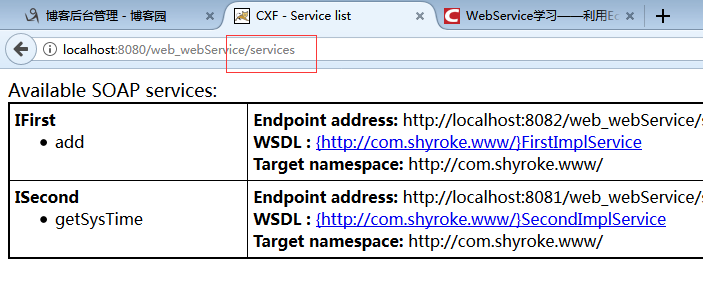
2.5 生成客户端
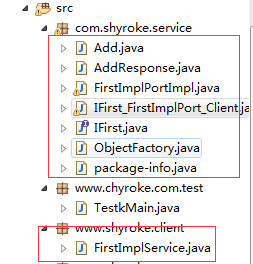
用工具生成客户端(具体步骤查看前几章)
2.6 测试
package www.chyroke.com.test;

import com.shyroke.service.IFirst;

import www.shyroke.client.FirstImplService;

public class TestkMain {

    public static void main(String[] args) {

        FirstImplService firstService=new FirstImplService();

        IFirst iFirst=firstService.getFirstImplPort();

        System.out.println("result==="+iFirst.add(5, 8));

    }

}
结果:
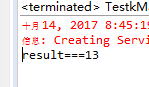
- 缺陷:虽然将webservice和web项目绑定在了一起,但是还是不能共同一个端口。
(十一)web服务与javaweb结合(2)的更多相关文章
- Java进阶(三十一) Web服务调用
Java进阶(三十一) Web服务调用 前言 有朋友问了一个问题:如何调用已知的音乐服务接口,服务文档如下: https://www.evernote.com/shard/s744/sh/c37cd5 ...
- (十)web服务与javaweb结合(1)
一.解决方法 A . 编写一个监听器,在监听器中发布服务 二.案例一 方法A:编写一个监听器,在监听器中发布服务 1. 编写服务接口 package com.shyroke.service; impo ...
- (十二) web服务与javaweb结合(3)
一.需求 上一章节虽然将webservice和web项目绑定在了一起,但是还是不能共同一个端口,本章讲解webservice和web项目绑定且共同端口. 二.案例 2.1 创建web工程,并引入依赖 ...
- JavaWeb使用Filter进行字符编码过滤 预防web服务中文乱码
JavaWeb使用Filter进行字符编码过滤 预防web服务中文乱码 准备条件:一个创建好的 JavaWeb 项目 步骤: 1.创建一个类并实现 Filter 接口 import javax.ser ...
- 大规模web服务开发技术
大规模web服务开发技术 总评 这本书是日本一个叫hatena的大型网站的CTO写的,通过hatena网站从小到大的演进来反应一个web系统从小到大过程中的各种系统和技术架构变迁,比较接 ...
- 上传文件服务与web服务分离
业务场景:1. 后端服务为java web应用,使用tomcat容器,多实例集群化部署.2. 前端使用nginx作为后端应用的反向代理. 业务需求:现在需要在java web应用端上传文件,同时还要能 ...
- Web服务器之Nginx详解(操作部分)
大纲 一.前言 二.Nginx 安装与配置 三.Nginx 配置文件详解 四.Nginx 命令参数 五.配置Nginx提供Web服务 六.配置Nginx的虚拟主机 七.配置Nginx的用户认证 八.配 ...
- HTTP协议基础与web服务的重定向,跳转以及请求转发
JavaWeb中,HttpServletRequest与HttpServletResponse几乎是处理各种请求与操作必备的参数,与原始的ServletRequest/ServletResponse相 ...
- Nginx Web服务(一)
一.Nginx原理介绍 1.1:什么是Nginx Nginx是一个开源的,支持高性能.高并发的WWW服务和代理服务软件 1.2:Nginx的功能特点及应用场合 ① 支持高并发:能支持几万并发连接,特别 ...
随机推荐
- IIS7下搭建PHP(FastCgiModule)
windows2008和windows vista都可以安装IIS7 第一步: 下载软件, php官方网站:www.php.net(下载winfows版本) phpmyadmin官方网站:www.ph ...
- python __iter__ 迭代器
1. 迭代器是什么? 迭代器是一个对象,是python非常强大的特性 根本上说, 迭代器就是有一个 next() 方法的对象, 而不是通过索引来计数. 当你或是一个循环机制(例如 for 语句)需要下 ...
- TreeSet和TreeMap不能存放重复元素?能不能存放null?其实不是这样的——灵活的二叉树
TreeSet和TreeMap不能存放重复元素?能不能存放null?其实不是这样的——灵活的二叉树 本文链接:https://blog.csdn.net/u010698072/article/de ...
- 一百四十四:CMS系统之评论布局和功能二
在base页加一个登录标识符 给加页面两个id,方便取值 js $(function () { //初始化ueditor var ue = UE.getEditor('editor', { 'serv ...
- web手工项目03-登录功能测试用例及缺陷编写-流程图画法-前后台下单及发货流程图-流程图设计测试用例方法-功能测试涉及到的四种数据库场景
回顾 注册功能测试(步骤,需求分析(输入分析,处理分析,输出分析),数据构造(有效等价类,无效等价类,有效数据,无效数据),编写用例,执行用例,缺陷报告) 轮播图功能测试(步骤,需求分析拆分测试点,测 ...
- Harbor 1.8.0 仓库的安装和使用
安装的先决条件 硬件环境 1.CPU 至少2G,最好4G 2.内存 至少4G,最好8G 3.磁盘 至少40G,最好160G 软件环境 1.docker版本 17.03.0-ce ...
- Maven 打war包
使用maven将项目达成war包 右击项目的跟项目,选择run as 选择maven build.... 进入窗口,在 Goals 输入命令 clean package,选择 skip Tes ...
- 小程序下载canvas生成图片
save_share_img:function(img){ var that = this; let { result } = that.data; getData.getData( "sa ...
- html设置多个div并排显示
我这里以4个div为例,html代码如下: <body> <div id="column1" style="background-color: blue ...
- 数据链路层学习之LLDP
数据链路层学习之LLDP 2013年09月02日 20:38:36 goodluckwhh 阅读数 42323 一.LLDP协议概述 随着网络技术的发展,接入网络的设备的种类越来越多,配置越来越复 ...