
uni-app使用Canvas绘图
最近公司项目在用uni-app做小程序商城,其中商品和个人需要生成图片海报,经过摸索记录后将一些重点记录下来。这里有两种方式来生成
1、后台控制生成
2、前端用canvas合成图片
这里我们只讲使用canvas合成图片的方法,canvas包括绘制文字、图片、图形以及图片显示处理。
一、初始化canvas画布
通过createCanvasContext方法来创建画布
var _this = this;

_this.ctx = uni.createCanvasContext('canvasid', this);

const C_W = 650; //canvas宽度,使用的手机屏幕

_this.canvasW = C_W; //

_this.canvasH = 420; // 设置画布高度

_this.ctx.setFillStyle('#545a7a'); //canvas背景颜色

_this.ctx.fillRect(0, 0, _this.canvasW, _this.canvasH); //canvas画布大小
二、画布绘制文字
画布绘制完成后就需要我们把海报需要的元素绘制到画布上,第一步:添加店铺名称,ShopName为定义的店铺名称或者说推广人名称,店铺名称,店铺名称显示使用文字处理:
文字排列方式包含:
1、textAlign = 'start'
2、textAlign = 'end'
3、textAlign = 'left'
4、textAlign = 'right'
5、textAlign = 'center'
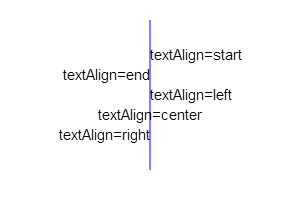
在通过setFillStyle设置文字颜色,setFontSize设置字体大小
let _strlineW = 0; //文本宽度

let _strHeight = C_P * 2 + 10; //绘制字体距离canvas顶部的初始高度

if (_this.ShopName != '') {

    //店铺名

    _this.ctx.textAlign = 'center';

    _this.ctx.setFillStyle(_this.TitleColor);

    _this.ctx.setFontSize(uni.upx2px(40));

    _this.ctx.fillText(_this.ShopName, _this.canvasW / 2, _strHeight);

    _strlineW += _this.ctx.measureText(_this.ShopName).width + uni.upx2px(10);

}
超长文字换行处理
//设置文本

            _this.ctx.setFontSize(uni.upx2px(28)); //设置标题字体大小

            _this.ctx.setFillStyle(_this.TitleColor); //设置标题文本颜色

            let _strLastIndex = 0; //每次开始截取的字符串的索引

            let _strHeight = r[1] + C_P * 2 + 10; //绘制字体距离canvas顶部的初始高度

            let _num=1;

            for (let i = 0; i < _this.Title.length; i++) {

                _strlineW += _this.ctx.measureText(_this.Title[i]).width;

                if (_strlineW > r[0]) {

                    if(_num == 2&&_this.LineType){

                        //文字换行数量大于二进行省略号处理

                        _this.ctx.fillText(_this.Title.substring(_strLastIndex, i-8)+'...', C_P, _strHeight);

                        _strlineW = 0;

                        _strLastIndex = i;

                        _num++;

                        break;

                    }else{

                        _this.ctx.fillText(_this.Title.substring(_strLastIndex, i), C_P, _strHeight);

                        _strlineW = 0;

                        _strHeight += 20;

                        _strLastIndex = i;

                        _num++;

                    }

                }else if (i == _this.Title.length - 1) {

                    _this.ctx.fillText(_this.Title.substring(_strLastIndex, i + 1), C_P, _strHeight);

                    _strlineW = 0;

                }

            }

            //设置文本 end
三、绘制图片
微信里面绘制图片需要先将图片地址转为临时图片地址使用方法如下:
async getImageInfo({ imgSrc }) {

            return new Promise((resolve, errs) => {

                uni.getImageInfo({

                    src: imgSrc,

                    success: function(image) {

                        resolve(image);

                    },

                    fail(err) {

                        errs(err);

                    }

                });

            });

        }


// 调用方法

let _imgInfo = await _this.getImageInfo({ imgSrc: _this.HeadImg }); //头像图
// 参数1 图片地址, 参数2 绘图x坐标, 参数3 绘图 y坐标 ,参数4 图片宽度, 参数5 图片高度
_this.ctx.drawImage(_imgInfo.path, (C_W - q[1])/2, _strHeight+5, q[1], q[1]);
有时候我们的图片需要处理下在显示,比如把头像做成圆形。
drawCircular(ctx, url, x, y, width, height) {

            //画圆形头像

            var avatarurl_width = width;

            var avatarurl_heigth = height;

            var avatarurl_x = x;

            var avatarurl_y = y;

            ctx.save();

            ctx.beginPath();

            ctx.arc(avatarurl_width / 2 + avatarurl_x, avatarurl_heigth / 2 + avatarurl_y, avatarurl_width / 2, 0, Math.PI * 2, false);

            ctx.clip();

            ctx.drawImage(url, avatarurl_x, avatarurl_y, avatarurl_width, avatarurl_heigth);

            ctx.restore();

        }
ctx为画布对象,url为图片地址,x为画布x轴位置,y为画布y轴位置,width为图像宽度,height为图像高度。
四、绘制圆角矩形/线条
fillRoundRect(cxt, x, y, width, height, radius, /*optional*/ fillColor) {

            //圆的直径必然要小于矩形的宽高

            if (2 * radius > width || 2 * radius > height) {

                return false;

            }

            cxt.save();

            cxt.translate(x, y);

            //绘制圆角矩形的各个边

            _this.drawRoundRectPath(cxt, width, height, radius);

            cxt.fillStyle = fillColor || '#000'; //若是给定了值就用给定的值否则给予默认值

            cxt.fill();

            cxt.restore();

        },

        drawRoundRectPath(cxt, width, height, radius) {

            cxt.beginPath(0);

            //从右下角顺时针绘制,弧度从0到1/2PI

            cxt.arc(width - radius, height - radius, radius, 0, Math.PI / 2);

            //矩形下边线

            cxt.lineTo(radius, height);

            //左下角圆弧,弧度从1/2PI到PI

            cxt.arc(radius, height - radius, radius, Math.PI / 2, Math.PI);

            //矩形左边线

            cxt.lineTo(0, radius);

            //左上角圆弧,弧度从PI到3/2PI

            cxt.arc(radius, radius, radius, Math.PI, (Math.PI * 3) / 2);

            //上边线

            cxt.lineTo(width - radius, 0);

            //右上角圆弧

            cxt.arc(width - radius, radius, radius, (Math.PI * 3) / 2, Math.PI * 2);

            //右边线

            cxt.lineTo(width, height - radius);

            cxt.closePath();

        }
uni-app使用Canvas绘图的更多相关文章
- uni app canvas 不生效
canvas 创建canvas绘图上下文. <canvas style="width: 300px; height: 200px;" canvas-id="firs ...
- Canvas绘图基础(一)
简单图形绘制 矩形:描边与填充 Canvas的API提供了三个方法,分别用于矩形的清除.描边及填充 clearRect(double x, double y, double w, double h) ...
- Android--使用Canvas绘图
前言 除了使用已有的图片之外,Android应用常常需要在运行时根据场景动态生成2D图片,比如手机游戏,这就需要借助于Android2D绘图的支持.本篇博客主要讲解一下Android下使用Canvas ...
- 【转】Android Canvas绘图详解(图文)
转自:http://www.jcodecraeer.com/a/anzhuokaifa/androidkaifa/2012/1212/703.html Android Canvas绘图详解(图文) 泡 ...
- Android中Canvas绘图基础详解(附源码下载) (转)
Android中Canvas绘图基础详解(附源码下载) 原文链接 http://blog.csdn.net/iispring/article/details/49770651 AndroidCa ...
- (转)Android--使用Canvas绘图
转:http://www.cnblogs.com/plokmju/p/android_canvas.html 前言 除了使用已有的图片之外,Android应用常常需要在运行时根据场景动态生成2D图片, ...
- Canvas绘图之平移translate、旋转rotate、缩放scale
画布操作介绍 画布绘图的环境通过translate(),scale(),rotate(), setTransform()和transform()来改变,它们会对画布的变换矩阵产生影响. 函数 方法 描 ...
- HTML5 学习总结(四)——canvas绘图、WebGL、SVG
一.Canvas canvas是HTML5中新增一个HTML5标签与操作canvas的javascript API,它可以实现在网页中完成动态的2D与3D图像技术.<canvas> 标记和 ...
- HTML5学习总结——canvas绘制象棋(canvas绘图)
一.HTML5学习总结——canvas绘制象棋 1.第一次:canvas绘制象棋(笨方法)示例代码: <!DOCTYPE html> <html> <head> & ...
- 伙伴们休息啦canvas绘图夜空小屋
HTML5 canvas绘图夜空小屋 伙伴们园友们,夜深了,休息啦,好人好梦... 查看效果:http://hovertree.com/texiao/html5/28/ 效果图如下: 代码如下: &l ...
随机推荐
- [Oracle]关于回滚段的一些转贴摘录
ORACLE 回滚段 回滚段概述 回滚段用于存放数据修改之前的值(包括数据修改之前的位置和值).回滚段的头部包含正在使用的该回滚段事务的信息.一个事务只能使用一个回滚段来存放它的回滚信息,而一个回滚段 ...
- 记录linux 生成crash dump文件步骤
执行文件编译时加入-g 命令 例如 g++ -g test.cpp 查看当前系统限制情况 ulimit -a 设置crash dump 文件大小 ulimit -c unlimited unlimit ...
- Linux嵌入式学习过程(转载)
嵌入式专业是一门实践性非常强的学科,只有多动手,多实践,多编程,多调试,多看书,多思考才能真正掌握好嵌入式开发技术.那么,如何从零开始学习嵌入式开发技术, 进入嵌入式开发大门呢,笔者根据自己的嵌入式学 ...
- Zynq_soc学习
Zynq_soc学习 SFP高速串行通信得搞来看看 最小系统 PL端时钟配置: 配置DDR控制器,主要是添加DDR正确的型号 外设电平接口配置: BANK0:LVCMOS3.3 BANK1:LVCMO ...
- 自定义msi安装包的执行过程
有时候我们需要在程序中执行另一个程序的安装,这就需要我们去自定义msi安装包的执行过程. 比如我要做一个安装管理程序,可以根据用户的选择安装不同的子产品.当用户选择了三个产品时,如果分别显示这三个产品 ...
- c++ for_each
#include<iostream>#include<algorithm>#include<vector>using namespace std; int main ...
- 阶段5 3.微服务项目【学成在线】_day02 CMS前端开发_17-CMS前端工程创建-单页面应用介绍
查看运行起来的页面的源代码 这个webpck打包生成的文件. 单页面应用的优缺点: 优点: 1.用户操作体验好,用户不用刷新页面,整个交互过程都是通过Ajax来操作. 2.适合前后端分离开发,服务端提 ...
- 一百二十九:CMS系统之七牛云存储介绍和配置
将图片的存储.尺寸等图片本身的一些擦做,交给七牛云处理,自己只关注网站开发本身 七牛云官网:https://www.qiniu.com 操作 登录后,点击管理控制台 点击对象存储-->新建存储空 ...
- 标签 <i>
<i>的使用 效果图
- MLN 讨论 —— inference
We consider two types of inference: finding the most likely state of the world consistent with some ...