
Flutter——AlertDialog组件、SimpleDialog组件、showModalBottomSheet组件(弹窗组件)
AlertDialog组件
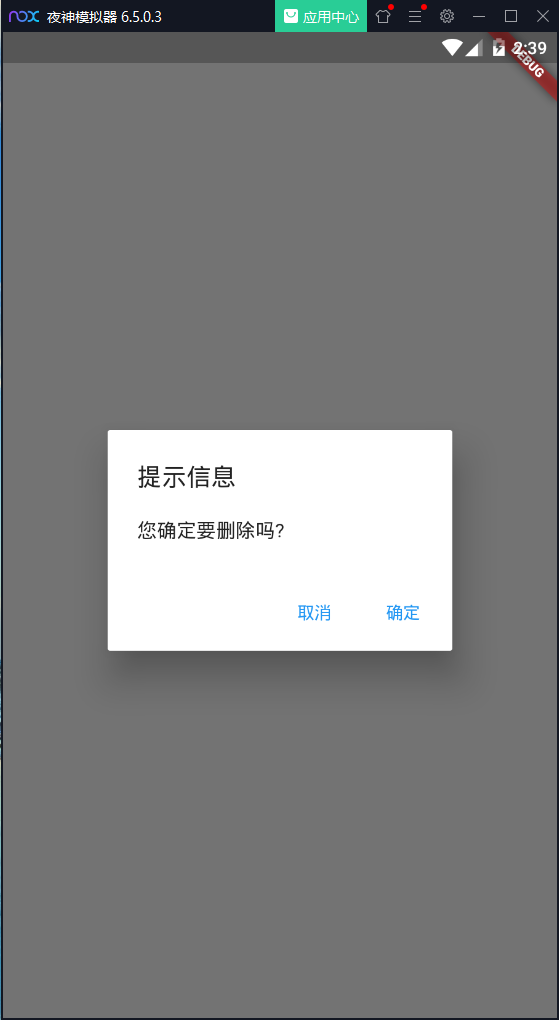
import 'package:flutter/material.dart';

void main() {

  runApp(MaterialApp(

    title: "DialogWidget",

    home: MyApp(),

  ));

}

class MyApp extends StatefulWidget {

  @override

  _MyAppState createState() => _MyAppState();

}

class _MyAppState extends State<MyApp> {

  _alertDialog() async{

    var result = await showDialog(

        barrierDismissible: false,  // 表示点击灰色背景的时候是否消失弹出框

        context: context,

        builder: (context) {

          return AlertDialog(

            title: Text("提示信息"),

            content: Text("您确定要删除吗?"),

            actions: <Widget>[

              FlatButton(

                child: Text("取消"),

                onPressed: () {

                  print("取消");

                  Navigator.of(context).pop("Cancel");

                },

              ),

              FlatButton(

                child: Text("确定"),

                onPressed: () {

                  print("确定");

                  Navigator.of(context).pop("Ok");

                },

              )

            ],

          );

        }

    );

    print(result);

  }

  @override

  Widget build(BuildContext context) {

    return Scaffold(

      body: Center(

        child: RaisedButton(

          child: Text("AlertDialog"),

          onPressed: _alertDialog,

        ),

      )

    );

  }

}
SimpleDialog组件
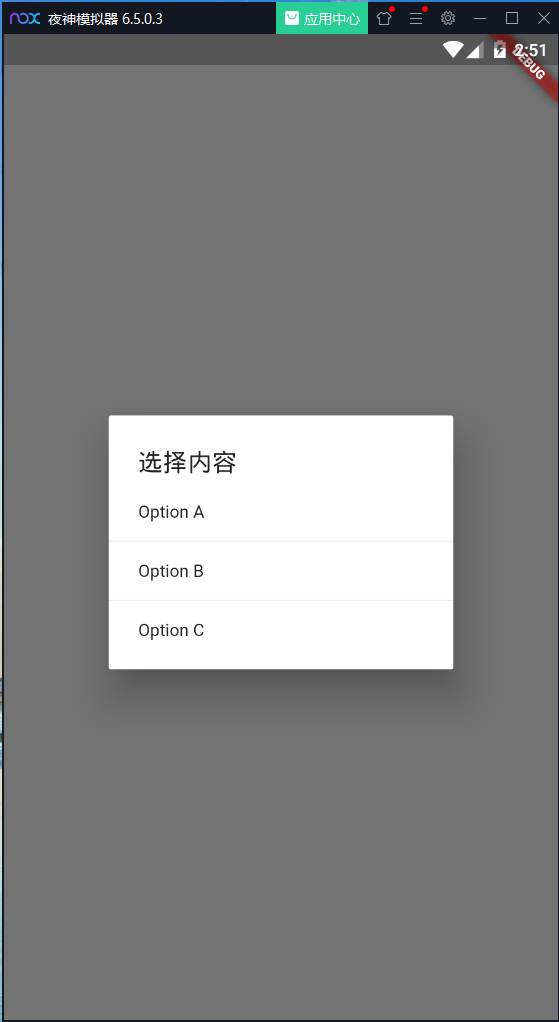
import 'package:flutter/material.dart';

void main() {

  runApp(MaterialApp(

    title: "DialogWidget",

    home: MyApp(),

  ));

}

class MyApp extends StatefulWidget {

  @override

  _MyAppState createState() => _MyAppState();

}

class _MyAppState extends State<MyApp> {

  _simpleDialog() async{

    var result = await showDialog(

        barrierDismissible: true,  // 表示点击灰色背景的时候是否消失弹出框

        context: context,

        builder: (context) {

          return SimpleDialog(

            title: Text("选择内容"),

            children: <Widget>[

              SimpleDialogOption(

                child: Text("Option A"),

                onPressed: () {

                  print("Option A");

                  Navigator.pop(context,"A");

                },

              ),

              Divider(),

              SimpleDialogOption(

                child: Text("Option B"),

                onPressed: () {

                  print("Option B");

                  Navigator.pop(context,"B");

                },

              ),

              Divider(),

              SimpleDialogOption(

                child: Text("Option C"),

                onPressed: () {

                  print("Option C");

                  Navigator.pop(context,"C");

                },

              )

            ],

          );

        }

    );

    print(result);

  }

  @override

  Widget build(BuildContext context) {

    return Scaffold(

      body: Center(

        child: RaisedButton(

          child: Text("SimpleDialog"),

          onPressed: _simpleDialog,

        ),

      )

    );

  }

}
showModalBottomSheet组件

import 'package:flutter/material.dart';

void main() {

  runApp(MaterialApp(

    title: "DialogWidget",

    home: MyApp(),

  ));

}

class MyApp extends StatefulWidget {

  @override

  _MyAppState createState() => _MyAppState();

}

class _MyAppState extends State<MyApp> {

  _modelBottomSheet() async{

    var result = await showModalBottomSheet(

        context: context,

        builder: (context) {

          return Container(

            height: 220.0,

            child: Column(

              children: <Widget>[

                ListTile(

                  title: Text("分享 A"),

                  onTap: () {

                    Navigator.pop(context,"分享 A");

                  },

                ),

                Divider(),

                ListTile(

                  title: Text("分享 B"),

                  onTap: () {

                    Navigator.pop(context,"分享 B");

                  },

                ),

                Divider(),

                ListTile(

                  title: Text("分享 C"),

                  onTap: () {

                    Navigator.pop(context,"分享 C");

                  },

                )

              ],

            ),

          );

        }

    );

    print(result);

  }

  @override

  Widget build(BuildContext context) {

    return Scaffold(

      body: Center(

        child: RaisedButton(

          child: Text("showModalBottomSheet"),

          onPressed: _modelBottomSheet,

        ),

      )

    );

  }

}
Flutter——AlertDialog组件、SimpleDialog组件、showModalBottomSheet组件(弹窗组件)的更多相关文章
- AlertDialog 、SimpleDialog、 showModalBottomSheet、showToast 自定义 Dialog
// AlertDialog .SimpleDialog.showModalBottomSheet.showToast // 使用showToast安装插件 https://pub.dev/packa ...
- 29 Flutter Dialog AlertDialog 、SimpleDialog、showModalBottomSheet、showToast
pubspec.yaml fluttertoast: ^ Dialog.dart import 'package:flutter/material.dart'; import 'package:flu ...
- Blazor Bootstrap 组件库 Toast 轻量弹窗组件介绍
轻量级 Toast 弹窗 DEMO https://www.blazor.zone/toasts 基础用法: 用户操作时,右下角给予适当的提示信息 <ToastBox class="d ...
- Flutter学习笔记(15)--MaterialApp应用组件及routes路由详解
如需转载,请注明出处:Flutter学习笔记(15)--MaterialApp应用组件及routes路由详解 最近一段时间生病了,整天往医院跑,也没状态学东西了,现在是好了不少了,也该继续学习啦!!! ...
- Vue列表组件与弹窗组件示例
列表组件 <!DOCTYPE html> <html> <head> <meta charset="utf-8" /> <me ...
- Jquery弹窗组件
下面是写的简单的Jquery弹窗组件 暂不支持animate,只能满足一般的弹窗显示隐藏需求,更多功能后续会完善!网上及jquery组件很多这样的弹窗,但是用别人的感觉心里过不去,所以就随便写写,当做 ...
- 百度智能小程序弹窗组件wcPop|智能小程序自定义model弹窗模板
百度智能小程序自定义弹窗组件wcPop|百度小程序model对话框|智能小程序弹窗界面模板 最近百度也推出了自己的智能小程序,如是就赶紧去试了下,官方提供的api还不是狠完整.而且官方提供的弹窗组件也 ...
- 基于JQ的自定义弹窗组件
<!DOCTYPE html> <html lang="en"> <head> <meta charset="UTF-8&quo ...
- 微信小程序弹窗组件
概述 自己封装的一个比较简单微信弹窗小组件,主要就是教会大家对微信小组件的用法和理解,因为微信小程序对组件介绍特别少,所以我就把自己的理解分享给大家 详细 代码下载:http://www.demoda ...
- 从零开始徒手撸一个vue的toast弹窗组件
相信普通的vue组件大家都会写,定义 -> 引入 -> 注册 -> 使用,行云流水,一气呵成,但是如果我们今天是要自定义一个弹窗组件呢? 首先,我们来分析一下弹窗组件的特性(需求): ...
随机推荐
- VS2010配置OpenGL开发环境(转)
OpenGL(Open Graphics Library)是一个跨编程语言.跨平台的专业图形程序接口.OpenGL是SGI公司开发的一套计算机图形处理系统,是图形硬件的软件接口,任何一个OpenGL应 ...
- LeetCode_401. Binary Watch
401. Binary Watch Easy A binary watch has 4 LEDs on the top which represent the hours (0-11), and th ...
- LeetCode_299. Bulls and Cows
299. Bulls and Cows Easy You are playing the following Bulls and Cows game with your friend: You wri ...
- express url跳转(重定向)的实现:res.location() res.redirect()
Express 是一个基于Node.js 实现的web框架,其响应HTTP请求的response对象中有两个响应url跳转方法res.location() res.redirect(),可以实现301 ...
- web端自动化——webdriver驱动
1.1Edge浏览器(不过,Edge浏览器只能运行于 Windows 10) Edge驱动的下载地址,复制链接http://go.microsoft.com/fwlink/?LinkId=619687 ...
- 解决ubuntu的firefox上网速度慢【转】
在ubuntu上用firefox上网十分慢,但是在切换了chrome后发现上网速度很快,是解析域名上出现了问题,所以要为FF设置DNS缓存以提高速度.(在WIN下这个是自动设置好的,在ubuntu下需 ...
- 服务发现--初识Consul
前言 服务注册.服务发现作为构建微服务架构得基础设施环节,重要性不言而喻.在当下,比较热门用于做服务注册和发现的开源项目包括zookeeper.etcd.euerka和consul.今天在这里对近期学 ...
- Qt5.编译错误.error: C2338: The slot requires more arguments than the signal provides.
1.Qt563x86vs2015,遇到如下 编译错误: error: C2338: The slot requires more arguments than the signal provides. ...
- confluence6.14.1linux安装破解
一.简介 Confluence为团队提供一个协作环境.在这里,团队成员齐心协力,各擅其能,协同地编写文档和管理项目.从此打破不同团队.不同部门以及个人之间信息孤岛的僵局,Confluence真正实现了 ...
- redis的key设置每天凌晨过期的思路
设置key凌晨过期的思路 设置key的值的时候,计算下当前时间到第二天凌晨的时间差,设置key的过期时间. 利用定时任务,每天凌晨将需要过期的key删除. 应用场景 按天为维度,限制用户对资源的访问次 ...