
CYLTabBarController的简单使用
 #pragma mark- 登录成功跳转至主页

 -(void)jumpToMainVC {

     [UIApplication sharedApplication].statusBarStyle = UIStatusBarStyleLightContent;

     NSArray *normalImage = @[@"notice_icon_normal", @"news_icon_normal", @"contacts_icon_normal", @"application_icon_normal"];

     NSArray *selectImage = @[@"notice_icon_pressed", @"news_icon_pressed", @"contacts_icon_pressed", @"application_icon_pressed"];

     NSArray *vcClass = @[@"NotifyViewController", @"NewsViewController", @"ContactsViewController", @"ApplicationViewController"];

     NSArray *titleArray = @[@"通知", @"新闻", @"联系人", @"应用"];

     NSMutableArray *allArray = [NSMutableArray array];

     for (int i = ; i < ; i++) {

         Class cla = NSClassFromString(vcClass[i]);

         UIViewController *vc = [[cla alloc] init];

         vc.navigationItem.title = titleArray[i];

         [vc.tabBarItem setTitle:titleArray[i]];

         [vc.tabBarItem setImage:[[UIImage imageNamed:normalImage[i]] imageWithRenderingMode:UIImageRenderingModeAlwaysOriginal]];

         [vc.tabBarItem setSelectedImage:[[UIImage imageNamed:selectImage[i]] imageWithRenderingMode:UIImageRenderingModeAlwaysOriginal]];

         BaseNavigationController *nav = [[BaseNavigationController alloc] initWithRootViewController:vc];

         [allArray addObject:nav];

     }

     UITabBarController *tab = [[UITabBarController alloc] init];

     tab.viewControllers = allArray;

     //设置navigationBar样式

     [self setUpNavigationBarAppearance];

     //tabBarItem 的选中和不选中文字属性

     [self setUpTabBarItemTextAttributes];

     self.window.rootViewController = tab;

     //打开收藏的数据库

     [[CollectDataCenter shareInstance] openDataBase];

 }

 /**

  *  设置navigationBar样式

  */

 - (void)setUpNavigationBarAppearance {

     UINavigationBar *navigationBarAppearance = [UINavigationBar appearance];

     UIImage *backgroundImage = nil;

     NSDictionary *textAttributes = nil;

     if (NSFoundationVersionNumber > NSFoundationVersionNumber_iOS_6_1) {

         backgroundImage = [UIImage imageNamed:@"navigationBar_BG"];

         textAttributes = @{

                            NSFontAttributeName: [UIFont boldSystemFontOfSize:],

                            NSForegroundColorAttributeName: [UIColor whiteColor],

                            };

     } else {

 #if __IPHONE_OS_VERSION_MIN_REQUIRED < __IPHONE_7_0

         backgroundImage = [UIImage imageNamed:@"navigationBar_BG"];

         textAttributes = @{

                            UITextAttributeFont: [UIFont boldSystemFontOfSize:],

                            UITextAttributeTextColor: [UIColor blackColor],

                            UITextAttributeTextShadowColor: [UIColor clearColor],

                            UITextAttributeTextShadowOffset: [NSValue valueWithUIOffset:UIOffsetZero],

                            };

 #endif

     }

     [navigationBarAppearance setBackgroundImage:backgroundImage

                                   forBarMetrics:UIBarMetricsDefault];

     [navigationBarAppearance setTitleTextAttributes:textAttributes];

 }

 /**

  *  tabBarItem 的选中和不选中文字属性

  */

 - (void)setUpTabBarItemTextAttributes {

     // 普通状态下的文字属性

     NSMutableDictionary *normalAttrs = [NSMutableDictionary dictionary];

     normalAttrs[NSForegroundColorAttributeName] = RGBA(, , , );

     // 选中状态下的文字属性

     NSMutableDictionary *selectedAttrs = [NSMutableDictionary dictionary];

     selectedAttrs[NSForegroundColorAttributeName] = RGBA(, , , );

     // 设置文字属性

     UITabBarItem *tabBar = [UITabBarItem appearance];

     [tabBar setTitleTextAttributes:normalAttrs forState:UIControlStateNormal];

     [tabBar setTitleTextAttributes:selectedAttrs forState:UIControlStateSelected];

     // 设置背景图片

     UITabBar *tabBarAppearance = [UITabBar appearance];

     [tabBarAppearance setBackgroundImage:[UIImage imageNamed:@"tabbarBG"]];

     //    tabBarAppearance.barTintColor = [UIColor lightGrayColor];

 }

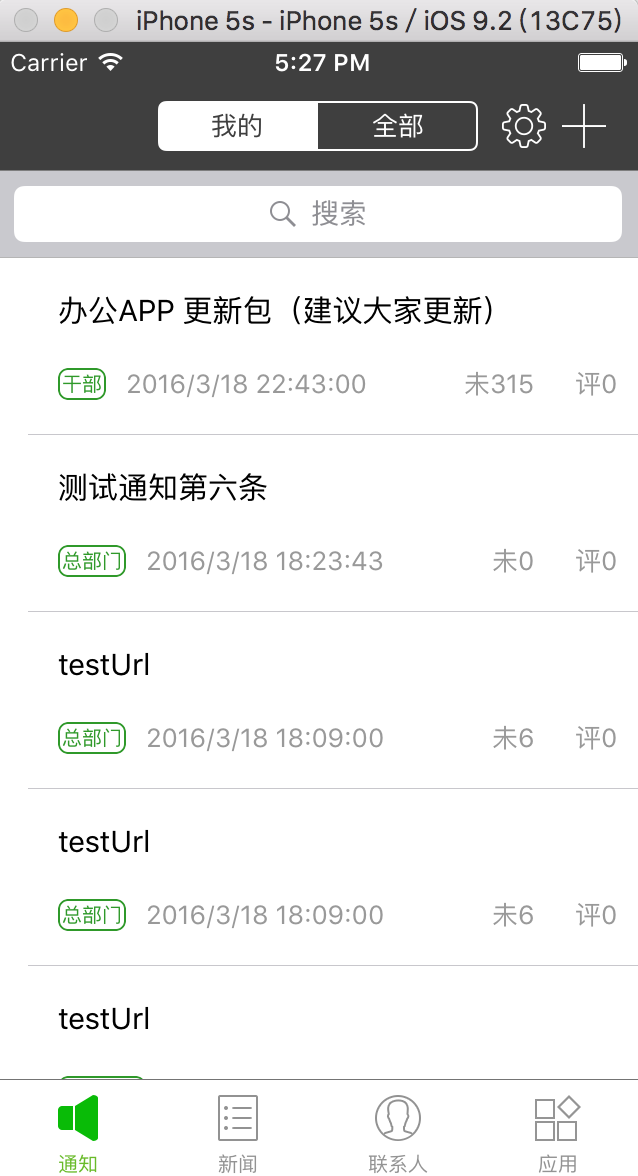
显示界面显示如下:
CYLTabBarController的简单使用的更多相关文章
- iOS:CYLTabBarController【低耦合集成TabBarController】
导航 与其他自定义TabBarController的区别 集成后的效果 项目结构 使用CYLTabBarController 第一步:使用CocoaPods导入CYLTabBarController ...
- 【造轮子】打造一个简单的万能Excel读写工具
大家工作或者平时是不是经常遇到要读写一些简单格式的Excel? shit!~很蛋疼,因为之前吹牛,就搞了个这东西,还算是挺实用,和大家分享下. 厌烦了每次搞简单类型的Excel读写?不怕~来,喜欢流式 ...
- Fabio 安装和简单使用
Fabio(Go 语言):https://github.com/eBay/fabio Fabio 是一个快速.现代.zero-conf 负载均衡 HTTP(S) 路由器,用于部署 Consul 管理的 ...
- node.js学习(三)简单的node程序&&模块简单使用&&commonJS规范&&深入理解模块原理
一.一个简单的node程序 1.新建一个txt文件 2.修改后缀 修改之后会弹出这个,点击"是" 3.运行test.js 源文件 使用node.js运行之后的. 如果该路径下没有该 ...
- 哪种缓存效果高?开源一个简单的缓存组件j2cache
背景 现在的web系统已经越来越多的应用缓存技术,而且缓存技术确实是能实足的增强系统性能的.我在项目中也开始接触一些缓存的需求. 开始简单的就用jvm(java托管内存)来做缓存,这样对于单个应用服务 ...
- 在Openfire上弄一个简单的推送系统
推送系统 说是推送系统有点大,其实就是一个消息广播功能吧.作用其实也就是由服务端接收到消息然后推送到订阅的客户端. 思路 对于推送最关键的是服务端向客户端发送数据,客户端向服务端订阅自己想要的消息.这 ...
- 我的MYSQL学习心得(一) 简单语法
我的MYSQL学习心得(一) 简单语法 我的MYSQL学习心得(二) 数据类型宽度 我的MYSQL学习心得(三) 查看字段长度 我的MYSQL学习心得(四) 数据类型 我的MYSQL学习心得(五) 运 ...
- 使用 Nodejs 搭建简单的Web服务器
使用Nodejs搭建Web服务器是学习Node.js比较全面的入门教程,因为要完成一个简单的Web服务器,你需要学习Nodejs中几个比较重要的模块,比如:http协议模块.文件系统.url解析模块. ...
- ASP.NET Aries 入门开发教程2:配置出一个简单的列表页面
前言: 朋友们都期待我稳定地工作,但创业公司若要躺下,也非意念可控. 若人生注定了风雨飘摇,那就雨中前行了. 最机开始看聊新的工作机会,欢迎推荐,创业公司也可! 同时,趁着自由时间,抓紧把这系列教程给 ...
随机推荐
- Solr添加paoding分词器
1.Solr3.6.2 并可运行 paoding-analysis3.0.jar 下载 2.1 解压{$Solr-Path}/example/webapp 下的solr.war文件,解压到当前文件夹 ...
- learning scala Case Classses
package com.aura.scala.day01 object caseClasses { def main(args: Array[String]): Unit = { // 注意在实例化案 ...
- Elasticsearch 索引文档的增删改查
利用Elasticsearch-head可以在界面上(http://127.0.0.1:9100/)对索引进行增删改查 1.RESTful接口使用方法 为了方便直观我们使用Head插件提供的接口进行演 ...
- Python学习之--基础语法
一.定义 Python 是一种解释型.面向对象.动态数据类型的高级程序设计语言. 二.Python变量的命名规则 1. 变量名只能包含字母.数字和下划线: 2. 变量名不能包含空格: 3. 不要将Py ...
- [Luogu] 外星密码
https://www.luogu.org/problemnew/show/P1928 沙比提 读清题目 #include <bits/stdc++.h> using namespace ...
- easy-table-vue+VueJs、SpringBoot+Mybatis实现MVVM模型前后台数据交互
该项目分为前端展示部分和后台服务部分. 前端部分 使用的技术是:NodeJs.Webpack.VueJs 使用的组件库是:IVIEW.easy-table-vue 使用的开发工具是:WebStorm ...
- 经常用到(创建OS)的命令
1. 将汇编代码编译为二进制模块文件 nasm mbr.asm -o mbr nasm loader.asm -o loader 2. 将wirte.c ...
- codeforces#1249F. Maximum Weight Subset(树上dp)
题目链接: http://codeforces.com/contest/1249/problem/F 题意: 一棵树的每个节点有个权值,选择一个节点集,使得任意点对的距离大于$k$ 求最大节点集权值, ...
- vue 传参props里面为什么要带type,还有default?
这个是子组件啦 ,写type的意思是swiperDate传过来的数据类型是数组,default就是表示不传默认返回的[ ],空数组. 这种就是表示传的数据类型是number,不传默认是0.
- JAVA基础知识|String、StringBuilder、StringBuffer比较
一.简介 String:不可变字符序列 StringBuffer:线程安全的可变字符序列 StringBuilder:非线程安全的可变字符序列 二.示例分析 [示例1] String A = &quo ...