
Android之界面(布局文件layput)
1。关于组件居中


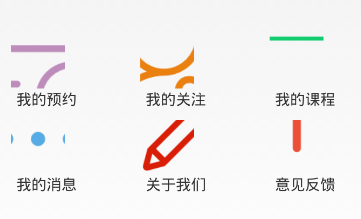

<LinearLayout xmlns:android="http://schemas.android.com/apk/res/android"

    xmlns:tools="http://schemas.android.com/tools"

    android:layout_width="fill_parent"

    android:layout_height="fill_parent"

    android:orientation="vertical"

    >

    <TextView

        android:id="@+id/tv_title"

           android:layout_width="match_parent"

           android:layout_height="0dp"

           android:layout_weight="1"

           android:text="个人中心"

           android:gravity="center"

           android:textSize="30px"

           android:background="#44cef6"

     />

        <LinearLayout

            android:layout_width="match_parent"

            android:layout_height="0dp"

            android:layout_weight="4"

            android:gravity="center"

        >

            <ImageView

                android:id="@+id/img_me"

                android:layout_width="wrap_content"

                android:layout_height="wrap_content"

                android:layout_gravity="center_vertical"

                android:src="@drawable/ic_launcher" />

        </LinearLayout>

        <LinearLayout

            android:layout_width="match_parent"

            android:layout_height="0dp"

            android:layout_weight="5"

        >

            <GridView

                android:id="@+id/person_grid_view"

                android:layout_width="wrap_content"

                android:layout_height="wrap_content"

                android:numColumns="3"

                android:stretchMode="columnWidth">

            </GridView>

        </LinearLayout>

</LinearLayout>
Android之界面(布局文件layput)的更多相关文章
- Android中得到布局文件对象有三种方式
Android中得到布局文件对象有三种方式 第一种,通过Activity对象 View view = Activity对象.getLayoutInflater().inflater(R.layout. ...
- Android中将xml布局文件转化为View树的过程分析(下)-- LayoutInflater源码分析
在Android开发中为了inflate一个布局文件,大体有2种方式,如下所示: // 1. get a instance of LayoutInflater, then do whatever yo ...
- Android中将xml布局文件转化为View树的过程分析(上)
有好几周没写东西了,一方面是因为前几个周末都有些事情,另外也是因为没能找到好的写作方向,或者说有些话题 值得分享.写作,可是自己积累还不够,没办法只好闷头继续研究了.这段时间一边在写代码,一边也在想A ...
- 设置Android Studio工程布局文件的默认布局
每次创建新的工程后,布局文件的的布局总是ConstraintLayout,如何更改? 进入Android Studio安装目录,用文本编辑器打开文件plugins\android\lib\templa ...
- Android笔记——在布局文件中插入另一个布局文件
假如有一个布局文件A.xml想把另外一个布局文件B.xml引进其布局,则可以通过下面的代码 <include layout="@layout/B" />
- Android中查看布局文件中的控件(view,id)在哪里被调用(使用)
在阅读别人的代码时通常是很痛苦的,有时很想要看一看布局中的控件在哪里被调用了,为之很苦恼 在这里提供一种方法. 复制要查看的控件ID,到R文件中搜索到该ID, 接下来就好办的了,选中ID按下C ...
- Android开发之布局文件里实现OnClick事件关联处理方法
一般监听OnClickListener事件,我们都是通过Button button = (Button)findViewById(....); button.setOClickLisener....这 ...
- Android studio中布局文件出现render problem问题
当做layout时,可能会出现render problem的情况.意思就是无法预览当前布局页面,这种情况是因为API版本太高造成的.只需要修改API为更低版本即可.
- android界面布局
(一)LinearLayout界面编排模式 他的格式是按照线性顺序,由上往下或右左往右,逐一排列界面组件. layout_width:中的“match_parent”表示要填满他所在的外框,而“wra ...
随机推荐
- 《Java程序设计与数据结构教程(第二版)》学习指导
<Java程序设计与数据结构教程(第二版)>学习指导 欢迎关注"rocedu"微信公众号(手机上长按二维码) 做中教,做中学,实践中共同进步! 原文地址:http:// ...
- Dump中查看dictionary信息的方法
In order to dump the contents of a dictionary, you need to start with either the MethodTable or the ...
- javascript,从库到框架再到平台
对于库,框架,平台,从事过后端开发的人并不陌生,一直基于.net平台做开发,本人懒惰,面对庞大的体系,基本只掌握一点开发上用得着的技术,到是在程序结构,业务过程等方面花了点精力. 随着VS开发工具的成 ...
- Android开发自学笔记(Android Studio)—4.4 AdapterView及其子类
一.引言 AdapterView本身是一个抽象类,而它派生的子类在用法上也基本相似,只是在显示上有一定区别,因此把他们也归为一类. AdapterView具有如下特征: Ada ...
- pagerank
http://jung.sourceforge.net/ https://github.com/louridas/pagerank/blob/aeb9b17ada1f925bb525961574f6d ...
- Google调用explorer.exe打开本地文件
给IE浏览器地址栏输个本地文件路径,会自动用explorer.exe打开,这个挺好的,但是IE对jQuery稍微高点的版本不怎么待见,只好自己给Google折腾一个调用explorer的功能----- ...
- Adapter的封装之路
原文:Adapter的封装之路 一.几种常见列表效果: 假如要用RecyclerView实现下面的几种效果,你会如何实现呢? 效果1:单布局效果 效果2:多布局效果 有多种Item布局 效果3 ...
- Ubuntu16.04/LinuxMint18安装openjdk-7-jdk
LinuxMint18的安装源已经默认没有openjdk7了,所以要自己手动添加仓库,如下: sudo add-apt-repository ppa:openjdk-r/ppa sudo apt-ge ...
- Zabbix监控mysql主从复制状态
原理 mysql slave show slave status\G 在输出信息中查看I/O线程和SQL线程的状态值(YES为正常,NO为错误) Slave_IO_Running: Yes Slave ...
- SQLServer2000数据库的安装
==================. 未完待续,持续更新中... -------------------------------------------------