
(2)Linux Java环境变量安装
- install default JRE/JDK
- Installing Java with
apt-getis easy. First, update the package index:- sudo apt-get update
- check if Java is not already installed:
- java -version
- If it returns "The program java can be found in the following packages", Java hasn't been installed yet, so execute the following command:
- sudo apt-get default-jre(This will install the Java Runtime Environment (JRE). )
- If you instead need the Java Development Kit (JDK), which is usually needed to compile Java applications (for example Apache Ant, Apache Maven, Eclipse and IntelliJ IDEA execute the following command:
- sudo apt-get install default-jdk
- That is everything that is needed to install Java.All other steps are optional and must only be executed when needed.
- Installing Java with
- Installing Oracle JDK (optional)
- The Oracle JDK is the official JDK; however, it is no longer provided by Oracle as a default installation for Ubuntu.
- You can still install it using apt-get.
- To install any version, first execute the following commands:
sudo apt-get install python-software-propertiessudo add-apt-repository ppa:webupd8team/javasudo apt-get update
- Then, depending on the version you want to install, execute one of the following commands:
- Oracle JDK6:This is an old version but still in use.
sudo apt-get install oracle-java6-installer
- Oracle JDK7:This is the latest stable version.
sudo apt-get install oracle-java7-installer
- Oracle JDK8:This is a developer preview, the general release is scheduled for March 2014. This external article about Java 8 may help you to understand what it's all about.
sudo apt-get install oracle-java8-installer
- Oracle JDK6:This is an old version but still in use.
- Managing Java (optional)(多版本环境下设置默认使用的版本)
- When there are multiple Java installations on your Droplet, the Java version to use as default can be chosen. To do this, execute the following command:
sudo update-alternatives --config java
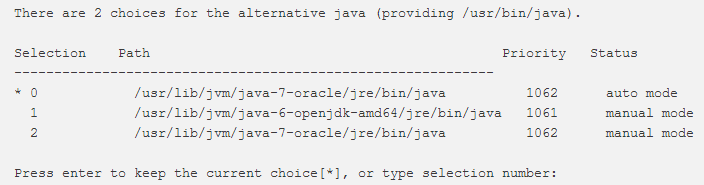
- It will usually return something like this if you have 2 installations (if you have more, it will of course return more):
- You can now choose the number to use as default. This can also be done for the Java compiler (
javac):sudo update-alternatives --config javac
- Setting the "JAVA_HOME" environment variable(取得Java安装路径,设置Java环境变量)
- To set the
JAVA_HOMEenvironment variable, which is needed for some programs, first find out the path of your Java installation:sudo update-alternatives --config java
- It returns something like:
- The path of the installation is for each:
/usr/lib/jvm/java-7-oracle/usr/lib/jvm/java-6-openjdk-amd64/usr/lib/jvm/java-7-oracle
- Copy the path from your preferred installation and then edit the file
/etc/environment:sudo nano /etc/environment
- In this file, add the following line (replacing YOUR_PATH by the just copied path):
JAVA_HOME="YOUR_PATH"
- That should be enough to set the environment variable. Now reload this file:
source /etc/environment
- Test it by executing:
echo $JAVA_HOME(If it returns the just set path, the environment variable has been set successfully. If it doesn't, please make sure you followed all steps correctly.)
- To set the
- When there are multiple Java installations on your Droplet, the Java version to use as default can be chosen. To do this, execute the following command:
- 通过URL链接安装jdk1.8
- wget --no-check-certificate --no-cookies --header "Cookie: oraclelicense=accept-securebackup-cookie" http://download.oracle.com/otn-pub/java/jdk/8u91-b14/jdk-8u91-linux-x64.tar.gz
sudo mkdir /usr/java
sudo tar zxf jdk-8u91-linux-x64.tar.gz -C /usr/java
sudo echo "export JAVA_HOME=/usr/java/jdk1.8.0_91" >> /etc/bashrc
sudo "export PATH=$PATH:$JAVA_HOME/bin" >> /etc/bashrc
sudo echo "export CLASSPATH=$JAVA_HOME/lib/dt.jar:$JAVA_HOME/lib/tools.jar" >> /etc/bashrc
source /etc/bashrc
- wget --no-check-certificate --no-cookies --header "Cookie: oraclelicense=accept-securebackup-cookie" http://download.oracle.com/otn-pub/java/jdk/8u91-b14/jdk-8u91-linux-x64.tar.gz

(2)Linux Java环境变量安装的更多相关文章
- [知了堂学习笔记]_牵线Eclipse和Tomcat第一篇 —— 配置Java环境变量&&安装eclipse
一.先给他们提供一个"浪漫的"环境,比如传说中的"鹊桥"--java环境变量.哈哈! 配置java环境变量. 下载jdk,根据自己电脑的版本和操作位数选择不同的 ...
- linux java环境变量设置
下载JRE或者JDK后解压,设置以下环境变量 JAVA_HOME=/home/zm/jdk1.8.0_181JRE_HOME=/home/zm/jdk1.8.0_181/jreCLASSPATH=.: ...
- JAVA环境变量安装
需配置的系统环境变量参数: JAVA_HOME:C:\Program Files\Java\jdk1.8.0_60 CLASS_PATH: ;%JAVA_HOME%\lib;%JAVA_HOME%\l ...
- Linux Java 环境变量设置
对整个机器:所有用户 1,在/etc/profile 文件末尾加入 export JAVA_HOME=/var/opt/jdk1.7.0_04 export PATH=$JAVA_HOME/bin:$ ...
- Linux中如何设置java环境变量
这里介绍Linux下如何设置java环境变量. 工具/原料 Linux java环境变量 方法/步骤 1 查看java的安装路径 查看java执行路径 配置java环境变量 java的安装 ...
- JDK的安装与配置java环境变量
JDK安装与配置java环境变量 安装JDK 1.百度搜索jdk8找到下载地址 下载地址:Java SE Development Kit 8 - Downloads (oracle.com) 2.点击 ...
- linux配置java环境变量(详细)
linux配置java环境变量(详细) 本文完全引用自: http://www.cnblogs.com/samcn/archive/2011/03/16/1986248.html 一. 解压安装jdk ...
- linux配置java环境变量
linux配置java环境变量(详细) 一. 解压安装jdk 在shell终端下进入jdk-6u14-linux-i586.bin文件所在目录, 执行命令 ./jdk-6u14-linux-i586. ...
- 14行脚本配置Linux下一个Java环境变量
供Java人们刚开始学习.多半Java它需要花费大量的精力在开发环境的配置,于Linux下一个,构造Java环境变量,很可能加入这一努力. 为此,我做了一个bash脚本来配置自己主动Java环境变量. ...
随机推荐
- 基于Docker的Mysql Cluster集群
参考 mysql-cluster镜像 https://medium.com/@ahmedamedy/mysql-clustering-with-docker-611dc28b8db7 使用Docker ...
- lnmt
目录 1.nginx安装与配置 1.1安装nginx 1.2nginx安装后的配置 2.mysql安装与配置 2.1安装mysql 2.2mysql配置 3.部署tomcat 3.1java环境安装 ...
- 【资料】哈代&拉马努金相关,悼文,哈佛演讲,及各种杂七杂八资料整理
悼文和哈佛演讲,因为有一堆公式所以实在懒得放lofter了. 信件和其他资料翻译在这里放个备份,基本上来自<Ramanujan:Letters and commentary>和<Ra ...
- centos 7 源码安装gogs
gogs 是轻量级的私有git 平台,允许个人通过低配置的服务器安装私有git gogs 的官网地址是:https://gogs.io/ 安装步骤 1)源码安装mysql 2) 源码安装git 3) ...
- 安装java jdk环境jdk1.8
1) yum 安装java jdk 1.8 * -y 验证java [root@localhost local]# java -version openjdk version "1.8.0_ ...
- 计划任务:at和crontab
一.概述 作为一名运维人员,你经常需要将某些命令或脚本放入计划任务中去执行.例如,服务器在白天的访问量一般较大,而服务器在承受巨大访问压力的同时对其进行全备份是不合适的,这时候就可以考虑将备份工作放入 ...
- 重启nginx:端口被占用问题
1.重启nginx出现端口占用问题: nginx: [emerg] bind() to 0.0.0.0:80 failed (98: Address already in use) 2.解决方法: 第 ...
- 为什么CSS,JS以及图片等这些资源的路径需要加问号
我们平时练习的时候,很少写路径上面需要加问号的,而实际应用当中,我们经常看到一些资源的路径后面跟着问号,这是为什么呢? 答:答案很简单哦,其实就是为了防止缓存,我们可以在原本路径的后面加上问号,加上我 ...
- STA之RC Corner
RC corner,这里的RC指gate跟network的寄生参数,寄生参数抽取工具根据电路的物理信息,抽取出电路的电阻电容值,再以寄生参数文件输入给STA工具,常见的寄生参数文件格式为SPEF. I ...
- jsp页面直接读取mysql数据库数据显示
jsp页面直接读取mysql数据库数据显示: <%@page import="java.sql.ResultSet"%> <%@page import=" ...