
SpringMVC代码复制版
Lib目录
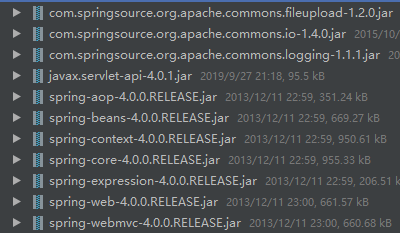
Java目录

HelloController文件代码
import org.springframework.web.servlet.ModelAndView;

import org.springframework.web.servlet.mvc.Controller;

import javax.servlet.http.HttpServletRequest;

import javax.servlet.http.HttpServletResponse;

public class HelloController implements Controller {

    public ModelAndView handleRequest(HttpServletRequest request, HttpServletResponse response)

            throws Exception {

        System.out.println("Hello SpringMVC");

        String name = request.getParameter("name");

        System.out.println(name);

        // 设置参数,回显到页面

//        request.setAttribute("msg", "今天下雨了");

//        request.getRequestDispatcher("/hello.jsp").forward(request, response);

        ModelAndView mv = new ModelAndView();

        mv.addObject("msg", "今天下雨了");

        mv.setViewName("/hello.jsp");

        return mv;

    }

}
AnotationController文件代码
import org.springframework.stereotype.Controller;

import org.springframework.web.bind.annotation.RequestMapping;

import org.springframework.web.servlet.ModelAndView;

import javax.servlet.http.HttpServletRequest;

import javax.servlet.http.HttpServletResponse;

import javax.servlet.http.HttpSession;

@Controller

public class AnotationController {

    @RequestMapping(value = "/method")

    public ModelAndView method(HttpServletRequest request, HttpServletResponse response)

            throws Exception {

        System.out.println("method");

        return null;

    }

    @RequestMapping(value = "/method2")

    public ModelAndView method2(HttpServletResponse response)

            throws Exception {

        System.out.println("method2");

        return null;

    }

    @RequestMapping(value = "/method3")

    public ModelAndView method3(HttpServletResponse response, HttpSession session)

            throws Exception {

        System.out.println("method3");

        return null;

    }

    @RequestMapping(value = "/method4")

    public ModelAndView method4(HttpSession session)

            throws Exception {

        System.out.println("method4");

        System.out.println(session);

        ModelAndView mv = new ModelAndView();

        mv.setViewName("/hello.jsp");

        return mv;

    }

    @RequestMapping(value = "/method5")

    public ModelAndView method5(String name)

            throws Exception {

        System.out.println(name);

        ModelAndView mv = new ModelAndView();

        mv.setViewName("/hello.jsp");

        return mv;

    }

}
DataController文件代码
import com.xmg.domain.User;

import org.springframework.stereotype.Controller;

import org.springframework.ui.Model;

import org.springframework.web.bind.annotation.ModelAttribute;

import org.springframework.web.bind.annotation.RequestMapping;

import org.springframework.web.servlet.ModelAndView;

import javax.servlet.http.HttpServletRequest;

import javax.servlet.http.HttpServletResponse;

import java.util.Date;

@Controller

public class DataController {

    // 通过原始方式

    @RequestMapping("/data1")

    public ModelAndView data1(HttpServletResponse response, HttpServletRequest request) {

        request.setAttribute("msg","下午出太阳了");

        ModelAndView mv = new ModelAndView();

        mv.setViewName("hello.jsp");

        return null;

    }

    // 通过通过ModelAndView addObject方式

    @RequestMapping("/data2")

    public ModelAndView data2() {

        System.out.println("data2");

        ModelAndView mv = new ModelAndView();

//        Map<String, String> map = new HashMap<>();

//        map.put("msg","明天不打球");

//        map.put("success","true");

//        mv.addAllObjects(map);

        mv.addObject("后天放假"); //默认的key:类型的全小写

        mv.addObject(new Date());

        mv.setViewName("hello.jsp");

        return null;

    }

    // 直接返回对象

    @RequestMapping("/data3")

    @ModelAttribute("msg")

    public User data3() {

        // 如果没有ModelAndView和response

        // 返回结果会找视图解析器 前缀+请求名+后缀

        return new User("xx","123");

    }

    @RequestMapping("/data4")

    public String data4() {

        System.out.println("data4");

        return "show";

    }

    @RequestMapping("/data5")

    public String data5(Model model) {

        System.out.println("data5");

        model.addAttribute("msg","等会休息一下");

        return "show";

    }

    @RequestMapping("/data6")

    public String data6() {

        System.out.println("data6");

        return "forward:show.jsp";

    }

    @RequestMapping("/data7")

    public String data7() {

        System.out.println("data7");

        return "redirect:show.jsp";

    }

}
ValueController文件代码
import com.xmg.domain.User;

import org.springframework.stereotype.Controller;

import org.springframework.web.bind.annotation.PathVariable;

import org.springframework.web.bind.annotation.RequestMapping;

import org.springframework.web.bind.annotation.RequestParam;

import org.springframework.web.servlet.ModelAndView;

import javax.servlet.http.HttpServletRequest;

import javax.servlet.http.HttpServletResponse;

@Controller

public class ValueController {

    // 1.通过最原始的方式来进行传值

    @RequestMapping("/value1")

    public ModelAndView value1(HttpServletRequest request, HttpServletResponse response) {

        System.out.println("value1");

        String name = request.getParameter("name");

        String password = request.getParameter("password");

        User user = new User(name, password);

        System.out.println(user);

        ModelAndView modelAndView = new ModelAndView();

        modelAndView.setViewName("/value.jsp");

        return modelAndView;

    }

    // 前台和后台传参

    @RequestMapping("/value2")

    public ModelAndView value2(String name, String password) {

        System.out.println("value2");

        User user = new User(name, password);

        System.out.println(user);

        ModelAndView modelAndView = new ModelAndView();

        modelAndView.setViewName("/value.jsp");

        return modelAndView;

    }

    // 前台和后台传参

    @RequestMapping("/value3")

    public ModelAndView value3(@RequestParam("name11") String name, String password) {

        System.out.println("value3");

        User user = new User(name, password);

        System.out.println(user);

        ModelAndView modelAndView = new ModelAndView();

        modelAndView.setViewName("/value.jsp");

        return modelAndView;

    }

    // 对象传参方式

    @RequestMapping("/value4")

    public ModelAndView value4(User u) {

        System.out.println("value4");

        System.out.println(u);

        ModelAndView modelAndView = new ModelAndView();

        modelAndView.setViewName("/value.jsp");

        return modelAndView;

    }

    // 地址栏传参

    @RequestMapping("/value5/{id}")

    public ModelAndView value5(@PathVariable("id")Long id) {

        System.out.println("value5");

        System.out.println(id);

        ModelAndView modelAndView = new ModelAndView();

        modelAndView.setViewName("/value.jsp");

        return modelAndView;

    }

}
FileController文件代码
import org.apache.commons.io.IOUtils;

import org.springframework.stereotype.Controller;

import org.springframework.web.bind.annotation.RequestMapping;

import org.springframework.web.bind.annotation.ResponseBody;

import org.springframework.web.multipart.MultipartFile;

import javax.servlet.http.HttpServletResponse;

import java.io.*;

import java.util.UUID;

@Controller

public class FileController {

    @RequestMapping("/upload")

    public void upload(MultipartFile file) {

        FileOutputStream fos = null;

        try {

            String lastName = file.getOriginalFilename().substring(file.getOriginalFilename().lastIndexOf("."));

            String fileName = UUID.randomUUID().toString();

            InputStream fis = file.getInputStream();

            fos = new FileOutputStream("D:\\file\\" + fileName);

            IOUtils.copy(fis, fos);

        } catch (Exception e) {

            e.printStackTrace();

        } finally {

            if (fos != null) {

                try {

                    fos.close();

                } catch (Exception e) {

                    e.printStackTrace();

                }

            }

        }

    }

    @RequestMapping("/downLoad")

    @ResponseBody //代表这次请求全部交给response来做处理

    public void DownLoad(HttpServletResponse response) {

        FileInputStream fis = null;

        try {

            // 设置下载头

            response.setHeader("Content-Disposition", "attachment;filename=" +

                    new String("三个小明".getBytes("UTF-8"), "iso8859-1") + ".jpg");

            File file = new File("D:\\file\\a.jpg");

            fis = new FileInputStream(file);

            OutputStream os = response.getOutputStream();

            IOUtils.copy(fis, os);

        } catch (Exception e) {

            e.printStackTrace();

        } finally {

            if (fis != null) {

                try {

                    fis.close();

                } catch (IOException e) {

                    e.printStackTrace();

                }

            }

        }

    }

}
DemoInterceptor文件代码
import org.springframework.web.servlet.HandlerInterceptor;

import org.springframework.web.servlet.ModelAndView;

import javax.servlet.http.HttpServletRequest;

import javax.servlet.http.HttpServletResponse;

public class DemoInterceptor implements HandlerInterceptor {

    // 在调用控制器方法之前

    public boolean preHandle(HttpServletRequest request, HttpServletResponse response,

                             Object o) throws Exception {

        System.out.println("DemoInterceptor.preHandle()");

        // 如果返回false为拦截这个请求

        return false;

    }

    // 在调用控制器方法之后,视图渲染之前

    public void postHandle(HttpServletRequest request, HttpServletResponse response,

                           Object o, ModelAndView modelAndView) throws Exception {

        System.out.println("DemoInterceptor.postHandle()");

    }

    // 视图渲染之后

    public void afterCompletion(HttpServletRequest request, HttpServletResponse response,

                                Object o, Exception e) throws Exception {

        System.out.println("DemoInterceptor.afterCompletion()");

    }

}
resources目录
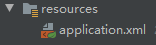
application.xml
<?xml version="1.0" encoding="UTF-8"?>

<beans xmlns="http://www.springframework.org/schema/beans"

       xmlns:xsi="http://www.w3.org/2001/XMLSchema-instance"

       xmlns:context="http://www.springframework.org/schema/context"

       xmlns:aop="http://www.springframework.org/schema/aop"

       xmlns:p="http://www.springframework.org/schema/p"

       xmlns:jee="http://www.springframework.org/schema/jee"

       xmlns:tx="http://www.springframework.org/schema/tx"

       xmlns:mvc="http://www.springframework.org/schema/mvc"

       xsi:schemaLocation="

            http://www.springframework.org/schema/beans

            http://www.springframework.org/schema/beans/spring-beans.xsd

            http://www.springframework.org/schema/context

            http://www.springframework.org/schema/context/spring-context.xsd

            http://www.springframework.org/schema/jee

            http://www.springframework.org/schema/jee/spring-jee.xsd

            http://www.springframework.org/schema/aop

            http://www.springframework.org/schema/aop/spring-aop.xsd

            http://www.springframework.org/schema/tx

            http://www.springframework.org/schema/tx/spring-tx.xsd

            http://www.springframework.org/schema/mvc

            http://www.springframework.org/schema/mvc/spring-mvc.xsd">

<!--    <bean name="/hello" class="com.xmg.HelloController"/>-->

<!--    <bean class="com.xmg.AnotationController"/>-->

    <!-- 添加对静态资源的支持 -->

<!--    <mvc:default-servlet-handler />-->

    <!-- 开启扫描 -->

    <context:component-scan base-package="com.xmg" />

    <!-- 添加对SpringMVC的注解支持 -->

    <mvc:annotation-driven/>

    <!-- 对静态资源的支持 -->

    <mvc:default-servlet-handler />

    <!-- 配置视图解析器 -->

    <bean class="org.springframework.web.servlet.view.InternalResourceViewResolver" >

        <property name="prefix" value="/WEB-INF/view/" />

        <property name="suffix" value=".jsp" />

    </bean>

    <!-- 配置上传文件的bean -->

    <bean id="multipartResolver" class="org.springframework.web.multipart.commons.CommonsMultipartResolver" >

        <!-- 设置上传文件的最大尺寸为1MB -->

        <property name="maxUploadSize" value="#{1024*1024}"/>

    </bean>

    <!-- 配置拦截器 -->

    <mvc:interceptors>

        <mvc:interceptor>

            <mvc:mapping path="/show.jsp"/>

            <bean class="com.xmg.DemoInterceptor" />

        </mvc:interceptor>

    </mvc:interceptors>

</beans>
Webapp目录
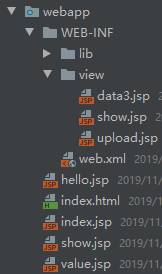
hello.jsp文件
<%@ page contentType="text/html;charset=UTF-8" language="java" %>

<%@ page isELIgnored="false"%>

<html>

<head>

    <title>Title</title>

</head>

<body>

回显的参数

${msg}

${success}

${string}

${date}

</body>

</html>
Show.jsp文件
<%@ page contentType="text/html;charset=UTF-8" language="java" %>

<%@ page isELIgnored="false"%>

<html>

<head>

    <title>Title</title>

</head>

<body>

${msg}

</body>

</html>
Value.jsp文件
<%@ page contentType="text/html;charset=UTF-8" language="java" %>

<html>

<head>

    <title>Title</title>

</head>

<body>

<fieldset>

    <legend>用户注册-原始方式</legend>

<form action="/value1" method="post" >

    <table>

        <tr>

            <td>用户名</td>

            <td><input type="text" name="name"></td>

        </tr>

        <tr>

            <td>密码</td>

            <td><input type="text" name="password"></td>

        </tr>

        <tr>

            <td colspan="2"><input type="submit" value="提交"></td>

        </tr>

    </table>

</form>

</fieldset>

<fieldset>

    <legend>用户注册-原始方式-参数名对应前台名称</legend>

    <form action="/value2" method="post" >

        <table>

            <tr>

                <td>用户名</td>

                <td><input type="text" name="name"></td>

            </tr>

            <tr>

                <td>密码</td>

                <td><input type="text" name="password"></td>

            </tr>

            <tr>

                <td colspan="2"><input type="submit" value="提交"></td>

            </tr>

        </table>

    </form>

</fieldset>

<fieldset>

    <legend>用户注册-原始方式-参数名对应前台名称</legend>

    <form action="/value3" method="post" >

        <table>

            <tr>

                <td>用户名</td>

                <td><input type="text" name="name11"></td>

            </tr>

            <tr>

                <td>密码</td>

                <td><input type="text" name="password"></td>

            </tr>

            <tr>

                <td colspan="2"><input type="submit" value="提交"></td>

            </tr>

        </table>

    </form>

</fieldset>

<fieldset>

    <legend>用户注册-对象传参</legend>

    <form action="/value4" method="post" >

        <table>

            <tr>

                <td>用户名</td>

                <td><input type="text" name="name"></td>

            </tr>

            <tr>

                <td>密码</td>

                <td><input type="text" name="password"></td>

            </tr>

            <tr>

                <td colspan="2"><input type="submit" value="提交"></td>

            </tr>

        </table>

    </form>

</fieldset>

</body>

</html>
Upload.jsp文件
<%@ page contentType="text/html;charset=UTF-8" language="java" %>

<html>

<head>

    <meta http-equiv="Content-Type" content="text/html; charset=UTF-8">

    <title>文件上传</title>

</head>

<body>

<fieldset>

    <legend>文件上传</legend>

    <form action="/upload" method="post" enctype="multipart/form-data">

        <input type="file" name="file">

        <input type="submit" value="提交">

    </form>

</fieldset>

</body>

</html>
SpringMVC代码复制版的更多相关文章
- 编写手机端自适应页面案例,springMVC代码,SpringMVC上传代码,去掉input框中原有的样式,使ios按钮没有圆角,css中的border-radius类似
1.编写的页面 <%@ page language="java" contentType="text/html; charset=UTF-8" page ...
- Docker — 从入门到实践PDF下载(可复制版)
0.9-rc2(2017-12-09)修订说明:本书内容将基于DockerCEv17.MM进行重新修订,计划2017年底发布0.9.0版本.旧版本(Docker1.13-)内容,请阅读docker-l ...
- ng2-timesheet, 一个timesheet.js的angular2复制版
一个 timesheet.js (JavaScript library for HTML5 & CSS3 time sheets) 的 Angular 2 复制版 用法: npm instal ...
- [C++]数组与指针(纯代码-复习用)
#include<iostream> #include<cmath> //C++ //#include<math.h> //C #include<ctime& ...
- DelphiXE5 Flappy Bird 复制版
没错 这就是用DelphiXe5 打造的.最流行的 Flappy bird!呵呵. 转 Delphi XE5 Firemonkey Flappy Bird Clone from fmxexpress
- Android中常用的颜色
代码: <?xml version=”″ ?> <resources> <color name=”white”>#ffffff</color><! ...
- PHP代码重用与函数编写
代码重用与函数编写 1.使用require()和include()函数 这两个函数的作用是将一个文件爱你载入到PHP脚本中,这样就可以直接调用这个文件中的方法.require()和include()几 ...
- Java如何搭建脚手架(自动生成通用代码),创建自定义的archetype(项目模板)
.personSunflowerP { background: rgba(51, 153, 0, 0.66); border-bottom: 1px solid rgba(0, 102, 0, 1); ...
- 如何在博客中使用SublimeText风格的代码高亮样式
因为觉得博客园自带的代码高亮样式很单一,不符合作为前端的我的审美习惯,于是下定决心要想办法折腾出一个方法来应用上另外一套代码高亮样式. 虽然探索的过程是很痛苦的,但最后还是成功了,但也不枉付出的那些努 ...
随机推荐
- Ubuntu 16.04下apt安装ssh及卸载(含FileZilla 使用过程)
前言:文件发布测试过程中需要使用Windows和Ubuntu实现文件共享. 以下内容转载自:http://blog.csdn.net/jiang13479/article/details/535014 ...
- 11-4-while和dowhile
<!DOCTYPE html> <html lang="en"> <head> <meta charset="UTF-8&quo ...
- HBase与传统关系数据库的对比分析
- Last- Linux必学的60个命令
1.作用 last命令的作用是显示近期用户或终端的登录情况,它的使用权限是所有用户.通过last命令查看该程序的log,管理员可以获知谁曾经或企图连接系统. 2.格式 1ast[—n][-f file ...
- [转]C# 委托、事件,lamda表达式
1. 委托Delegate C#中的Delegate对应于C中的指针,但是又有所不同C中的指针既可以指向方法,又可以指向变量,并且可以进行类型转换, C中的指针实际上就是内存地址变量,他是可以直接操作 ...
- WPF 导出Excel 导出图片
/// <summary> /// 导出Excel /// </summary> private void ExportExcel(DataTable ExcelDt) { / ...
- day43作业
注册页面: <!DOCTYPE html> <html lang="en"> <head> <meta charset="UTF ...
- git 命令行(二)-创建合并分支
1. 创建和合并分支 1. 我们创建 xu 分支,然后切换到 xu 分支: 2. 用 git branch 命令查看当前分支: git branch命令会列出所有分支,当前分支前面会标一个*号. ...
- vim之buffer 与 折叠
常用的折叠命令有: zf zi zo zc zd zf10j从当前行向下10行创建折叠(共11行),zfj创建两行的折叠 常用的还有zf%. 进行多文件编辑时,会涉及到buffer的使用::ls 查看 ...
- name和value的简单js用法
name和value: 例如: <input type="text" name="txt"/> name用于定义这个input收到的值的变量名,在上 ...