
spring boot 多数据源加载原理
git代码:https://gitee.com/wwj912790488/multiple-data-sources
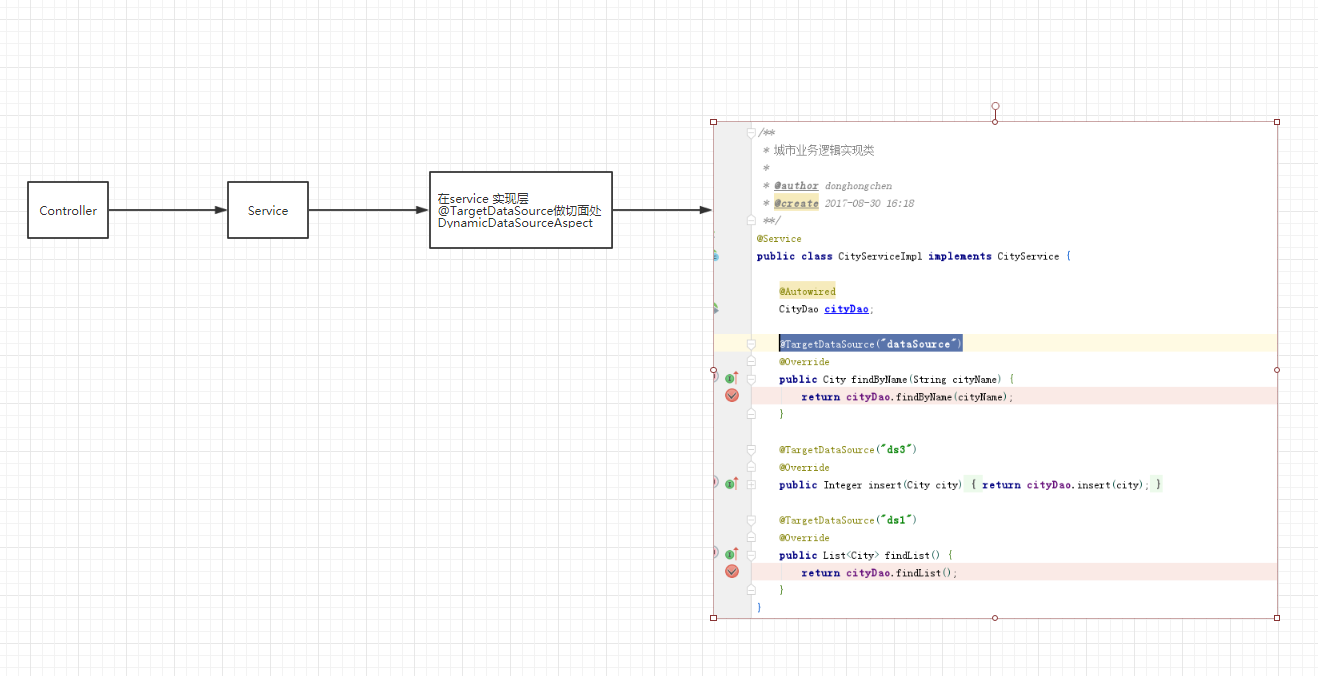
DynamicDataSourceAspect切面 必须定义@Order(-10),保证该aop在@Transaction之前执行
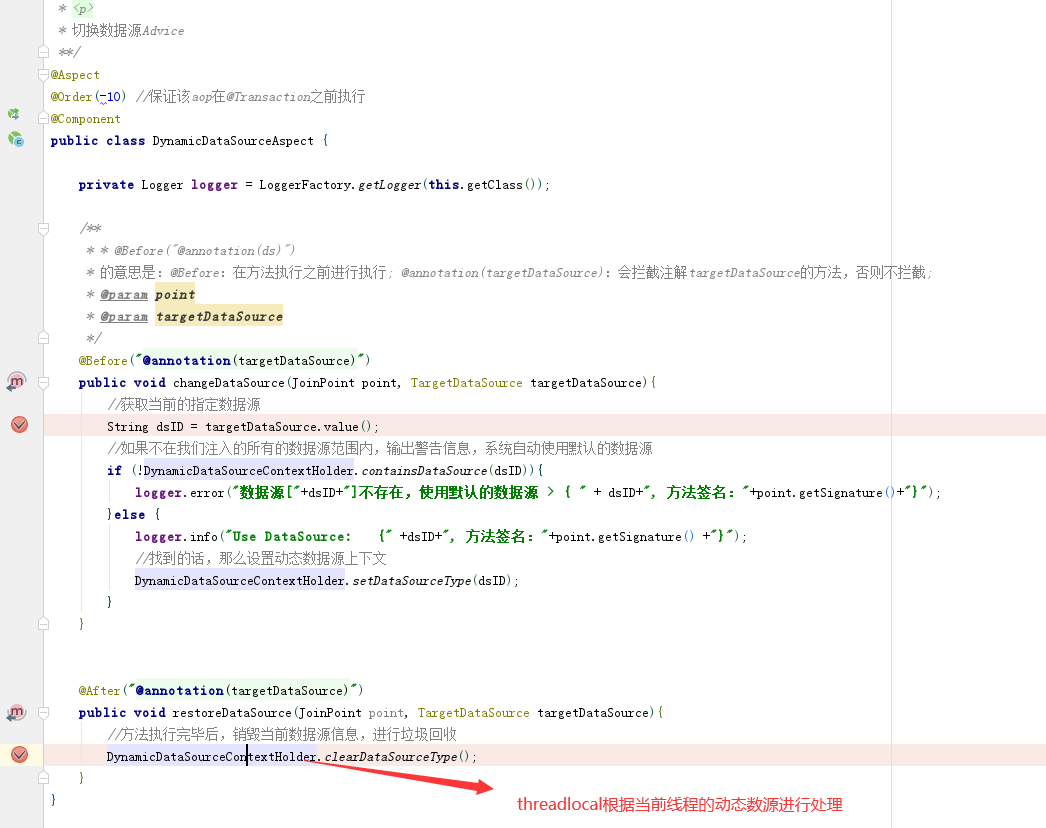
配置如下,分别加载三个数据库配置
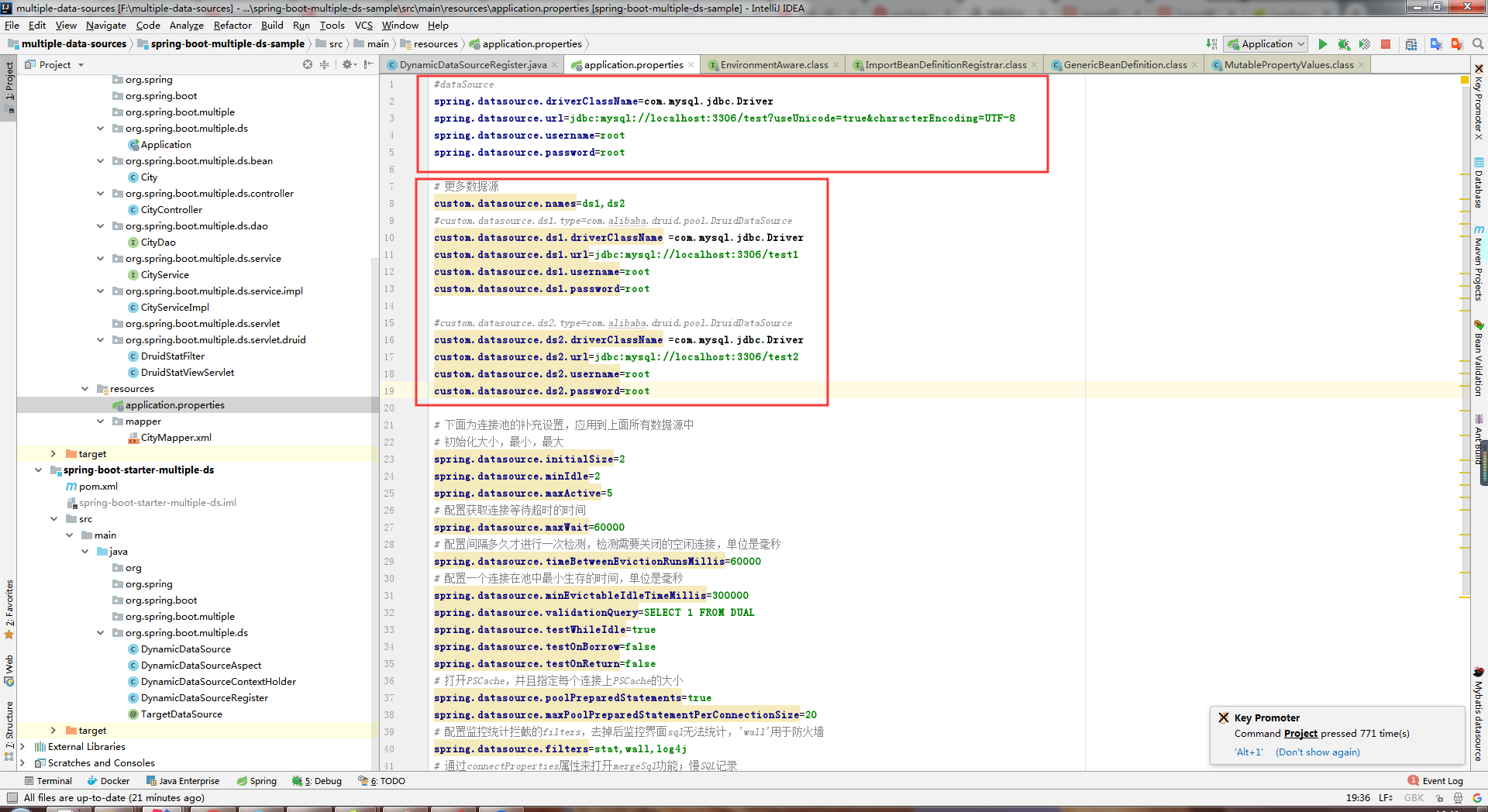
1.利用ImportBeanDefinitionRegistrar和EnvironmentAware 加载注册多个数据源bean
package org.spring.boot.multiple.ds;

import com.alibaba.druid.pool.DruidDataSource;

import org.slf4j.Logger;

import org.slf4j.LoggerFactory;

import org.springframework.beans.MutablePropertyValues;

import org.springframework.beans.PropertyValues;

import org.springframework.beans.factory.support.BeanDefinitionRegistry;

import org.springframework.beans.factory.support.GenericBeanDefinition;

import org.springframework.boot.bind.RelaxedDataBinder;

import org.springframework.boot.bind.RelaxedPropertyResolver;

import org.springframework.context.EnvironmentAware;

import org.springframework.context.annotation.ImportBeanDefinitionRegistrar;

import org.springframework.core.convert.ConversionService;

import org.springframework.core.convert.support.DefaultConversionService;

import org.springframework.core.env.Environment;

import org.springframework.core.type.AnnotationMetadata;

import javax.sql.DataSource;

import java.util.HashMap;

import java.util.Map;

/**

 * @author donghongchen

 * @create 2017-09-04 15:34

 * <p>

 * 动态数据源注册

 **/

public class DynamicDataSourceRegister implements ImportBeanDefinitionRegistrar, EnvironmentAware {

    private Logger logger = LoggerFactory.getLogger(this.getClass());

    //如果配置文件中未指定数据源类型,使用默认值

    private static final Object DATASOURCE_TYPE_DEFAULT = "org.apache.tomcat.jdbc.pool.DataSource";

    private ConversionService conversionService = new DefaultConversionService();

    private PropertyValues dataSourcePropertyValues;

    //默认数据源

    private DataSource defaultDataSource;

    private Map<String, DataSource> customDataSources = new HashMap<>();

    /**

     * 加载多数据源配置

     *

     * @param environment

     */

    @Override

    public void setEnvironment(Environment environment) {

        initDefaultDataSource(environment);

        initCustomDataSources(environment);

    }

    private void initDefaultDataSource(Environment environment) {

        //读取主数据源

        RelaxedPropertyResolver propertyResolver = new RelaxedPropertyResolver(environment, "spring.datasource.");

        Map<String, Object> dsMap = new HashMap<>();

        dsMap.put("type", propertyResolver.getProperty("type"));

        dsMap.put("driverClassName", propertyResolver.getProperty("driverClassName"));

        dsMap.put("url", propertyResolver.getProperty("url"));

        dsMap.put("username", propertyResolver.getProperty("username"));

        dsMap.put("password", propertyResolver.getProperty("password"));

        //创建数据源

        defaultDataSource = buildDataSource(dsMap);

        dataBinder(defaultDataSource, environment);

    }

    private void initCustomDataSources(Environment environment) {

        //读取配置文件获取更多数据源,也可以通过defaultDataSource读取数据库获取更多数据源

        RelaxedPropertyResolver propertyResolver = new RelaxedPropertyResolver(environment, "custom.datasource.");

        String dsPrefixs = propertyResolver.getProperty("names");

        if (null == dsPrefixs || "".equals(dsPrefixs)) {

            return;

        }

        String[] dsPrefixsArr = dsPrefixs.split(",");

        for (String dsPrefix : dsPrefixsArr) {

            Map<String, Object> dsMap = propertyResolver.getSubProperties(dsPrefix + ".");

            DataSource ds = buildDataSource(dsMap);

            customDataSources.put(dsPrefix, ds);

            dataBinder(ds, environment);

        }

    }

    private DataSource buildDataSource(Map<String, Object> dsMap) {

        Object type = dsMap.get("type");

        if (type == null) {

            type = DATASOURCE_TYPE_DEFAULT;

        }

        Class<? extends DataSource> dataSourceType;

        try {

            dataSourceType = (Class<? extends DataSource>) Class.forName((String) type);

            String driverClassName = dsMap.get("driverClassName").toString();

            String url = dsMap.get("url").toString();

            String username = dsMap.get("username").toString();

            String password = dsMap.get("password").toString();

            DruidDataSource dataSource = new DruidDataSource();

            dataSource.setUrl(url);

            dataSource.setUsername(username);

            dataSource.setPassword(password);

            dataSource.setDriverClassName(driverClassName);

            return dataSource;

//            DataSourceBuilder factory = DataSourceBuilder.create().

//                    driverClassName(driverClassName).type(dataSourceType).url(url).username(username).password(password);

//            return factory.build();

        } catch (ClassNotFoundException ex) {

            logger.error(ex.getMessage(), ex);

        }

        return null;

    }

    private void dataBinder(DataSource dataSource, Environment environment) {

        RelaxedDataBinder dataBinder = new RelaxedDataBinder(dataSource);

        dataBinder.setConversionService(conversionService);

        dataBinder.setIgnoreNestedProperties(false);

        dataBinder.setIgnoreInvalidFields(false);

        dataBinder.setIgnoreUnknownFields(true);

        if (dataSourcePropertyValues == null) {

            Map<String, Object> rpr = new RelaxedPropertyResolver(environment, "spring.datasource").

                    getSubProperties(".");

            Map<String, Object> values = new HashMap<>(rpr);

            //排除已经设置的属性

            values.remove("type");

            values.remove("driverClassName");

            values.remove("url");

            values.remove("username");

            values.remove("password");

            dataSourcePropertyValues = new MutablePropertyValues(values);

        }

        dataBinder.bind(dataSourcePropertyValues);

    }

    @Override

    public void registerBeanDefinitions(AnnotationMetadata importingClassMetadata, BeanDefinitionRegistry registry) {

        Map<String, Object> targetDataSource = new HashMap<>();

        //将主数据源添加到更多数据源中

        targetDataSource.put("dataSource", defaultDataSource);

        DynamicDataSourceContextHolder.dataSourceIDS.add("dataSource");

        //添加更多数据源

        targetDataSource.putAll(customDataSources);

        for (String key : customDataSources.keySet()) {

            DynamicDataSourceContextHolder.dataSourceIDS.add(key);

        }

        //创建DynamicDataSource

        GenericBeanDefinition beanDefinition = new GenericBeanDefinition();

        beanDefinition.setBeanClass(DynamicDataSource.class);

        beanDefinition.setSynthetic(true);

        MutablePropertyValues mpv = beanDefinition.getPropertyValues();

        //添加属性

        mpv.addPropertyValue("defaultTargetDataSource", defaultDataSource);

        mpv.addPropertyValue("targetDataSources", targetDataSource);

        registry.registerBeanDefinition("dataSource", beanDefinition);

    }

}
根据@annotation 去动态切换数据源
package org.spring.boot.multiple.ds;

import org.aspectj.lang.JoinPoint;

import org.aspectj.lang.annotation.After;

import org.aspectj.lang.annotation.Aspect;

import org.aspectj.lang.annotation.Before;

import org.slf4j.Logger;

import org.slf4j.LoggerFactory;

import org.springframework.core.annotation.Order;

import org.springframework.stereotype.Component;

/**

 * @author donghongchen

 * @create 2017-09-04 14:44

 * <p>

 * 切换数据源Advice

 **/

@Aspect

@Order(-10) //保证该aop在@Transaction之前执行

@Component

public class DynamicDataSourceAspect {

    private Logger logger = LoggerFactory.getLogger(this.getClass());

    /**

     * * @Before("@annotation(ds)")

     * 的意思是:@Before:在方法执行之前进行执行; @annotation(targetDataSource):会拦截注解targetDataSource的方法,否则不拦截;

     * @param point

     * @param targetDataSource

     */

    @Before("@annotation(targetDataSource)")

    public void changeDataSource(JoinPoint point, TargetDataSource targetDataSource){

        //获取当前的指定数据源

        String dsID = targetDataSource.value();

        //如果不在我们注入的所有的数据源范围内,输出警告信息,系统自动使用默认的数据源

        if (!DynamicDataSourceContextHolder.containsDataSource(dsID)){

            logger.error("数据源["+dsID+"]不存在,使用默认的数据源 > { " + dsID+", 方法签名:"+point.getSignature()+"}");

        }else {

            logger.info("Use DataSource:   {" +dsID+", 方法签名:"+point.getSignature() +"}");

            //找到的话,那么设置动态数据源上下文

            DynamicDataSourceContextHolder.setDataSourceType(dsID);

        }

    }

    @After("@annotation(targetDataSource)")

    public void restoreDataSource(JoinPoint point, TargetDataSource targetDataSource){

        //方法执行完毕后,销毁当前数据源信息,进行垃圾回收

        DynamicDataSourceContextHolder.clearDataSourceType();

    }

}
最后对应到对应的DAO层调用 。
spring boot 多数据源加载原理的更多相关文章
- Spring boot 国际化自动加载资源文件问题
Spring boot 国际化自动加载资源文件问题 最近在做基于Spring boot配置的项目.中间遇到一个国际化资源加载的问题,正常来说只要在application.properties文件中定义 ...
- Spring Boot的属性加载顺序
伴随着团队的不断壮大,往往不需要开发人员知道测试或者生产环境的全部配置细节,比如数据库密码,帐号信息等.而是希望由运维或者指定的人员去维护配置信息,那么如果要修改某项配置信息,就不得不去修改项 ...
- Spring Boot JPA 懒加载
最近在使用spring jpa 的过程中经常遇到懒加载的错误:"` org.hibernate.LazyInitializationException: could not initiali ...
- Spring Boot 实现配置文件加解密原理
Spring Boot 配置文件加解密原理就这么简单 背景 接上文<失踪人口回归,mybatis-plus 3.3.2 发布>[1] ,提供了一个非常实用的功能 「数据安全保护」 功能,不 ...
- 「新特性」Spring Boot 全局懒加载机制了解一下
关于延迟加载 在 Spring 中,默认情况下所有定的 bean 及其依赖项目都是在应用启动时创建容器上下文是被初始化的.测试代码如下: @Slf4j @Configuration public cl ...
- 在IDEA下使用Spring Boot的热加载(Hotswap)
你是否遇到过这样的困扰: 当你写完一段代码后,要看到效果,必须点击IDEA的停止按钮,然后再次重启启动项目,你是否觉得这样很烦呢? 如果你觉得很烦,本文就是用来解决你的问题的. 所谓热加载,就是让我们 ...
- Spring Boot JDBC:加载DataSource过程的源码分析及yml中DataSource的配置
装载至:https://www.cnblogs.com/storml/p/8611388.html Spring Boot实现了自动加载DataSource及相关配置.当然,使用时加上@EnableA ...
- spring boot 是如何加载jackson的?
Spring Boot 自动引入jackson: 通过:Spring-Boot-starter-web Jackson自动配置 这里的configurations是读取的这里: 通过反射加载Jacks ...
- Spring Boot 如何热加载jar实现动态插件?
一.背景 动态插件化编程是一件很酷的事情,能实现业务功能的 解耦 便于维护,另外也可以提升 可扩展性 随时可以在不停服务器的情况下扩展功能,也具有非常好的 开放性 除了自己的研发人员可以开发功能之外, ...
随机推荐
- 使用PHP类TCPDF生成PDF文档
转自:http://www.blhere.com/1180.html 这两天遇到一个项目中,需要php自动处理生成pdf文档.在网上找了好几个类,最后决定使用TCPDF,使用的时候真是发现这个类真是强 ...
- Servlet身份验证过滤器
文件:index.html 文件:MyFilter.java 文件:MyServlet.java 文件:web.xml
- 2019-3-13-win10-uwp-使用-ScaleTransform-放大某个元素
title author date CreateTime categories win10 uwp 使用 ScaleTransform 放大某个元素 lindexi 2019-3-13 19:5:56 ...
- QT_OPENGL-------- 5.model
在qt中实现opengl obj模型导入: main.cpp #include<GL/glew.h> #include <GLFW/glfw3.h> #include<s ...
- linux下安装使用MySQL 以及 python mysqldb 遇到的问题
一.安装mysql sudo apt-get install mysql-client-core-5.5 然后会出现: ERROR 2002 (HY000): Can't connect to loc ...
- 2019-2-27-如何替换一个-exe-的图标
title author date CreateTime categories 如何替换一个 exe 的图标 lindexi 2019-02-27 20:33:16 +0800 2019-2-27 2 ...
- 01docker简单使用和配置(容器、镜像)
一:容器中运行简单应用程序 1:hello world 使用docker可以在容器中运行应用程序,使用docker run命令即可.比如下面的命令: $ docker run ubuntu /bin ...
- 11-1 css属性选择器
一 基础选择器 标签选择器:选择的标签的‘共性’,而不是特性 div{}.ul{}.ol{}.form{} 类选择器:.box{} id选择器:#box{} 只能选择器的特性,主要是为了js *通配符 ...
- jmeter日期处理beanshell(2)
import java.text.SimpleDateFormat;import java.util.Calendar;import java.util.Date;import java.text.P ...
- [***]HZOJ 优美序列
又是一道神仙题.考试的时候居然打了一个回滚莫队,不知道我咋想的…… 先说一个某OJT80,洛谷T5分的思路(差距有点大): 可以把位置和编号映射一下,区间内最大值和最小值对应的位置,每次更新,直到找到 ...